
pengenalan
This manual provides detailed instructions for the assembly, operation, and maintenance of your VIVO DESK-E3CVC Electric 2-Tier Corner L-Shaped Standing Desk. This desk, featuring a light wood top and white frame with light gray drawers, is designed to offer a versatile and ergonomic workspace with electric height adjustment and integrated storage. Please read this manual thoroughly before assembly and use to ensure safe and efficient operation.
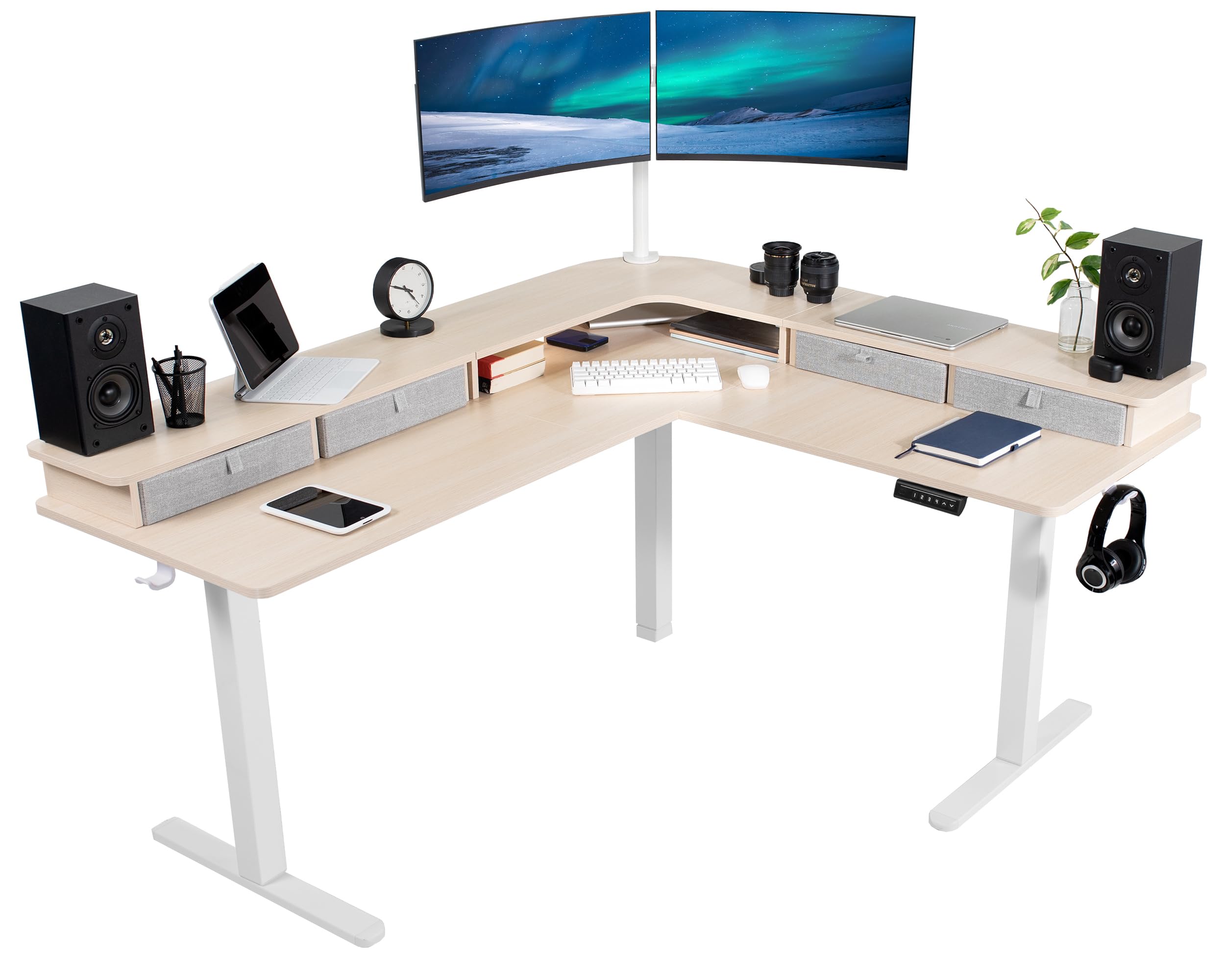
Image: The VIVO DESK-E3CVC Electric 2-Tier Corner L-Shaped Standing Desk in a light wood finish with a white frame, shown in a modern office setting.
Maklumat Keselamatan
Always ensure the desk is properly assembled and the casters are securely attached. When adjusting the height, use the memory controller carefully to maintain stability. Keep the desk away from heat sources and do not place heavy objects on the desk that could cause it to tip over. Always follow the manufacturer's instructions for assembly, use, and maintenance.
- Pastikan semua komponen diikat dengan selamat sebelum digunakan.
- Do not overload the desk; the maximum weight capacity is 225 paun.
- Jauhkan kanak-kanak dan haiwan peliharaan daripada meja semasa pelarasan ketinggian.
- Avoid placing liquids directly on the desk surface to prevent damage to electronic components.
- Putuskan sambungan kuasa sebelum membersihkan atau melakukan sebarang penyelenggaraan.
Kandungan Pakej
Verify that all components are present and undamaged before beginning assembly. The package includes:
- L-Shaped 3-Part Desktop (Light Wood Top)
- Bingkai Meja Elektrik (Putih)
- Pengawal memori
- 4 x Storage Drawers (Light Gray)
- 4 x 2" Casters
- 2 x Klip Kabel
- 2 x Accessory Hooks
- Perkakasan dan Alat Pemasangan

Imej: Jarak dekat view of the included accessories: four light gray storage drawers, four 2-inch casters, two cable clips, and two accessory hooks.
Arahan Perhimpunan
Assembly requires two people for optimal safety and ease. Follow the included printed instructions for detailed steps. An official assembly video is also available to guide you through the process.
Video: Official VIVO assembly guide for the 2-Tier 63 x 55 Inch Corner Electric Desk with Storage (DESK-E3CVB, similar to DESK-E3CVC). This video demonstrates the step-by-step process for setting up the desk frame and attaching the desktop sections.
- Buka Pembungkusan Komponen: Keluarkan semua bahagian dari bungkusan dengan berhati-hati dan letakkannya di atas permukaan yang bersih dan lembut untuk mengelakkan calar.
- Pasang Kerangka Meja: Follow the instructions to connect the leg columns, feet, and crossbars to form the electric desk frame. Ensure all screws are tightened securely.
- Attach Desktop Sections: Position the L-shaped desktop sections onto the assembled frame. Secure them using the provided screws. Note that some holes may require self-tapping.
- Pasang Panel Kawalan: Mount the memory controller to the underside of the desk in an easily accessible location. Connect the motor and power cables as directed.
- Tambah Aksesori: Attach the storage drawers, casters (if desired), cable clips, and accessory hooks according to your preference.
- Pengurusan Kabel: Use the included cable clips to organize and secure power cords and other cables, preventing entanglement during height adjustments.
Syor: It is often easier to assemble the desk right-side-up and then carefully attach the top sections, even if it requires lying on your back for some steps, rather than assembling upside-down and attempting to flip the heavy desk.
Arahan Operasi
Pelarasan Ketinggian
The VIVO DESK-E3CVC features a powerful electric motor for smooth height adjustments. The desk can be adjusted from a minimum height of 30.4 inci to a maximum height of 48.5 inci (main desktop).
- Gunakan Atas (▲) dan Bawah (▼) arrows on the memory controller to manually adjust the desk height.
- The digital display will show the current height.

Image: Diagram illustrating the height adjustment range of the VIVO standing desk, from 30.4 inches to 48.5 inches, highlighting the powerful motor and collision protection.
Pratetap Memori
The memory controller allows you to save up to four preferred height settings for quick adjustments.

Image: Close-up of the desk's control panel, showing the digital height display and four numbered memory preset buttons, along with up and down adjustment arrows.
- Untuk Menyimpan Pratetap:
- Laraskan meja pada ketinggian yang anda inginkan menggunakan anak panah Atas/Bawah.
- Tekan ke "S" button (Set). The display will flash.
- Tekan segera salah satu butang pratetap bernombor (1, 2, 3, atau 4) to save the current height to that position.
- To Use a Preset:
- Hanya tekan butang pratetap bernombor yang sepadan (1, 2, 3, atau 4Meja akan bergerak secara automatik ke ketinggian yang disimpan.
Perlindungan Perlanggaran
The desk is equipped with a collision protection feature. If the desk encounters an obstruction during height adjustment, it will automatically stop and reverse slightly to prevent damage.
Penyelenggaraan
- Pembersihan: Lap permukaan meja dengan lembut, damp cloth. Avoid abrasive cleaners or harsh chemicals. For the frame, use a mild detergent if necessary.
- Pemeriksaan biasa: Periksa semua skru dan sambungan secara berkala untuk memastikan ia kekal ketat. Ketatkan semula jika terdapat sebarang kelonggaran.
- Pengurusan Kabel: Ensure cables are neatly organized and not pinched or stretched during height adjustments.
- Penjagaan Motor: The electric motor is designed for long-term use and requires minimal maintenance. Avoid obstructing the motor or forcing adjustments.
Menyelesaikan masalah
| Masalah | Kemungkinan Punca | Penyelesaian |
|---|---|---|
| Meja tidak bergerak. | Kabel kuasa diputuskan; beban motor yang berlebihan; isu panel kawalan. | Check power connections. Reduce weight on the desk. Reset the system by unplugging for 10 seconds and plugging back in. |
| Pelarasan ketinggian tidak sekata. | Pengagihan berat tidak sekata; sambungan longgar. | Agihkan berat secara sama rata. Periksa dan ketatkan semua sambungan rangka. |
| Meja berhenti semasa pelarasan. | Collision detection activated; motor overheating. | Remove any obstructions. Allow motor to cool down for 20 minutes before resuming operation. |
| Pratetap memori tidak berfungsi. | Prosedur menyimpan yang salah. | Refer to the "Memory Presets" section for correct saving steps. |
Spesifikasi
| Ciri | Perincian |
|---|---|
| Nombor Model | DESK-E3CVC |
| Bentuk Meja | L-Shape, 2-Tier |
| Dimensi Desktop | 63"L x 55.2"D |
| Julat Pelarasan Tinggi | 30.4" to 48.5" (main desktop) |
| Kapasiti Berat | 225 paun |
| Jenis Motor | Motor Tunggal Elektrik |
| Pratetap Memori | 4 |
| Bahan Atas | Engineered Wood (Light Wood Finish) |
| Bahan Bingkai | Alloy Steel (White Finish) |
| Termasuk Storan | 4 Light Gray Drawers |
| Perhimpunan Diperlukan | Ya (Disyorkan 2 orang) |

Image: Overhead diagram of the L-shaped desk, showing key dimensions such as 63" and 55.2" lengths, 23.5" depth, and 27.8" corner depth. Also indicates the 225 lbs weight capacity.
Waranti dan Sokongan
The VIVO DESK-E3CVC Electric 2-Tier Corner L-Shaped Standing Desk comes with a Waranti terhad 3 tahun covering parts and labor. For technical assistance, troubleshooting, or warranty claims, please contact VIVO customer support.
- Pengeluar: VIVO
- Jenis Waranti: Limited (3 years)
- Hubungi Sokongan: Refer to the VIVO official website or the contact information provided with your purchase for customer service details.