
1. Pengenalan
This manual provides detailed instructions for the installation, operation, and maintenance of your SZSINOCAM QW5 2K PTZ Outdoor Solar WiFi Security Camera. Please read this manual thoroughly before using the product to ensure correct usage and optimal performance. Keep this manual for future reference.
2. Produk Lebihview
2.1 Ciri-ciri Utama
- 2K/3MP HD Video: Provides clear and detailed surveillance footage.
- Solar-Powered & Rechargeable Battery: Equipped with a 10000mAh battery and a high-efficiency solar panel for continuous power.
- Fungsi PTZ: 355° horizontal pan and 110° vertical tilt for wide area coverage.
- Penglihatan Malam Lanjutan: Supports infrared, full-color, and sound & light alarm night vision modes.
- Pengesanan Gerakan PIR: Intelligent human recognition to reduce false alarms, with customizable detection zones and adjustable sensitivity.
- Audio Dua hala: Mikrofon dan pembesar suara terbina dalam untuk komunikasi masa nyata.
- IP66 Kalis Cuaca: Direka untuk kegunaan luar dalam pelbagai keadaan cuaca.
- Dual Wi-Fi Antennas: 5dBi antennas for stable wireless connection.
- Storan Fleksibel: Supports local storage via Micro SD card (up to 256GB, not included) and cloud storage service.
- Perkongsian Berbilang Pengguna: Membenarkan berbilang pengguna mengakses suapan kamera secara serentak.
2.2 Rajah Produk
The image below illustrates the main components of the SZSINOCAM QW5 camera system.

Image: The SZSINOCAM QW5 camera unit, solar panel, and a smartphone displaying the camera's live view. The camera features dual antennas and a lens with integrated lights.
3. Panduan Pemasangan
3.1 Sebelum Pemasangan
- Pastikan semua komponen ada dan tidak rosak.
- Fully charge the camera battery using a USB cable before the first use. This ensures the camera has sufficient power to operate while the solar panel begins charging.
- Verify a stable 2.4GHz Wi-Fi signal at the intended installation location. The camera does not support 5GHz Wi-Fi.
3.2 Muat Turun Aplikasi dan Persediaan Akaun
- Imbas kod QR yang disediakan dalam pembungkusan produk atau lawati veepai.com/veecam_download.html to download the 'O-KAM' application.
- Install the 'O-KAM' app on your smartphone.
- Daftar akaun baharu atau log masuk jika anda sudah mempunyai akaun.
3.3 Berpasangan Kamera
- Open the 'O-KAM' app and follow the on-screen instructions to add a new device.
- Hidupkan kamera. Kamera akan memasuki mod berpasangan.
- Use the app to scan the QR code located on the camera or in the manual to initiate the connection process.
- Follow the prompts to connect the camera to your 2.4GHz Wi-Fi network.

Image: A visual guide showing three steps for camera setup: 1. Scan the QR code for the 'O-KAM' app, 2. Fully charge the camera and configure Wi-Fi, 3. Add the camera to your phone.
3.4 Memasang Kamera dan Panel Suria
Pilih lokasi yang memberikan pendedahan cahaya matahari yang optimum untuk panel solar dan kawasan yang jernih view for the camera. Ensure the camera is within range of your Wi-Fi network.
- Use the provided mounting bracket and screws to securely attach the camera to a wall or other stable surface.
- Mount the solar panel in a location that receives direct sunlight for several hours daily.
- Connect the solar panel cable to the camera's charging port. Ensure the connection is secure and weatherproof.

Image: The SZSINOCAM QW5 camera and its solar panel are mounted on an outdoor wooden wall, demonstrating a strong and stable Wi-Fi connection. The image highlights 2.4GHz Wi-Fi compatibility and dual 5dBi antennas.

Image: The camera is shown mounted with its solar panel, illustrating its solar-powered capability for 365 days of uninterrupted security. It emphasizes the rechargeable battery and the option for USB charging, with an initial full charge recommended for first use.
4. Arahan Operasi
4.1 Langsung View dan Main semula
Access the 'O-KAM' app to view the live feed from your camera. You can also review dirakam footage from the SD card or cloud storage.
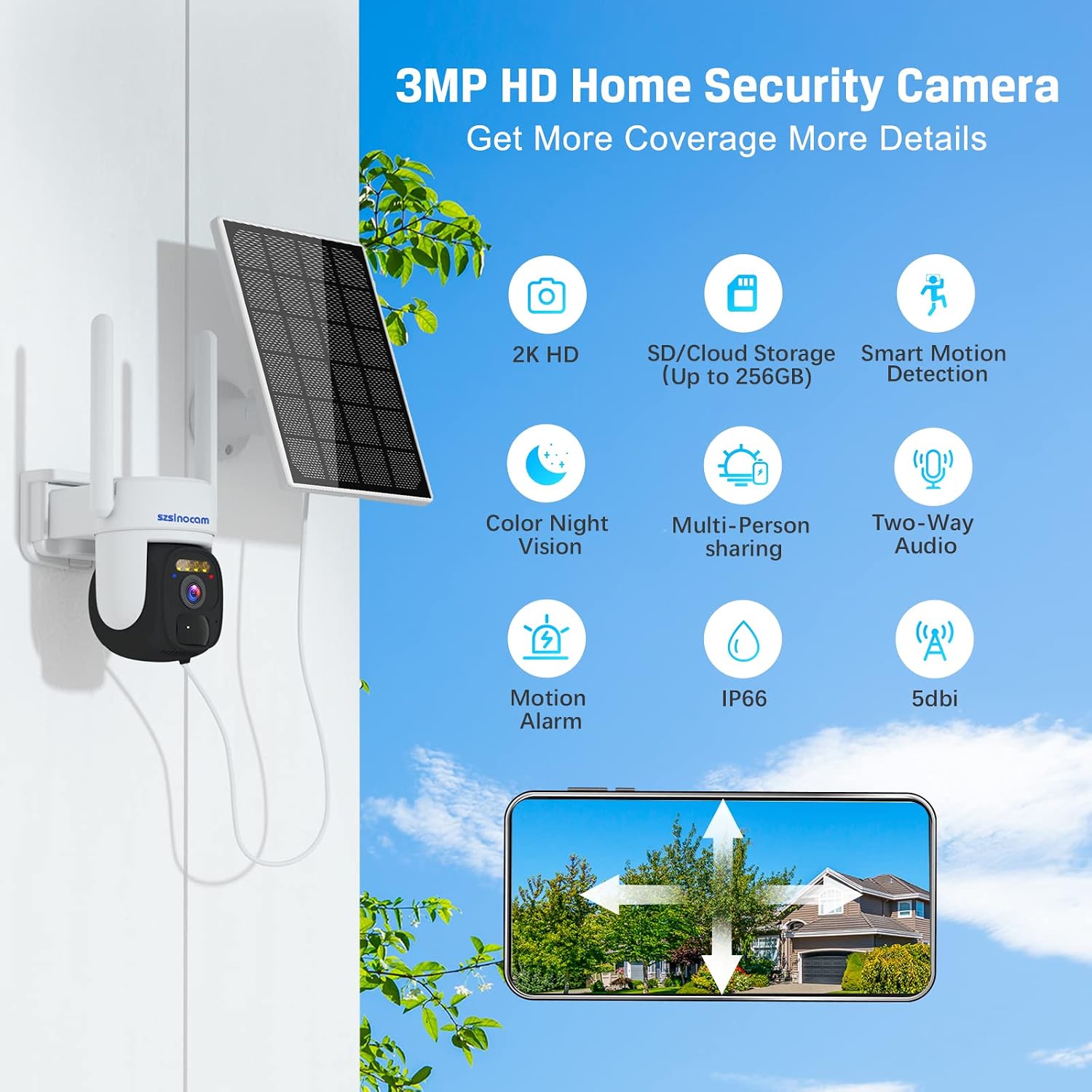
Image: A smartphone displaying the camera's live feed and options for local storage and remote playback, including calendar, screenshot, and record functions.
4.2 Kawalan Pan dan Condongkan
Within the 'O-KAM' app, use the on-screen controls to remotely adjust the camera's viewsudut ing. Kamera ini menyokong kecondongan mendatar 355° dan kecondongan menegak 110°.

Image: The camera is depicted with arrows indicating its 355° pan and 90° tilt capabilities, ensuring comprehensive coverage of the monitored area. It also mentions 4X digital zoom.
4.3 Mod Penglihatan Malam
Kamera ini menawarkan pelbagai pilihan penglihatan malam:
- Penglihatan Malam Inframerah: Hitam putih standard view in low light.
- Penglihatan Malam Warna Penuh: Activates built-in spotlights to provide color images in the dark.
- Sound and Light Alarm Night Vision: Combines full-color vision with an audible alarm and flashing lights upon motion detection.

Image: A visual comparison of the camera's night vision capabilities, including infrared night vision, full-color night vision, and sound and light alarm night vision, demonstrating enhanced visibility in low-light conditions.
4.4 Motion Detection and Alarms
The camera utilizes PIR (Passive Infrared) motion detection with an AI algorithm to identify human shapes, minimizing false alarms. When motion is detected, the camera can trigger various alarms and send instant notifications to your phone.
- Customizable Alarm Zones: Tentukan kawasan tertentu dalam kamera view untuk pengesanan gerakan.
- Adjustable Detection Distance: Set the range at which motion is detected.
- Mod Penggera: Choose between siren, voice, or combined sound and light alarms.
- Pemberitahuan Segera: Receive alerts on your smartphone within seconds of detection.

Image: An illustration showing how to define custom alarm zones within the camera's field of view, highlighting a specific area like a garage entrance for monitoring.

Image: A screenshot from the app demonstrating the setting for PIR alarm detection distance, allowing users to adjust the range from near to far.

Image: A smartphone displaying an instant motion alarm message notification, indicating a visitor has been detected by the camera.
4.5 Audio Dua Hala
Use the two-way audio feature in the 'O-KAM' app to speak through the camera's speaker and listen through its microphone. This allows for direct communication with individuals near the camera.

Image: A split image demonstrating color night vision capturing a child playing, and the two-way audio feature allowing a parent to speak to the child remotely via a smartphone.
4.6 Pilihan Storan
Kamera menyokong dua kaedah penyimpanan untuk foo yang dirakamtage:
- Kad SD mikro: Masukkan kad Micro SD (sehingga 256GB, tidak disertakan) ke dalam slot yang ditetapkan pada kamera untuk storan setempat.
- Storan Awan: A 3-day free cloud storage service is available. Refer to the app for subscription options for extended cloud storage.

Image: A close-up of the camera showing the Micro SD card slot and an icon representing cloud storage, illustrating the dual storage options.
4.7 Perkongsian Berbilang Pengguna
You can share access to your camera's live feed and recordings with family members or trusted individuals through the 'O-KAM' app.

Imej: Ilustrasi yang menggambarkan pro berbilang penggunafiles around a globe, with a smartphone showing a camera feed, symbolizing the multi-user sharing capability for family members.
5. Penyelenggaraan
5.1 Pengecasan Bateri
The camera's 10000mAh battery is primarily charged by the solar panel. In periods of low sunlight or heavy usage, the battery can also be charged via a standard USB power adapter (not included).
- Pastikan panel solar bersih dan bebas daripada halangan untuk memaksimumkan kecekapan pengecasan.
- If the battery level is critically low, remove the camera and charge it indoors using a USB cable until fully charged.
5.2 Penjagaan Am
- Bersihkan kanta kamera dan panel solar dengan kerap dengan lembut, damp kain untuk memastikan imej yang jelas dan pengecasan yang cekap.
- Elakkan menggunakan bahan kimia yang keras atau bahan kasar yang boleh merosakkan permukaan atau kanta kamera.
- Ensure all ports and covers are securely closed to maintain the IP66 weatherproof rating.
6. Penyelesaian masalah
- Kamera tidak bersambung ke Wi-Fi: Ensure your Wi-Fi network is 2.4GHz. Check Wi-Fi signal strength at the camera's location. Restart your router and the camera.
- Bateri tidak dicas: Verify the solar panel is receiving direct sunlight and is clean. Check the connection between the solar panel and the camera. Charge the camera via USB if necessary.
- Kualiti imej yang lemah: Bersihkan lensa kamera. Pastikan tiada halangan dalam bidang kamera viewPeriksa kelajuan sambungan internet anda.
- Penggera palsu yang kerap: Adjust the PIR detection sensitivity and customize alarm zones in the 'O-KAM' app to focus on relevant areas.
- No motion detection notifications: Ensure notifications are enabled in both the 'O-KAM' app and your smartphone's settings. Check the camera's motion detection settings.
For further assistance, refer to the 'O-KAM' app's help section or contact customer support.
7. Spesifikasi
| Ciri | Spesifikasi |
|---|---|
| Nombor Model | QW5 |
| Jenama | SZSINOCAM |
| Resolusi Video Berkesan | 3 MP (2K) |
| Resolusi Rakaman Video | 1080p |
| Teknologi Komunikasi Tanpa Wayar | Wi-Fi (2.4GHz) |
| Julat Pan/Sendeng | Pan 355° / Condong 110° |
| Ciri Khas | Portable, Night Vision (Infrared, Full-Color, Alarm), PIR Motion Detection, Two-Way Audio |
| Persekitaran Penggunaan | Luar (Kalis Cuaca IP66) |
| Sumber Kuasa | Battery Powered (10000mAh rechargeable battery) with Solar Panel |
| Penggunaan Kuasa | 10 Watt |
| Peranti Serasi | Telefon pintar |
| Pilihan Storan | Kad Mikro SD (sehingga 256GB), Storan Awan |
| bahan | plastik |
| Dimensi | 21.8 x 15 x 14.3 cm |
| Berat badan | 920 gram |
8. Waranti dan Sokongan
For information regarding warranty coverage, technical support, or replacement parts, please refer to the product packaging or visit the official SZSINOCAM website. Contact details for customer service are typically provided with your purchase documentation.