
pengenalan
This manual provides detailed instructions for the setup, operation, and maintenance of your LFF Atomic Clock Model LWC204. This digital clock features a large, easy-to-read display, atomic time synchronization, and a wireless sensor for indoor and outdoor temperature readings. Please read this manual thoroughly before use to ensure proper functionality and longevity of your device.
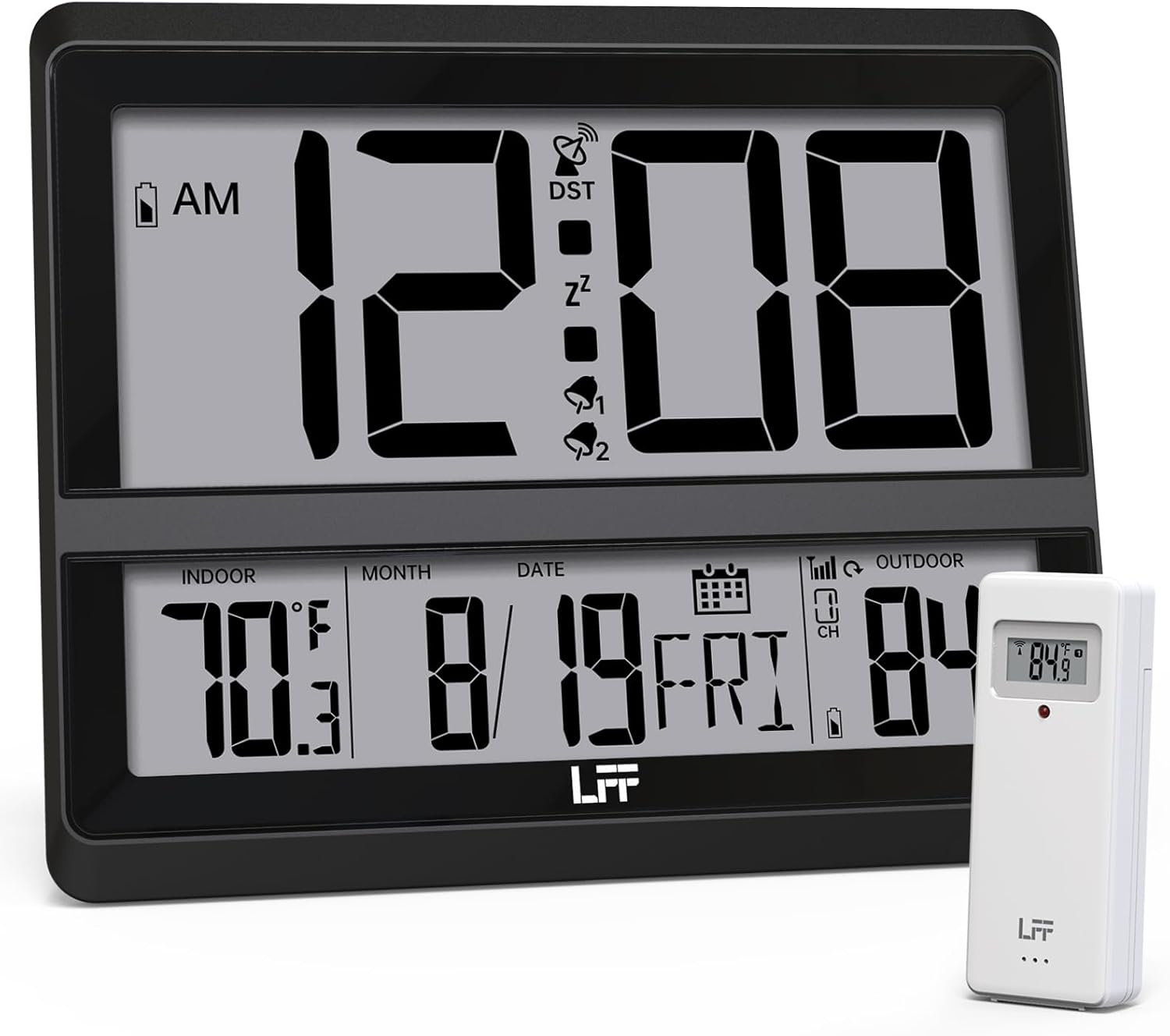
Image: The LFF Atomic Clock main unit with its wireless outdoor temperature sensor.
Kandungan Pakej
- LFF Atomic Clock Main Unit
- Penderia Suhu Luar Wayarles
- Manual Arahan (dokumen ini)
- Bracket for table standing
Note: Batteries are not included. The main clock unit requires 3x AA batteries, and the outdoor sensor requires 2x AAA batteries.
Produk Selesaiview
Familiarize yourself with the main components and controls of your LFF Atomic Clock.

Image: Front display and rear button layout of the LFF Atomic Clock.
Ciri Paparan:
- Paparan Masa: Large digits for current time (12/24 Hour format).
- Penunjuk PG/PTG: Untuk format 12 jam.
- DST Symbol: Indicates Daylight Saving Time is active.
- RCC Reception Icon: Shows status of atomic time signal reception.
- Alarm Icons (Zz, 1, 2): Indicate active alarms and snooze function.
- Suhu Dalaman: Current temperature inside (°C/°F).
- Suhu Luaran: Current temperature from wireless sensor (°C/°F).
- Date & Weekday: Month, Day, and Day of the Week.
- Penunjuk Bateri Rendah: For both main unit and outdoor sensor.
Butang Belakang:
- Butang SET: Enters setting mode.
- Butang PENGGERA: Accesses alarm settings.
- CHANNEL Button: Cycles through outdoor sensor channels (if multiple sensors are used).
- DOWN/WAVE/°C/°F Button: Decreases values in setting mode, manually initiates atomic signal search (WAVE), or switches temperature units.
- UP/ALARM Button: Increases values in setting mode, or activates/deactivates alarm.
Persediaan
1. Pemasangan Bateri
- Penderia Luaran:
- Buka petak bateri di bahagian belakang sensor luar wayarles.
- Insert 2x AAA batteries, observing the correct polarity (+/-).
- Tutup petak bateri dengan selamat.
- Note: For temperatures below -4°F (-20°C), Lithium batteries are recommended for the outdoor sensor.
- Main Clock Unit:
- Open the battery compartment on the back of the main clock unit.
- Masukkan 3x bateri AA, dengan memerhatikan kekutuban yang betul (+/-).
- Tutup petak bateri dengan selamat.

Image: Battery compartments for the main clock and outdoor sensor.
2. Initial Synchronization and Settings
Upon battery installation, the clock will automatically begin searching for the WWVB atomic time signal and attempt to connect with the outdoor sensor.
- The RCC Reception Icon will flash during the atomic signal search. This process may take several minutes or up to 24 hours depending on signal strength.
- The outdoor temperature should appear on the display within a few minutes after the sensor batteries are installed. If not, press the SALURAN button on the main unit to cycle through channels or press the reset button on the outdoor sensor.
3. Manual Settings (if needed)
If the atomic signal is not received or you wish to adjust settings manually:
- Tetapan Zon Waktu:
- Tekan dan tahan butang SET button for 3 seconds to enter time zone setting.
- Gunakan UP/ALARM or DOWN/WAVE/°C/°F buttons to select your time zone (e.g., PST, MST, CST, EST).
- Tekan SET untuk mengesahkan dan beralih ke tetapan seterusnya.
- Format 12/24 Jam:
- After time zone, the hour format will flash. Use UP/ALARM or DOWN/WAVE/°C/°F to select 12-hour or 24-hour format.
- Tekan SET untuk mengesahkan.
- Tetapan Masa dan Tarikh Manual:
- Teruskan menekan SET to cycle through Year, Month, Day, Hour, Minute settings.
- guna UP/ALARM or DOWN/WAVE/°C/°F untuk menyesuaikan setiap nilai.
- Tekan SET untuk mengesahkan setiap tetapan.
- Waktu Penjimatan Siang (DST):
- After setting the time, the DST setting will flash. Use UP/ALARM or DOWN/WAVE/°C/°F to enable or disable DST.
- Tekan SET untuk keluar dari mod tetapan.

Image: The clock automatically corrects time daily via WWVB signal.
4. Penempatan Sensor Luar
- Place the wireless outdoor sensor within 330 feet (100 meters) of the main unit.
- Choose a shaded location to avoid direct sunlight, which can affect temperature accuracy.
- Pastikan sensor dilindungi daripada hujan dan salji secara langsung.
- Elakkan meletakkan sensor berhampiran objek logam besar atau peralatan elektrik yang boleh mengganggu isyarat tanpa wayar.

Image: Wireless range of 330 feet for the outdoor sensor.
Arahan Operasi
1. Mod Paparan
- The clock continuously displays time, indoor temperature, outdoor temperature, date, and day of the week.
- Tekan ke DOWN/WAVE/°C/°F butang untuk bertukar antara Celsius (°C) dan Fahrenheit (°F) untuk paparan suhu.
2. Fungsi Penggera
- Menetapkan Penggera:
- Tekan ke PENGGERA button once to display Alarm 1 time. Press again for Alarm 2.
- While an alarm time is displayed, press and hold the PENGGERA button for 3 seconds to enter alarm setting mode. The hour will flash.
- guna UP/ALARM or DOWN/WAVE/°C/°F untuk menyesuaikan jam. Tekan PENGGERA untuk mengesahkan.
- The minute will flash. Use UP/ALARM or DOWN/WAVE/°C/°F untuk menyesuaikan minit. Tekan PENGGERA untuk mengesahkan dan keluar dari tetapan penggera.
- Mengaktifkan/Menyahaktifkan Penggera:
- Tekan ke PENGGERA button to display Alarm 1 or Alarm 2.
- Tekan ke UP/ALARM button to toggle the alarm ON or OFF. The corresponding alarm icon (1 or 2) will appear/disappear on the display.
- Fungsi Tunda:
- Apabila penggera berbunyi, tekan MENGEJUTKAN button (usually located on top or a dedicated button) to activate snooze. The alarm will sound again after approximately 5-10 minutes.
- To stop the alarm completely, press any other button (e.g., PENGGERA, SET).
3. Manual Atomic Signal Search
If you wish to manually initiate a search for the WWVB atomic time signal, press and hold the DOWN/WAVE/°C/°F button for 3 seconds. The RCC Reception Icon will flash, indicating the search is in progress.
Penyelenggaraan
- Pembersihan: Wipe the clock and sensor with a soft, dry cloth. Do not use abrasive cleaners or solvents.
- Penggantian Bateri: When the low battery indicator appears on the display for either the main unit or the outdoor sensor, replace the batteries promptly to ensure continuous operation and accurate readings. Refer to the "Battery Installation" section for details.
- Storan: Jika menyimpan peranti untuk tempoh yang lama, keluarkan semua bateri untuk mengelakkan kebocoran.
Menyelesaikan masalah
| Masalah | Kemungkinan Punca | Penyelesaian |
|---|---|---|
| Tiada paparan pada unit utama. | Bateri mati atau tidak dipasang dengan betul. | Periksa kekutuban bateri dan gantikan dengan bateri AA yang baru. |
| Suhu luar tidak dipaparkan atau salah. |
|
|
| Atomic time signal not received (RCC icon flashing or not displayed). |
|
|
| Time is incorrect after atomic synchronization. | Tetapan zon waktu yang salah. | Adjust the time zone setting as described in the "Manual Settings" section. |
Spesifikasi
| Ciri | Perincian |
|---|---|
| Nombor Model | LWC204 |
| Jenis Paparan | LCD Digital |
| Sumber Kuasa (Unit Utama) | 3x Bateri AA (tidak termasuk) |
| Sumber Kuasa (Penderia Luaran) | 2x Bateri AAA (tidak termasuk) |
| Julat Suhu Dalaman | 32°F hingga 122°F (0°C hingga 50°C) |
| Julat Suhu Luar | -58°F hingga 158°F (-50°C hingga 70°C) |
| Julat Tanpa Wayar | Sehingga 330 kaki (100 meter) di udara terbuka |
| Format Masa | 12/24 Jam boleh dipilih |
| Dimensi (Unit Utama) | 7.48" L x 8.66" T (lebih kurang) |
| Pilihan Pemasangan | Wall Mount or Tabletop (bracket included) |
Waranti dan Sokongan
LFF products are designed for reliability and performance. For specific warranty information, please refer to the warranty card included with your purchase or contact LFF customer support.
For technical assistance or further inquiries, please visit the official LFF weblaman web atau hubungi jabatan khidmat pelanggan mereka. Butiran perhubungan biasanya terdapat pada pembungkusan produk atau kehadiran rasmi dalam talian jenama.