
Logicool M550MGR
Logicool Signature M550MGR Silent Wireless Mouse User Manual
Model: M550MGR
1. Pengenalan
The Logicool Signature M550MGR is a silent wireless mouse designed for comfort and productivity. It features the unique SmartWheel for versatile scrolling and SilentTouch technology for reduced click noise. This mouse offers dual connectivity options: Bluetooth Low Energy and the Logi Bolt USB receiver, ensuring stable performance across various operating systems.

Image: The Logicool Signature M550MGR mouse, highlighting its ergonomic design and advanced scrolling capabilities.
2. Kandungan Pakej
- Logicool Signature M550MGR Wireless Mouse
- Penerima USB Logi Bolt
- 1 Bateri AA (prapasang)
- Dokumentasi Pengguna (manual ini)
3. Persediaan
3.1. Pemasangan Bateri
- Cari petak bateri di bahagian bawah tetikus.
- Buka penutup petak bateri.
- Ensure the AA battery is correctly oriented according to the polarity indicators (+/-).
- Tutup penutup petak bateri.
3.2. Menyambung Tetikus Anda
The M550MGR offers two connection methods: Logi Bolt USB receiver or Bluetooth Low Energy.
3.2.1. Sambungan Penerima USB Logi Bolt
- Remove the Logi Bolt USB receiver from the battery compartment or packaging.
- Palamkan penerima USB Logi Bolt ke dalam port USB yang tersedia pada komputer anda.
- The mouse should automatically connect. If not, ensure the mouse is powered on.
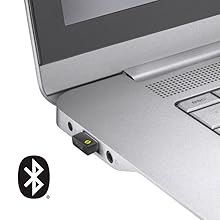
Image: The Logi Bolt USB receiver connected to a laptop, illustrating the wireless connection method.
3.2.2. Bluetooth Low Energy Connection
- Pastikan Bluetooth peranti anda didayakan.
- Hidupkan tetikus.
- Press and hold the connect button on the underside of the mouse for 3 seconds until the LED indicator starts blinking rapidly.
- On your device, go to Bluetooth settings and select "Logicool M550MGR" from the list of available devices to pair.
- The LED indicator will turn solid for a few seconds, then turn off, indicating a successful connection.

Image: Visual representation of the two connectivity options: Bluetooth and the Logi Bolt USB receiver.
4. Arahan Operasi
4.1. Fungsi Asas
- Klik Kiri: Tindakan utama, pemilihan.
- Klik kanan: Tindakan kedua, menu konteks.
- Roda Tatal: Tatal ke atas atau ke bawah melalui dokumen dan web muka surat.
4.2. SmartWheel Scrolling
The SmartWheel automatically switches between two scrolling modes:
- Line-by-line Scrolling: For precise navigation, ideal for detailed work.
- Hyper-fast Scrolling: Spin the wheel quickly to effortlessly glide through long documents and web pages. The wheel will automatically switch to this mode when spun with momentum.

Imej: Dari dekat view of the SmartWheel, demonstrating its design for efficient scrolling.
4.3. Teknologi Senyap Sentuh
The M550MGR incorporates SilentTouch technology, which reduces click noise by 90% compared to traditional mice, while maintaining the familiar click feel. This creates a quieter work environment without compromising tactile feedback.

Image: A user operating the silent mouse in a calm environment, illustrating the benefit of SilentTouch technology.
5. Ciri-ciri
- SmartWheel: Automatic switching between precise line-by-line and hyper-fast scrolling.
- Teknologi SilentTouch: 90% reduced click noise with retained click feel.
- Kesambungan Dwi: Connect via Logi Bolt USB receiver or Bluetooth Low Energy.
- Reka bentuk ergonomik: Comfortable shape with rubber side grips for extended use.
- Hayat Bateri yang Panjang: Up to 24 months on a single AA battery.
- Keserasian Berbilang OS: Supports Windows, macOS, Chrome OS, iPadOS, and Android.
6. Maklumat Bateri
- Jenis Bateri: 1 x AA alkaline battery.
- Hayat Bateri: Up to 24 months, depending on usage.
- Penggantian Bateri: Replace the AA battery when the LED indicator on the mouse turns red or when performance degrades. Follow the installation steps in Section 3.1.
7. Keserasian
The Logicool Signature M550MGR mouse is compatible with the following operating systems:
- Logi Bolt Connection:
- Windows 10, 11 atau lebih baru
- macOS 10.10 atau lebih baru
- OS Chrome
- Bluetooth Low Energy Connection:
- Windows 10, 11 atau lebih baru
- macOS 10.15 atau lebih baru
- OS Chrome
- iPadOS 13.4 atau lebih baru
- Android 5.0 atau lebih baru
Note: This mouse is not compatible with Logitech Unifying receivers.
8. Penyelenggaraan
- Pembersihan: Use a soft, lint-free cloth to clean the mouse surface. For stubborn dirt, slightly dampen kain dengan air. Elakkan bahan kimia yang keras atau bahan yang melelas.
- Penderia: Pastikan sensor optik di bahagian bawah tetikus bersih dan bebas daripada habuk atau serpihan untuk prestasi penjejakan yang optimum.
- Storan: When not in use for extended periods, turn off the mouse to conserve battery life. Store in a dry, cool place.
9. Penyelesaian masalah
9.1. Tetikus Tidak Membalas
- Pastikan tetikus dihidupkan.
- Periksa tahap bateri dan ganti jika perlu.
- For Logi Bolt connection: Ensure the receiver is securely plugged into a working USB port. Try a different USB port.
- For Bluetooth connection: Ensure Bluetooth is enabled on your device and the mouse is paired. Try re-pairing the mouse (refer to Section 3.2.2).
- Mulakan semula komputer atau peranti anda.
9.2. Erratic Cursor Movement
- Bersihkan sensor optik di bahagian bawah tetikus.
- Pastikan anda menggunakan tetikus pada permukaan yang sesuai. Elakkan permukaan yang sangat reflektif atau lutsinar.
- Move the mouse closer to the Logi Bolt receiver or your Bluetooth-enabled device to reduce interference.
9.3. SmartWheel Not Switching Modes
- Ensure the wheel is spun with enough momentum to activate hyper-fast scrolling.
- Check for any debris around the scroll wheel that might impede its movement.
10. Spesifikasi
| Jenama | Logicool |
| Nombor Model | M550MGR |
| warna | grafit |
| Teknologi Ketersambungan | Bluetooth, Logi Bolt (USB) |
| Teknologi Pengesanan Pergerakan | Optik |
| Ciri Khas | SilentTouch, Wireless |
| Dimensi Produk | 6.1 x 10.82 x 3.88 cm |
| Berat Barang | 97.4 g |
| Jenis Bateri | 1 x Bateri AA |
| Masa Penggunaan Berterusan | Sehingga 24 bulan |
11. Waranti dan Sokongan
The Logicool Signature M550MGR Wireless Mouse comes with a Waranti pengilang selama 2 tahun dari tarikh pembelian.
For technical support, warranty claims, or additional information, please visit the official Logicool support webtapak atau hubungi perkhidmatan pelanggan mereka. Simpan bukti pembelian anda untuk tujuan waranti.
Official Logicool Support: www.logicool.co.jp
Ask a question about this manual
Ask about setup, troubleshooting, compatibility, parts, safety, or missing instructions. Manuals+ will review the question and use this page’s manual context to help answer it.