
1. Pengenalan
The Potensic ATOM SE is a lightweight and portable GPS drone designed for both beginners and advanced users. It features a 4K camera with advanced stabilization, intelligent flight modes, and extended flight time, making it ideal for capturing aerial footage.
Ciri-ciri Utama:
- Ringan & Mudah Alih: Weighs less than 249g, compliant with Class C0 certification, and features a foldable design for easy transport.
- Masa Penerbangan Lanjutan: Equipped with two intelligent batteries, each providing 31 minutes of flight, totaling 62 minutes.
- Kamera EIS 4K: Features a 1/3" 12 MP CMOS sensor for 12 MP photos and UHD 4K/30fps videos, enhanced by ShakeVanish technology for vibration reduction.
- Intelligent Flight Control: SurgeFly system offers Video, Normal, and Sport flight modes, with Sport mode reaching speeds up to 16 m/s in 2.8 seconds.
- Penghantaran Jarak Jauh: PixSync 2.0 technology provides smooth HD video transmission up to 4 km (13,120 feet) with low latency.
- High-Precision GPS: Enables intelligent return-to-home functions (low battery, signal loss) and advanced flight modes via the PotensicPro app (Follow Me, Waypoint Flight, Circle Flight).
- Rintangan angin: Capable of withstanding Level 5 winds for stable flight and clear imaging.
2. Kandungan Pakej
Sahkan bahawa semua item terdapat dalam pakej anda:
- Potensic ATOM SE Drone
- Alat Kawalan Jauh
- Intelligent Flight Batteries (x2)
- Propellers (Spare Set)
- Kabel Pengecas USB-C
- RC Cables (Micro USB, USB-C, Lightning)
- Pemutar skru
- Sarung Pembawa Tersuai
- Manual Pengguna (dokumen ini)

Image: All components of the Potensic ATOM SE package, including the drone, remote controller, two batteries, spare propellers, charging cables, screwdriver, and carrying case.
3. Drone Overview
Familiarize yourself with the drone's components before operation.
- Penjual: Provide lift and thrust.
- Motor: Memandu kipas.
- Camera & Gimbal: Captures photos and videos, with ShakeVanish stabilization.
- Bateri Penerbangan Pintar: Powers the drone.
- Petunjuk Status: LEDs indicating drone status.
- Lengan boleh dilipat: Allow for compact storage.

Imej: Dari dekat view of the Potensic ATOM SE drone's camera and gimbal system, highlighting the 12 MP Sony CMOS sensor and ShakeVanish technology for image stabilization.
4. Alat Kawalan Jauh Lebihview
The remote controller allows you to control the drone and access its features.
- Kayu Kawalan: Untuk arah penerbangan dan ketinggian.
- Pemegang Telefon: Secures your smartphone for FPV viewing.
- Antena: Untuk penghantaran isyarat.
- Butang Kuasa: To turn the controller on/off.
- Return-to-Home Button: Initiates automatic return to takeoff point.
- Butang Foto/Video: To capture images or start/stop recording.

Image: A user holding the Potensic ATOM SE remote controller with a smartphone mounted, displaying the drone's live FPV feed, illustrating the PixSync 2.0 HD transmission system.
5. Maklumat Bateri
Charging the Intelligent Flight Battery:
- Connect the USB-C charging cable to the battery.
- Sambungkan hujung kabel yang satu lagi ke penyesuai kuasa USB (tidak disertakan).
- The battery indicator lights will show the charging status. All lights solid indicate a full charge.
Installing the Intelligent Flight Battery:
- Pastikan dron dimatikan.
- Insert the fully charged battery into the battery compartment on the drone until it clicks securely into place.
6. Persediaan
Pemasangan Kipas:
- Identify the correct propellers (marked A or B) for each motor.
- Attach the propellers to the corresponding motor shafts and secure them with the provided screws using the screwdriver. Ensure they are firmly attached but do not overtighten.
Muat Turun Apl dan Sambungan:
- Muat turun PotensicPro app from your device's app store (compatible with iOS 11+ and Android 7.0+).
- Lekapkan telefon pintar anda pada pemegang telefon alat kawalan jauh.
- Use one of the provided adapter cables (Micro USB, USB-C, or Lightning) to connect your smartphone to the remote controller.
- Hidupkan alat kawalan jauh, kemudian dron.
- Open the PotensicPro app and follow the on-screen instructions to connect to the drone.
7. Operasi
Senarai Semak Pra-Penerbangan:
- Ensure batteries for both drone and controller are fully charged.
- Pastikan kipas dipasang dengan betul dan tidak rosak.
- Verify that the drone arms are unfolded and locked.
- Ensure you are in an open area, away from obstacles, people, and restricted airspace.
- Confirm GPS signal acquisition before takeoff for stable flight and RTH functionality.
Berlepas dan Mendarat:
- Pelepasan Automatik: In the PotensicPro app, tap the 'Auto Takeoff' button. The drone will ascend to a safe height and hover.
- Berlepas Manual: Push both control sticks down and outwards to start the motors. Then, push the left stick up to ascend.
- Pendaratan Automatik: In the PotensicPro app, tap the 'Auto Landing' button. The drone will descend and land automatically.
- Pendaratan Manual: Gently pull the left control stick down to descend. Once landed, push both control sticks down and inwards to stop the motors.
Mod Penerbangan:
The SurgeFly flight control system offers three modes:
- Mod Video: Optimized for smooth, cinematic footage with reduced speed and responsiveness.
- Mod Biasa: Standard flight mode, balancing speed and stability.
- Mod Sukan: Provides maximum speed (up to 16 m/s) and agility for dynamic flight.

Image: The Potensic ATOM SE drone in flight, demonstrating its SurgeFly technology and ability to reach speeds of up to 16 m/s in 2.8 seconds.
Intelligent Flight Functions (via PotensicPro App):
- Return to Home (RTH): The drone automatically returns to its takeoff point. This can be activated manually via the controller button or automatically triggered by low battery or signal loss.
- Ikut Saya: The drone tracks and follows the remote controller or connected smartphone.
- Penerbangan Titik Jalan: Plan a flight path by setting multiple waypoints on the map, and the drone will fly along the designated route.
- Penerbangan Bulatan: The drone flies in a circular path around a designated point of interest.
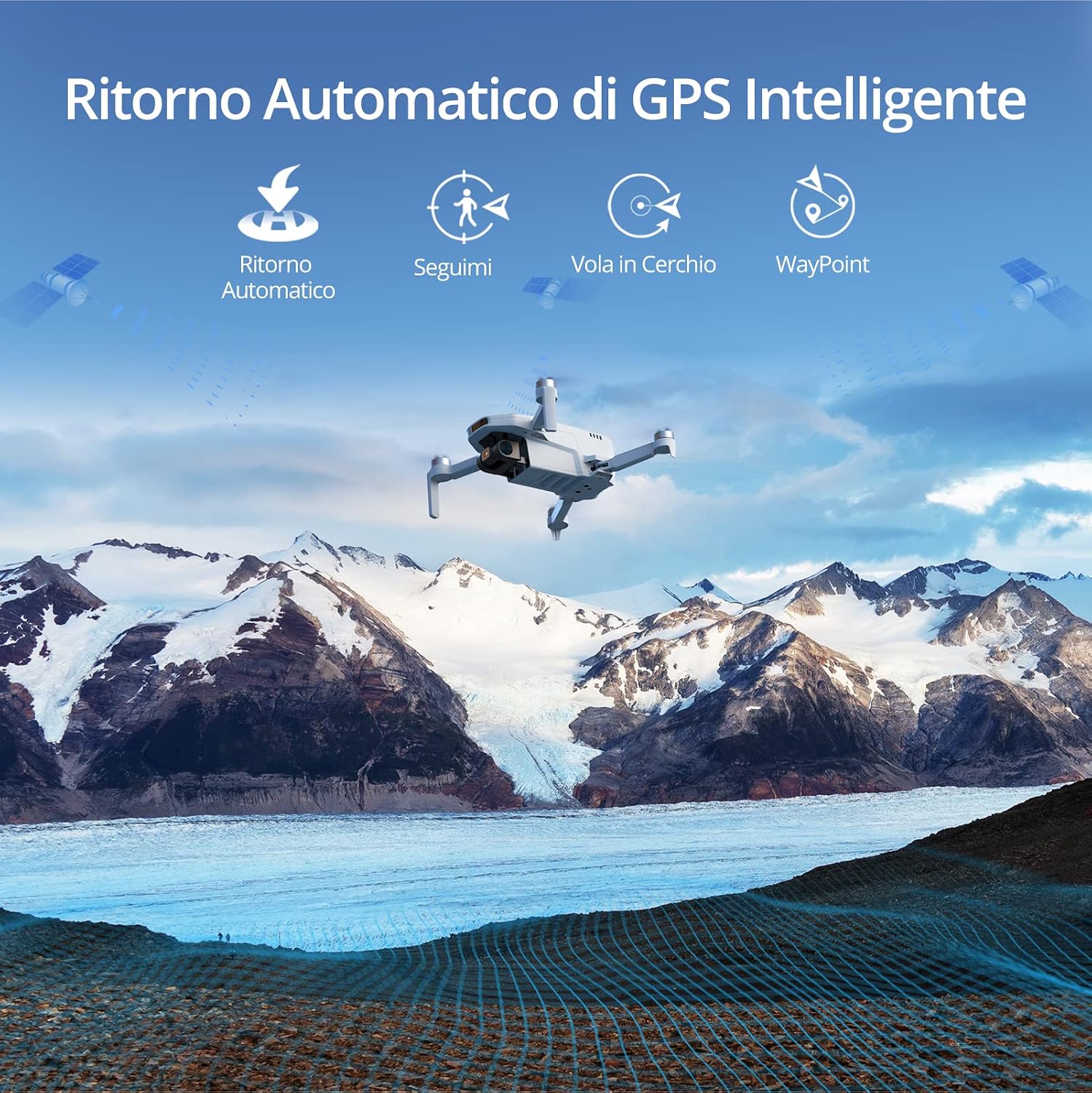
Image: The Potensic ATOM SE drone flying over a scenic mountain landscape, illustrating its intelligent GPS features such as Automatic Return, Follow Me, Circle Flight, and Waypoint navigation.
Operasi Kamera:
- Tangkapan Foto: Press the dedicated photo button on the remote controller or in the app to take a 12 MP photo.
- Rakaman Video: Press the dedicated video button on the remote controller or in the app to start/stop 4K/30fps video recording.
- Kawalan Gimbal: Use the gimbal dial on the remote controller to adjust the camera's tilt angle.
8. Penyelenggaraan
Kemas kini Firmware:
The drone and remote controller firmware can be updated via FOTA (Firmware Over-The-Air) using the PotensicPro app. It is recommended to keep the firmware updated for optimal performance and new features.
- Ensure both drone and controller are powered on and connected to the app.
- Follow the app's instructions for firmware updates.
- For camera-related firmware updates, ensure a micro SD card (not included) is inserted into the drone.
Pembersihan dan Penyimpanan:
- Clean the drone and remote controller with a soft, dry cloth after each use.
- Avoid exposing the drone to water or moisture.
- Store the drone and accessories in the provided carrying case in a cool, dry place.
- For long-term storage, charge the batteries to approximately 50-60% to prolong their lifespan.
9. Penyelesaian masalah
Isu dan Penyelesaian Biasa:
- Dron tidak dapat dihidupkan: Pastikan bateri dicas sepenuhnya dan dipasang dengan betul.
- Tiada suapan FPV: Check the connection between your smartphone and the remote controller. Ensure the PotensicPro app is open and connected to the drone.
- Penerbangan tidak stabil: Calibrate the drone's compass and IMU as instructed in the app. Ensure you are flying in an open area with strong GPS signal. Check for damaged propellers.
- Kualiti imej/video yang lemah: Ensure the camera lens is clean. Check for sufficient lighting. Update camera firmware if available.
- Drone not responding to controller: Re-pair the remote controller with the drone as per app instructions. Ensure both devices are powered on.
10. Spesifikasi
| Ciri | Perincian |
|---|---|
| Jenama | Potensik |
| Nama Model | Potensic ATOM SE |
| Berat Lepas | <249g |
| Masa Penerbangan Maks | 31 minutes per battery (62 minutes total with 2 batteries) |
| Sensor Kamera | 1/3" 12 MP CMOS |
| Resolusi Foto | 12 MP |
| Resolusi Video | 4K/30fps UHD |
| Penstabilan Imej | EIS (ShakeVanish Technology) |
| Julat Penghantaran Maks | 4 km (13,120 feet) with PixSync 2.0 |
| Max Speed (Sport Mode) | 16 m/s |
| GPS | Integrated High-Precision GPS |
| Rintangan Angin | Tahap 5 |
| Keserasian Aplikasi | iOS 11+, Android 7.0+ |
11. Safety Guidelines and Regulations
Operating a drone requires adherence to local regulations and safety practices. The Potensic ATOM SE is classified as a C0 UAS (Unmanned Aircraft System).
| kategori | Requirement/Guideline |
|---|---|
| Kelas UAS | C0 |
| Berat Lepas | <250g |
| Flight Scenario | May fly over people but not over crowds; fly within visual line of sight, with the remote pilot intervening at all times. |
| Kelayakan | Baca manual pengguna dengan teliti. |
| Pendaftaran Operator | ya |
| Ketinggian Penerbangan | Below 120m above ground level. |
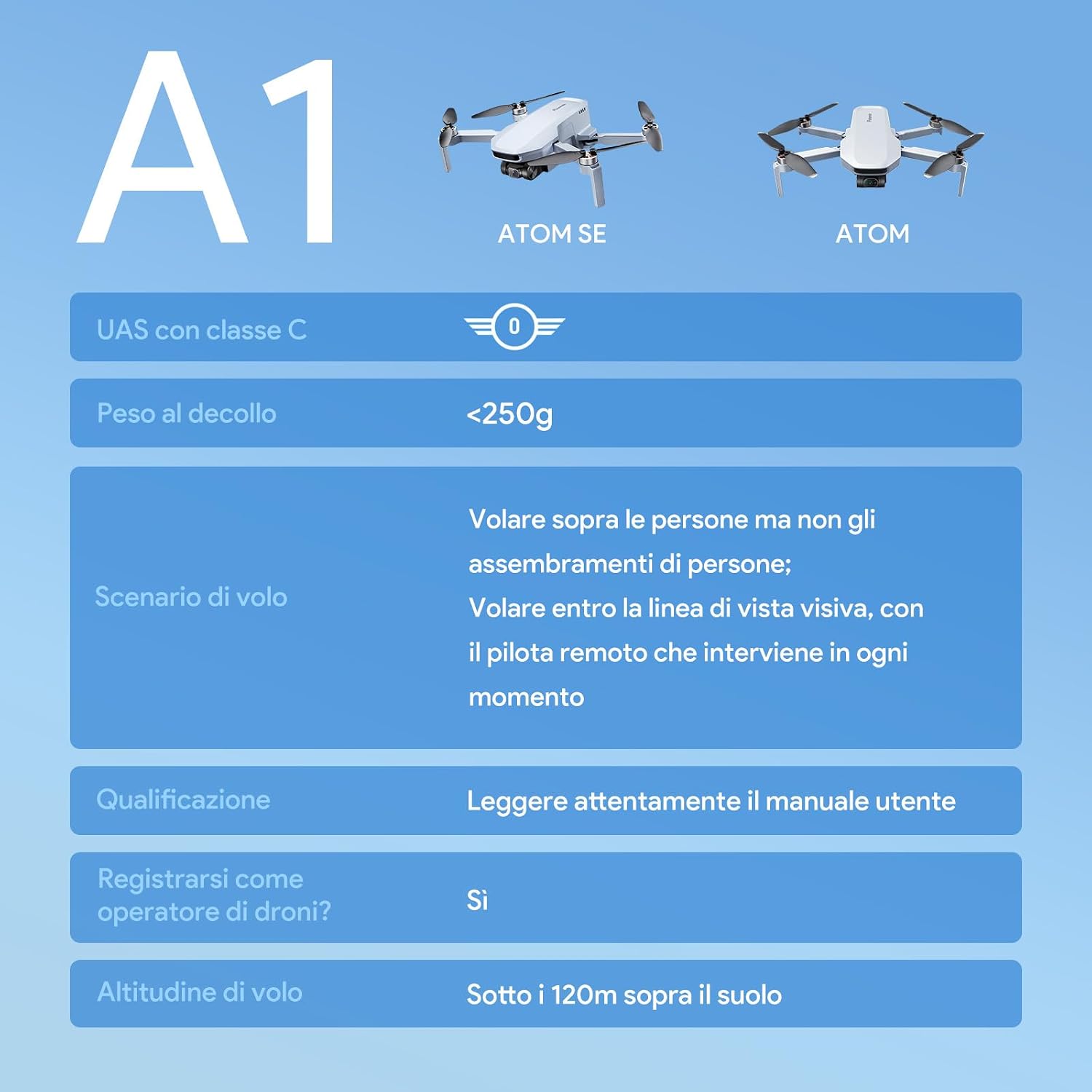
Image: A table detailing the A1 classification for the Potensic ATOM SE, including takeoff weight, flight scenarios, pilot qualification, operator registration, and maximum flight altitude.
Petua Keselamatan Am:
- Sentiasa terbang di kawasan terbuka, jauh dari bangunan, pokok dan talian kuasa.
- Kekalkan jarak yang selamat daripada manusia dan haiwan.
- Do not fly in adverse weather conditions (strong winds, rain, snow).
- Respect privacy and avoid flying over private property without permission.
- Always keep the drone within your visual line of sight.
12. Waranti dan Sokongan
Potensic provides a standard warranty for the ATOM SE drone. For detailed warranty information, please refer to the official Potensic webtapak atau hubungi sokongan pelanggan.
If you encounter any issues or have questions regarding your Potensic ATOM SE drone, please contact Potensic customer support through their official channels. Keep your purchase receipt as proof of purchase for warranty claims.


