
pengenalan
Thank you for choosing the BEYONDOP OP-MT615 Smart LED Desk LampManual ini menyediakan maklumat penting untuk penggunaan meja baharu anda yang selamat dan cekap.ampSila baca arahan ini dengan teliti sebelum digunakan dan simpannya untuk rujukan pada masa hadapan.
The BEYONDOP OP-MT615 is designed to provide versatile and eye-caring illumination for various tasks, featuring adjustable brightness, multiple color modes, and smart auto-dimming capabilities.

Image: The BEYONDOP OP-MT615 Smart LED Desk Lamp in a typical desk setup, illustrating its modern design and illumination.

Image: The BEYONDOP OP-MT615 Smart LED Desk Lamp positioned next to a sofa, demonstrating its versatility in various home environments.
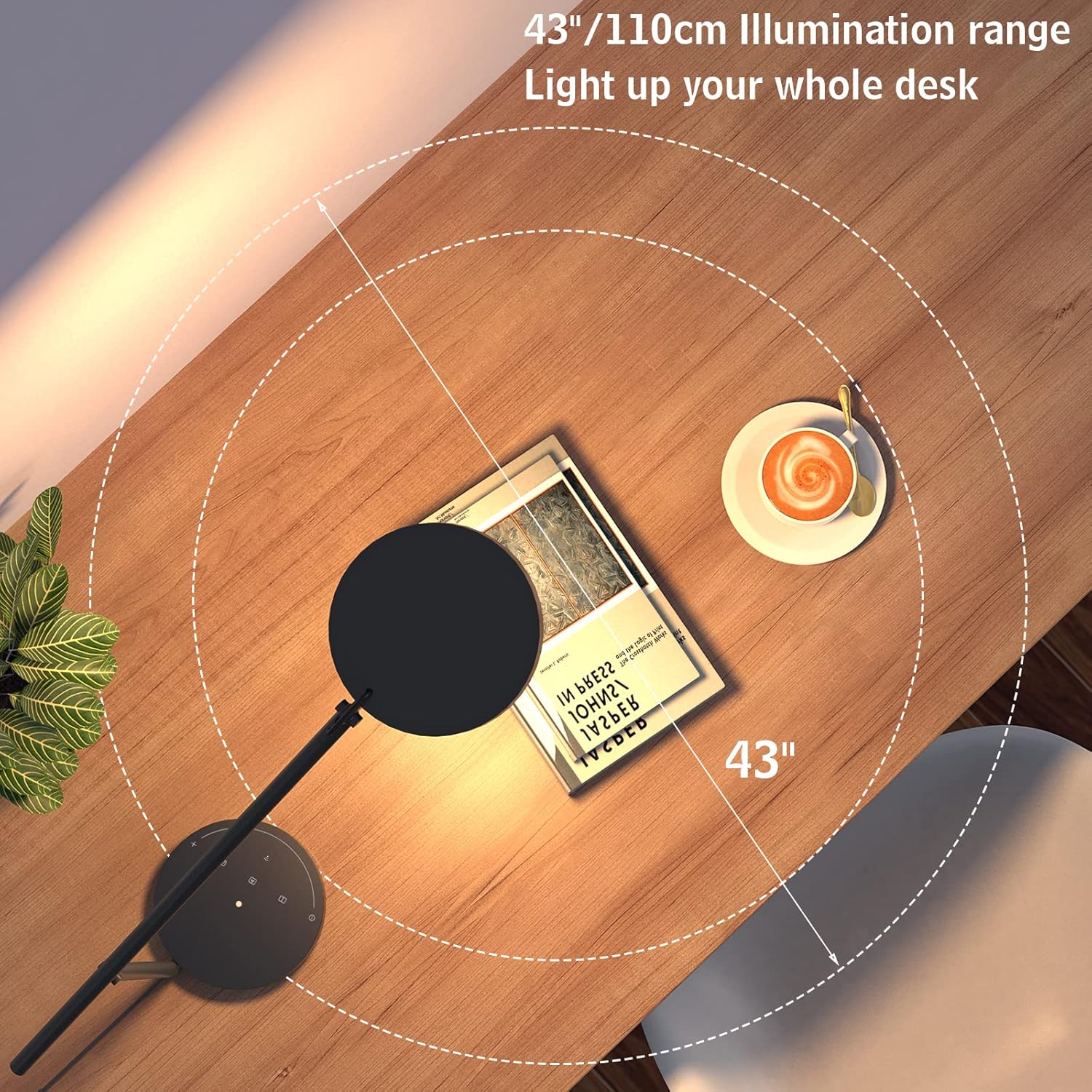
Image: An overhead perspective illustrating the wide 43-inch (110 cm) illumination range of the lamp, designed to cover an entire desk surface.
1. Arahan Persediaan
Follow these steps to set up your BEYONDOP OP-MT615 Smart LED Desk Lamp:
- Buka Pembungkusan Komponen: Carefully remove all components from the packaging. Ensure you have the lamp asas, lamp arm with head, and power adapter.
- Pasang Lamp:
- Letakkan lamp asas di atas permukaan yang stabil dan rata.
- Masukkan lamp arm into the designated slot on the base. Ensure it is securely seated.
- Sambungkan Kuasa: Palamkan penyesuai kuasa ke dalam lamp's power input port, then plug the adapter into a standard electrical outlet (100V-240V).
- Letakkan Lamp: Adjust the swing arm and lamp head to your desired position. The lamp features a rotatable head and flexible metal swing arm for multi-angle adjustment.

Image: An illustration detailing the dimensions and the layout of the touch control panel on the lamp's base, including the power button, mode selection, and dimming slider.
2. Arahan Operasi
The BEYONDOP OP-MT615 lamp mempunyai kawalan sentuh intuitif yang terletak di tapaknya.

Imej: A terperinci view daripada lamp's touch control panel on the base, highlighting the power, mode, and brightness controls, alongside diagrams illustrating the lamp head's adjustable angles (45°-260° rotation and 180° swing).
2.1 Hidupkan/Mati Kuasa
- Untuk Menghidupkan: Lightly touch the power symbol (Ⓢ) pada lamp asas.
- Untuk Mematikan: Lightly touch the power symbol (Ⓢ) lagi.
2.2 Pelarasan Kecerahan (Malap)
- Slide Dimming: Slide your finger along the curved touch slider on the base to adjust brightness from 15% to 100%.
- Lamp offers 9 levels of brightness adjustment.
2.3 Mod Suhu Warna
Lamp offers 3 distinct color temperature modes (3500K, 4000K, 5000K) to suit different activities. Touch the mode selection buttons to cycle through them:
- Mod Bacaan: Provides a warm, comfortable light (e.g., 3500K) ideal for extended reading sessions.
- Mod Penulisan: Offers a neutral white light (e.g., 4000K) suitable for focused tasks and writing.
- Auto Mode / Smart Mode: Activates the built-in ambient light sensor.

Image: An infographic illustrating the three distinct color modes (Reading, Writing, Smart) and the nine adjustable brightness levels, ranging from 10% to 100% illumination.
2.4 Smart Mode (Auto-Dimming)
When Smart Mode is activated, the lamp's built-in ambient light sensor automatically adjusts the brightness to reduce contrast between the lamp's output and the surrounding environment. This feature helps soothe eye fatigue and creates a comfortable viewpengalaman dalam.
2.5 Fungsi Memori
Lamp features a memory function that recalls your last used brightness and color temperature settings when turned back on.
2.6 Melaraskan Lamp kedudukan
Lamp head can rotate from 45° to 260°, and the swing arm offers 180° adjustment, allowing you to direct light precisely where needed. Gently adjust the arm and head to avoid excessive force.
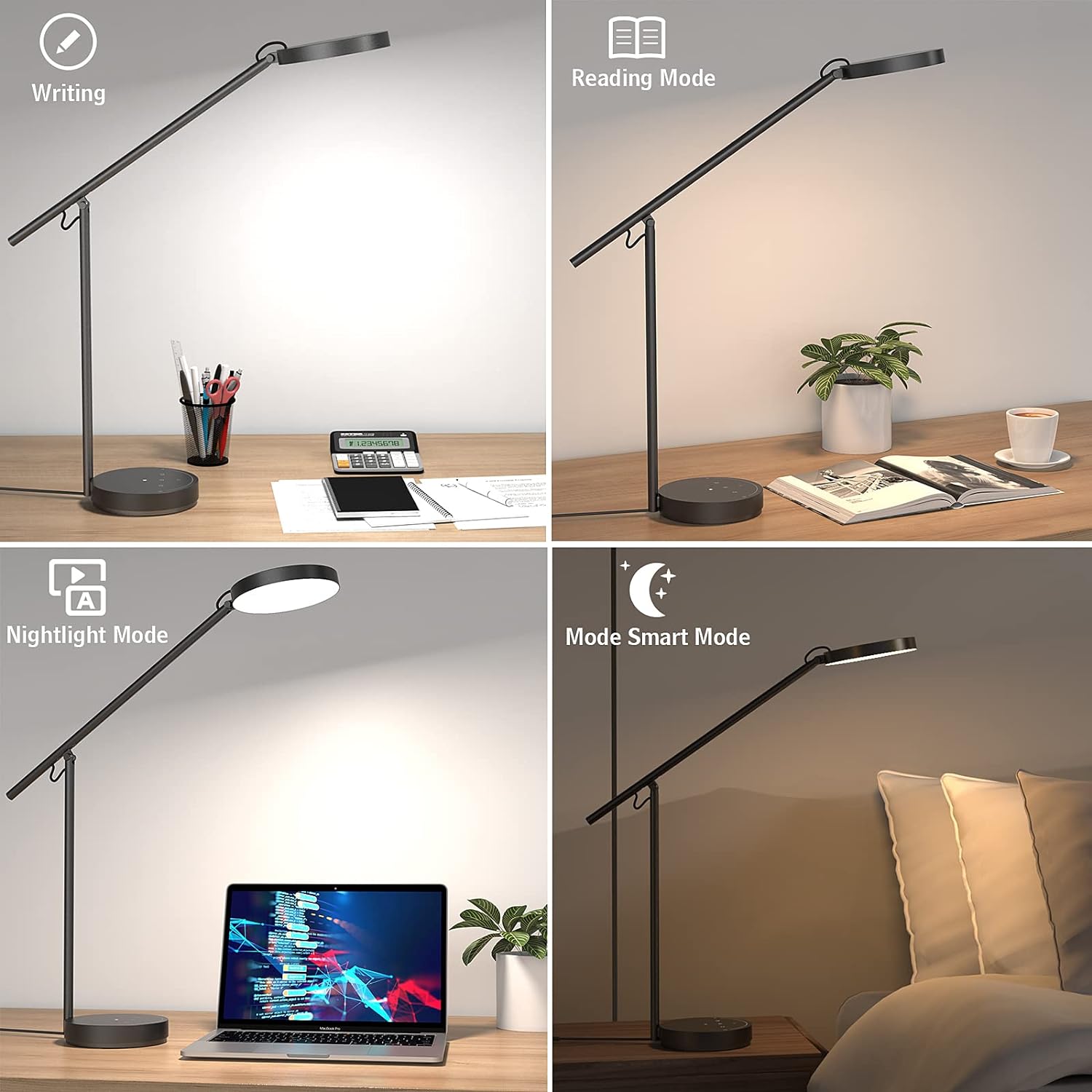
Image: A composite image displaying the lamp's performance in four different settings: Writing mode (bright, cool light), Reading mode (warm, soft light), Nightlight mode (low illumination), and Smart mode (auto-adjusted brightness).

Imej: Tayangan kolajcasing the BEYONDOP OP-MT615 lamp being used for diverse activities such as reading, working, studying, drawing, sewing, and gaming, highlighting its adaptability.
3. Penyelenggaraan
Proper maintenance ensures the longevity and optimal performance of your BEYONDOP OP-MT615 Desk Lamp.
- Pembersihan:
- Sentiasa cabut plag lamp daripada salur keluar kuasa sebelum dibersihkan.
- Lap lamp's surface with a soft, dry cloth. For stubborn marks, a slightly damp kain boleh digunakan, diikuti dengan kain kering.
- Jangan gunakan pembersih yang kasar, pelarut atau bahan kimia yang keras, kerana ini boleh merosakkan kemasan dan komponen elektronik.
- Storan: Jika menyimpan lamp Untuk tempoh yang lama, pastikan ia bersih dan kering. Simpan di tempat yang sejuk dan kering, jauh daripada cahaya matahari langsung dan suhu yang melampau.
- Jangka hayat LED: The integrated LED light source has an average lifespan of 50,000 hours and is not user-replaceable.
4. Penyelesaian masalah
If you encounter issues with your BEYONDOP OP-MT615 Desk Lamp, sila rujuk masalah dan penyelesaian biasa berikut:
| Masalah | Kemungkinan Punca | Penyelesaian |
|---|---|---|
| Lamp tidak menyala. |
|
|
| Cahaya berkelip-kelip atau tidak stabil. |
|
|
| Brightness or color mode cannot be adjusted. |
|
|
If the problem persists after trying these solutions, please contact BEYONDOP customer support for further assistance.
5. Spesifikasi Produk
Key technical specifications for the BEYONDOP OP-MT615 Smart LED Desk Lamp:
- model: OP-MT615
- Dimensi (D x W x H): 8.1" x 6.4" x 20.8" (20.8 x 16.4 x 53 cm)
- Berat Barang: 4.89 paun (2.22 kg)
- Bahan: Acrylonitrile Butadiene Styrene, Aluminum, Polycarbonate
- Jenis Selesai: metalik
- Jenis Sumber Cahaya: LED
- Bilangan Sumber Cahaya: 84
- Wattage: 18 Watt Hours (Maximum Compatible Wattage)
- Kecerahan: 1975 Lux
- Suhu Warna: 3500K, 4000K, 5000K (3 modes)
- Indeks Paparan Warna (CRI): ≥95
- Purata Kehidupan: 50,000 Jam
- Voltage: 100V-240V
- Kaedah Kawalan: Sentuh
- Ciri Khas: Dimmable, 3 Color Temperatures, Flicker-free, Eye-caring, Memory Function, Foldable, Adjustable, Smart LED with Light Sensor (Auto-adjust brightness), Corded Electric.

Image: An exploded diagram illustrating the internal components of the lamp head, including the high-quality metal material, dual-color LED bead light source board, light guideable seal cover, prismatic lens, and fly-eye micro prisms matrix lens, highlighting the advanced optical design.
6. Maklumat Waranti
BEYONDOP products are manufactured to high-quality standards. For specific warranty details regarding your OP-MT615 Smart LED Desk Lamp, please refer to the warranty card included with your purchase or contact BEYONDOP customer support. Keep your purchase receipt as proof of purchase for any warranty claims.
7. Sokongan Pelanggan
If you have any questions, require technical assistance, or need to report an issue with your BEYONDOP OP-MT615 Smart LED Desk Lamp, please contact our customer support team.
- Sokongan dalam talian: Visit the official BEYONDOP website or Amazon store page for FAQs and contact options.
- e-mel: Rujuk pembungkusan produk atau kad jaminan anda untuk sokongan e-mel terus.
Please have your model number (OP-MT615) and purchase information ready when contacting support.