
RC-CAS07 (Replacement)
Manual Pengguna Alat Kawalan Jauh
For Aiwa Compact Disc Carry Component Stereo Audio Systems
Models: CX-LEM57, CX-LEM52, RC-CAS07, XR-EM30, XR-EM31, XR-EM20, CX-LEM30, CX-LEM31, CX-LEM20, XR-M918, XR-M919, MX-LM918
Jenama: Generik
pengenalan
This manual provides essential instructions for the setup, operation, and maintenance of your replacement remote control for various Aiwa Compact Disc Carry Component Stereo Audio Systems. This remote is designed as an infrared replacement. Please ensure your original remote matches the appearance of this replacement for optimal compatibility.
Persediaan
Pemasangan Bateri
Alat kawalan jauh memerlukan dua (2) bateri AA (tidak termasuk).
- Cari petak bateri di belakang alat kawalan jauh.
- Luncurkan penutup petak bateri ke bawah atau mengikut arah yang ditunjukkan oleh anak panah untuk membukanya.
- Masukkan dua bateri AA, pastikan terminal positif (+) dan negatif (-) sejajar dengan betul dengan tanda di dalam petak.
- Tutup penutup petak bateri dengan menggelongsorkannya semula ke tempatnya sehingga ia berbunyi dengan selamat.
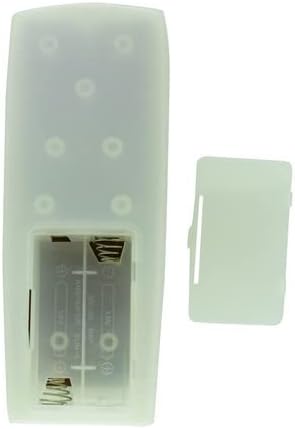
Rajah 1: Belakang view of the remote control with the battery cover removed, illustrating the battery compartment.
Arahan Operasi
Kegunaan Umum
This remote control is an infrared (IR) replacement. Point the remote directly at the IR receiver on your Aiwa stereo system. Ensure there are no obstructions between the remote and the stereo system.

Rajah 2: Depan view alat kawalan jauh.
Fungsi Utama
- KUASA: Menghidupkan atau mematikan sistem stereo.
- JILID +/-: Melaraskan tahap output audio.
- MAIN/JEDA: Starts or pauses playback of audio.
- SKIP/SEARCH: Navigates between tracks or fast-forwards/rewinds within a track.
- Numerical Buttons (0-9, +10): For direct track selection or input.
- FUNGSI: Selects different audio sources or modes (e.g., CD, Radio, MD).
- DISPLAY/CHARACTER: Changes display information or enters characters.
- MASUK: Mengesahkan pilihan.
- MD EDIT/REC: Functions related to MiniDisc recording and editing (if applicable to your system).
Nota tentang Keserasian: This is a replacement remote. While designed to be compatible, it may not offer all the exact same functions as your original remote. Refer to your stereo system's original manual for specific functions if needed.
Penyelenggaraan
Pembersihan
To clean the remote control, wipe it with a soft, dry cloth. Do not use abrasive cleaners, solvents, or chemical sprays, as these can damage the surface or internal components.
Penggantian Bateri
Replace batteries when the remote's response becomes sluggish or stops working. Always replace both batteries at the same time with new AA batteries. Do not mix old and new batteries, or different types of batteries. Remove batteries if the remote will not be used for an extended period to prevent leakage.
Menyelesaikan masalah
- Jauh tidak bertindak balas:
- Periksa sama ada bateri dimasukkan dengan betul dengan kekutuban yang betul.
- Gantikan bateri lama dengan yang baru.
- Ensure there are no obstructions between the remote and the stereo system's IR receiver.
- Confirm you are pointing the remote directly at the stereo system.
- Beberapa fungsi tidak berfungsi:
- This remote is a replacement and may not support all functions of your original remote. Verify if the specific function was present on the original remote and if this replacement is designed to support it.
- Ensure your stereo system model is listed as compatible.
- Gangguan:
- Sumber cahaya yang kuat (seperti cahaya matahari langsung atau lampu pendarfluor) boleh mengganggu isyarat IR. Cuba kendalikan alat kawalan jauh dalam keadaan pencahayaan yang berbeza.
If issues persist, please contact the seller for further assistance.
Spesifikasi
| Ciri | Perincian |
|---|---|
| Teknologi Ketersambungan | Inframerah |
| Peranti Serasi | Aiwa Stereo System (Specific models listed in title) |
| Sumber Kuasa | 2 x Bateri AA (tidak termasuk) |
| warna | Random (as per product listing) |
| Pengeluar | Easytry |
| ASIN | B0BJDVGDWJ |
Waranti dan Sokongan
This product is a replacement remote control. Specific warranty details are not provided in the product information. For any questions, concerns, or support regarding this replacement remote, please contact the seller directly through the platform where it was purchased.
Penting: As stated by the manufacturer, this replacement remote may not offer all the full same functions as your original remote. Please verify compatibility with your specific Aiwa model before purchase.
Ask a question about this manual
Ask about setup, troubleshooting, compatibility, parts, safety, or missing instructions. Manuals+ will review the question and use this page’s manual context to help answer it.