
1. Produk Lebihview
Haloview BT-M7 is a wireless monitor designed to provide enhanced visibility for your vehicle or trailer. It features a 7-inch display and supports 1080P video recording. This monitor is specifically designed for use with BT7 series cameras.
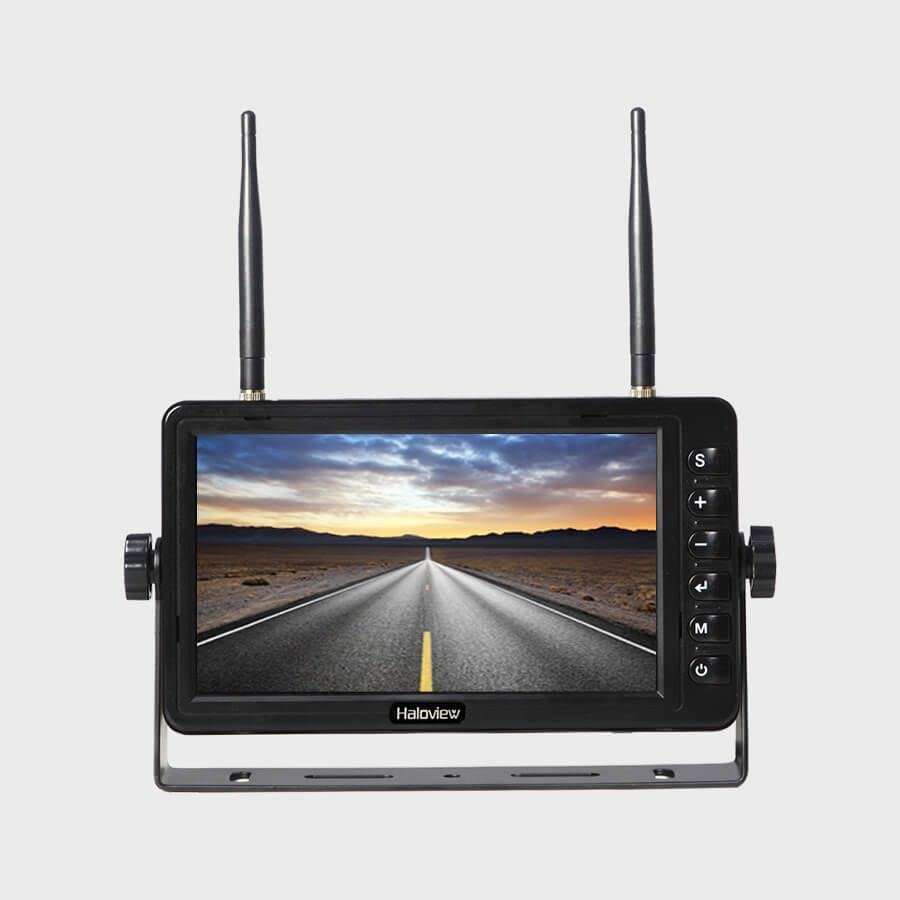
Figure 1: Haloview BT-M7 Wireless Monitor unit.
Ciri-ciri Utama:
- 1080P Video Recording Resolution: Seamless recording events with 1080P@30fps FHD Resolution Lens.
- Paparan 7-inci: Clear and bright screen for optimal viewing.
- Kesambungan Tanpa Wayar: Provides a stable wireless connection to compatible cameras.
- Nota Keserasian Penting: This monitor is NOT compatible with 720P wireless cameras.
2. Persediaan
2.1 Monitor Placement and Power
- Pilih Lokasi: Place the BT-M7 monitor on your dashboard or another suitable flat surface within your vehicle's cabin. Ensure it does not obstruct your view jalan raya.
- Sambungan Kuasa: Connect the monitor to your vehicle's 12V cigarette lighter socket using the provided power adapter. The adapter typically includes an on/off button for convenience.
- Optional Direct Wiring: For a more permanent installation, the system includes a wiring harness that allows direct integration into your vehicle's electrical system. Consult a professional for direct wiring installation if you are unsure.
2.2 Pemasangan Kamera
Haloview BT-M7 system supports multiple cameras for comprehensive coverage. Installation methods may vary slightly depending on the camera type (rear or side marker).
- Kamera Belakang: Mount the rear camera securely on the back of your trailer or RV. For longer vehicles, an antenna extender may be necessary to ensure a strong signal to the monitor.
- Side Marker Cameras: These cameras are designed to replace existing side marker lights on your vehicle or trailer. Ensure proper wiring to integrate them with your vehicle's lighting system.
2.3 Pairing Cameras with the Monitor
To establish a wireless connection between your cameras and the BT-M7 monitor:
- Power on the monitor and the camera(s) you wish to pair.
- Pada monitor, tekan butang MENU butang untuk mengakses menu utama.
- Navigasi ke BERPASANG option using the arrow buttons and press OK.
- While the monitor is in pairing mode, press the pairing button on the camera's wireless repeater unit (usually located near the camera or its antenna). This typically needs to be done within a 20-second window.
- Once successfully paired, the camera's video feed will appear on the monitor. Repeat for additional cameras.
3. Arahan Operasi
3.1 Menukar Kamera Views
To cycle through the connected camera views, tekan SEL (Select) button on the monitor. Each press will switch to the next active camera feed or a multi-view display if configured.
3.2 Parking Lines
The monitor can display adjustable parking lines for assistance with backing up. These lines can be turned on, off, or adjusted for specific camera views via the monitor's menu settings.
3.3 Rakaman Video
The BT-M7 monitor supports video recording. Insert a compatible SD card into the designated slot on the monitor to enable recording functionality. Recorded footage can be played back directly on the monitor.
3.4 Pemantauan Audio
Some cameras may transmit audio. The monitor features a volume control in its menu settings, allowing you to listen to audio from the active camera feed.
4. Penyelenggaraan
Regular maintenance ensures optimal performance and longevity of your Haloview BT-M7 system.
- Pembersihan: Periodically clean the monitor screen and camera lenses with a soft, damp kain. Elakkan pembersih kasar yang boleh menggaru permukaan.
- Pemeriksaan Sambungan: Regularly inspect all power and antenna connections for tightness and signs of wear or corrosion.
- Kemas Kini Perisian: Check the Haloview rasmi website for any available firmware updates for your monitor and cameras.
5. Penyelesaian masalah
If you encounter issues with your BT-M7 monitor, try the following steps:
- Tiada isyarat:
- Ensure all cameras and the monitor are powered on.
- Verify that the cameras are correctly paired with the monitor (refer to Section 2.3).
- Check all cable connections for security.
- Ensure no large metal objects are obstructing the wireless signal path between the camera and monitor.
- Kualiti Imej Lemah:
- Clean camera lenses and monitor screen.
- Check for any physical damage to the camera or its lens.
- Ensure the camera is within the effective range of the monitor.
- Monitor Tidak Menghidupkan:
- Check the power connection to the cigarette lighter socket or direct wiring.
- Ensure the vehicle's power outlet is functional.
6. Spesifikasi
| Ciri | Perincian |
|---|---|
| Dimensi Produk | 4.47 x 7.5 x 0.72 inci |
| Berat Barang | 2.75 paun |
| Pengeluar | Haloview |
| Nombor Model Item | BT-M7 |
| Saiz Paparan Skrin Berdiri | 7 Inci |
| Nisbah Aspek | 16:9 |
| Resolusi | 1080P (1920x1080), FHD 1080p, HD |
| Penerangan Permukaan Skrin | Berkilat |
7. Waranti dan Sokongan
For detailed warranty information, technical support, and service inquiries, please refer to the official Haloview webtapak atau hubungi perkhidmatan pelanggan mereka secara langsung. Simpan resit pembelian anda sebagai bukti pembelian untuk tuntutan waranti.