
LENRUE A39PRO
LENRUE A39PRO USB-C Computer Speaker User Manual
Model: A39PRO | Brand: LENRUE
1. Pengenalan
Thank you for choosing the LENRUE A39PRO USB-C Computer Speaker. This speaker is designed to provide clear and powerful audio for your laptop or desktop computer with a simple plug-and-play Type-C connection. This manual provides detailed instructions for setup, operation, and maintenance to ensure optimal performance and longevity of your device.
2. Kandungan Pakej
Sila sahkan bahawa semua item terdapat dalam pakej:
- 1 x LENRUE A39PRO Computer Speaker
- 1 x Manual Pengguna (dokumen ini)
3. Produk Lebihview
The LENRUE A39PRO speaker features a sleek design with intuitive controls and vibrant lighting. Familiarize yourself with the components below.
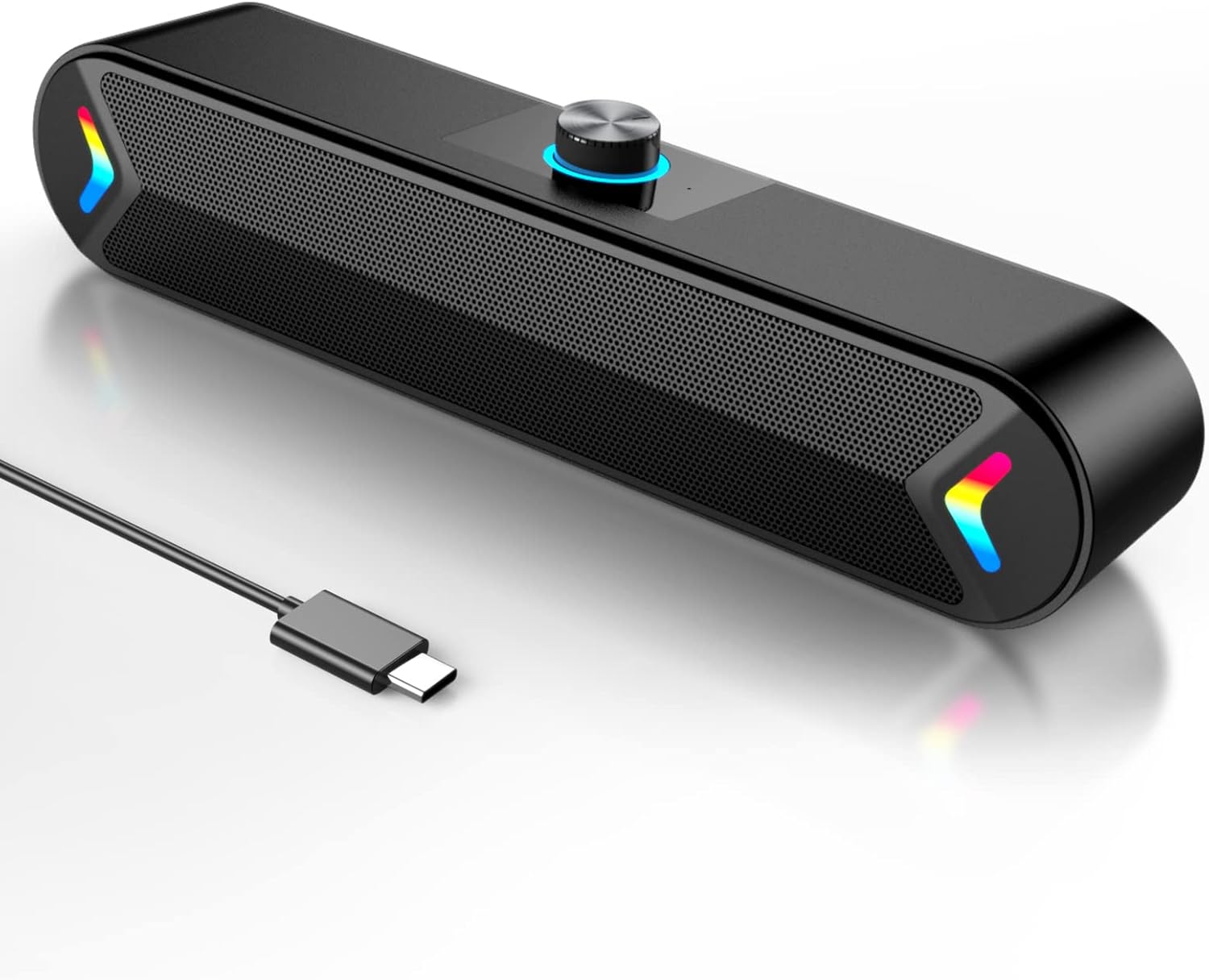
Rajah 3.1: Depan view of the LENRUE A39PRO speaker, showing the main grille and integrated USB-C cable.

Rajah 3.2: Atas dan belakang view of the speaker, highlighting the volume knob and the power/light control button.
Komponen Utama:
- Tombol Kelantangan: Located on the top, used for adjusting audio volume.
- Butang Kuasa/Cahaya: Located on the back, controls power and the colorful light feature.
- Kabel USB-C: Integrated cable for both power and audio input.
- Dual 5W Drivers: Internal components providing clear stereo sound.
- Independent Bass Diaphragm: Enhances bass performance.
4. Arahan Persediaan
The LENRUE A39PRO speaker is designed for simple plug-and-play operation. No additional drivers or software are required for most operating systems.
Menyambung Pembesar Suara:
- Locate an available USB-C port on your laptop or desktop computer.
- Insert the integrated USB-C cable from the LENRUE A39PRO speaker firmly into the USB-C port on your computer.

Rajah 4.1: Illustrates connecting the speaker's USB-C cable to a laptop's Type-C port.
- The speaker will automatically power on and be recognized by your operating system. You may need to select the "LENRUE A39PRO" as the default audio output device in your computer's sound settings.

Rajah 4.2: The speaker in operation, connected to a laptop, demonstrating its plug-and-play functionality.
Nota Penting: Ensure your device has a Type-C interface for compatibility. The single USB-C cable transmits both audio and electrical power to the speaker.
5. Arahan Operasi
Kawalan Kelantangan:
- Putar Tombol Kelantangan on the top of the speaker clockwise to increase the volume.
- Putar Tombol Kelantangan lawan arah jam untuk mengurangkan kelantangan.
Controlling the Colorful Light:
The speaker features a colorful light design that can be controlled via the button on the back.
- Tekan ke Butang Kuasa/Cahaya once to turn on the speaker and activate the colorful lights.
- Tekan ke Butang Kuasa/Cahaya a second time to turn off the colorful lights while keeping the speaker powered on.
- Tekan ke Butang Kuasa/Cahaya a third time to power off both the speaker and the lights.
6. Keserasian
The LENRUE A39PRO speaker offers wide compatibility with various operating systems and devices that feature a USB-C port for audio and power.

Rajah 6.1: Visual representation of the speaker's compatibility with Windows, macOS, Chrome OS, Linux, and Unix systems.
Sistem Operasi yang Disokong:
- Windows PCs (Vista/7/8/10)
- macOS (MacBook Air, Mac mini)
- Google Chromebooks
- Linux
- Unix
Peranti Serasi:
- Laptops with Type-C port
- Desktop Computers with Type-C port
7. Penyelesaian masalah
If you encounter issues with your LENRUE A39PRO speaker, please refer to the following common problems and solutions:
| Masalah | Kemungkinan Punca | Penyelesaian |
|---|---|---|
| Tiada bunyi dari pembesar suara. |
|
|
| Lights are off, but speaker is on. | Lights have been toggled off. | Press the Power/Light Button once to cycle through light modes and turn them back on. |
| Bunyi herot atau tidak jelas. |
|
|
| Speaker not recognized by computer. |
|
|
8. Spesifikasi
| Ciri | Perincian |
|---|---|
| Nama Model | A39PRO |
| Jenis Pembesar Suara | Pembesar suara Komputer |
| Teknologi Ketersambungan | USB (Jenis-C) |
| Sumber Kuasa | Corded Electric (via USB-C) |
| Mod Keluaran Audio | Stereo |
| Kuasa Output Maksimum Pembesar Suara | 10 Watts (2x5W) |
| Jenis Pengawal | Kawalan tombol |
| Dimensi Produk (D x W x H) | 2.17"D x 12.6"W x 2.56"H |
| Berat Barang | 1.3 paun |
| warna | Black-USBC |
| Ciri Khas | One Cable with Type-C plug for charging and audio, Colorful light Design |
9. Penyelenggaraan
Proper care and maintenance will ensure the longevity and optimal performance of your speaker.
- Pembersihan: Use a soft, dry cloth to wipe the surface of the speaker. Do not use liquid cleaners or abrasive materials, as they may damage the finish or internal components.
- Storan: Apabila tidak digunakan untuk tempoh yang lama, simpan pembesar suara di tempat yang sejuk dan kering jauh dari cahaya matahari langsung dan suhu yang melampau.
- Pengendalian: Avoid dropping the speaker or subjecting it to strong impacts, which can damage internal circuitry.
- Pendedahan Air: Pembesar suara tidak kalis air. Elakkan daripada terdedah kepada air atau cecair lain.
10. Waranti dan Sokongan
The LENRUE A39PRO speaker comes with a Waranti Terhad. For specific warranty terms, conditions, and support inquiries, please refer to the warranty information provided at the time of purchase or contact LENRUE customer support directly through their official channels.
For further assistance or technical support, please visit the official LENRUE webtapak atau hubungi bahagian perkhidmatan pelanggan mereka.
Ask a question about this manual
Ask about setup, troubleshooting, compatibility, parts, safety, or missing instructions. Manuals+ will review the question and use this page’s manual context to help answer it.