
1. Pengenalan
Terima kasih kerana membeliasing the COSTWAY Mobile 3-in-1 Air Cooler, Humidifier, and Fan. This appliance is designed to provide a comfortable environment by offering cooling, humidification, and air circulation functions. It features a 10-liter water tank, three operating modes, three fan speeds, a 15-hour timer, and a remote control for convenient operation. Please read this manual thoroughly before use to ensure proper operation, maintenance, and safety.

Imej 1.1: Depan view of the COSTWAY Mobile 3-in-1 Air Cooler.
2. Arahan Keselamatan
Untuk mengurangkan risiko kebakaran, kejutan elektrik atau kecederaan, sentiasa ikuti langkah berjaga-jaga keselamatan asas ini:
- Baca semua arahan sebelum menggunakan perkakas.
- Pastikan bekalan kuasa voltage sepadan dengan label penilaian pada perkakas.
- Jangan rendam perkakas, kord kuasa, atau palamkan ke dalam air atau cecair lain.
- Unplug the appliance from the power outlet when not in use, before cleaning, or before moving.
- Jauhkan perkakas daripada kanak-kanak dan haiwan peliharaan.
- Jangan kendalikan perkakas dengan kord atau palam yang rosak, atau jika ia tidak berfungsi atau telah rosak dalam apa jua cara.
- Letakkan perkakas pada permukaan yang stabil dan rata.
- Jangan halang saluran masuk atau keluar udara. Kekalkan jarak sekurang-kurangnya 20 cm dari dinding dan objek lain.
- Do not use the appliance in bathrooms or other humid environments where it could come into contact with water.
- Only use clean tap water in the water tank. Do not add any chemicals or additives other than recommended ice packs.
- Do not attempt to repair or modify the appliance yourself. Contact qualified service personnel.
3. Produk Lebihview
3.1 Komponen
The air cooler consists of the main unit, a water tank, a removable air filter, a honeycomb cooling pad, and a remote control. Two ice packs are also included for enhanced cooling.
3.2 Panel Kawalan dan Paparan
The LED control panel on top of the unit allows you to manage all functions. It includes buttons for Power, Speed, Mode, Timer, Oscillation, and Cooling. The display shows current settings.

Imej 3.1: Terperinci view of the LED control panel and remote control.
4. Persediaan
4.1 Membongkar dan Meletakkan Kedudukan
- Keluarkan perkakas dari bungkusannya dengan berhati-hati.
- Place the air cooler on a firm, level surface. Ensure there is at least 20 cm of space around the unit for proper airflow.
- The unit is equipped with 360° swivel wheels and integrated handles for easy movement.

Image 4.1: The air cooler features wheels and handles for easy portability.
4.2 Mengisi Tangki Air
- Tarik keluar tangki air dari bahagian bawah belakang unit.
- Isi tangki dengan air paip bersih sehingga penunjuk aras 'MAX'. Jangan penuhkan.
- For enhanced cooling, place the included ice packs in a freezer for a few hours until frozen.
- Setelah beku, letakkan pek ais ke dalam tangki air.
- Slide the water tank back into the unit until it clicks into place.
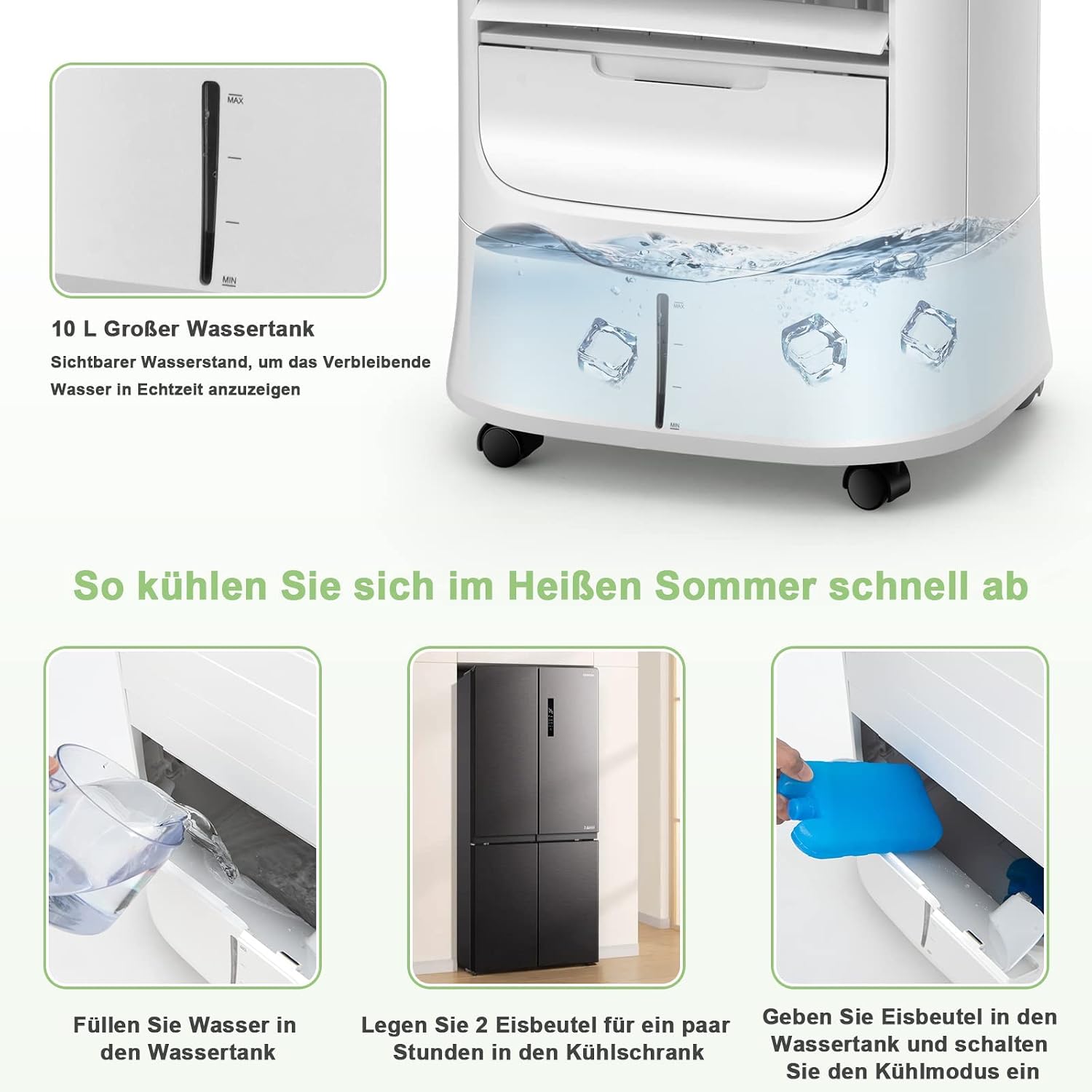
Image 4.2: Steps for filling the water tank and adding ice packs.
5. Arahan Operasi
5.1 Hidupkan/Mati Kuasa
- Palamkan kord kuasa ke salur keluar elektrik yang sesuai.
- Tekan ke kuasa butang pada panel kawalan atau alat kawalan jauh untuk menghidupkan atau mematikan unit.
5.2 Pelarasan Kelajuan Kipas
- Tekan ke Kelajuan button repeatedly to cycle through the three fan speeds: Low, Medium, and High.
5.3 Pemilihan Mod
Tekan ke Mod butang untuk memilih salah satu daripada mod pengendalian berikut:
- Mod Biasa: Memberikan aliran udara yang malar pada kelajuan yang dipilih.
- Mod Semula Jadi: Mensimulasikan angin semula jadi dengan mengubah kelajuan kipas.
- Mod tidur: Beroperasi pada kelajuan yang lebih rendah dan lebih senyap, secara beransur-ansur berkuranganasing fan speed for undisturbed sleep.

Image 5.1: The air cooler offers Normal, Natural, and Sleep modes with adjustable fan speeds.
5.4 Fungsi Ayunan
- Tekan ke Oscillation button to activate the automatic horizontal swing of the external louvers (120° up and down).
- The internal louvers can be manually adjusted 63° left and right to direct airflow.

Image 5.2: The air cooler features wide-angle oscillation for even air distribution.
5.5 Penetapan Pemasa
- Tekan ke Pemasa butang berulang kali untuk menetapkan masa operasi yang diingini (dari 1 hingga 15 jam). Unit akan dimatikan secara automatik selepas masa yang ditetapkan.
5.6 Cooling/Humidification Function
- Ensure the water tank is filled and ice packs are inserted (if desired).
- Tekan ke Sejuk button to activate the cooling and humidification function. The unit will draw water from the tank to cool and humidify the air.
6. Penyelenggaraan
Penyelenggaraan tetap memastikan prestasi optimum dan memanjangkan jangka hayat penyejuk udara anda.
6.1 Cleaning the Air Filter and Honeycomb Cooling Pad
- Cabut plag perkakas sebelum membersihkan.
- Remove the rear filter screen and the honeycomb cooling pad.
- Clean the air filter and cooling pad with a soft brush and mild detergent, then rinse thoroughly with clean water.
- Allow them to air dry completely before reinserting them into the unit.

Image 6.1: The air cooler's filtration system, including the removable dust filter and honeycomb cooling pad.
6.2 Membersihkan Tangki Air
- Cabut plag perkakas.
- Pull out the water tank and empty any remaining water.
- Clean the tank with a soft cloth and mild detergent. Rinse thoroughly to remove any residue.
- For thorough cleaning, the drain plug at the bottom of the unit can be used to empty the tank.
- Allow the tank to dry completely before reinserting.
6.3 Penyimpanan
If the appliance will not be used for an extended period, empty and clean the water tank and filter. Store the unit in a cool, dry place, preferably in its original packaging.
7. Penyelesaian masalah
| Masalah | Kemungkinan Punca | Penyelesaian |
|---|---|---|
| Tiada kuasa | Power cord not plugged in; no power at outlet; unit turned off. | Check power cord connection; check circuit breaker; press Power button. |
| Aliran udara yang lemah | Air filter or cooling pad clogged; fan speed too low. | Clean air filter and cooling pad; increase fan speed. |
| Tiada kesan penyejukan | Tangki air kosong; fungsi penyejukan tidak diaktifkan; pek ais tidak digunakan. | Fill water tank; press Cool button; add frozen ice packs. |
| Kebocoran air | Water tank overfilled; tank not properly seated; drain plug loose. | Do not overfill; ensure tank is correctly inserted; check drain plug. |
| Bunyi yang tidak biasa | Unit tidak berada di atas permukaan yang rata; objek asing dalam kipas. | Place on a level surface; unplug and check for obstructions. |
Jika masalah berterusan selepas mencuba penyelesaian ini, sila hubungi sokongan pelanggan.
8. Spesifikasi
| Ciri | Spesifikasi |
|---|---|
| Jenama | COSTWAY |
| Nama Model | ES10122DE-WH-GM |
| Fungsi | Air Cooler, Humidifier, Fan |
| bahan | ABS Terpolymer |
| warna | putih |
| Jenis Pemasangan | Freestanding |
| Jenis Kawalan | Remote Control, LED Panel |
| Kapasiti Tangki Air | 10 Liter |
| Berat Produk | 7.7 Kilogram |
| Dimensi Produk (L x W x H) | 39 x 33 x 74 cm |
| Wattage | 78 W |
| Voltage | 220-240 V, 50/60 Hz |
| Tahap Kebisingan | Less than 58 Decibels |
| Bilangan Kelajuan | 3 |
| Pemasa | 0-15 Jam |
| Kelajuan Udara | 1.8-5 m/s |
| Komponen yang Disertakan | 2 x Pek Ais |

Image 8.1: Dimensions and technical specifications of the air cooler.
9. Waranti dan Sokongan
This product comes with a standard manufacturer's warranty. For detailed warranty information, please refer to the warranty card included with your purchase or contact COSTWAY customer service. If you encounter any issues or have questions regarding the operation or maintenance of your air cooler, please reach out to our support team for assistance.
Contact information for support can typically be found on the product packaging, the official COSTWAY webtapak, atau resit pembelian anda.