
1. Pengenalan
This manual provides detailed instructions for the setup, operation, and maintenance of your ARRAROWN ZK-TB21 Bluetooth Audio Amplifier Board. This 2.1 channel stereo digital amplifier is designed for DIY home speaker projects, offering 50W per stereo channel and 100W for the subwoofer, with Bluetooth 5.0 and AUX input capabilities.
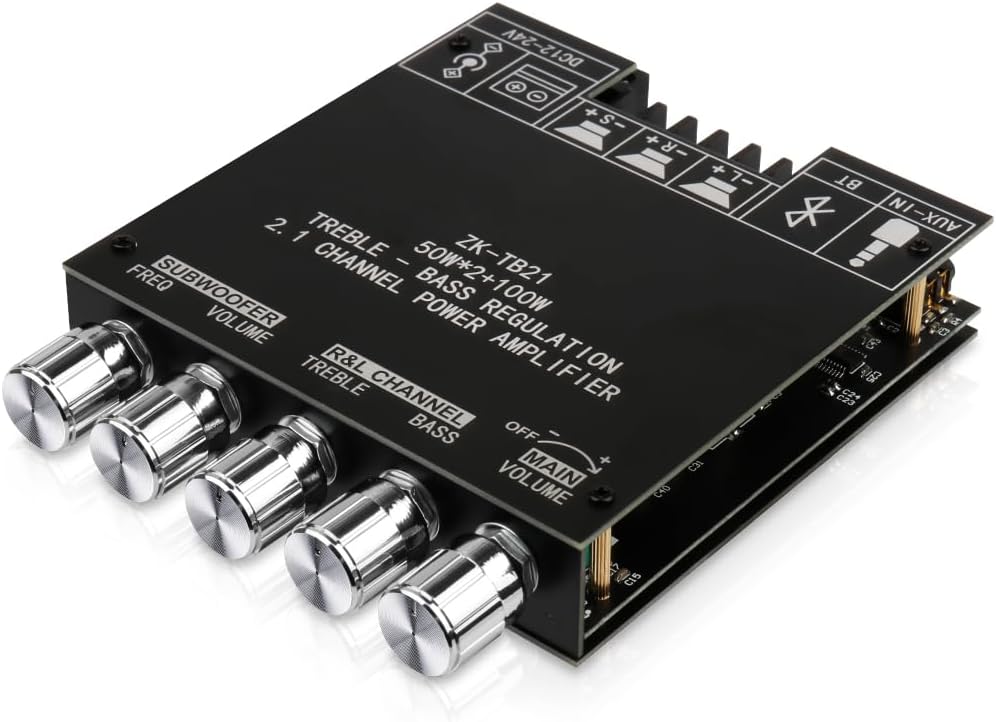
Figure 1: ARRAROWN ZK-TB21 Bluetooth Audio Amplifier Board. This image displays a top-down, angled view of the ZK-TB21 amplifier board, showcasing its compact design and all control knobs for subwoofer frequency, subwoofer volume, left/right channel treble, left/right channel bass, and main volume. The board also features clearly labeled input and output terminals.
2. Produk Lebihview
2.1 Ciri-ciri Utama
- 2.1 Channel Output: Provides 50W x 2 for stereo channels and 100W for the subwoofer.
- Kesambungan Bluetooth 5.0: Untuk penstriman audio tanpa wayar.
- Input Audio AUX: Menyokong sambungan audio berwayar.
- Treble and Bass Control: Independent adjustment knobs for main channels and subwoofer.
- Fungsi pelindung: Termasuk vol-overtage, bawah-voltage, over-heat, and short-circuit protection.
- Reka bentuk padat: Small size (4.72 in x 3.94 in x 0.7 in) for easy integration into DIY projects.
2.2 Pengenalan Komponen

Figure 2: ZK-TB21 Amplifier Board Connection Diagram. This detailed diagram of the ZK-TB21 amplifier board clearly indicates the power input (DC12-24V), subwoofer speaker terminals, left and right channel speaker terminals, and AUX input. It also labels the control knobs for subwoofer frequency, subwoofer volume, left/right channel treble, left/right channel bass, and main volume.
The board features the following main components and controls:
- DC12-24V Power Input: Untuk menyambungkan bekalan kuasa.
- Subwoofer Speaker Terminals (-S, +S): For connecting your subwoofer.
- Left Channel Speaker Terminals (-L, +L): For connecting the left stereo speaker.
- Right Channel Speaker Terminals (-R, +R): For connecting the right stereo speaker.
- AUX-IN: 3.5mm jack for wired audio input.
- Subwoofer Freq Knob: Melaraskan frekuensi pemotongan untuk subwoofer.
- Subwoofer Volume Knob: Mengawal kelantangan output subwufer.
- R&L Channel Treble Knob: Adjusts the high frequencies for the left and right stereo channels.
- R&L Channel Bass Knob: Adjusts the low frequencies for the left and right stereo channels.
- Tombol Kelantangan Utama: Controls the overall output volume. This knob also serves as the power switch (OFF/ON).

Figure 3: Internal Components. An internal view of the ZK-TB21 amplifier board, highlighting key components such as the low noise front stage beroperasi amplifier, shield power inductance, large capacity energy storage capacitors, and the original imported 3116 amplifier chip. This illustrates the quality of internal construction.
3. Maklumat Keselamatan
Please read and understand all safety instructions before operating this device. Failure to do so may result in injury or damage to the product.
- Pastikan bekalan kuasa voltage is within the specified DC 12-24V range. Using an incorrect voltage boleh merosakkan amplebih hidup.
- Jangan dedahkan peranti kepada air, lembapan atau suhu yang melampau.
- Elakkan daripada meletakkan amppemanas di bawah cahaya matahari langsung atau berhampiran sumber haba.
- Pastikan pengudaraan yang betul untuk mengelakkan terlalu panas.
- Do not attempt to disassemble or modify the amplifier beyond the intended assembly. This may void the warranty and pose safety risks.
- Jauhkan daripada kanak-kanak.
- Always disconnect power before making any connections or disconnections.

Figure 4: Device Protective Functions. This diagram shows the dimensions of the ZK-TB21 amplifier board (120mm x 100mm x 23mm) and icons representing its protective functions: over-voltage perlindungan, di bawah voltage protection, over-heat protection, and short-circuit protection. This emphasizes the compact size and built-in safety mechanisms.
4. Panduan Persediaan
4.1 Assembly (if applicable)
The ZK-TB21 board may come with protective plates and standoffs for assembly. Follow the diagram below to secure the board within its enclosure.

Rajah 5: Amplifier Board Assembly. An exploded diagram illustrating the assembly of the ZK-TB21 amplifier board, showing the top and bottom protective plates, the main circuit board, and the standoffs and screws used for secure enclosure.
4.2 Pembesar Suara Penyambung
- Identify the speaker terminals on the board (Subwoofer: -S, +S; Left Channel: -L, +L; Right Channel: -R, +R).
- Connect your subwoofer to the Subwoofer terminals, ensuring correct polarity.
- Connect your left stereo speaker to the Left Channel terminals, ensuring correct polarity.
- Connect your right stereo speaker to the Right Channel terminals, ensuring correct polarity.
4.3 Sambungan Kuasa
- Ensure the Main Volume knob is in the OFF position.
- Connect a DC 12-24V power supply to the DC power input jack on the board.
- Palamkan bekalan kuasa ke salur keluar kuasa yang sesuai.
4.4 Sambungan Input Audio
The amplifier supports two audio input methods: Bluetooth and AUX.
- Bluetooth: This is the primary wireless input.
- AUX-IN: For wired connections, use a 3.5mm audio cable to connect your audio source to the AUX-IN jack.
5. Arahan Operasi
5.1 Menghidupkan/Mematikan
Rotate the Main Volume knob clockwise to turn the amplifier ON. Rotate it counter-clockwise until it clicks to turn the amppenguat MATI.
5.2 Sambungan Bluetooth
- Hidupkan amplifier. The Bluetooth indicator light will flash, indicating it is in pairing mode.
- On your audio device (e.g., smartphone, tablet), enable Bluetooth and search for available devices.
- Select "ZK-TB21" from the list of devices to pair.
- Once connected, the Bluetooth indicator light will remain solid. You can now stream audio wirelessly.
Video 1: Wuzhi Audio Bluetooth! This video demonstrates the Bluetooth functionality of the amplifier, showing how to connect an audio source and play music. It highlights the ease of wireless setup.
5.3 Penggunaan Input AUX
If you prefer a wired connection, plug a 3.5mm audio cable from your audio source into the AUX-IN jack on the amplifier board. When using AUX mode, ensure that any active Bluetooth connection to the amplifier has been disconnected.
5.4 Adjusting Audio Settings
- Kelantangan Utama: Use the Main Volume knob to control the overall sound level.
- Treble/Bass (R&L Channel): Adjust these knobs to fine-tune the high and low frequencies of your stereo speakers.
- Kelantangan Subwufer: Use this knob to set the desired loudness of the subwoofer.
- Subwoofer Freq: Adjust this knob to control the crossover frequency for the subwoofer, determining which low frequencies are sent to it.
6. Penyelenggaraan
- Pembersihan: Gunakan kain lembut dan kering untuk membersihkannya amppapan penghawa dingin. Jangan gunakan pembersih cecair atau pelarut.
- Storan: Apabila tidak digunakan untuk tempoh yang lama, simpan amplifier in a cool, dry place away from direct sunlight and moisture.
- Pengendalian: Handle the board with care to avoid damaging components or connections.
7. Penyelesaian masalah
| Masalah | Kemungkinan Punca | Penyelesaian |
|---|---|---|
| Tiada keluaran bunyi |
|
|
| Bunyi herot |
|
|
| Isu sambungan Bluetooth |
|
|
| Amppemanasan lebih panas |
|
|
8. Spesifikasi
- model: ZK-TB21
- Jenama: ARRAROWN
- Saluran: 2.1 (Left, Right, Subwoofer)
- Kuasa Output: 50W x 2 (stereo) + 100W (subwoofer)
- Input Voltage: DC 12-24V
- Bekalan Minimum Voltage: 12 Volt (DC)
- Bekalan Maksimum Voltage: 24 Volt (DC)
- Arus Bekalan: 5 Amps (recommended)
- Versi Bluetooth: 5.0
- Input Audio: Bluetooth, AUX (3.5mm)
- Dimensi: 5.16 x 4.41 x 2.01 inci (lebih kurang 131 x 112 x 51 mm)
- Berat Barang: 8.4 auns (lebih kurang 238 gram)
- UPC: 789615751216
9. Waranti dan Sokongan
For warranty information or technical support, please refer to the product packaging or contact the manufacturer directly through their official channels. Keep your purchase receipt for any warranty claims.