
pengenalan
This manual provides essential information for the safe and efficient operation, maintenance, and troubleshooting of your Shark EVOPOWER SYSTEM iQ+ CS851JMVAE Cordless Stick Vacuum Cleaner. Please read this manual thoroughly before first use and keep it for future reference.
Apa yang ada dalam Kotak
Sahkan bahawa semua komponen terdapat dalam pakej anda:
- Unit Vakum Utama
- Lithium-ion Battery (x2)
- Automatic Dust Collection Dock (with charging function)
- Mini Motor Head
- Muncung Futon
- Pet Multi Nozzle
- Brush Crevice Nozzle
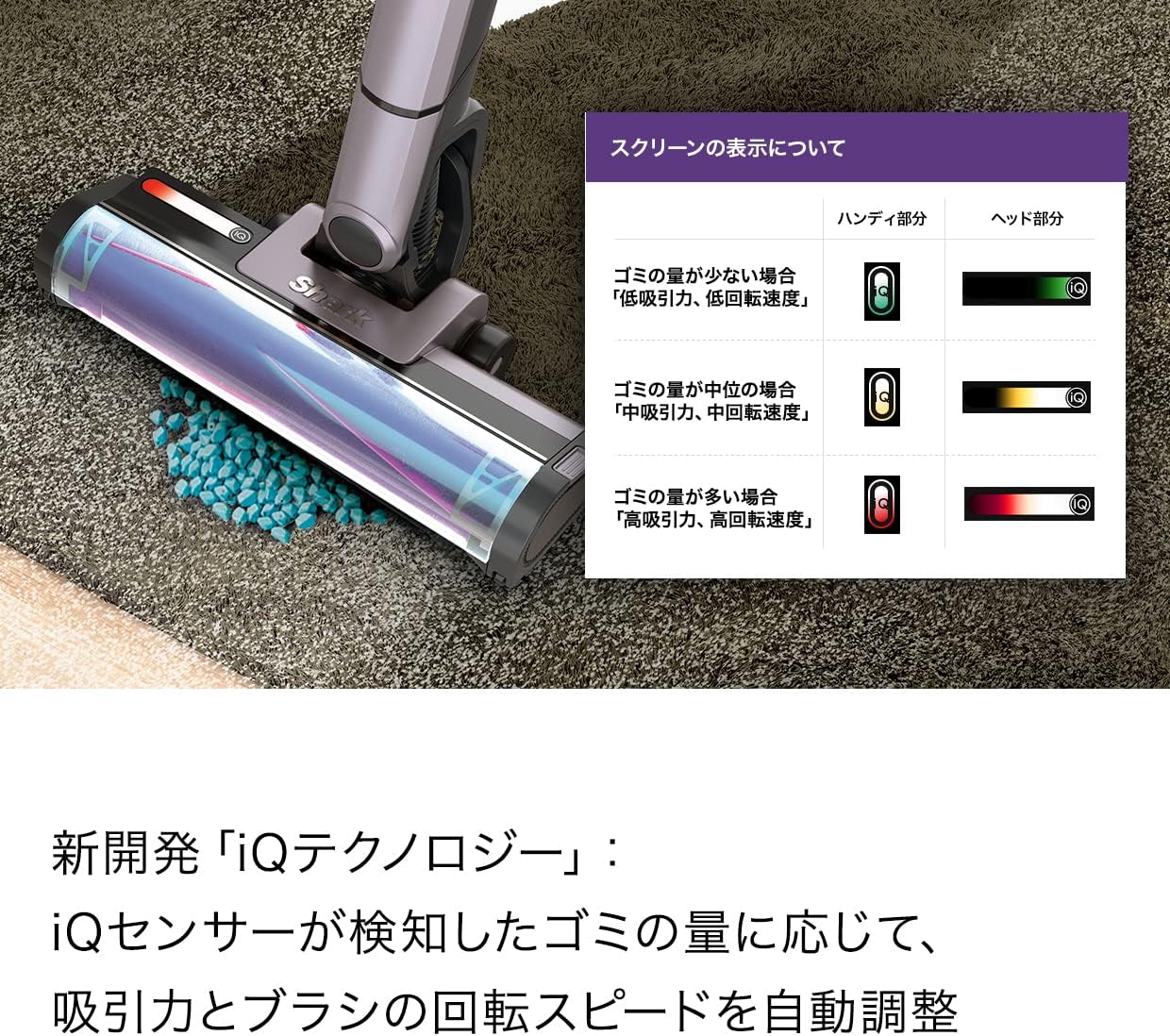
Image: All included components of the Shark EVOPOWER SYSTEM iQ+ CS851JMVAE, neatly arranged around the automatic dust collection dock.
Persediaan
- Perhimpunan: Connect the main vacuum unit to the extension wand, and then attach the desired cleaning head (e.g., Hybrid Power Clean head). Ensure all connections click securely into place.
- mengecas: Place the assembled vacuum cleaner onto the Automatic Dust Collection Dock. Ensure the battery is properly inserted into the main unit or charged separately in the dock's charging slot. The indicator lights will show charging status.
- Caj Permulaan: For optimal performance, fully charge the battery before first use. Charging time is approximately 3.5 hours.

Image: The Shark EVOPOWER SYSTEM iQ+ CS851JMVAE cordless stick vacuum cleaner fully assembled and ready for use.

Image: A user retrieving the vacuum cleaner from its charging dock, illustrating its ready-to-use state.
Arahan Operasi
Menghidupkan/Mematikan
Tekan butang kuasa yang terletak pada unit utama untuk menghidupkan atau mematikan pembersih vakum.
Mod Pembersihan
The vacuum features iQ Technology, which automatically adjusts suction power and brush rotation speed based on the amount of dust detected by the iQ sensor. Manual modes are also available:
- Mod Rangsangan: Provides maximum suction for large debris or when quick cleaning is desired.
- Mod Eko: Reduces noise and conserves battery, suitable for households with sound-sensitive pets or children, or for nighttime cleaning.

Image: Visual representation of the Boost and Eco modes, indicating their respective uses.
Menggunakan Lampiran
The vacuum can be easily converted into a powerful handheld cleaner by pressing the release button. Attach various nozzles for specific cleaning tasks:
- Hybrid Power Clean Head: Shark's unique head designed to remove large debris and debris along walls, preventing hair and pet fur from tangling.
- Mini Motor Head: Sesuai untuk upholsteri dan bulu haiwan peliharaan.
- Muncung Futon: Specialized for cleaning futons and mattresses.
- Pet Multi Nozzle: Versatile tool for pet-related messes.
- Brush Crevice Nozzle: Untuk membersihkan ruang dan sudut yang ketat.

Image: The vacuum cleaner effectively cleaning a carpeted surface.

Image: The vacuum cleaner demonstrating its ability to clean debris close to wall edges.

Image: The vacuum cleaner's FLEX function allowing easy cleaning under low-lying furniture.

Image: The vacuum cleaner being used in its compact handheld configuration for targeted cleaning.

Image: Demonstrations of the handheld vacuum's versatility in cleaning different areas, including beds, tight crevices, and curtains.
Lampu Utama LED
The vacuum is equipped with double LED headlights on the cleaning head to illuminate hidden dust and debris in dimly lit areas.

Image: The vacuum cleaner's LED headlights illuminating dust on a dark floor, enhancing visibility during cleaning.
Penyelenggaraan
Automatic Dust Collection
When the vacuum is placed on the Automatic Dust Collection Dock, it automatically empties the dust cup into the dock's larger dust bin. This reduces the frequency of manual dust disposal to approximately once a month, depending on usage and environment.

Image: The Shark vacuum cleaner positioned on its automatic dust collection dock.

Image: A visual comparison illustrating the clean dust disposal process of the Shark system versus the dust-scattering issue with traditional methods.
Manual Dust Cup Emptying (Handheld)
For the handheld unit, press the release button to open the dust cup and empty debris directly into a waste bin. This is a one-touch operation for convenience.

Image: A user demonstrating the one-touch dust cup emptying feature of the handheld vacuum.
Pembersihan Penapis
Regularly clean the filters to maintain optimal suction performance. Refer to the full instruction manual for detailed steps on removing and cleaning the filters. Ensure filters are completely dry before reinserting.
Penyelenggaraan Roll Brush
Periodically check the brush roll for tangled hair or debris. The Hybrid Power Clean head is designed to minimize tangles, but occasional inspection and cleaning may be necessary. Remove any obstructions carefully.
Menyelesaikan masalah
| Masalah | Kemungkinan Punca | Penyelesaian |
|---|---|---|
| Vakum tidak dihidupkan | Bateri tidak dicas atau dimasukkan dengan tidak betul. | Pastikan bateri dicas sepenuhnya dan dimasukkan dengan betul. |
| Daya sedutan berkurang | Clogged filter, full dust cup, or blocked nozzle/hose. | Clean or replace filters, empty dust cup, check for and remove blockages. |
| Gulung berus tidak berputar | Obstruction in brush roll, or brush roll motor issue. | Remove any tangled hair or debris from the brush roll. If problem persists, contact support. |
| Pengumpulan habuk automatik tidak berfungsi | Dock's dust bin is full, or vacuum not properly seated on dock. | Empty the dock's dust bin. Ensure the vacuum is correctly aligned and seated on the dock. |
For further assistance, please refer to the comprehensive user manual or contact Shark customer support.
Spesifikasi
| Ciri | Perincian |
|---|---|
| Jenama | jerung |
| Nombor Model | CS851JMVAE |
| Jenis Produk | Pembersih hampagas |
| Sumber Kuasa | Dikuasakan Bateri |
| Jenis Bateri | Litium-ion |
| Masa Mengecas | 3.5 Jam |
| Berat Barang | 2 kg |
| Dimensi Produk (L x W x H) | 11.4 x 25.8 x 104 cm |
| Jenis Penapis | Kartrij |
| Ciri Khas | Headlight, Bagless, Cordless, Automatic Dust Collection, iQ Technology |
| warna | Move Gray |
| UPC | 622356265614 |
Waranti dan Sokongan
The manufacturer's warranty applies only to products purchased from 'SharkNinja' or authorized retailers. To receive warranty service, product registration is required. Please register your product after arrival. The manufacturer warranty period varies by product; please refer to the full instruction manual for specific details.
For technical support, spare parts, or warranty claims, please contact Shark customer service. Contact information can typically be found on the manufacturer's official webtapak atau dalam bahan pembungkusan.