
1. Produk Lebihview
The havit GK59 Gaming Microphone is designed for clear audio capture during gaming, streaming, and voice communication. It features a condenser microphone for high-quality sound and a versatile design for ease of use.

Rajah 1.1: Depan view of the havit GK59 Gaming Microphone, showcasing its main body, stand, and control buttons.
Ciri-ciri Utama:
- Mudah Digunakan: Simple plug-and-play functionality.
- Good Performance: Delivers clear and consistent audio.
- Good Quality: Pembinaan tahan lama untuk kegunaan yang boleh dipercayai.
- Reka Bentuk Mudah Alih: Padat dan mudah diangkut.
- Pendirian boleh laras: Membolehkan kedudukan yang fleksibel.
2. Arahan Persediaan
2.1 Kandungan Pakej
Sila semak pakej untuk item berikut:
- havit GK59 Gaming Microphone
- Kabel Sambungan USB
- Manual Pengguna (dokumen ini)
2.2 Menyambung Mikrofon
The GK59 microphone offers versatile connectivity options for various devices.
- Sambungan USB: Connect the provided USB cable to the USB-C port on the back of the microphone and the other end to an available USB port on your computer or gaming console. The microphone is plug-and-play and should be automatically recognized by most operating systems.
- 3.5mm Jack Connection: For devices supporting a 3.5mm auxiliary input, connect a 3.5mm audio cable (not included) to the 3.5mm jack on the back of the microphone and to your device's audio input.
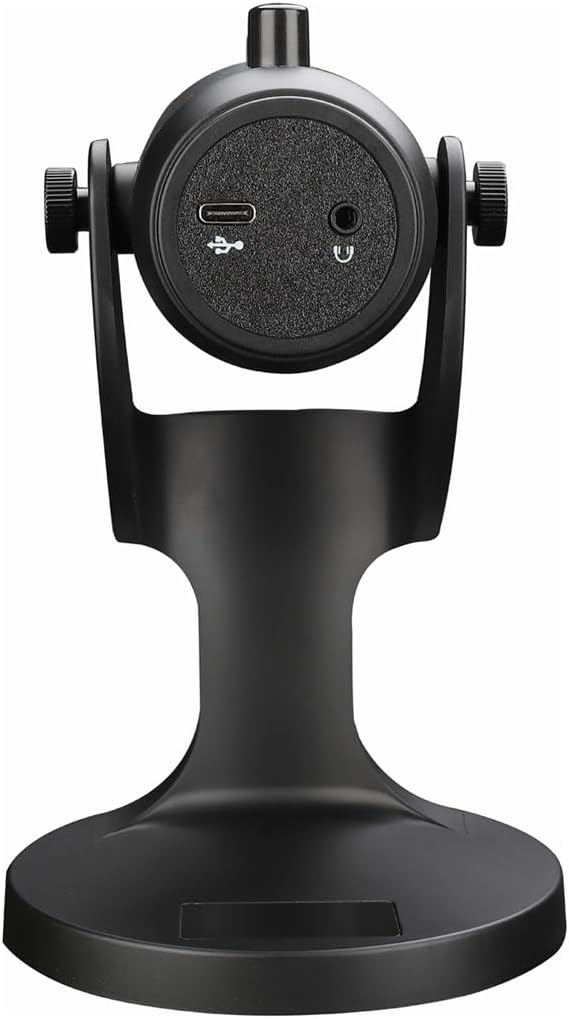
Rajah 2.1: Belakang view of the havit GK59 Gaming Microphone, highlighting the USB-C port for data and power, and the 3.5mm headphone jack for monitoring.
After connecting, ensure the microphone is selected as the default input device in your system's sound settings or your gaming/streaming software.
3. Arahan Operasi
3.1 Kawalan Asas
The havit GK59 features intuitive controls located on the front of the microphone body:
- Butang Bisukan: Press to mute or unmute the microphone. An indicator light will typically show the mute status.
- MIC +/- Buttons: Adjust the microphone input sensitivity (gain). Press '+' to increase, '-' to decrease.
- VOL +/- Butang: Adjust the headphone output volume for monitoring. Press '+' to increase, '-' to decrease.
- ECHO +/- Buttons: Adjust the echo effect level. Press '+' to increase, '-' to decrease.
Rajah 3.1: Terperinci view of the microphone's control panel, including the mute button, microphone gain, volume, and echo adjustment buttons.
3.2 Adjusting Microphone Position
The microphone is equipped with an adjustable stand, allowing you to optimize its position for best sound capture and comfort.
- Gently hold the microphone body and the base of the stand.
- Tilt the microphone forward or backward to achieve the desired angle. The stand's design helps reduce vibration and abnormal sounds during use.
- Position the microphone approximately 6-12 inches (15-30 cm) from your mouth for optimal voice clarity.

Figure 3.2: The havit GK59 microphone demonstrating its adjustable tilt feature on the stand, designed for anti-vibration.
4. Penyelenggaraan
4.1 Pembersihan
To maintain the microphone's performance and appearance:
- Disconnect the microphone from its power source before cleaning.
- Gunakan kain lembut dan kering untuk mengelap permukaan luar.
- Jangan gunakan pembersih cecair, aerosol atau pelarut, kerana ini boleh merosakkan kemasan atau komponen dalaman.
4.2 Penyimpanan
When not in use, store the microphone in a cool, dry place away from direct sunlight and extreme temperatures. Protect it from dust and moisture.
5. Penyelesaian masalah
If you encounter issues with your havit GK59 Gaming Microphone, please refer to the following table for common problems and solutions:
| Masalah | Kemungkinan Punca | Penyelesaian |
|---|---|---|
| No sound input from microphone | Mikrofon tidak disambungkan dengan betul Incorrect input device selected Mikrofon diredamkan | Pastikan kabel USB disambungkan dengan selamat. Check system sound settings and select GK59 as input. Press the Mute button on the microphone to unmute. |
| Kelantangan mikrofon rendah | Microphone gain too low System input volume too low | Press the 'MIC +' button on the microphone. Adjust input volume in your system's sound settings. |
| Audio yang herot atau tidak jelas | Microphone gain too high Microphone too close to mouth Kebisingan persekitaran | Press the 'MIC -' button on the microphone. Adjust microphone position (6-12 inches from mouth). Kurangkan bunyi latar belakang dalam persekitaran anda. |
| No headphone monitoring sound | Fon kepala tidak disambungkan Kelantangan fon kepala terlalu rendah | Ensure headphones are plugged into the 3.5mm jack. Press the 'VOL +' button on the microphone. |
6. Spesifikasi Teknikal
Below are the technical specifications for the havit GK59 Gaming Microphone:
| Ciri | Spesifikasi |
|---|---|
| Jenama | mempunyai |
| Nombor Model | GK59 |
| Teknologi Ketersambungan | USB, 3.5 mm Jack (Auxiliary) |
| Penggunaan yang Disyorkan | Permainan |
| Corak Kutub | Satu arah |
| Faktor Bentuk Mikrofon | Handheld (with desktop stand) |
| Berat Barang | 429 Gram |
| Impedans | 250 ohm |
| Nisbah Isyarat-ke-Bunyi | 18 dB |
| Bunyi Yang Boleh Didengar | 18 Desibel |
| Sumber Kuasa | Elektrik Bertali arus (melalui USB) |
| Peranti Serasi | Gaming Consoles, PCs |
| Dimensi Item (LxWxH) | 5.59 x 4.92 x 9.06 inci |
| warna | Hitam |
7. Waranti dan Sokongan
7.1 Maklumat Waranti
The havit GK59 Gaming Microphone comes with a standard manufacturer's warranty. Please refer to the warranty card included in your product packaging or visit the official havit webtapak untuk terma dan syarat jaminan terperinci.
7.2 Sokongan Pelanggan
For technical assistance, troubleshooting not covered in this manual, or warranty claims, please contact havit customer support through their official channels. You can find more information and contact details on the havit Store on Amazon atau pegawai mereka webtapak.