
1. Lebihview
The ASRock X670E PG Lightning is a high-performance motherboard designed to support AMD AM5 Ryzen 7000 Series Processors. It features advanced connectivity, robust power delivery, and extensive expansion options, making it suitable for demanding computing tasks and gaming. This manual provides essential information for the proper installation, operation, and maintenance of your motherboard.
Ciri-ciri Utama:
- Supports AMD AM5 Ryzen 7000 Series Processors
- Chipset AMD X670
- Dual Channel DDR5 Memory, up to 128GB
- Multiple PCIe 5.0 and PCIe 4.0 slots for expansion
- Integrated AMD RDNA2 Graphics (actual support varies by CPU)
- Audio HD 7.1-CH (Realtek ALC897)
- LAN Realtek 2.5G
- Six SATA3 ports and three Hyper M.2 slots
- Extensive I/O with USB 3.2 Gen2x2 Type-C, HDMI, and DisplayPort
2. Persediaan dan Pemasangan
Before beginning installation, ensure your workspace is clean and static-free. Always handle components by their edges to avoid damage from electrostatic discharge.
2.1. Pemasangan Pemproses
Carefully open the CPU socket lever. Align the triangular mark on your AMD AM5 Ryzen processor with the corresponding mark on the socket. Gently place the CPU into the socket without applying force. Close the lever to secure the processor.

Imej: Atas ke bawah view of the ASRock X670E PG Lightning motherboard, showing the CPU socket ready for processor installation.
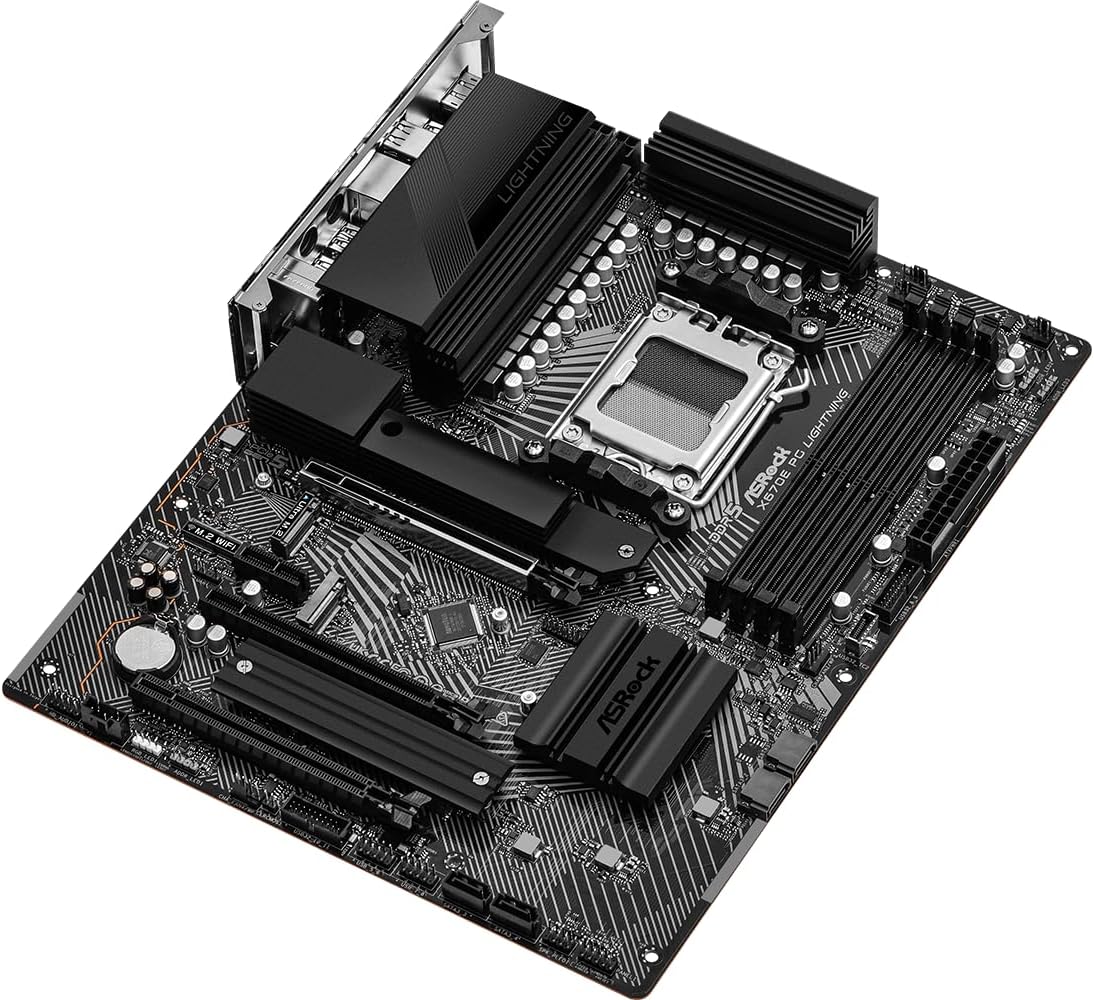
Image: Close-up of the CPU socket on the ASRock X670E PG Lightning motherboard with the retention arm open, illustrating the installation readiness.
2.2. Pemasangan Memori
The motherboard supports DDR5 memory. For optimal performance, install memory modules in a dual-channel configuration. Refer to the motherboard manual for specific slot population guidelines. Open the clips on the DIMM slots, align the memory module notch with the slot key, and press down firmly on both ends until the clips snap into place.
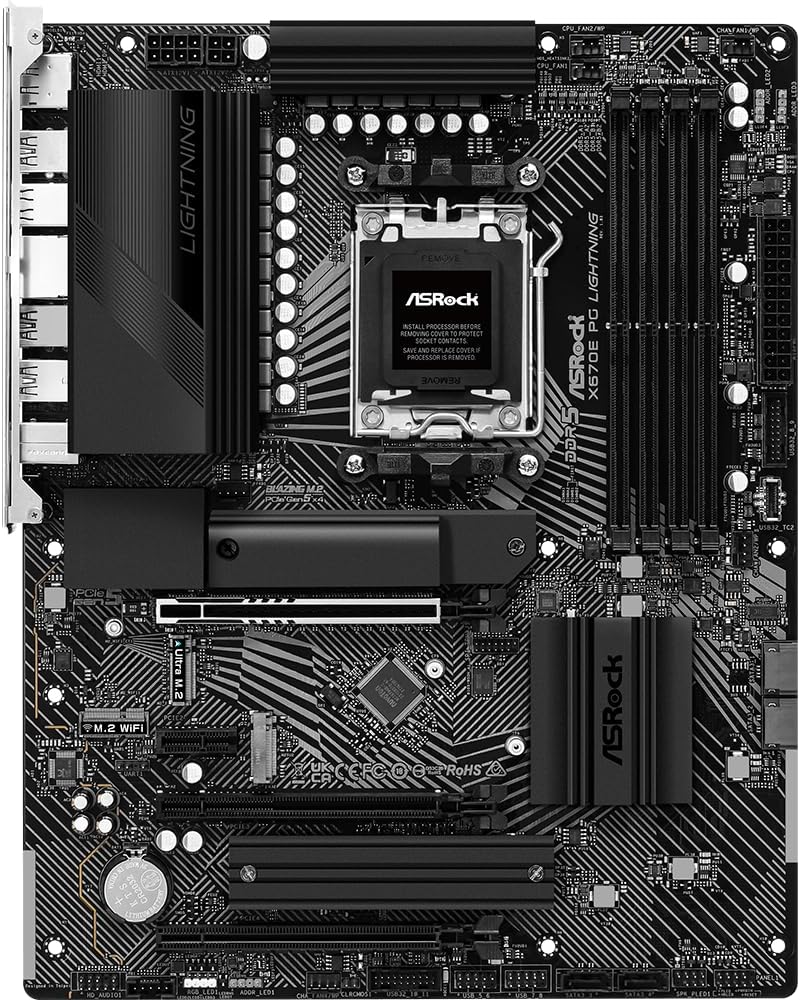
Imej: Bersudut view of the ASRock X670E PG Lightning motherboard, showing the four DDR5 memory slots and the CPU socket area.
2.3. Pemasangan Peranti Storan
Install M.2 NVMe SSDs into the available M.2 slots. Secure them with the provided screws or standoffs. For SATA drives, connect the SATA data cables to the motherboard's SATA ports and the power cables from your power supply to the drives.

Imej: Jarak dekat view of the ASRock X670E PG Lightning motherboard, detailing the M.2 slots, heatsinks, and chipset area.
2.4. Pemasangan Kad Grafik
Insert your PCIe graphics card into the primary PCIe 5.0 x16 slot. Ensure it is seated firmly and secure it with the case screw. Connect the necessary PCIe power cables from your power supply to the graphics card.
2.5. Sambungan Bekalan Kuasa
Connect the 24-pin ATX power connector and the 8-pin (or 4+4-pin) CPU power connector from your power supply to the corresponding headers on the motherboard. Ensure all connections are secure.
3. Arahan Operasi
3.1. But Pertama
After assembling your system, connect your monitor, keyboard, and mouse. Power on the system. The first boot may take longer than usual due to memory training. If the system does not display, check all power connections and component seating.
3.2. Konfigurasi BIOS/UEFI
Press the 'Delete' or 'F2' key during startup to enter the BIOS/UEFI setup utility. Here you can configure boot order, enable XMP/EXPO profiles for memory, adjust fan speeds, and monitor system status. Save changes before exiting.
3.3. Pemasangan Pemandu
After installing your operating system, install the latest drivers for your motherboard's chipset, LAN, audio, and any other integrated components. These can typically be found on the ASRock support webtapak untuk model khusus anda.
4. Penyelenggaraan
4.1. Kemas Kini BIOS
Periksa ASRock secara berkala website for BIOS/UEFI updates. Updates can improve system stability, compatibility, and performance. Follow the provided instructions carefully when performing a BIOS update to avoid system damage.
4.2. Pembersihan
Periodically clean your computer's interior to prevent dust buildup, which can lead to overheating and reduced performance. Use compressed air to remove dust from fans, heatsinks, and other components. Ensure the system is powered off and unplugged before cleaning.
4.3. Pemeriksaan Komponen
Occasionally inspect all internal connections (power cables, data cables, expansion cards) to ensure they are securely seated. Loose connections can cause intermittent issues or system instability.
5. Penyelesaian masalah
5.1. Isu Biasa
- Tiada Paparan: Verify monitor connection, graphics card seating, and power cables. Try reseating RAM modules.
- Boot Loops/System Instability: Reset BIOS to default settings. Check memory compatibility and seating. Ensure CPU cooler is properly installed.
- Periferi Tidak Dikesan: Ensure USB devices are connected to the correct ports. Update chipset drivers.
5.2. Diagnostic LEDs
The motherboard features four single LEDs to indicate the boot state (CPU, DRAM, VGA, BOOT). If an issue occurs during startup, the corresponding LED will remain lit, helping to identify the problematic component.
5.3. Hubungi Sokongan
If you encounter persistent issues that cannot be resolved using the troubleshooting steps, please contact ASRock technical support for further assistance.
6. Spesifikasi
| Ciri | Spesifikasi |
|---|---|
| Jenama | ASRock |
| Nama Model | X670E PG LIGHTNING |
| Soket CPU | Soket AM5 |
| Pemproses yang Serasi | Pemproses Siri AMD Ryzen 7000 |
| Jenis Chipset | AMD X670 |
| Teknologi Memori RAM | DDR5 |
| Slot Memori Tersedia | 4 |
| Max RAM Memory Size | 128 GB |
| Antara Muka Kad Grafik | Integrated (actual support varies by CPU) |
| Total PCIe Ports | 4 (1x PCIe 5.0 x16, 1x PCIe 4.0 x16, 1x PCIe 4.0 x1, 1x M.2) |
| Total SATA Ports | 6 |
| Jumlah Port USB | 16 (including USB 3.2 Gen2x2 Type-C) |
| Bilangan Port Ethernet | 1 (LAN 2.5G) |
| Dimensi Item L x W x H | 11.7"L x 2.8"W x 13.8"H |
7. Waranti dan Sokongan
This ASRock motherboard comes with a Waranti 3 Tahun. For detailed warranty terms and conditions, please refer to the official ASRock webtapak atau hubungi perkhidmatan pelanggan mereka.
For technical support, driver downloads, and further product information, visit the official ASRock support page: ASRock Store di Amazon
8. Visual Produk
8.1. Imej Produk

Image: Rear I/O panel of the ASRock X670E PG Lightning motherboard, featuring multiple USB ports, 2.5G LAN, HDMI, DisplayPort, and audio jacks.

Imej: Bersudut view of the ASRock X670E PG Lightning motherboard, showcasing the overall layout and design from the top-right perspective.
8.2. Video Produk Rasmi
Video: A product demonstration video showcasing the features and design of the ASRock X670E PG Lightning motherboard.