
pengenalan
Terima kasih kerana membeliasing the Thomson MIC401BT Stereo CD/Bluetooth Micro-Chain System. This manual provides essential information for the safe and efficient operation of your new audio system. Please read these instructions thoroughly before use and retain them for future reference.
Maklumat Keselamatan
- Sumber Kuasa: Pastikan bekalan kuasa voltage sepadan dengan label penilaian pada unit.
- Pengudaraan: Jangan halang bukaan pengudaraan. Berikan ruang yang mencukupi di sekeliling unit untuk aliran udara yang betul.
- Air dan Kelembapan: Jangan dedahkan unit kepada hujan, lembapan atau cecair menitis/percikan. Jauhkan objek yang diisi dengan cecair, seperti pasu, dari unit.
- haba: Jangan letakkan unit berhampiran sumber haba seperti radiator, daftar haba, dapur, atau radas lain (termasuk amppenghidup) yang menghasilkan haba.
- Pembersihan: Cabut palam unit dari salur keluar dinding sebelum membersihkan. Gunakan kain lembut dan kering sahaja.
- Servis: Jangan cuba servis produk ini sendiri. Rujuk semua perkhidmatan kepada pegawai perkhidmatan yang berkelayakan.
Kandungan Pakej
Carefully unpack your micro-chain system and check that all items are present and in good condition. The package should contain:
- Thomson MIC401BT Stereo Micro-Chain System
- Alat Kawalan Jauh
- Penyesuai Kuasa
- Manual Pengguna
Packaging box of the Thomson MIC401BT Stereo CD/Bluetooth Micro-Chain System, showing the product and its features.
Produk Selesaiview
Familiarize yourself with the main components and controls of your Thomson MIC401BT system.
Depan View

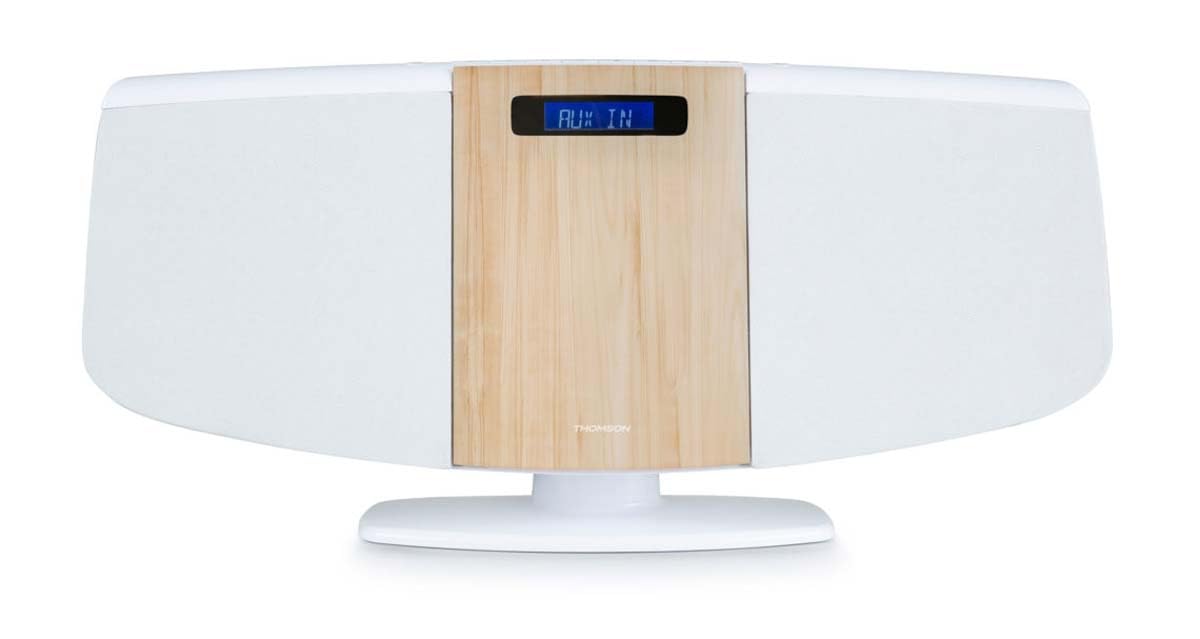
Depan view of the Thomson MIC401BT micro-chain system, showcasing its white and wood-grain design with a digital display.
The front panel features the central digital display, the CD loading slot (behind the wood-grain panel), and integrated stereo speakers on either side.
Top Panel Controls and Ports

Close-up of the top panel controls of the Thomson MIC401BT, including the USB charge port, AUX-IN jack, and various function buttons for playback and settings.
The top panel includes:
- Butang SUMBER: To switch between input modes (CD, Bluetooth, FM, AUX).
- Butang SLEEP: To set the sleep timer.
- Butang MASA: Untuk menetapkan jam.
- Butang PENGGERA: To set the alarm function.
- Butang ENTER: Untuk mengesahkan pilihan.
- Butang Kawalan Main Semula: Main/Jeda, Berhenti, Langkau Ke Hadapan/Ke Belakang.
- USB CHARGE Port (5V === 1000mA): Untuk mengecas peranti luaran.
- AUX IN (3.5mm): Untuk menyambungkan sumber audio luaran.
- Jack fon kepala: Untuk mendengar secara peribadi.
Persediaan
1. Sambungan Kuasa
- Connect the power adapter to the DC IN port on the back of the unit.
- Palamkan penyesuai kuasa ke salur keluar dinding standard.
2. Antena FM
Extend the FM wire antenna fully for optimal radio reception. Position it away from other electronic devices to minimize interference.
3. Pilihan Penempatan
The MIC401BT can be placed on a flat surface using its integrated stand or mounted on a wall.
- Peletakan Desktop: Pastikan unit diletakkan pada permukaan yang stabil dan rata.
- Pemasangan Dinding: Use appropriate screws and wall plugs (not supplied) for your wall type. Consult a professional if unsure. Ensure the unit is securely fastened to prevent falling.

The Thomson MIC401BT micro-chain system mounted on a wall shelf, demonstrating its versatile placement options.
Arahan Operasi
1. Hidupkan/Mati Kuasa
Tekan ke SUMBER button once to turn the unit on. Press and hold the SUMBER butang untuk mematikannya.
2. Pemilihan Sumber
Tekan ke SUMBER button repeatedly to cycle through available modes: CD, Bluetooth, FM Radio, AUX-IN.
3. Main semula CD
- Pilih mod CD menggunakan SUMBER butang.
- Gently open the CD door (the wood-grain panel) and insert a CD with the label side facing forward.
- Close the CD door. The system will automatically begin playing the CD.
- Use the Play/Pause, Stop, and Skip buttons on the unit or remote control to manage playback.

Terperinci view of the Thomson MIC401BT CD player mechanism with the disc tray open, ready for CD insertion.
4. Berpasangan Bluetooth
- Pilih mod Bluetooth menggunakan SUMBER button. The display will show "BLUETOOTH" and flash, indicating it's in pairing mode.
- Dayakan Bluetooth pada peranti mudah alih anda (telefon pintar, tablet, dll.).
- Cari untuk "MIC401BT" in your device's Bluetooth settings and select it to pair.
- Once paired, the display will stop flashing, and you can play audio from your device through the micro-chain system.
5. Radio FM
- Select FM Radio mode using the SUMBER butang.
- Use the Skip Forward/Backward buttons to manually tune to a station or press and hold them for automatic scanning.
- To save a station, refer to the detailed instructions in the full manual for memory presets.
6. AUX-IN Connection
- Sambungkan peranti audio luaran (cth, pemain MP3) ke AUX IN port using a 3.5mm audio cable (not supplied).
- Select AUX-IN mode using the SUMBER butang.
- Mainkan audio daripada peranti anda yang disambungkan.
7. Pengecasan USB
Connect your USB-powered device to the CAJ USB port (5V === 1000mA) on the top panel to charge it. This port is for charging only and does not support media playback.
8. Fungsi Penggera
Tekan ke PENGGERA button to enter alarm setting mode. Use the navigation buttons to set the desired alarm time and source (e.g., FM radio, CD). Press MASUK to confirm each setting. Refer to the full manual for detailed alarm setup instructions.
Penyelenggaraan
- Membersihkan Unit: Gunakan kain lembut dan kering untuk membersihkan bahagian luar unit. Jangan gunakan pembersih yang melelas, lilin atau pelarut.
- Penjagaan Pemain CD: Keep the CD compartment clean. Avoid touching the lens. If a CD is dirty, wipe it with a soft, lint-free cloth from the center outwards.
- Storan: Jika unit ini tidak akan digunakan untuk tempoh yang lama, cabut plagnya dari soket kuasa dan simpan di tempat yang sejuk dan kering.
Menyelesaikan masalah
| Masalah | Kemungkinan Punca | Penyelesaian |
|---|---|---|
| Tiada kuasa | Kabel kuasa tidak disambungkan; Salur keluar kuasa rosak | Periksa sambungan kabel kuasa; Cuba soket yang berbeza |
| Tiada bunyi | Volume too low; Incorrect source selected; Headphones connected | Increase volume; Select correct source; Disconnect headphones |
| CD tidak dimainkan | CD inserted incorrectly; CD is dirty or scratched; Incorrect mode | Re-insert CD correctly; Clean or replace CD; Select CD mode |
| Bluetooth tidak berpasangan | Device too far; Bluetooth not enabled on device; Incorrect mode | Move device closer; Enable Bluetooth on device; Select Bluetooth mode |
| Penerimaan FM yang lemah | Antenna not extended; Interference | Extend and adjust antenna; Move unit away from other electronics |
Spesifikasi
- model: MIC401BT
- Jenama: Thomson (Manufactured by Big Ben)
- Ketersambungan: Tambahan, Bluetooth, USB
- warna: putih
- Jenis pembesar suara: Stereo
- Sumber Kuasa: Kabel elektrik
- Peranti Serasi: MP3 player, Personal computer, Tablet, Television, Smartphone
- gaya: Kotak Boom CD
- Output Kuasa Audio: 60 Watt
- Piawaian yang Disokong: Bluetooth, FM
- Sokongan Format Audio: CD, MP3
- Bilangan Penceramah: 2
- USB Charge Output: 5V, 1000mA
Waranti dan Sokongan
This Thomson MIC401BT Stereo CD/Bluetooth Micro-Chain System comes with a Waranti 2 tahun dari tarikh pembelian. Sila simpan bukti pembelian anda untuk tuntutan waranti.
For technical support, troubleshooting assistance beyond this manual, or warranty service, please contact your retailer or the official Thomson customer support channel. Contact information can typically be found on the product packaging or the manufacturer's webtapak.