
1. Pengenalan
Thank you for choosing the UNITED LED40HS82A11 40-inch Full HD Smart Android TV. This television combines a vibrant Full HD display with the power of Android 11, offering a seamless entertainment experience. With built-in Chromecast and Airplay, Wi-Fi, Ethernet, and support for various digital broadcasting standards (DVB/T2/S2/C, MPEG-4, HEVC Main 10), your new TV is designed for versatile use, from watching movies and playing games to browsing the internet.
This manual provides essential information for setting up, operating, and maintaining your television. Please read it thoroughly before using the product and keep it for future reference.

Imej 1.1: Depan view of the UNITED LED40HS82A11 TV with Android TV interface.
2. Maklumat Keselamatan
Before operating your TV, please read all safety instructions carefully. Improper use can result in electric shock, fire, or damage to the appliance.
- Bekalan Kuasa: Ensure the TV is connected to an AC 100-240V, 50/60Hz power supply. Do not overload power outlets.
- Pengudaraan: Jangan sekat bukaan pengudaraan. Benarkan ruang yang mencukupi di sekeliling TV untuk aliran udara yang betul.
- Air dan Kelembapan: Jangan dedahkan TV kepada hujan atau lembapan. Jangan letakkan objek yang diisi dengan cecair, seperti pasu, di TV.
- Sumber Haba: Jauhkan TV daripada sumber haba seperti radiator, daftar haba, dapur atau peralatan lain yang menghasilkan haba.
- Pembersihan: Cabut plag TV dari salur keluar dinding sebelum membersihkan. Gunakan kain lembut dan kering. Jangan gunakan pembersih cecair atau pembersih aerosol.
- Servis: Jangan cuba servis produk ini sendiri. Rujuk semua perkhidmatan kepada pegawai perkhidmatan yang berkelayakan.
- Kanak-kanak: Supervise children to ensure they do not play with the TV.
3. Kandungan Pakej
Please check that the following items are included in your TV package:
- UNITED LED40HS82A11 40-inch Full HD Smart Android TV
- Remote Control (with 2x AAA 1.5V batteries)
- Kord Kuasa
- Penyangga TV (2 keping) dan Skru
- MiniAV Adapter Cable
- Manual Pengguna (dokumen ini)
Jika terdapat sebarang barang yang hilang atau rosak, sila hubungi peruncit anda.
4. Persediaan
4.1 Memasang Stand
- Letakkan TV dengan berhati-hati menghadap ke bawah di atas permukaan yang lembut dan rata (cth., selimut atau busa) untuk mengelakkan kerosakan skrin.
- Jajarkan kaki pendirian dengan slot yang sepadan di bahagian bawah TV.
- Secure each stand leg with the provided screws. Ensure they are tightened firmly.
- Angkat TV dengan berhati-hati ke kedudukan tegak dan letakkan pada permukaan yang stabil dan rata.
4.2 Pemasangan Dinding (Pilihan)
This TV is compatible with VESA standard wall mounts. The VESA mounting pattern for this model is typically 200x200mm. Please consult a professional for wall mounting to ensure proper installation and safety. Wall mount bracket and screws are not included.
4.3 Menyambung Peranti Luaran
TV anda menawarkan pelbagai pilihan sambungan untuk peranti luaran.
Imej 4.1: Belakang view TV dengan susun atur port.
- HDMI: Connect Blu-ray players, game consoles, set-top boxes, or other HDMI-enabled devices. The TV supports multiple HDMI inputs.
- USB: Sambungkan peranti storan USB (cth., pemacu kilat) untuk memainkan media files. The TV has 1 USB port.
- MiniAV: Use the provided MiniAV adapter cable to connect older devices with composite video and stereo audio outputs.
- Output Fon Kepala: Sambungkan fon kepala untuk mendengar secara peribadi.
4.4 Antenna/Cable Connection
Connect your terrestrial antenna (DVB-T/T2) or satellite dish (DVB-S/S2) cable to the appropriate input on the back of the TV. For cable TV (DVB-C), connect the cable to the antenna input.
4.5 Network Connection (Wi-Fi & Ethernet)
Your TV can connect to the internet via Wi-Fi or an Ethernet cable.
- Wi-Fi: During the initial setup or via the settings menu, select your Wi-Fi network and enter the password.
- Ethernet: Connect an Ethernet cable from your router to the LAN port on the back of the TV.
5. Persediaan Kali Pertama
- Hidupkan kuasa: After connecting all necessary cables, plug the power cord into an electrical outlet. Press the power button on the remote control or on the TV.
- Konfigurasi Awal: TV akan membimbing anda melalui proses persediaan awal.
- Pemilihan Bahasa: Pilih bahasa pilihan anda.
- Persediaan Rangkaian: Sambung ke rangkaian Wi-Fi anda atau gunakan sambungan Ethernet.
- Akaun Google: Sign in with your Google account to access the Google Play Store, personalized recommendations, and other Android TV features.
- Imbasan Saluran: The TV will prompt you to scan for available channels based on your antenna/cable connection.
- Tetapan Privasi: Review dan laraskan tetapan privasi seperti yang dikehendaki.
- Persediaan Selesai: Once all steps are finished, your TV is ready for use.
6. Mengendalikan TV Anda
6.1 Fungsi Kawalan Jauh
The remote control allows you to navigate the TV's features. Familiarize yourself with the buttons:
- Kuasa: Menghidupkan/mematikan TV.
- Input: Memilih sumber input (HDMI, AV, TV).
- Butang Navigasi (Atas/Bawah/Kiri/Kanan): Beralih melalui menu dan pilihan.
- OK/Masukkan: Mengesahkan pilihan.
- Belakang: Kembali ke skrin sebelumnya.
- Rumah: Mengakses skrin utama Android TV.
- Kelantangan Naik/Turun: Melaraskan kelantangan.
- Saluran Atas/Bawah: Menukar saluran TV.
- Pembantu Google: Mengaktifkan arahan suara.
- Butang Apl: Akses terus kepada aplikasi penstriman popular.
6.2 Navigating Android TV Interface
The Android TV home screen provides access to your installed apps, live TV, and recommended content. Use the navigation buttons on your remote to browse categories like Search, Home, Discover, and Apps.

Image 6.1: Android TV home screen with various applications.
6.3 Pemilihan Sumber Input
Tekan ke Input button on your remote control to switch between connected devices (e.g., HDMI 1, HDMI 2, AV) and the built-in TV tuner.
6.4 Penalaan Saluran
If you connected an antenna or cable, you can access live TV channels. Use the Saluran Atas/Bawah buttons to change channels. To perform a new channel scan or adjust channel settings, go to the TV's settings menu.
6.5 Menggunakan Ciri Pintar
- Apl: Muat turun dan pasang pelbagai aplikasi daripada Google Play Store.
- Chromecast Terbina dalam: Cast content (videos, photos, music) from your compatible smartphone, tablet, or computer directly to your TV. Look for the Chromecast icon in supported apps.
- Airplay: For Apple device users, Airplay allows you to stream content or mirror your screen to the TV.
- Pelayaran Internet: Gunakan a web browser app to surf the internet.
7. Penyelenggaraan
7.1 Membersihkan TV
- Sentiasa cabut plag TV sebelum membersihkan.
- Gunakan kain lembut, kering dan bebas serabut untuk mengelap skrin dan kabinet.
- Untuk tanda degil pada skrin, ringan dampen kain dengan air atau pembersih skrin khusus (jangan sembur terus ke skrin).
- Elakkan menggunakan pembersih, lilin atau pelarut yang kasar kerana ia boleh merosakkan kemasan TV.
7.2 Kemas Kini Perisian
Your Android TV may receive software updates to improve performance and add new features. It is recommended to keep your TV connected to the internet to receive these updates automatically. You can also check for updates manually in the TV's settings menu.
8. Penyelesaian masalah
Jika anda menghadapi masalah dengan TV anda, rujuk masalah dan penyelesaian biasa berikut:
- Tiada Kuasa:
- Periksa sama ada kord kuasa dipasang dengan selamat ke dalam TV dan salur keluar dinding.
- Ensure the wall outlet is working by plugging in another device.
- Cuba tekan butang kuasa pada TV itu sendiri, bukan hanya alat kawalan jauh.
- Tiada Gambar, Tetapi Bunyi Hadir:
- Pastikan sumber input yang betul dipilih.
- Check the cable connections to external devices.
- Cuba mulakan semula TV dan peranti yang disambungkan.
- Tiada Bunyi, Tetapi Gambar Hadir:
- Periksa tahap kelantangan dan pastikan TV tidak diredamkan.
- Verify audio settings in the TV menu and on the external device.
- Try a different HDMI cable or input.
- Alat Kawalan Jauh Tidak Berfungsi:
- Gantikan bateri dalam alat kawalan jauh.
- Pastikan tiada halangan antara alat kawalan jauh dan penderia IR TV.
- Halakan alat kawalan jauh terus ke TV.
- Isu Sambungan Wi-Fi:
- Mulakan semula penghala dan modem anda.
- Semak sama ada kata laluan Wi-Fi yang dimasukkan adalah betul.
- Move the TV closer to the router or use an Ethernet cable for a stable connection.
Untuk isu yang lebih kompleks, sila hubungi sokongan pelanggan.
9. Spesifikasi
Here are the technical specifications for the UNITED LED40HS82A11 TV:
| Ciri | Spesifikasi |
|---|---|
| Jenama | BERSATU |
| Nama Model | LED40HS82A11 |
| Saiz Skrin | 40 inci |
| Resolusi Paparan | HD Penuh (1920 x 1080 piksel) |
| Sistem Operasi | Android 11 |
| Teknologi Ketersambungan | Wi-Fi, Ethernet, Bluetooth, HDMI, USB |
| Ciri Khas | Smart TV, Flat Screen, Chromecast Built-in, Airplay, Pre-installed Apps |
| Penala | DVB/T2/S2/C |
| Penyahkodan Video | MPEG-4, HEVC Main 10 |
| Kadar Segar Semula | 60 Hz |
| Nisbah Aspek | 16:9 |
| Port USB | 1 |
| Peranti Serasi | Fon kepala |
| warna | Hitam |
| Pengeluar | CHANGHONG EROPAH ELEKTRIK SRO |
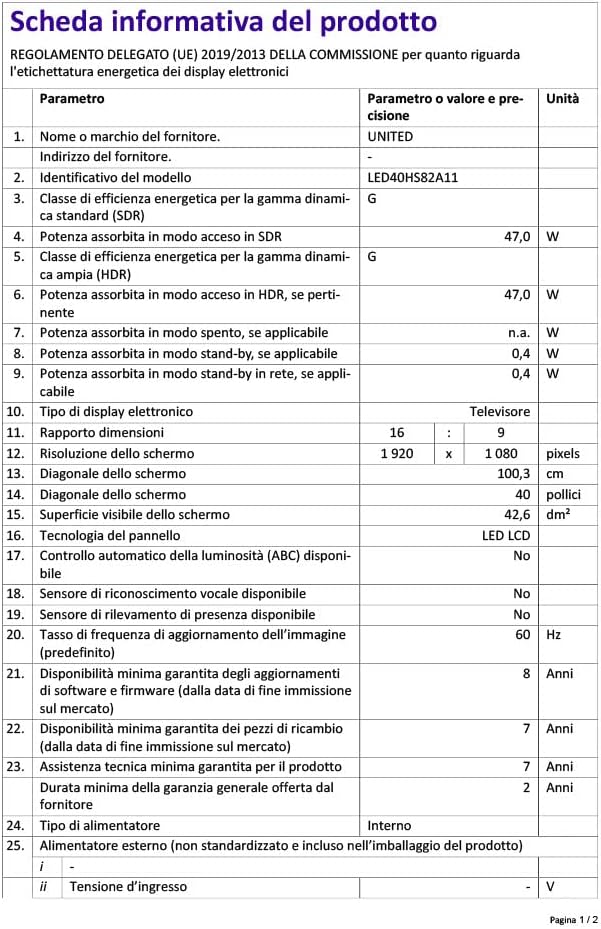
Image 9.1: EU Energy Label for LED40HS82A11.
For detailed product information, including energy consumption data, please refer to the official EU EPREL database via the QR code on the energy label or by visiting https://eprel.ec.europa.eu/qr/1068369.
10. Waranti dan Sokongan
For warranty information, please refer to the warranty card included with your product or contact your retailer. The manufacturer, CHANGHONG EUROPE ELECTRIC S.R.O., provides general support for this product.
Please note that information regarding software update guarantees and spare parts availability is not explicitly provided for this model. For any technical assistance or service inquiries, please contact the customer support channels provided by your point of purchase.