
1. Pengenalan
Thank you for choosing the Cxy T18 Portable Car Jump Starter Power Bank. This device is designed to provide a reliable solution for starting 12V vehicles with up to 6L gas or 3L diesel engines, and also functions as a power bank for your electronic devices and an LED flashlight. Please read this manual thoroughly before use to ensure safe and optimal operation.
2. Arahan Keselamatan
Always observe the following safety precautions when using the Cxy T18 Jump Starter:
- jangan hidupkan semula bateri yang beku.
- jangan use the jump starter if the battery clamps atau kabel rosak.
- jangan sambungkan cl positif (+) dan negatif (-)ampbersama-sama.
- jangan benarkan kanak-kanak mengendalikan peranti tersebut.
- Ensure the vehicle is in park (P) or neutral (N) and the parking brake is engaged before jump starting.
- Wear eye protection and gloves when working with vehicle batteries.
- Gunakan peranti di kawasan yang mempunyai pengudaraan yang baik.
- If the device shows "Clamps Reversely" on the display, immediately disconnect the clamps and re-attach them correctly.
- If the device shows "Over Heat", allow it to cool down before further use.
- Jauhkan peranti daripada air, kelembapan dan suhu yang melampau.
- Simpan peranti di tempat yang sejuk dan kering apabila tidak digunakan.
3. Kandungan Pakej
Sahkan bahawa semua item terdapat dalam pakej anda:
- Cxy T18 Auto Start Aid Power Bank
- 12V Smart Battery Clamp (Heavy-duty jump leads)
- Kabel USB-C
- Manual Pengguna
4. Produk Lebihview
Familiarize yourself with the components and display indicators of your Cxy T18 Jump Starter.
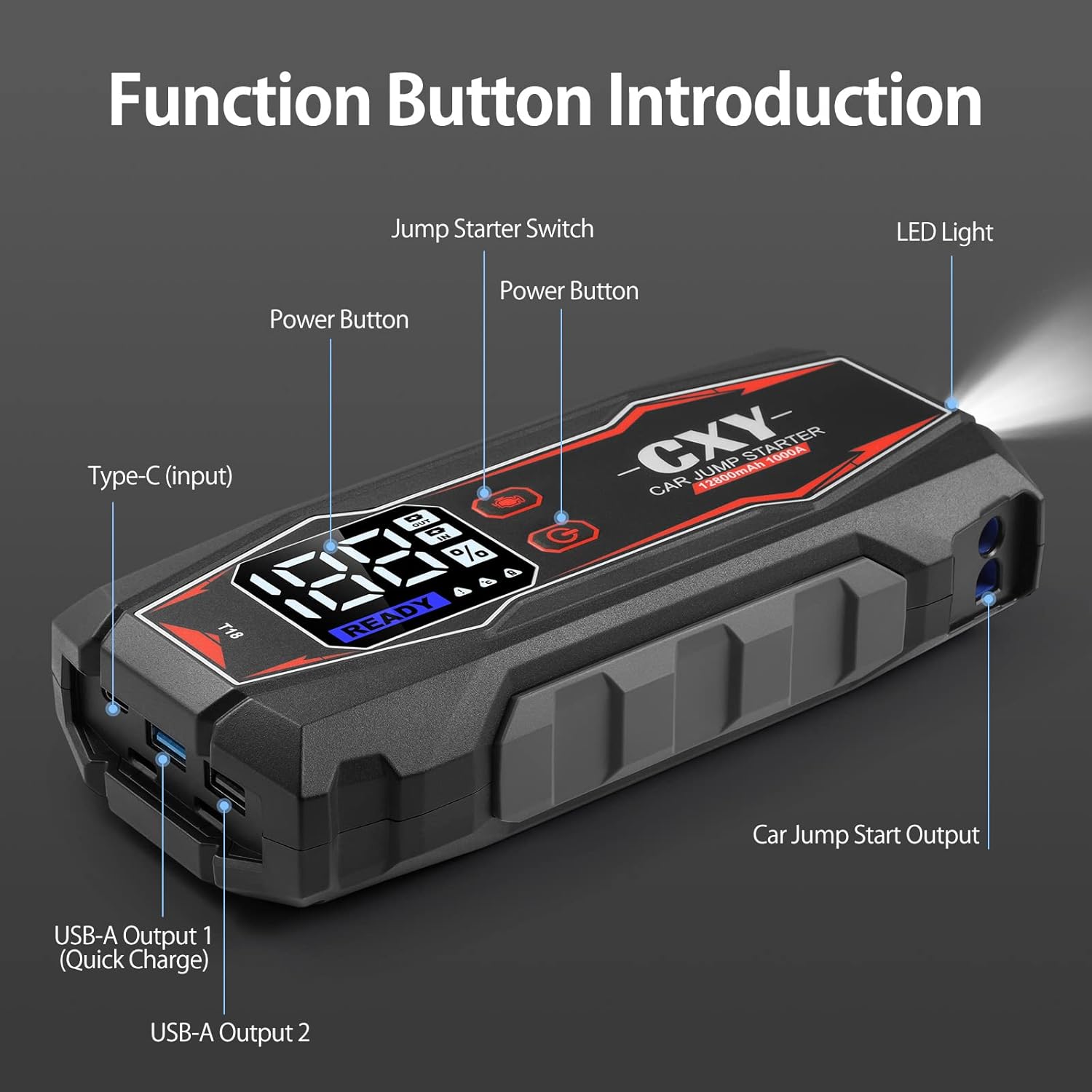
Rajah 4.1: Cxy T18 Jump Starter with labeled function buttons and ports.
- 1. Jump Starter Switch: Activates the jump start function.
- 2. Butang Kuasa: Turns the device on/off and cycles through display modes.
- 3. Type-C (Input): Digunakan untuk mengecas starter lompat.
- 4. USB-A Output 1 (Quick Charge): High-speed charging port for compatible devices.
- 5. USB-A Output 2: Standard charging port for electronic devices.
- 6. Car Jump Start Output: Port for connecting the smart battery clamps.
- 7. Lampu LED: Built-in flashlight with multiple modes.
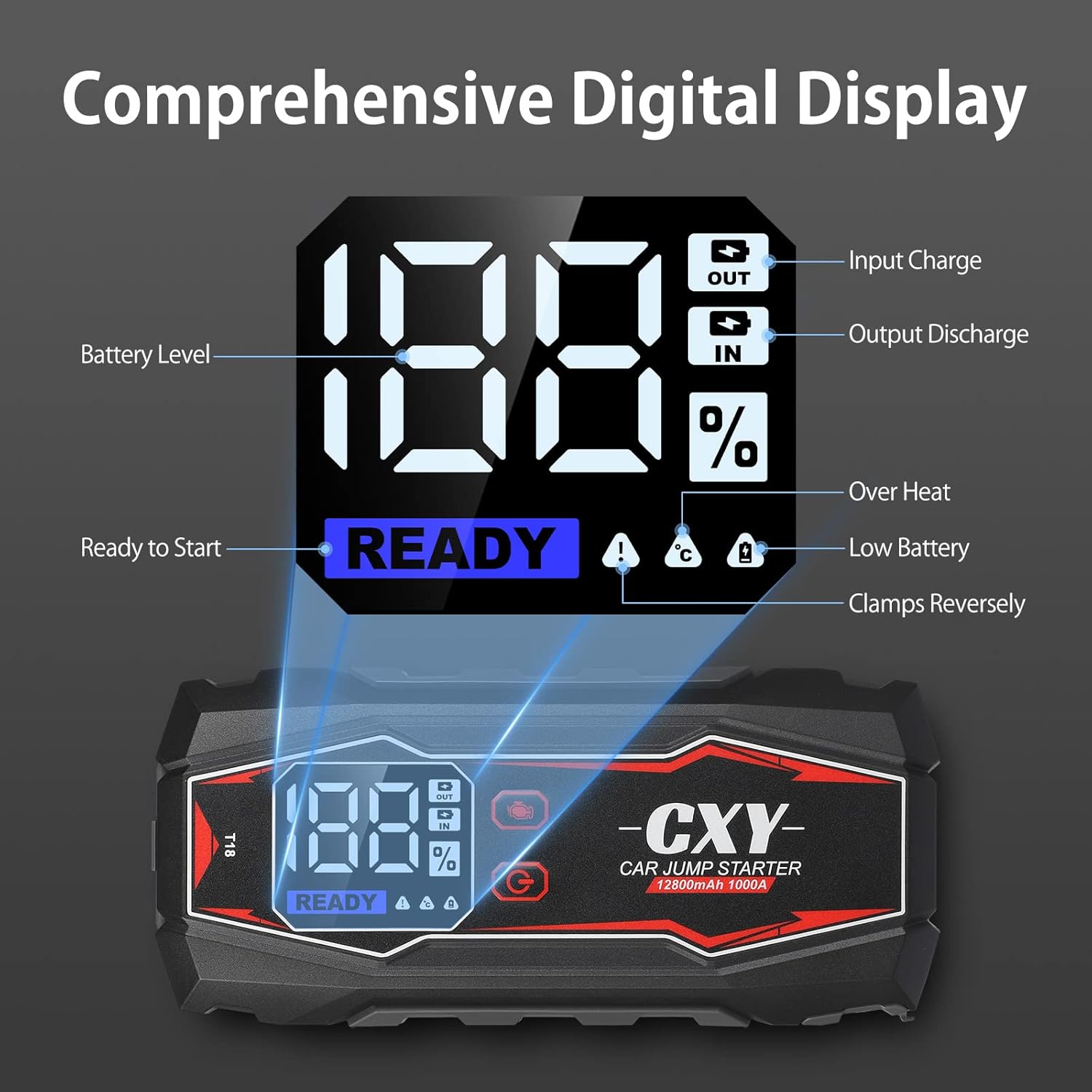
Rajah 4.2: Digital LED display showing battery level, charging status, and error indicators.
- Battery Level (%): Indicates the remaining charge of the jump starter.
- Input Charge (IN): Illuminates when the device is being charged.
- Output Discharge (OUT): Illuminates when the device is charging external devices.
- Bersedia untuk Memulakan: Indicates the device is ready for jump starting.
- Lebih Panas: Warning indicator for overheating.
- Bateri Rendah: Warning indicator for low internal battery.
- Clamps Reversely: Warning indicator for incorrect clamp sambungan.

Rajah 4.3: The heavy-duty smart battery clamps feature double and long metal contacts for better conductivity and increased durability compared to standard clamps.
5. Persediaan dan Pengecasan Awal
Before first use, fully charge the Cxy T18 Jump Starter. Connect the USB-C cable to the Type-C input port on the device and plug the other end into a suitable USB wall adapter (not included). The digital display will show "IN" and the battery percentagpeningkatanasing. A full charge is indicated when the display shows 100%.
It is recommended to recharge the device every 3-6 months to maintain battery health, even if not in use.
6. Arahan Pengendalian: Menghidupkan Kenderaan Secara Langsung
Ikuti langkah-langkah ini dengan teliti untuk menghidupkan kenderaan anda dengan selamat:
- Sediakan Kenderaan: Ensure the vehicle's ignition is off, and the parking brake is engaged. Place the vehicle in park (P) or neutral (N).
- Sambungkan Clamps untuk Melompat Permulaan: Insert the blue plug of the smart battery clamps into the "Car Jump Start Output" port on the Cxy T18. Ensure a firm connection.
- Sambungkan Clamps kepada Bateri:
- Sambungkan merah positif (+) clamp ke terminal positif (+) bateri kenderaan.
- Sambungkan hitam negatif (-) clamp ke terminal negatif (-) bateri kenderaan.
Penting: If the display shows "Clamps Reversely", immediately disconnect and re-attach the clamps dengan betul.
- Aktifkan Permulaan Lompat: Press the "Jump Starter Switch" button on the Cxy T18. The digital display should show "READY".
- Mulakan Kenderaan: Turn the vehicle's ignition key to start the engine.
- Putuskan sambungan Clamps: Once the engine starts, immediately disconnect the black negative (-) clamp pertama, kemudian cl positif merah (+)amp from the vehicle battery. Finally, disconnect the smart battery clamps from the Cxy T18.
- Store the Device: Store the Cxy T18 in its case in a cool, dry place.

Rajah 6.1: Proper connection of the Cxy T18 Jump Starter to a vehicle battery for safe starting.
7. Charging the Cxy T18 Power Bank
To charge the Cxy T18, connect the provided USB-C cable to the Type-C input port on the device. Plug the other end into a USB wall adapter (5V/2A or higher recommended for faster charging). The digital display will show the "IN" indicator and the battery percentage. Peranti dicas sepenuhnya apabila paparan menunjukkan 100%.
8. Multifunction Features
8.1. Fungsi Power Bank
The Cxy T18 can charge various electronic devices such as smartphones, tablets, and other USB-powered gadgets. It features two USB-A output ports:
- USB-A Output 1 (Quick Charge): Provides faster charging for compatible devices.
- Keluaran USB-A 2: Standard charging output.
To use, connect your device's USB charging cable to one of the USB-A output ports on the Cxy T18. The "OUT" indicator will illuminate on the digital display.

Rajah 8.1: The Cxy T18 functioning as a power bank, charging a smartphone via its USB output ports.
8.2. Lampu suluh LED
The built-in LED flashlight offers three modes for various situations:
- Normal Flashlight: Untuk pencahayaan umum.
- Mod SOS: Emits an SOS signal for emergencies.
- Mod Strob: Flashing light for signaling or attracting attention.
To activate the flashlight, press and hold the LED Light button. Press again to cycle through the modes. Press and hold again to turn off.

Rajah 8.2: The Cxy T18's integrated LED flashlight providing illumination, useful for emergency lighting, night walking, and rescue situations.
9. Penyelesaian masalah
If you encounter issues with your Cxy T18, refer to the following common problems and solutions:
| Masalah | Kemungkinan Punca | Penyelesaian |
|---|---|---|
| Peranti tidak dihidupkan. | Low battery or completely discharged. | Cas peranti sepenuhnya menggunakan kabel USB-C. |
| "Clamps Reversely" error on display. | Positive and negative clamps disambungkan dengan salah. | Putuskan sambungan dengan segeraamps and re-attach them to the correct battery terminals (red to +, black to -). |
| Kenderaan tidak bermula selepas percubaan melompat. |
|
|
| "Over Heat" error on display. | Device has been used excessively or in high temperatures. | Disconnect the device and allow it to cool down for at least 15-30 minutes before attempting further use. |
| Pengecasan USB tidak berfungsi. |
|
|
10. Spesifikasi
| Ciri | Perincian |
|---|---|
| Jenama | Cxy |
| Nombor Model | FR-CXY-T18V-TC-CXY |
| Arus Puncak | 1000 Amps |
| Kapasiti Bateri | Up to 12800mAh (as per product description) |
| Jenis Perkhidmatan Kenderaan | Kereta Penumpang |
| Compatible Engine Type | Up to 6L Gas or 3L Diesel Engines |
| Voltage | 12 Volt |
| Berat Barang | 1.3 Kilogram |
| Keluaran USB 1 | Quick Charge (18W) |
| Keluaran USB 2 | Output USB Standard |
| Mod Lampu LED | SOS, Spotlight, Strobe |
| UPC | 721295738293 |
11. Waranti dan Sokongan
The Cxy T18 Jump Starter Power Bank comes with a 30-day money-back guarantee. For any questions, technical assistance, or warranty claims, please contact our customer service. We offer 24/7 friendly customer service to assist you.
Please refer to your purchase documentation for specific contact details or visit the official Cxy webtapak.