
pengenalan
Thank you for choosing the Camry EB4030H Electronic Personal Body Composition Scale. This manual provides essential information for the safe and effective use of your new scale. Please read these instructions thoroughly before use and retain them for future reference.
Maklumat Keselamatan Penting
- Sentiasa letakkan penimbang pada permukaan yang keras dan rata. Menggunakannya pada permukaan lembut seperti permaidani boleh menjejaskan ketepatan.
- Do not use the scale on wet or slippery floors to prevent accidents.
- Jangan melompat ke atas penimbang. Naik dan turunkan penimbang dengan perlahan.
- Jauhkan penimbang daripada air dan suhu yang melampau.
- This scale is for household use only and not intended for medical diagnosis or treatment.
- If the scale malfunctions, do not attempt to repair it yourself. Contact customer support.
- Jauhkan bateri daripada kanak-kanak.
Kandungan Pakej
Sila semak pakej untuk item berikut:
- Camry EB4030H Electronic Personal Body Composition Scale
- Manual Pengguna
Produk Selesaiview
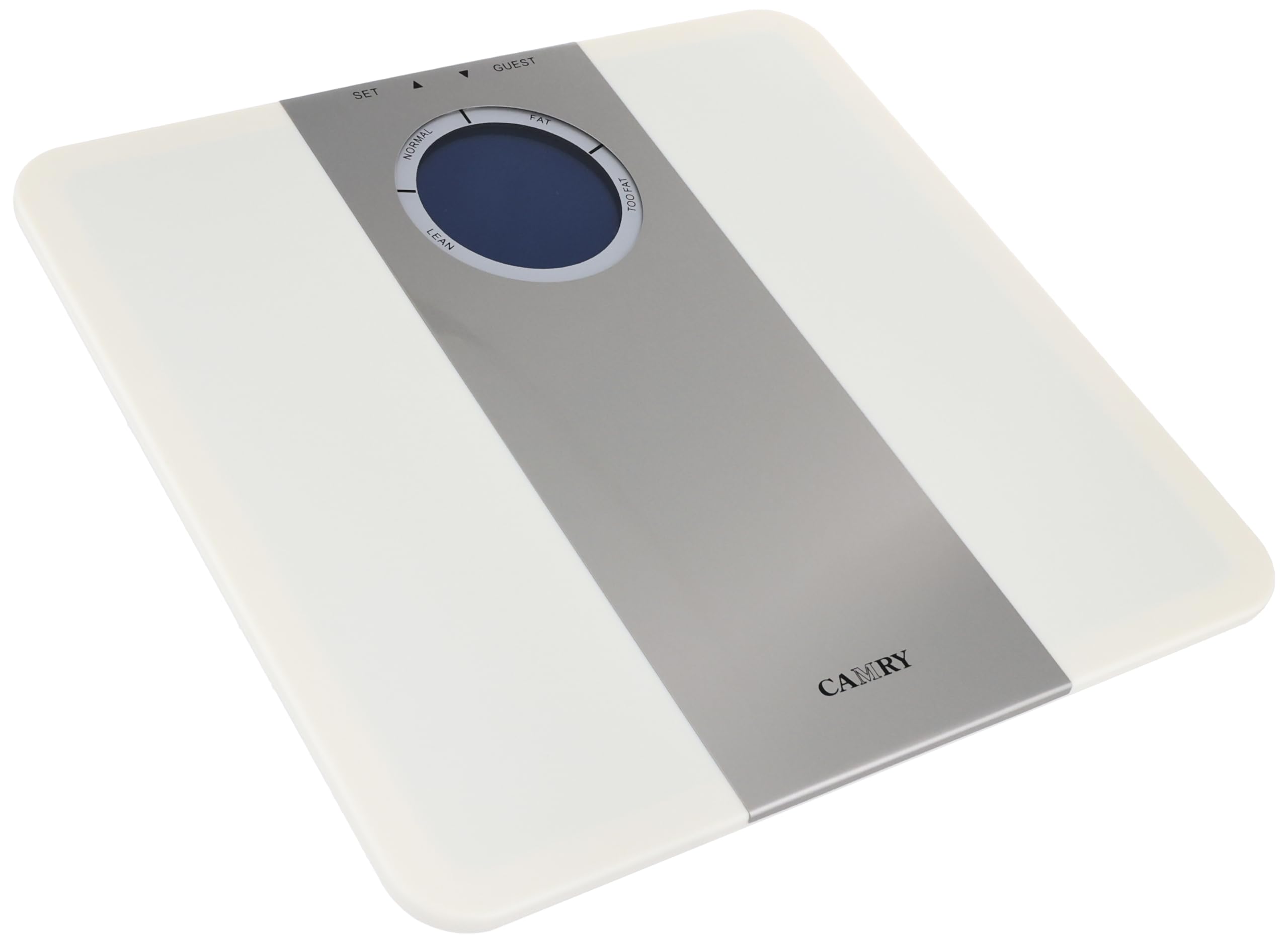
The Camry EB4030H scale features a clear digital display and intuitive controls for both weight and body composition analysis. The display area indicates various body composition categories such as 'FAT', 'NORMAL', 'LEAN', and 'TOO FAT', along with 'SET' and 'GUEST' functions for user management.
Persediaan
1. Pemasangan Bateri
- Cari petak bateri di bahagian bawah penimbang.
- Buka penutup petak bateri.
- Insert the required batteries (typically AAA, not included) ensuring correct polarity (+/-).
- Tutup penutup petak bateri dengan selamat.
2. Penempatan Awal
Place the scale on a hard, flat, and stable surface. Avoid carpets, rugs, or uneven flooring, as these can lead to inaccurate readings.
Arahan Operasi
1. Menghidupkan/Mematikan
The scale typically powers on automatically when you step on it. It will power off automatically after a few seconds of inactivity.
2. Pemilihan Unit
If your scale supports multiple units (e.g., kg, lb), there is usually a button on the underside or near the battery compartment to switch between them. Press this button to select your preferred unit before weighing.
3. Setting User Profiles (for Body Composition Analysis)
To utilize the body composition features, you may need to set up a user profile. Look for a 'SET' button or similar control. Follow the on-screen prompts to enter personal data such as age, height, and gender. The 'GUEST' function allows for a single measurement without saving data.
4. Taking a Weight Measurement
- Ensure the scale is on a flat, hard surface.
- Gently step onto the scale with bare feet, standing still and centered.
- Your weight will be displayed on the screen. Wait for the reading to stabilize.
- Step off the scale. The reading will hold for a few seconds before the scale powers off.
5. Pengukuran Komposisi Badan
Selepas menyediakan pengguna pro andafile and selecting it (or using 'GUEST' mode), step onto the scale with bare feet. The scale will measure your weight and then proceed to analyze body composition. The display will indicate categories such as 'FAT', 'NORMAL', 'LEAN', or 'TOO FAT' based on its internal algorithms. Refer to the scale's display for specific indicators.
Penyelenggaraan dan Penjagaan
- Pembersihan: Lap permukaan skala dengan lembut, damp kain. Jangan gunakan pembersih yang kasar atau rendam kerak di dalam air.
- Storan: Simpan penimbang di tempat yang sejuk dan kering. Elakkan meletakkan objek berat di atasnya apabila tidak digunakan.
- Penggantian Bateri: When the display shows a 'Lo' or low battery indicator, replace all batteries with new ones of the same type.
Menyelesaikan masalah
| Masalah | Kemungkinan Punca | Penyelesaian |
|---|---|---|
| No display / Scale won't turn on | Bateri mati; Pemasangan bateri yang salah | Gantikan bateri; Periksa polariti bateri |
| Bacaan tidak tepat | Scale on uneven surface; Scale moved recently; Overload | Place on hard, flat surface; Recalibrate by stepping on/off; Do not exceed max capacity |
| 'Lo' or 'Err' on display | Low battery; Measurement error; Overload | Replace batteries; Step off and re-measure; Do not exceed max capacity |
| Body composition not measured | Not using bare feet; User profile not set up; Electrodes not clean | Ensure bare feet contact electrodes; Set up user profile; Clean electrodes with a damp kain |
Spesifikasi
| Ciri | Perincian |
|---|---|
| Jenama | Camry |
| Model | EB4030H |
| Kapasiti Berat Maksimum | 150 kg |
| Berat Barang | 200 gram |
| Faktor Bentuk | Mini |
| bahan | Multi-material construction |
| warna | Pelbagai warna |
Waranti dan Sokongan
This product is manufactured by Camry. For warranty information or technical support, please refer to the warranty card included with your purchase or contact the retailer where the product was acquired. Keep your purchase receipt as proof of purchase for any warranty claims.