
1. Pengenalan
Thank you for choosing the Mcdodo OT-1580 Wireless Adapter. This device is designed to provide seamless wireless connectivity for a variety of peripherals, enhancing your digital experience. Please read this manual carefully to ensure proper installation, operation, and maintenance of your adapter.
2. Produk Lebihview
The Mcdodo OT-1580 is a compact and efficient wireless adapter. Its key features include:
- Keserasian Serbaguna: Connects effortlessly with a range of wireless devices such as headphones, keyboards, mice, speakers, and more.
- Low Energy Technology: Utilizes wireless low energy technology to minimize power consumption and extend battery life of connected devices.
- Prestasi Dipertingkat: Achieves data transfer speeds up to 3 Mbps, improving overall wireless experience and sound quality.
- Julat Lanjutan: Offers a transmission distance of up to 20 meters for greater flexibility and convenience.
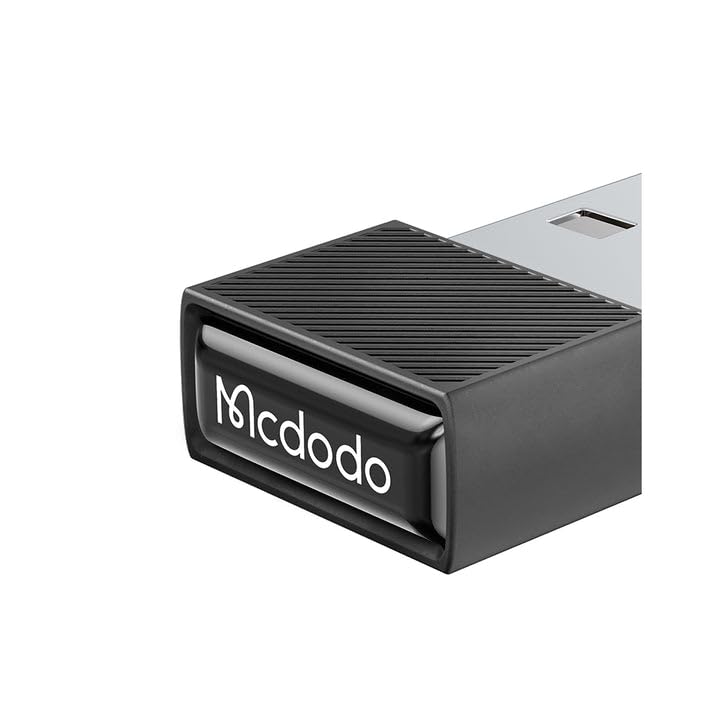
Imej 2.1: Depan view of the Mcdodo OT-1580 Wireless Adapter. This image shows the compact design of the adapter, highlighting its small form factor.
3. Kandungan Pakej
Sila sahkan bahawa semua item terdapat dalam pakej anda:
- Mcdodo OT-1580 Wireless Adapter
- Manual Pengguna (dokumen ini)
4. Arahan Persediaan
Follow these steps to set up your Mcdodo OT-1580 Wireless Adapter:
- Masukkan Penyesuai: Locate an available USB port on your computer, laptop, or compatible device. Gently insert the Mcdodo OT-1580 Wireless Adapter into the USB port. Ensure it is fully seated.
- Pemasangan Pemandu (jika perlu): In most modern operating systems (Windows 10/11, macOS, Linux), the adapter should be recognized automatically, and drivers will install without user intervention. If prompted, allow the system to install necessary drivers. If automatic installation fails, please visit the official Mcdodo webtapak untuk muat turun pemandu.
- Sahkan Pemasangan: Once installed, a notification or an icon in your system tray/menu bar should indicate that the wireless adapter is ready for use.

Image 4.1: The Mcdodo OT-1580 Wireless Adapter plugged into a laptop's USB port. This illustrates the physical connection of the adapter to a host device.
5. Arahan Operasi
After successful installation, you can begin connecting your wireless devices:
- Enable Wireless on Your Device: Ensure the wireless function is enabled on the peripheral you wish to connect (e.g., headphones, keyboard, mouse).
- Mod Berpasangan: Put your wireless peripheral into pairing mode. Refer to your peripheral's user manual for specific instructions on how to do this.
- Cari untuk Peranti: On your computer or host device, open the wireless settings (e.g., Bluetooth settings on Windows/macOS). Initiate a scan for new devices.
- Pilih dan Sambungkan: From the list of available devices, select your peripheral and click "Connect" or "Pair." You may be prompted to enter a PIN or confirm a pairing code.
- Sambungan Berjaya: Once connected, your peripheral should be ready for use. The system will typically indicate a successful connection.

Image 5.1: A visual representation of the Mcdodo OT-1580 Wireless Adapter facilitating a connection between a laptop and a mobile device. This highlights the adapter's role in enabling wireless data transfer.
6. Penyelenggaraan dan Penjagaan
To ensure the longevity and optimal performance of your Mcdodo OT-1580 Wireless Adapter, please follow these guidelines:
- Pembersihan: Gunakan kain lembut dan kering untuk membersihkan penyesuai. Elakkan menggunakan pembersih cecair atau pelarut.
- Storan: Apabila tidak digunakan, simpan penyesuai di tempat yang sejuk dan kering, jauh dari cahaya matahari langsung dan suhu yang melampau.
- Pengendalian: Avoid dropping the adapter or subjecting it to strong impacts. Do not attempt to disassemble the device.
- Kelembapan: Jauhkan penyesuai daripada air dan cecair lain.
7. Penyelesaian masalah
If you encounter issues with your Mcdodo OT-1580 Wireless Adapter, refer to the following common problems and solutions:
| Masalah | Penyelesaian yang Mungkin |
|---|---|
| Penyesuai tidak dikenali oleh komputer. |
|
| Cannot connect to wireless device. |
|
| Poor connection or intermittent signal. |
|
8. Spesifikasi
| Ciri | Perincian |
|---|---|
| Nombor Model | OT-1580 |
| Jenama | Mcdodo |
| Teknologi Ketersambungan | Wayarles (Bluetooth 5.1) |
| Kelajuan Pemindahan Data | Sehingga 3 Mbps |
| Jarak Penghantaran | Sehingga 20 meter |
| Peranti Serasi | Headphones, Keyboards, Mice, Speakers, and other wireless peripherals |
| warna | Kelabu Gelap |
| Berat Barang | 57 g |
| Dimensi Pakej | 18 x 7 x 2.2 cm |
9. Waranti dan Sokongan
Mcdodo products are designed for reliability and performance. For detailed warranty information, please refer to the warranty card included with your purchase or visit the official Mcdodo website. For technical support, driver downloads, or further assistance, please visit the Mcdodo official store page or contact Mcdodo customer service.
