
Sharp 32FG6EA
Manual Pengguna TV Android HD Sharp 32FG6EA 32-inci
Model: 32FG6EA
1. Pengenalan
This manual provides essential information for the proper setup, operation, and maintenance of your Sharp 32FG6EA 32-inch HD Android TV. The Sharp 32FG6EA offers a wide range of connection options and features the Android TV operating system, providing a modern and intuitive television experience. It functions as an all-in-one entertainment hub, integrating Google Assistant for a smarter viewing experience. Users can quickly access entertainment, control smart devices, and obtain on-screen information using voice commands.
2. Maklumat Keselamatan
Sila baca semua arahan keselamatan dengan teliti sebelum menggunakan televisyen. Simpan manual ini untuk rujukan masa hadapan.
- Bekalan Kuasa: Ensure the TV is connected to a power source with the correct voltage. Jangan bebankan soket kuasa secara berlebihan.
- Pengudaraan: Jangan sekat bukaan pengudaraan. Benarkan ruang yang mencukupi di sekeliling TV untuk aliran udara yang betul untuk mengelakkan terlalu panas.
- Air dan Kelembapan: Do not expose the TV to rain, moisture, or excessive humidity. Avoid placing objects filled with liquids on or near the TV.
- Pembersihan: Cabut plag TV sebelum membersihkan. Gunakan kain lembut dan kering. Jangan gunakan pembersih cecair atau semburan aerosol.
- penempatan: Place the TV on a stable, level surface. If wall-mounting, ensure the mount is securely installed and can support the TV's weight.
- Servis: Jangan cuba servis TV sendiri. Rujuk semua servis kepada kakitangan perkhidmatan yang berkelayakan.
3. Kandungan Pakej
Sahkan bahawa semua item terdapat dalam pembungkusan:
- Sharp 32FG6EA 32-inch HD Android TV
- Alat Kawalan Jauh (dengan 2 bateri AAA)
- Stand Type Base
- Manual Arahan
- Kabel Kuasa
4. Persediaan
4.1 Membongkar
Carefully remove the TV and all accessories from the packaging. Retain the packaging materials for future transport or servicing.
4.2 Memasang Stand
If you are not wall-mounting the TV, attach the included stand base:
- Letakkan skrin TV ke bawah pada permukaan yang lembut dan rata untuk mengelakkan kerosakan.
- Jajarkan tapak pendirian dengan lubang pelekap di bahagian bawah TV.
- Selamatkan dirian menggunakan skru yang disediakan. Pastikan dirian dipasang dengan kukuh.
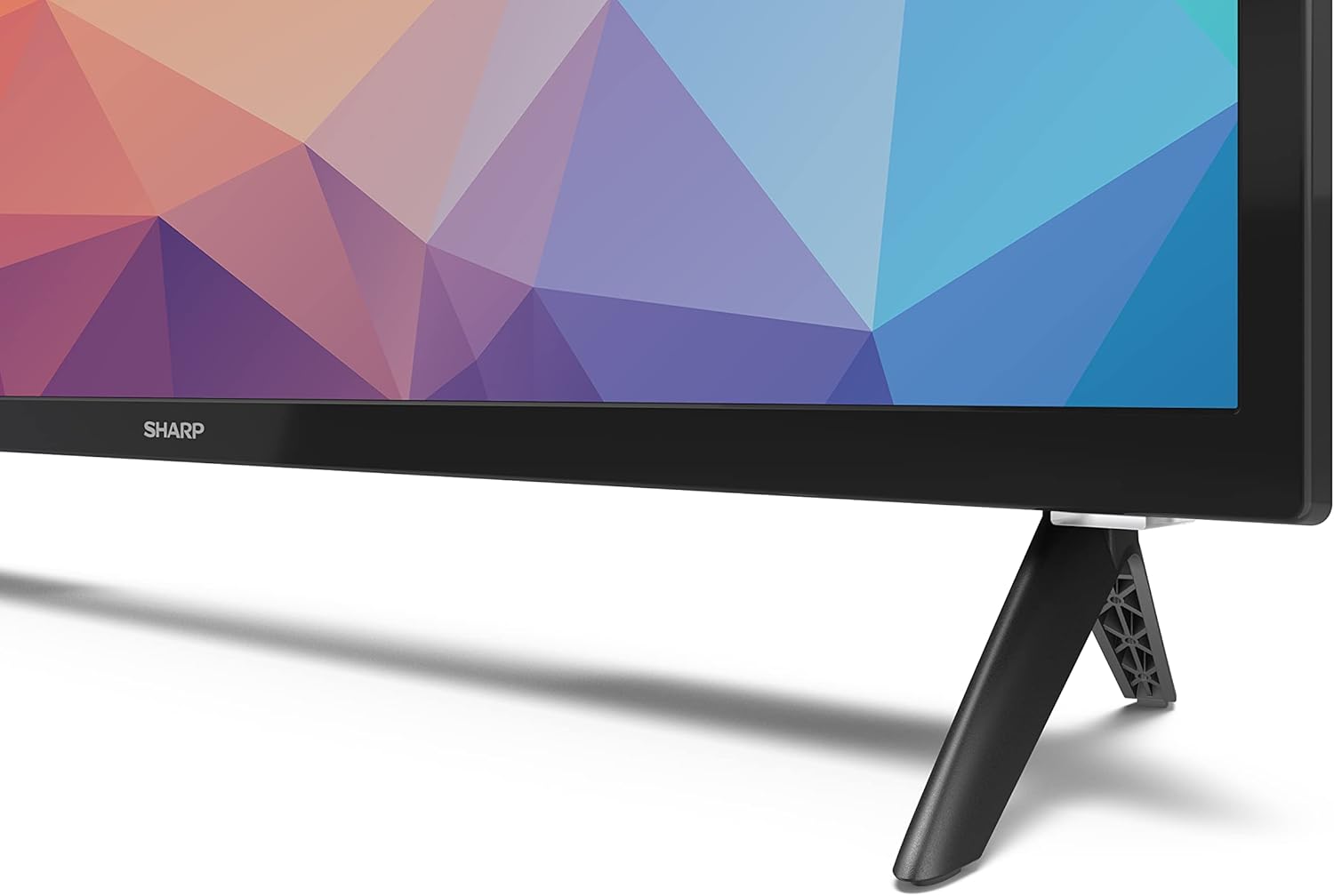
Image: Close-up of the TV stand attachment.
4.3 Pemasangan Dinding
The Sharp 32FG6EA supports VESA wall mounts with dimensions of 75 x 75 mm. Wall mount hardware is not included. Follow the instructions provided with your wall mount kit.
4.4 Menyambung Peranti Luaran
TV anda mempunyai berbilang port untuk menyambungkan pelbagai peranti:
- HDMI: Connect Blu-ray players, game consoles, or set-top boxes to the 2 HDMI ports.
- USB: Connect USB storage devices for media playback to the 2 USB ports.
- Antena/Kabel: Sambungkan antena atau sumber TV kabel untuk saluran siaran.
- Ethernet: Untuk sambungan internet berwayar.
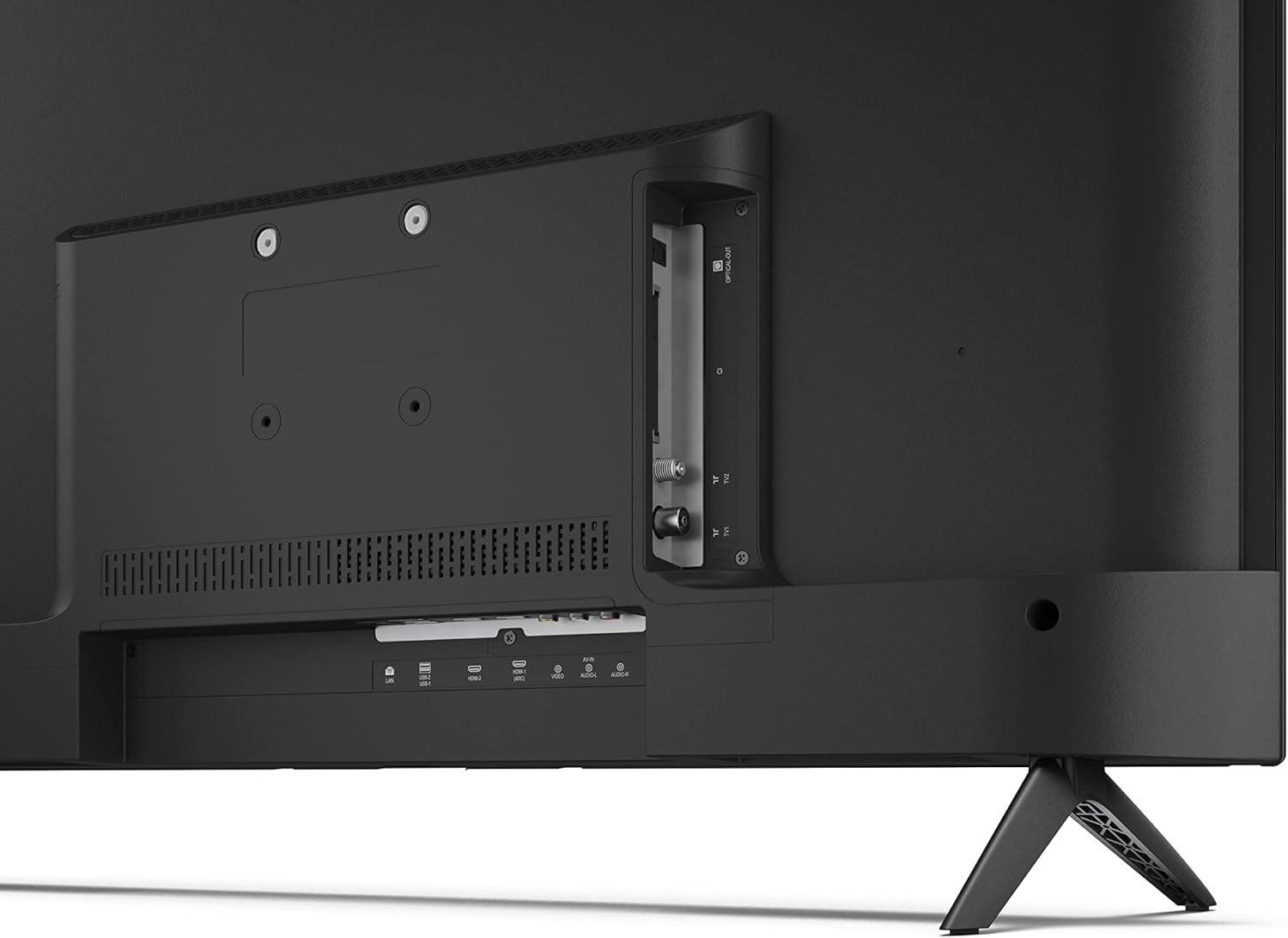
Imej: Belakang view daripada TV dengan port sambungan.
4.5 Sambungan Kuasa
After connecting all necessary devices, plug the power cable into the TV and then into a wall outlet.
4.6 Wizard Persediaan Awal
Setelah dihidupkan pertama, TV akan membimbing anda melalui proses persediaan awal. Ini termasuk:
- Pemilihan bahasa.
- Sambungan rangkaian (Wi-Fi atau Ethernet).
- Google account sign-in (required for full Android TV features).
- Pengimbasan saluran.
5. Beroperasi
5.1 Alat Kawalan Jauh Lebihview
The included remote control allows you to navigate the TV's features. Insert the 2 AAA batteries into the remote control before use.
- Butang Kuasa: Menghidupkan atau mematikan TV.
- Directional Pad (D-Pad) & OK Button: Navigasi menu dan sahkan pilihan.
- Butang Belakang: Kembali ke skrin sebelumnya.
- Butang rumah: Mengakses skrin utama Android TV.
- Kelantangan Naik/Turun: Melaraskan kelantangan audio.
- Saluran Atas/Bawah: Menukar saluran TV.
- Butang Pembantu Google: Mengaktifkan kawalan suara.
- Butang Pintasan Apl: Butang khusus untuk perkhidmatan penstriman popular seperti Netflix, Prime Video dan YouTube.
5.2 Navigasi Antara Muka Android TV
The Android TV home screen provides access to your installed apps, recommended content, and settings. Use the directional pad on your remote to navigate through the interface.
5.3 Pembantu Google
Tekan butang Google Assistant pada alat kawalan jauh anda dan bercakap ke dalam mikrofon untuk:
- Cari untuk filem, rancangan atau maklumat.
- Kawal peranti rumah pintar.
- Buka aplikasi.
- Laraskan tetapan TV.
5.4 Chromecast Terbina dalam
The TV includes Chromecast built-in, allowing you to cast content from compatible apps on your smartphone, tablet, or computer directly to the TV screen.
5.5 Kesambungan Bluetooth
Connect Bluetooth devices such as headphones or speakers to your TV for a personalized audio experience. Navigate to the TV's settings menu to pair new Bluetooth devices.
5.6 Tetapan Audio
The TV supports Dolby Audio with 2 x 6 W RMS speakers. You can adjust audio settings, including sound modes and equalizer, through the TV's settings menu.
6. Penyelenggaraan
6.1 Membersihkan TV
Untuk membersihkan skrin dan kabinet TV:
- Cabut palam kord kuasa daripada salur keluar dinding.
- Use a soft, lint-free cloth to gently wipe the screen and surfaces.
- Untuk tanda degil, sedikit dampbilas kain dengan air atau pembersih skrin khusus (sapukan pada kain, bukan terus pada skrin).
- Jangan gunakan pembersih yang melelas, lilin atau pelarut.
6.2 Kemas Kini Perisian
Your Android TV may receive periodic software updates to improve performance and add new features. Ensure your TV is connected to the internet to receive these updates. You can check for updates manually in the TV's settings menu.
7. Penyelesaian masalah
Jika anda menghadapi masalah dengan TV anda, rujuk masalah dan penyelesaian biasa berikut:
- Tiada Kuasa: Pastikan kabel kuasa dipasang dengan selamat pada kedua-dua TV dan salur keluar dinding yang berfungsi. Cuba kedai lain.
- Tiada Gambar/Bunyi: Check that the correct input source is selected. Verify all cables (HDMI, antenna) are properly connected.
- Alat Kawalan Jauh Tidak Berfungsi: Periksa bateri dan pastikan ia dimasukkan dengan betul. Halakan alat kawalan jauh terus ke sensor IR TV.
- Kualiti Gambar Lemah: Check antenna/cable connections. Adjust picture settings in the TV menu. For streaming content, ensure a stable internet connection.
- Tiada sambungan internet: Verify Wi-Fi password or Ethernet cable connection. Restart your router and the TV.
- Apps Not Working: Ensure the TV's software is up to date. Try clearing the app's cache or reinstalling the app.
If problems persist, consult the Sharp support webtapak atau hubungi perkhidmatan pelanggan.
8. Spesifikasi
| Ciri | Spesifikasi |
|---|---|
| Nombor Model | 32FG6EA |
| Jenama | tajam |
| Saiz Skrin | 32 Inci (81 cm pepenjuru) |
| Teknologi Paparan | LED |
| Resolusi | 720p (1366 x 768 piksel) |
| Nisbah Aspek | 16:9 |
| Kadar Segar Semula | 50 Hz |
| Sistem Operasi | Android TV 11 |
| Ciri Khas | Android TV, Google Assistant, Chromecast built-in |
| Output Audio | 2 x 6 W RMS, Dolby Audio |
| Port HDMI | 2 |
| Port USB | 2 |
| Ketersambungan | Wi-Fi, Bluetooth, Ethernet |
| Pemasangan Dinding VESA | 75 x 75 mm |
| Dimensi dengan Dirian (W x H x D) | 731 x 486 x 177 mm |
| Dimensi tanpa Stand (W x H x D) | 731 x 433 x 68 mm |
| Dimensi Produk (D x W x H) | 16 x 73 x 46.4 cm (approximate, with stand) |
| Berat badan | 3.9 kg |
| Kelas Kecekapan Tenaga | E |

Image: TV dimensions diagram.

Image: Energy Label. For more details, visit Pangkalan Data EPREL.
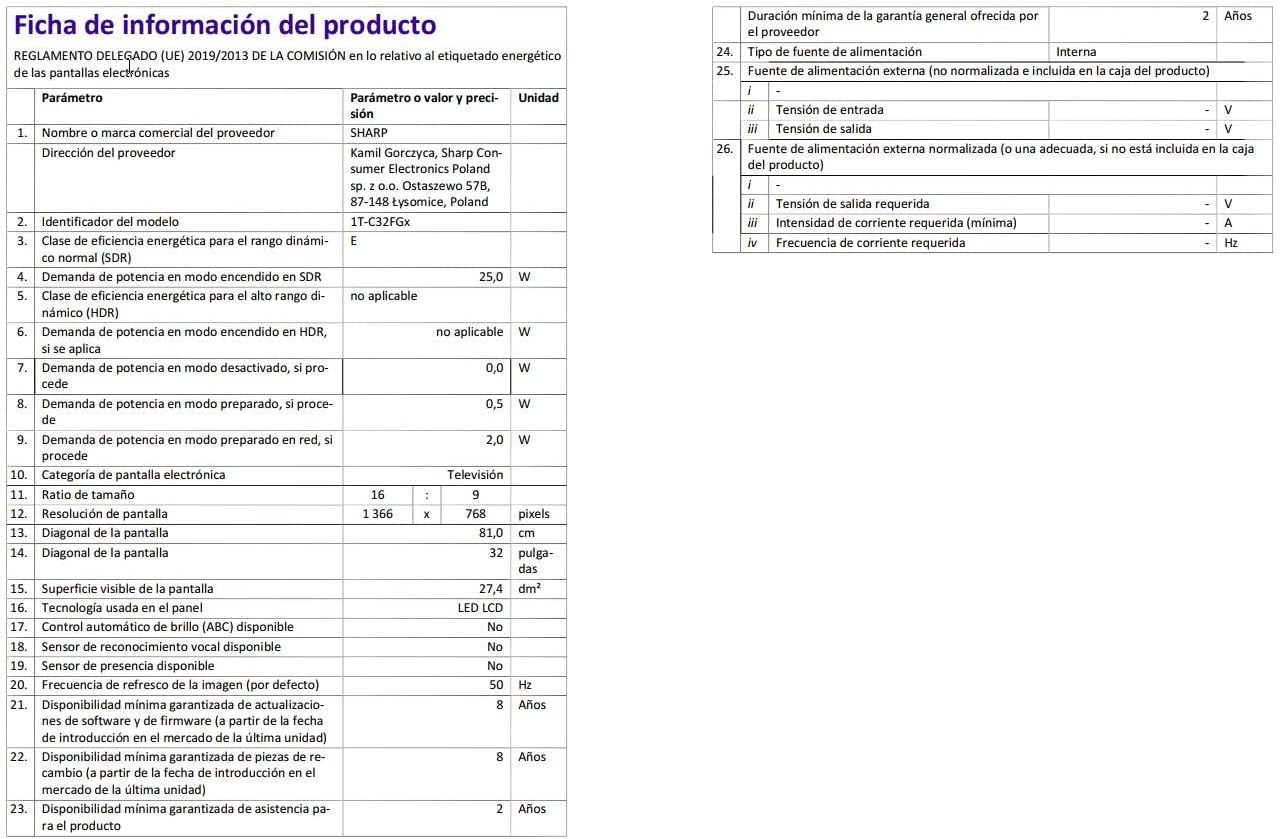
Image: Detailed product information sheet.
9. Waranti dan Sokongan
The Sharp 32FG6EA television comes with a minimum general warranty duration of 2 years from the provider.
For technical support, warranty claims, or further assistance, please refer to the contact information provided with your purchase documentation or visit the official Sharp support webtapak untuk wilayah anda.
Ask a question about this manual
Ask about setup, troubleshooting, compatibility, parts, safety, or missing instructions. Manuals+ will review the question and use this page’s manual context to help answer it.