1. Pengenalan
This manual provides instructions for the Generic replacement infrared (IR) remote control, designed to operate specific functions of the Auna Multimedia Micro Stereo HD Bluetooth Soundbar Speaker System. This remote is a direct replacement for the original remote control.
Nota Penting:
- This replacement remote control may not support all functions of the original remote. Some advanced or specific features might not be accessible.
- Ensure your Auna Multimedia Micro Stereo HD Bluetooth Soundbar Speaker System model is compatible with this replacement remote. If your specific model number is not explicitly listed as compatible, this remote may not function correctly.
- This remote operates using infrared (IR) technology. Ensure a clear line of sight between the remote and the Auna system's IR receiver.
2. Persediaan
2.1 Pemasangan Bateri
The remote control requires two (2) CR2 batteries (not included). Follow these steps to install the batteries:
- Cari petak bateri di belakang alat kawalan jauh.
- Luncurkan penutup petak bateri ke bawah atau ke arah yang ditunjukkan oleh anak panah untuk membukanya dengan lembut.
- Insert two CR2 batteries, ensuring the positive (+) and negative (-) terminals align correctly with the markings inside the compartment.
- Luncurkan penutup petak bateri kembali ke tempatnya sehingga ia berbunyi dengan selamat.
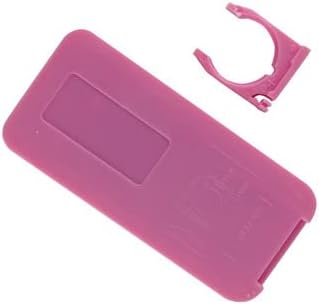
Imej: Belakang view of the remote control, illustrating the battery compartment. The compartment cover is typically located on the lower half of the remote's back side.
Awas:
- Jangan campurkan bateri lama dan baru.
- Jangan campurkan bateri beralkali, standard (karbon-zink), atau boleh dicas semula (nikel-kadmium).
- Remove batteries if the remote control will not be used for an extended period.
3. Arahan Operasi
Once batteries are installed, the remote control is ready for use. Point the remote directly at the Auna Multimedia Micro Stereo HD Bluetooth Soundbar Speaker System's IR receiver.
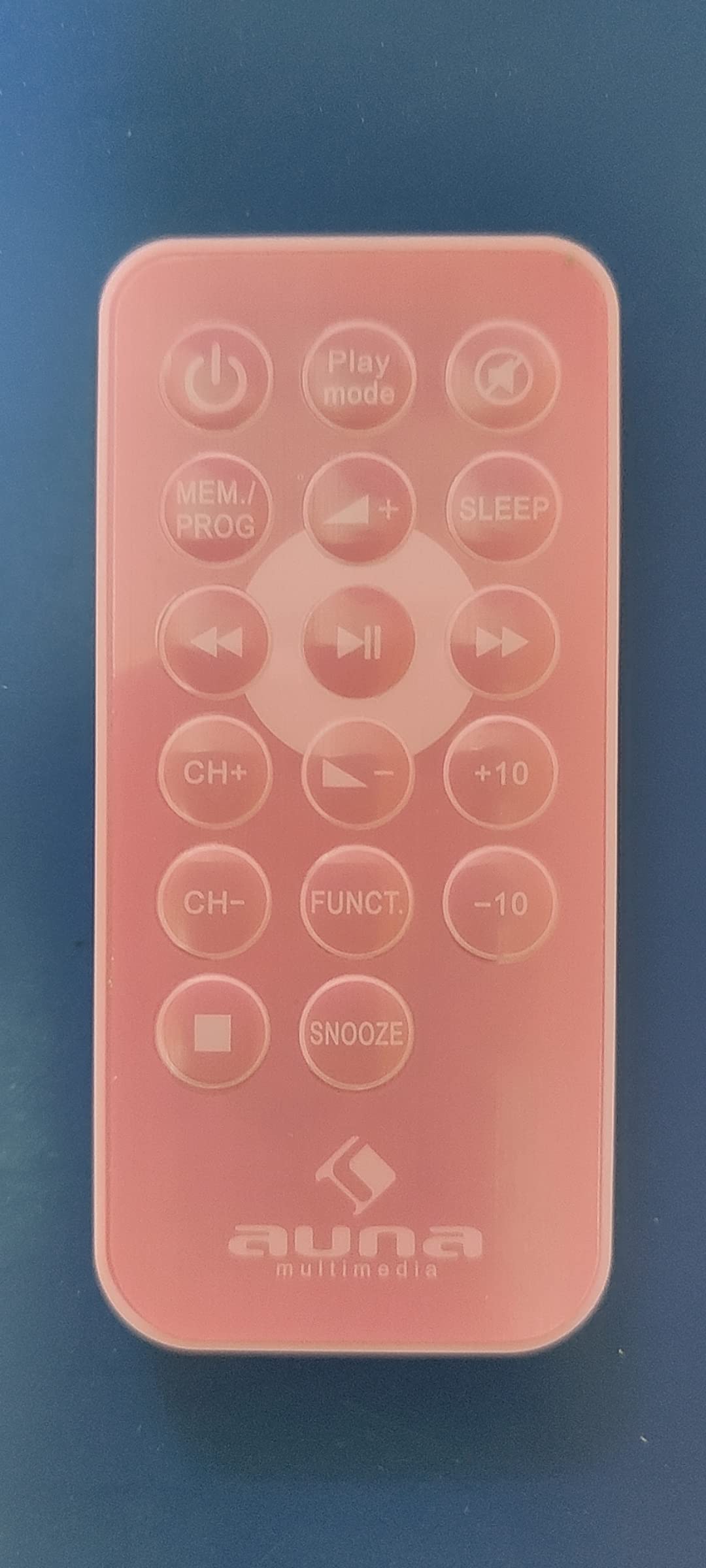
Imej: Depan view of the remote control, displaying its buttons. Key functions include Power, Mute, Volume Up/Down, Channel/Track navigation, Play/Pause, and Input/Function selection.
3.1 Fungsi Asas
- Butang kuasa (⏻): Press to turn the Auna system ON or OFF.
- Butang Redam (🔇): Tekan untuk membisukan atau meredam audio.
- Volume Up/Down (VOL+/VOL-): Tekan untuk meningkatkan atau menurunkan tahap kelantangan.
- Main/Jeda (⏸): Mengawal main balik untuk media.
- Previous/Next Track (⏮/⏭): Navigates between tracks or channels.
- Function/Input (FUNC): Cycles through available input sources (e.g., Bluetooth, AUX, USB).
- Sleep (SLEEP): Activates or deactivates the sleep timer function.
Refer to your Auna Multimedia Micro Stereo HD Bluetooth Soundbar Speaker System's original manual for detailed information on specific functions and their operation.
4. Penyelenggaraan
4.1 Membersihkan Alat Jauh
Untuk membersihkan alat kawalan jauh, gunakan kain lembut dan kering. Jangan gunakan pembersih cecair, semburan atau bahan yang melelas, kerana ini boleh merosakkan permukaan alat kawalan jauh atau komponen dalaman.
4.2 Penggantian Bateri
Replace batteries when the remote's range decreases or it becomes unresponsive. Follow the battery installation steps in Section 2.1. Dispose of used batteries responsibly according to local regulations.
5. Penyelesaian masalah
If the remote control is not functioning as expected, consider the following:
- Tiada jawapan:
- Ensure new batteries are correctly installed with the correct polarity.
- Gantikan bateri lama dengan yang baru.
- Check for any obstructions between the remote and the Auna system's IR receiver.
- Ensure you are within the effective range of the remote control (typically up to 20 feet/6 meters).
- Fungsi Terhad:
- As a replacement remote, some advanced functions of the original system may not be supported. This is normal for universal or replacement remotes.
- Verify that your Auna system model is indeed compatible with this replacement remote.
6. Spesifikasi
| Model | Replacement Remote for Auna Multimedia Micro Stereo HD Bluetooth Soundbar Speaker System |
| Jenama | Generik |
| Teknologi Ketersambungan | Inframerah (IR) |
| Jenis Pengawal | Kawalan Butang |
| Sumber Kuasa | 2 x CR2 Batteries (not included) |
| Peranti Serasi | Auna Multimedia Micro Stereo HD Bluetooth Soundbar Speaker System |
7. Waranti dan Sokongan
As a generic replacement product, specific warranty and support details may vary. Please refer to the seller or retailer from whom you purchased this remote control for information regarding warranty coverage, returns, or technical assistance.
For issues related to the Auna Multimedia Micro Stereo HD Bluetooth Soundbar Speaker System itself, please consult the original manufacturer's documentation or support channels.


