
1. Pengenalan
This manual provides detailed instructions for the operation and maintenance of your LFF DAB+/FM Digital Radio, Model YT81107. Please read this manual thoroughly before using the device to ensure proper function and to maximize your listening experience.

Imej 1: Depan view of the LFF DAB+/FM Digital Radio, Model YT81107, featuring its speaker grille, color LCD display, and telescopic antenna.
2. Kandungan Pakej
Sila semak pakej untuk item berikut:
- 1 x LFF DAB Digital Radio (Model YT81107)
- 1 x Penyesuai Kuasa AC
- 1 x Panduan Permulaan Pantas (manual ini)
Jika ada item yang hilang atau rosak, sila hubungi sokongan pelanggan dengan segera.
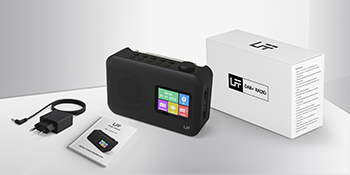
Image 2: The LFF DAB+/FM Digital Radio, AC power adapter, and quick start guide as included in the package.
3. Ciri-ciri Produk
The LFF DAB+/FM Digital Radio YT81107 offers a range of features designed for versatile listening:
- DAB+ and FM Digital Radio: Supports ultra-wide signals in DAB+ (174.928 - 239.2 MHz) and FM (87.5 - 108 MHz) bands.
- Pratetap Stesen: Store up to 30 FM and 30 DAB+ stations for quick access.
- Paparan LCD yang jelas: Large color LCD screen displays station information and time.
- Pilihan Kuasa Fleksibel: Operates with the included AC adapter or 4 x 1.5V (LR6, AA) batteries (not included).
- Enhanced Reception: Features a 39 cm extendable antenna for improved signal strength.
- Pemasa Tidur: Programmable sleep timer (15/30/45/60/90/120 minutes).
- Jam Penggera Dwi: Tetapkan dua penggera bebas.
- Kesambungan Bluetooth: Functions as a Bluetooth speaker for streaming audio from compatible devices.
- Jack fon kepala: Bicu 3.5mm untuk mendengar secara peribadi.

Imej 3: Selesaiview of the radio's functions, including DAB+ radio, 60 presets, FM radio, sleep timer, headphone jack, Bluetooth, full-color screen, and dual alarm.

Image 4: Close-up of the radio's full-color LCD display, showing time and date.
4. Persediaan
4.1 Menguasakan Peranti
Your radio can be powered by either the AC adapter or batteries.
- Kuasa AC: Connect the included AC adapter to the DC 5V input port on the radio and plug the other end into a standard wall outlet.
- Kuasa Bateri: Open the battery compartment on the back of the radio. Insert 4 x 1.5V AA (LR6) batteries, ensuring correct polarity. Close the compartment securely. (Batteries are not included.)
4.2 Pelarasan Antena
Extend the telescopic antenna fully and adjust its angle for optimal reception. For DAB+ and FM radio, a fully extended antenna generally provides the best signal.

Image 5: Illustration of the radio's dimensions (16.1 x 10.9 x 5.6 cm), battery requirements (4 x 1.5V AA), AC adapter (5V/1000mA), and the 360° adjustable antenna.
4.3 Initial Scan for Stations
Upon first power-on, the radio will typically perform an automatic scan for available DAB+ and FM stations. This process may take a few minutes. Once complete, the radio will store the found stations.
5. Arahan Operasi
5.1 Menghidupkan/Mematikan
Tekan ke kuasa button (usually located on the top or front panel) to turn the radio on or off.
5.2 Pemilihan Mod
Tekan ke Mod button to cycle through available modes: DAB+ Radio, FM Radio, and Bluetooth.
5.3 Tuning Radio Stations (DAB+/FM)
There are three primary ways to find and select radio stations:
- Imbasan Automatik: In DAB+ or FM mode, initiate an auto-scan. The radio will search for and list all available stations.
- Carian Manual: Use the tuning knob or navigation buttons to manually adjust the frequency.
- Pratetap: Store your favorite stations to preset numbers (1-30 for FM, 1-30 for DAB+). To save a station, tune to it, then press and hold a preset number button until the display confirms storage. To recall a station, simply press the corresponding preset number button.

Image 6: Visual representation of the three methods for selecting radio stations: Automatic Scan, Manual Search, and using Presets.
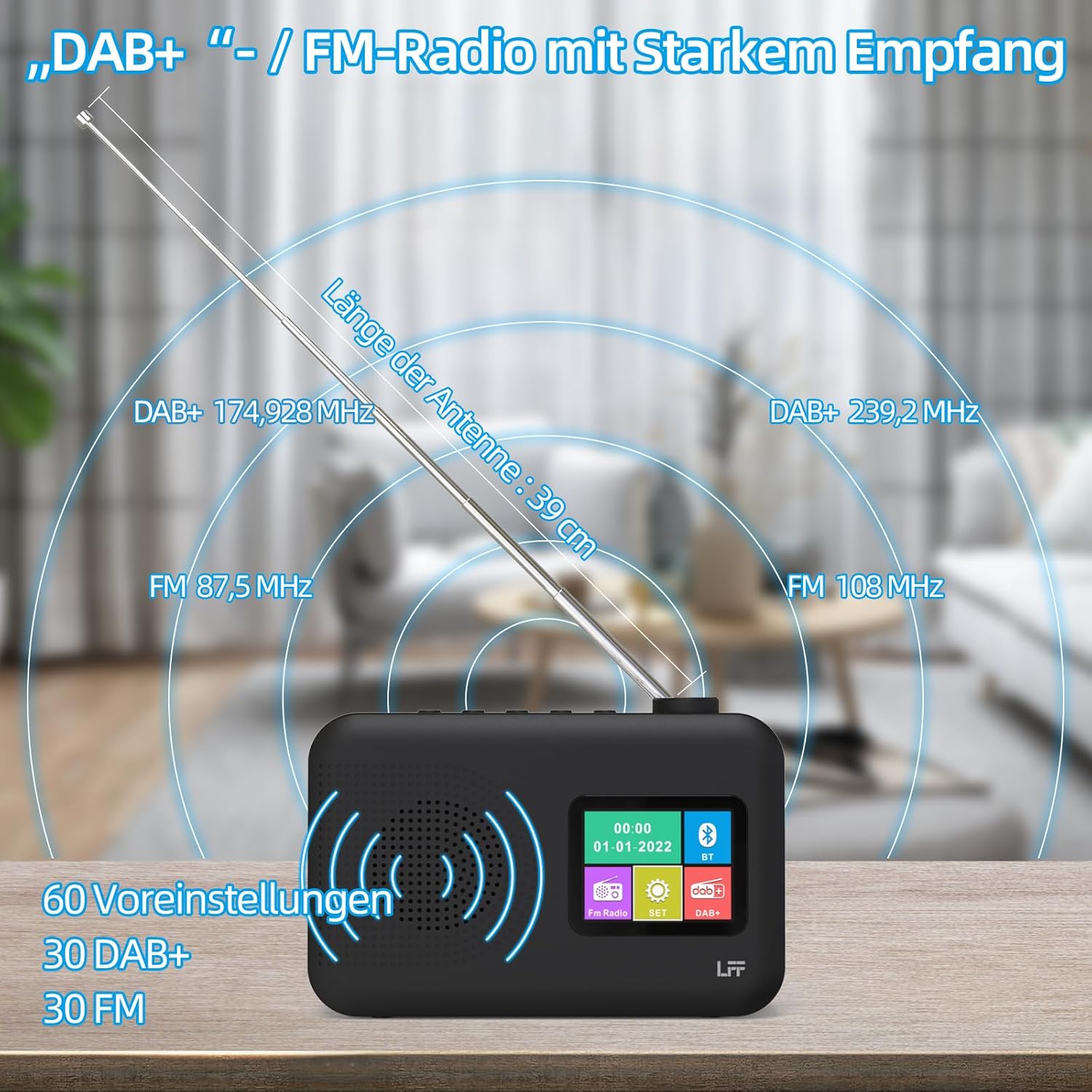
Image 7: Diagram showing the radio's reception capabilities for DAB+ (174.928 - 239.2 MHz) and FM (87.5 - 108 MHz) bands, highlighting the 39 cm antenna and 60 total presets.
5.4 Kawalan Kelantangan
Adjust the volume using the dedicated volume knob or buttons, typically located on the top or side of the radio. The radio features 16 adjustable volume levels.
5.5 Pemasa Tidur
To activate the sleep timer:
- Tekan ke Pemasa Tidur butang.
- Cycle through the available durations: 15, 30, 45, 60, 90, or 120 minutes.
- Radio akan dimatikan secara automatik selepas masa yang dipilih.

Image 8: Visual guide to setting the sleep timer, showing options for 15, 30, 45, 60, 90, and 120 minutes.
5.6 Dwi Jam Penggera
Untuk menetapkan penggera:
- Tekan ke Penggera button to access alarm settings.
- Pilih Penggera 1 atau Penggera 2.
- Set the desired alarm time, alarm source (e.g., buzzer, DAB+, FM), and volume.
- Sahkan tetapan anda.

Image 9: Depiction of the dual alarm clock feature, allowing for two separate alarm settings (Alarm 1 and Alarm 2).
5.7 Kesambungan Bluetooth
Untuk memasangkan peranti anda melalui Bluetooth:
- Switch the radio to Bluetooth mode. The display will indicate it is searching for devices.
- Pada telefon pintar atau peranti lain yang didayakan Bluetooth anda, cari peranti Bluetooth yang tersedia.
- Select "LFF YT81107" (or similar name) from the list to pair.
- Once connected, you can stream audio from your device to the radio.
Note: This radio acts as a Bluetooth receiver. It cannot connect to Bluetooth headphones.

Image 10: The radio's display showing a successful Bluetooth connection, indicating the paired device name.
5.8 Penggunaan Fon Kepala
Plug standard 3.5mm wired headphones into the headphone jack on the side of the radio for private listening. The internal speaker will automatically mute when headphones are connected.

Image 11: Close-up of the 3.5mm headphone jack located on the side of the radio.
6. Penyelenggaraan
To ensure the longevity and optimal performance of your radio, follow these maintenance guidelines:
- Pembersihan: Gunakan kain lembut dan kering untuk membersihkan bahagian luar radio. Jangan gunakan pembersih, lilin atau pelarut yang kasar.
- Storan: When not in use for extended periods, remove batteries and store the radio in a cool, dry place.
- Persekitaran: Elakkan daripada mendedahkan radio kepada suhu yang melampau, cahaya matahari langsung, kelembapan tinggi atau persekitaran berdebu.
- Pendedahan Air: This radio is not waterproof. Keep it away from water and liquids.
7. Penyelesaian masalah
Jika anda menghadapi masalah dengan radio anda, rujuk masalah dan penyelesaian biasa berikut:
| Masalah | Kemungkinan Punca | Penyelesaian |
|---|---|---|
| Tiada kuasa | AC adapter not connected, batteries depleted or incorrectly inserted. | Ensure AC adapter is securely plugged in. Replace batteries or check polarity. |
| Penerimaan radio yang lemah | Antenna not extended, weak signal area, interference. | Fully extend and adjust the antenna. Move the radio to a different location. Avoid placing near other electronic devices. |
| Bluetooth tidak bersambung | Radio not in Bluetooth mode, device not discoverable, already paired with another device. | Ensure radio is in Bluetooth mode. Make sure your device's Bluetooth is on and discoverable. Disconnect from other Bluetooth devices. |
| Penggera tidak berbunyi | Alarm not activated, volume too low, incorrect time setting. | Verify alarm is set and enabled. Increase alarm volume. Check alarm time. |
| Tiada bunyi dari pembesar suara | Volume too low, headphones connected. | Increase volume. Disconnect headphones. |
If the problem persists after trying these solutions, please contact LFF customer support.
8. Spesifikasi
| Ciri | Perincian |
|---|---|
| Jenama | LFF |
| Nombor Model | YT81107 |
| warna | Hitam |
| Dimensi (L x W x H) | 16.1 x 5.9 x 10.9 cm |
| Teknologi Penalaan | DAB+ |
| Kumpulan Radio yang Disokong | DAB+ (174.928 - 239.2 MHz), FM (87.5 - 108 MHz) |
| Ketersambungan | Bluetooth, 3.5mm Headphone Jack |
| Sumber Kuasa | AC Adapter (5V/1000mA), 4 x 1.5V AA (LR6) Batteries |
| Ciri Khas | Color LCD Display, Sleep Timer, Dual Alarm Clock, 60 Presets (30 DAB+, 30 FM) |
| Peranti Serasi | Smartphones (for Bluetooth audio), Wired Headphones |
9. Waranti dan Sokongan
LFF is committed to providing quality products. If you experience any quality issues or require assistance with your LFF DAB+/FM Digital Radio, please contact our customer support directly. Refer to the contact information provided in your purchase documentation or on the official LFF webtapak.