
pengenalan
This manual provides comprehensive instructions for the installation, operation, and maintenance of your Dioche Fingerprint Password Keyless Entry Lock. Please read this manual thoroughly before installation and use to ensure proper function and security.
Ciri-ciri Produk
- Kaedah Membuka Kunci Berbilang: Supports fingerprint, password, IC card, and emergency mechanical key access.
- Bekalan Kuasa Kecemasan: Features a low voltage alarm and USB emergency charging port for power bank use.
- Pembinaan Tahan Lama: Made from high-quality aluminum alloy and ABS material for rust resistance, strength, and durability.
- Pemasangan Mudah: Clip-on design requires no wiring or drilling, preventing glass damage. Suitable for 12mm frameless glass doors and wooden doors with 4-15mm seams.
- Kapasiti Pengguna Tinggi: Stores up to 100 user profiles.
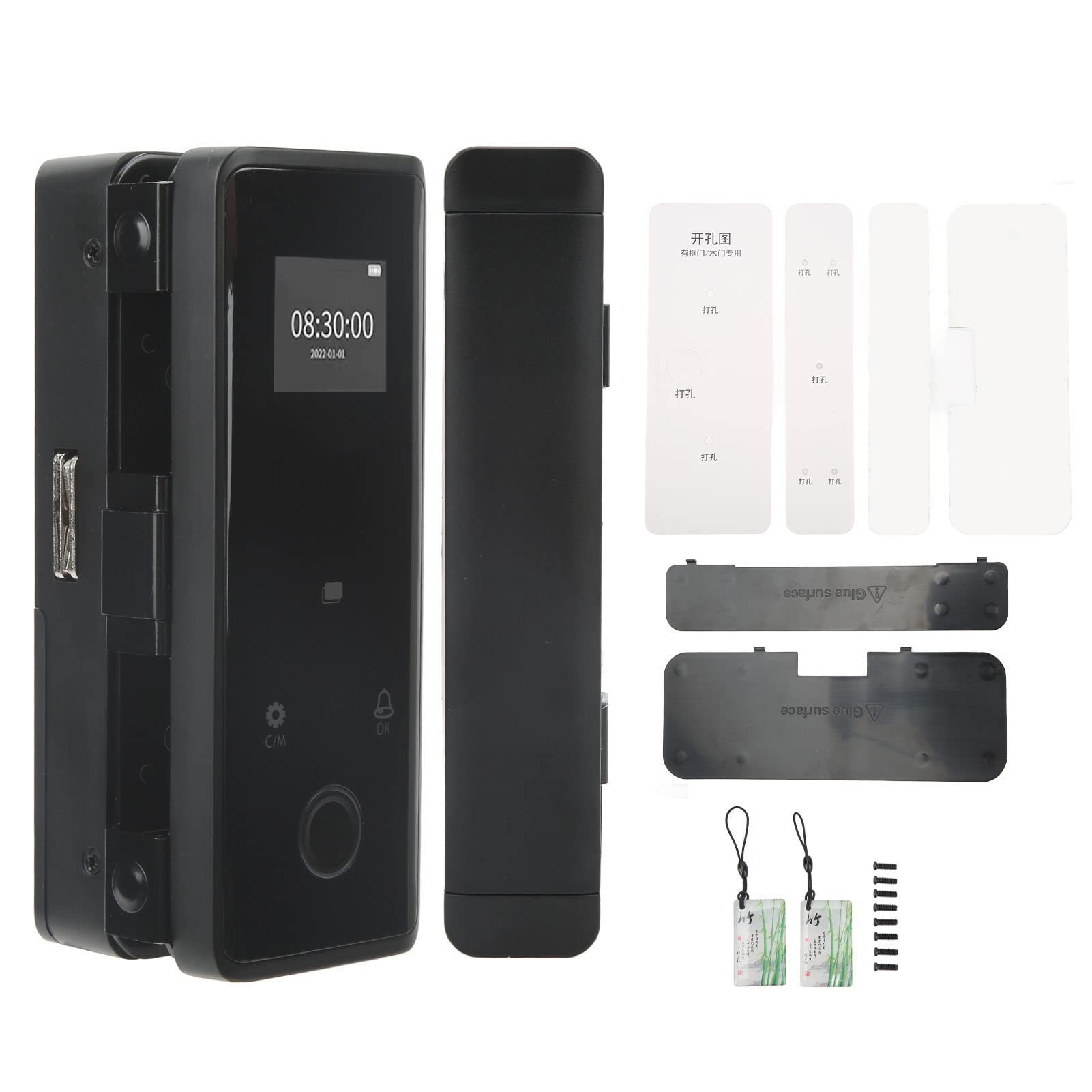
Imej: Depan dan sisi view of the Dioche Smart Lock, illustrating its compact design.

Image: The Dioche Smart Lock highlighting its fingerprint unlocking capability.

Image: The Dioche Smart Lock demonstrating IC card access.
Video: Selesaiview of the Smart Glass Door Safety Lock, showcasing its keyless entry features.
Video: Produk tamatview of the LE-170 Black Glass Door Lock, detailing its design and functions.
Kandungan Pakej
Sahkan bahawa semua komponen hadir sebelum memulakan pemasangan:
- Main Lock Unit (Front and Rear Panels)
- Mounting Plates/Brackets
- Kad IC
- Kunci Kecemasan
- Skru Pemasangan
- Templat Pemasangan
- Manual Pengguna (dokumen ini)

Image: All components included in the Dioche Smart Lock package.
Spesifikasi
| Ciri | Perincian |
|---|---|
| Jenama | Dioche |
| Nombor Model | FGDL-001 |
| Jenis Kunci | Keypad, Fingerprint, IC Card |
| bahan | Aloi Aluminium, ABS |
| warna | Hitam |
| Ciri Khas | Alarm, Fingerprint, Fob Unlock, Touchscreen, Emergency Power Supply |
| Penggunaan yang Disyorkan | Office, Glass Doors, Wooden Doors |
| Keserasian Ketebalan Pintu | 12mm frameless glass doors; 4-15mm door seams for various door types |
| Berat Barang | 1.04 Kilogram |
Arahan Pemasangan
The Dioche Keyless Entry Lock is designed for easy, non-invasive installation. No drilling or wiring is required for frameless glass doors.
1. Sediakan Pintu
- Ensure the glass door thickness is 12mm. For other door types, ensure door seam is between 4-15mm.
- Clean the installation area on the door thoroughly.
- Verify sufficient clearance for the lock components.
Video: Detailed installation guide for glass door requirements, showing necessary clearances.
2. Mount the Lock Units
- Attach the front and rear lock panels to the door using the provided clip-on mechanism. Ensure they are aligned correctly.
- Secure the units with the appropriate screws, ensuring a snug fit without overtightening, especially on glass.
- Connect any internal cables between the front and rear units as instructed in the detailed diagram (refer to included paper manual for diagrams).
3. Pasang Bateri
- Open the battery compartment on the rear panel.
- Insert the required batteries (not included) according to polarity markings.
- Tutup petak bateri dengan selamat.
4. Persediaan Awal
- Follow the on-screen prompts or refer to the detailed programming section in the included paper manual to set up the administrator fingerprint/password.
- Test the lock functionality to ensure it locks and unlocks smoothly.
Arahan Operasi
Kaedah Membuka Kunci
- Cap jari: Letakkan jari berdaftar anda pada sensor cap jari. Kunci akan dibuka setelah pengesahan berjaya.
- kata laluan: Enter your registered password on the touchscreen keypad, then press '#' or 'OK' to confirm.
- Kad IC: Present your registered IC card to the card reader area on the lock. The lock will unlock automatically.
- Kunci Kecemasan: In case of electronic failure or dead batteries, use the physical emergency key to unlock the door.

Image: The Dioche Smart Lock demonstrating its various unlocking methods, including fingerprint, password, IC card, and mobile app control.
Mengunci Pintu
The lock typically features an automatic locking mechanism after the door closes. Verify this function after installation. Manual locking may also be available via a button or turning the interior knob.
Pengurusan Pengguna
Access the lock's menu (usually by pressing 'C/M' or a similar button) and enter the administrator password/fingerprint to manage users. You can add, modify, or delete fingerprints, passwords, and IC cards for up to 100 users.
Penyelenggaraan
- Pembersihan: Wipe the lock's surface with a soft, dry cloth. Avoid abrasive cleaners or solvents that may damage the finish or electronic components.
- Penggantian Bateri: Gantikan bateri dengan segera apabila voltan rendahtage alarm sounds. Use high-quality alkaline batteries for optimal performance.
- Kuasa Kecemasan: If batteries die completely, use a power bank connected to the USB emergency charging port to temporarily power the lock for entry.
- Penyelenggaraan Utama: Keep emergency keys in a safe, accessible location outside the locked area.
Menyelesaikan masalah
| Masalah | Kemungkinan Punca | Penyelesaian |
|---|---|---|
| Kunci tidak bertindak balas. | Bateri mati. | Gantikan bateri atau gunakan kuasa USB kecemasan. |
| Cap jari tidak dikenali. | Finger is dirty, wet, or not properly placed; fingerprint not registered. | Clean and dry finger, ensure proper placement, re-register fingerprint if necessary. |
| Kata laluan tidak diterima. | Incorrect password entered; keypad malfunction. | Verify password, try again. If issue persists, use another unlock method or emergency key. |
| IC card not working. | Card not registered; card damaged. | Ensure card is registered. Try a different registered card. |
| Lock is loose on the door. | Skru pemasangan longgar. | Carefully tighten mounting screws. |
Waranti dan Sokongan
For warranty information and technical support, please refer to the contact details provided with your purchase documentation or visit the official Dioche webtapak. Simpan bukti pembelian anda untuk tuntutan waranti.