
pengenalan
This manual provides detailed instructions for the installation, operation, and maintenance of your Bileeko Wireless Backup Camera Kit. This system is designed to enhance safety and convenience when reversing or parking your vehicle by providing a clear, stable rear view.
The kit features a 5-inch HD 1080P monitor and a 170° wide-angle waterproof camera, utilizing 2.4G digital wireless signals for stable transmission without interference. It is suitable for various vehicles including cars, minivans, SUVs, and pickups.

Image: The Bileeko Wireless Backup Camera Kit, featuring the monitor and camera, installed on a vehicle.
Apa yang ada dalam Kotak
Sila semak kandungan pakej untuk memastikan semua item ada:
- 5-inch HD Monitor
- Kamera Sandaran Tanpa Wayar
- Monitor Stand-up Holder
- Monitor Suction Cup Holder
- Kabel Kuasa Kamera
- Monitor Power Cable (Cigarette Lighter Adapter)
- Antena untuk Monitor

Image: A visual representation of all components included in the Bileeko Wireless Backup Camera Kit package.
Persediaan dan Pemasangan
Follow these steps for proper installation of your wireless backup camera system:
- Pasang Monitor: Choose between the stand-up holder or the suction cup holder. Attach the chosen mount to the 5-inch monitor. Securely place the monitor on your dashboard or windshield in a position that does not obstruct your view semasa memandu.
- Power the Monitor: Connect the monitor's power cable to your vehicle's cigarette lighter socket. Ensure the connection is secure.
- Pasang Kamera: Mount the wireless backup camera at the rear of your vehicle, typically near the license plate or tailgate handle. Ensure it has a clear, unobstructed view.
- Kuasakan Kamera: Connect the camera's power cable to your vehicle's taillight wiring. The red wire connects to the reversing lamp's positive (+) terminal, and the black wire connects to a ground (GND) point. This ensures the camera activates when the vehicle is in reverse.
- Sambungan Antena: Ensure the antenna is securely attached to the monitor to optimize signal stability.

Image: A detailed wiring diagram illustrating how to connect the monitor and camera to the vehicle's power sources.

Image: Illustration of the two included monitor brackets: a suction cup bracket for windshield mounting and a dash stand bracket for dashboard placement.
Arahan Operasi
Operasi Asas
Once installed and powered, the monitor will automatically display the camera feed when your vehicle is in reverse. The digital wireless signal ensures a stable and clear image.

Image: The 5-inch LCD monitor mounted on a dashboard, showing a clear rear view imej.
Pantau Pelarasan
The 5-inch HD monitor features a sun-shield design to reduce glare in bright conditions. You can adjust various display settings using the menu buttons located on the monitor:
- Butang Menu: Press to access display settings.
- Butang '+' dan '-': Use these to navigate through menu options and adjust values.
Adjustable settings typically include:
- Kecerahan
- Berbeza
- warna
- Hue
- Zum
- Guide Lines (On/Off)
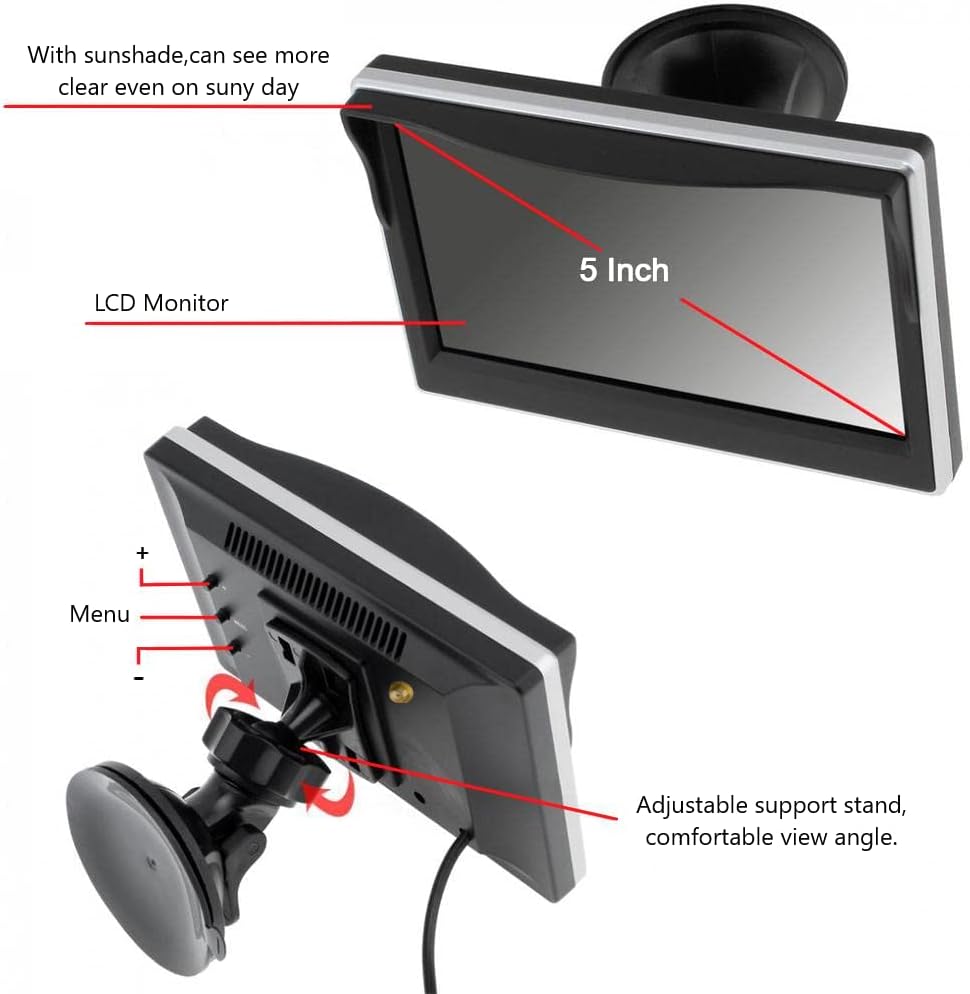
Imej: Sebelah view of the monitor highlighting the menu buttons for adjusting display settings and the adjustable support stand.
Bantuan Tempat Letak Kereta
The 170° ultra-wide-angle camera provides an expansive view, effectively minimizing blind spots. The monitor can display adjustable guide lines to assist with accurate reversing and parking. These guide lines can be toggled on or off via the monitor's menu.

Image: An overhead diagram illustrating the 170-degree wide-angle view and the use of adjustable parking guide lines for safe maneuvering.
Penglihatan Malam
The camera features superb night vision capabilities, allowing for clear visibility in low-light conditions. It utilizes ambient light from reversing lamps or streetlights, eliminating the need for additional light sources for effective night operation.

Image: A visual comparison demonstrating the enhanced clarity of the camera's super night vision compared to ordinary night vision.
Penyelenggaraan
The Bileeko Wireless Backup Camera Kit is designed for durability and minimal maintenance.
- Ketahanan Kamera: The camera boasts an IP69 waterproof rating, making it highly resistant to dust, water, and shock. It is built to withstand various weather conditions, including heavy rain, snow, and hot temperatures.
- Pembersihan: Periodically clean the camera lens and monitor screen with a soft, damp cloth. Avoid using abrasive cleaners or solvents that could damage the surfaces.
- Pemeriksaan Kabel: Regularly check all power cable connections for tightness and signs of wear or damage.

Imej: Dari dekat view of the camera demonstrating its IP69 waterproof rating with water splashing over it.
Menyelesaikan masalah
If you encounter issues with your Bileeko Wireless Backup Camera Kit, refer to the following common problems and solutions:
| Masalah | Kemungkinan Punca | Penyelesaian |
|---|---|---|
| Tiada imej pada monitor | No power to monitor or camera; Loose connections; Camera not activated. | Check if the monitor is plugged into the cigarette lighter and receiving power. Ensure the camera is correctly wired to the reversing lamp and ground. Verify all cable connections are secure. |
| Imej berkelip atau tidak stabil | Weak wireless signal; Electrical interference. | Ensure the monitor's antenna is securely attached and positioned for optimal reception. While the system uses stable digital signals, extreme electrical interference from other devices could rarely occur. Try repositioning the monitor or camera slightly. |
| Imej terlalu gelap/terang atau warnanya tidak jelas | Monitor display settings are incorrect. | Access the monitor's menu using the '+' and '-' buttons to adjust brightness, contrast, color, and hue settings. |
| Guide lines not visible or incorrect | Guide lines feature is turned off or misaligned. | Check the monitor's menu settings to ensure guide lines are enabled. If available, adjust their position or width through the menu. |
Spesifikasi
| Ciri | Spesifikasi |
|---|---|
| Jenama | Bileeko |
| Nombor Model | B0BCH7GV87 |
| Saiz Skrin | 5 Inci |
| Teknologi Paparan | LCD |
| Resolusi Tangkapan Video | 480p (Output resolution, monitor supports 1080P input) |
| Sudut Sebenar daripada View | 170 Darjah |
| Teknologi Penderia Optik | CCD |
| Jenis Penyambung | Wireless (2.4G Digital Signal) |
| Jenis Pemasangan | Lekapan Permukaan |
| Voltage | 12 Volt |
| Penilaian Kalis Air | IP69 |
| Penilaian Lux | 0.1 |
Maklumat Waranti
The Bileeko Wireless Backup Camera Kit comes with a 2-year limited warranty from the date of purchase. This warranty covers manufacturing defects and malfunctions under normal use. Please retain your proof of purchase for warranty claims.
For warranty service, please contact customer support with your product model number and a description of the issue.
Sokongan
For further assistance, technical support, or inquiries regarding your Bileeko Wireless Backup Camera Kit, please contact our customer service team.
- e-mel: support@bileeko.com (Cthample)
- Webtapak: www.bileeko.com/support (Cthample)
Please have your product model number (B0BCH7GV87) ready when contacting support to ensure efficient service.