
1. Pengenalan
This manual provides essential instructions for the safe and effective use of your Otech DIV004 Li-ion battery, designed for compatibility with Doro DFC-0130 portable telephones. Please read this manual thoroughly before installation and use to ensure optimal performance and safety.

Imej 1: Depan view of the Otech DIV004 Li-ion Battery Pack, showing brand, model, voltage, kapasiti dan amaran keselamatan.
2. Maklumat Keselamatan
Keselamatan anda adalah yang paling utama. Sila patuhi langkah berjaga-jaga berikut:
- Pelupusan: Do not dispose of the battery in fire. This may cause an explosion.
- mengecas: Use only the specified charger for your Doro DFC-0130 telephone. Using an incompatible charger may damage the battery or device and poses a fire risk.
- Litar pintas: Do not short circuit the battery terminals. This can lead to overheating, fire, or explosion.
- Suhu: Elakkan daripada mendedahkan bateri kepada suhu yang melampau (panas atau sejuk).
- kerosakan: Do not use the battery if it appears damaged, swollen, or leaking.
- Kanak-kanak: Jauhkan bateri daripada kanak-kanak.
3. Persediaan dan Pemasangan
Follow these steps to install the Otech DIV004 battery into your Doro DFC-0130 telephone:
- Matikan: Ensure your Doro DFC-0130 telephone is completely powered off before beginning installation.
- Keluarkan Penutup Bateri: Locate and carefully remove the battery compartment cover on the back of your telephone. Refer to your phone's original manual if you need assistance.
- Keluarkan Bateri Lama (jika berkenaan): If replacing an existing battery, gently lift it out of the compartment.
- Masukkan Bateri Baharu: Align the Otech DIV004 battery with the contacts in the battery compartment. Ensure the battery is inserted with the correct polarity, matching the markings inside the compartment. Do not force the battery into place.
- Perlindungan Selamat: Gantikan penutup petak bateri, pastikan ia terpasang dengan selamat pada tempatnya.
- Caj Permulaan: Adalah disyorkan untuk mengecas sepenuhnya bateri baharu sebelum penggunaannya yang pertama.
4. Operating Instructions (Charging)
To ensure the longevity and performance of your Otech DIV004 battery, follow these charging guidelines:
- Penggunaan Pertama: For optimal performance, fully charge the battery before its initial use.
- Keserasian Pengecas: Always use the original or a certified compatible charger designed for your Doro DFC-0130 telephone.
- Proses Pengecasan: Connect your telephone to its charger. The phone's display or indicator light will typically show that it is charging.
- Caj Penuh: Disconnect the charger once the battery is fully charged to prevent overcharging, although modern batteries and chargers have built-in protection.
- Elakkan Pelepasan Dalam: While Li-ion batteries do not suffer from 'memory effect', it is generally best to recharge them before they are completely depleted.
5. Penyelenggaraan
Proper maintenance will help extend the life of your Otech DIV004 battery:
- Storan: If storing the battery for an extended period, keep it in a cool, dry place, ideally at about 50% charge. Avoid extreme temperatures.
- Pembersihan: Periodically clean the battery contacts and the phone's battery terminals with a clean, dry cloth to ensure good connection.
- Elakkan Kerosakan Fizikal: Jangan jatuhkan, tebuk atau buka bateri.
- Kitar semula: When the battery reaches the end of its life, dispose of it responsibly at an authorized recycling facility. Do not discard with household waste.
6. Penyelesaian masalah
If you encounter issues with your Otech DIV004 battery, consider the following:
- Bateri Tidak Dicas:
- Ensure the charger is properly connected to both the phone and a working power outlet.
- Verify that the battery is correctly seated in the phone's compartment.
- Try using a different compatible charger or power outlet to rule out charger or outlet issues.
- Clean the battery and phone contacts.
- Hayat Bateri Pendek:
- Pastikan bateri telah dicas sepenuhnya.
- Reduce background applications or features on your phone that consume significant power.
- Battery life naturally diminishes over time and with usage cycles. If the battery is old, replacement may be necessary.
- Battery Swelling or Overheating:
- Hentikan penggunaan segera of the battery and phone.
- Carefully remove the battery if safe to do so and dispose of it properly at a recycling facility.
- Do not attempt to charge or use a swollen or excessively hot battery.
If problems persist, contact Otech customer support or your retailer for further assistance.
7. Spesifikasi
| Ciri | Spesifikasi |
|---|---|
| Jenama | Otech |
| Model | DIV004 |
| Keserasian | Doro DFC-0130 |
| Jenis Bateri | Li-ion |
| Voltage | 3.7V |
| Kapasiti | 850mAh |
| Tenaga | 3.14Wj |
| Pengeluar | Otech |
| ASIN | B0BBTKB9DJ |
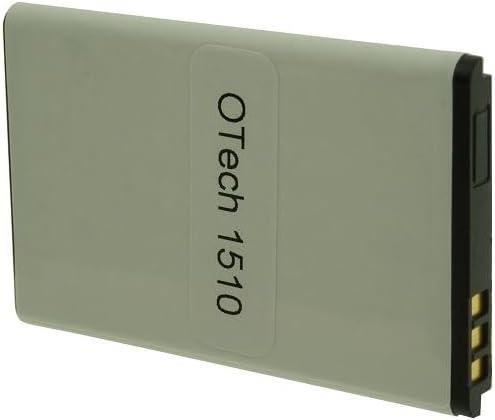
Imej 2: Belakang view of the Otech DIV004 Li-ion Battery Pack, showing the 'Otech 1510' label.
8. Waranti dan Sokongan
The Otech DIV004 battery comes with a Waranti 1 tahun dari tarikh pembelian. Waranti ini meliputi kecacatan pembuatan di bawah penggunaan biasa.
For warranty claims, technical support, or any questions regarding your Otech battery, please contact your retailer or Otech customer service directly. Please have your purchase receipt and product information available when contacting support.
Untuk maklumat lanjut, anda boleh melawati Otech brand page.