
pengenalan
This document provides essential information for the setup, operation, and maintenance of your Generic replacement remote control for AIWA Compact Disc CD Stereo Systems. This remote is designed to function as a direct replacement for the original remote controls of the listed compatible models. Please note that while this remote is highly compatible, some advanced or specific functions of your original system might not be fully supported. This remote operates using Infrared (IR) technology and cannot be programmed.
Nota Penting: As indicated by the manufacturer, this product typically does not include a printed instruction manual. This digital guide is provided to assist you with basic usage.
Persediaan
1. Pemasangan Bateri
The remote control requires two (2) AA batteries for operation. Batteries are not included with the remote.
- Cari petak bateri di belakang alat kawalan jauh.
- Luncurkan penutup petak bateri ke bawah atau mengikut arah yang ditunjukkan oleh anak panah untuk membukanya.
- Insert two AA batteries, ensuring the positive (+) and negative (-) terminals align correctly with the markings inside the compartment. Incorrect insertion can prevent the remote from functioning.
- Luncurkan penutup petak bateri kembali ke tempatnya sehingga ia berbunyi dengan selamat.

Rajah 1: Belakang view of the remote with the battery cover removed, illustrating the battery placement area.
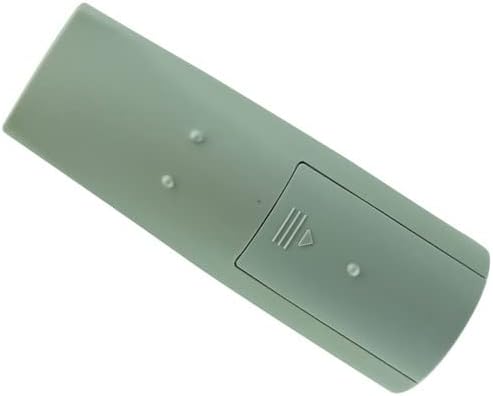
Rajah 2: Belakang view of the remote with the battery cover installed, ready for use.
2. Penggunaan Pertama
Once batteries are installed, the remote is ready for use. Point the remote control directly at your AIWA Compact Disc CD Stereo System and press any button to test its functionality. No programming or pairing is required as it is an Infrared (IR) remote.
Arahan Operasi
This section details the primary functions of the remote control buttons. Refer to the image below for button layout.

Rajah 3: Depan view alat kawalan jauh dengan susun atur butang.
| Butang | Fungsi |
|---|---|
| KUASA | Menghidupkan atau mematikan sistem stereo. |
| FUNGSI | Cycles through input sources (e.g., CD, Tuner, Tape, Aux). |
| Numeric Keypad (0-9, +10) | Direct selection of CD tracks, radio presets, or other numerical inputs. The "+10" button adds 10 to the current track/preset number. |
| BAND | Switches between FM and AM radio bands. |
| PRESET (Up/Down) | Menavigasi melalui pratetap radio yang disimpan. |
| TUNE (Up/Down) | Manually tunes radio frequencies up or down. |
| PLAY/PAUSE (▶/⏸) | Memulakan atau menjeda main balik CD. |
| STOP (⏹) | Menghentikan main balik CD. |
| SKIP (⏭/⏮) | Skips to the next or previous track on a CD. |
| REWIND/FAST FORWARD (⏪/⏩) | Fast forwards or rewinds within a track. |
| SET | Used for confirming settings, often in conjunction with navigation buttons. |
| JELAS | Clears current input or selection. |
| MONO TUNER | Switches the tuner between stereo and mono reception. |
| T-BASS | Activates or deactivates the bass boost feature. |
| TREBLE | Melaraskan tahap treble. |
| JILID (+/-) | Meningkatkan atau mengurangkan kelantangan induk. |
| DISC DIRECT PLAY (1, 2, 3) | Directly selects and plays a specific disc in a multi-disc changer (if applicable to your system). |
| JAM | Mengakses atau menetapkan jam sistem. |
For detailed operation of specific features of your AIWA stereo system, please refer to the original user manual of your stereo system.
Penyelenggaraan
Pembersihan
Untuk mengekalkan rupa dan fungsi alat kawalan jauh:
- Lap permukaan dengan kain lembut dan kering.
- Untuk kotoran degil, sedikit dampen kain dengan air atau pembersih yang lembut dan tidak melelas. Jangan gunakan bahan kimia yang keras atau bahan yang melelas.
- Avoid getting moisture into the button crevices or battery compartment.
Penggantian Bateri
Replace batteries when the remote's response becomes sluggish or it stops functioning. Always replace both AA batteries at the same time with new ones. Do not mix old and new batteries, or different types of batteries.
Penyimpanan
If the remote control will not be used for an extended period, remove the batteries to prevent leakage and potential damage to the remote.
Menyelesaikan masalah
| Masalah | Kemungkinan Punca | Penyelesaian |
|---|---|---|
| Jauh tidak berfungsi. | Bateri mati atau salah dimasukkan. | Check battery polarity (+/-). Replace with fresh AA batteries. |
| Jauh tidak berfungsi. | Obstruction between remote and stereo system. | Ensure a clear line of sight between the remote's IR emitter and the stereo system's IR receiver. |
| Jauh tidak berfungsi. | Remote is too far from the stereo system. | Move closer to the stereo system. The effective range is typically up to 20 feet (6 meters). |
| Certain functions do not work. | The replacement remote may not support all original functions. | This is a common limitation of universal or replacement remotes. Refer to your stereo system's original manual for functions not covered. |
| Remote is unresponsive after a drop. | Kerosakan dalaman. | If troubleshooting steps above do not resolve the issue, the remote may be damaged and require replacement. |
Spesifikasi
- Keserasian Model: AIWA CX-NR11, NSX-R20, CX-LEM52, RC-CAS07, XR-EM30, XR-EM31, XR-EM20, CX-LEM30, CX-LEM31, RC-CAS05, XR-EC10, XR-EC12, XR-TC80, CX-LEM50, CX-LEM20, NSX-R11, NSX-R17 Compact Disc CD Stereo Systems
- Sumber Kuasa: 2 x Bateri AA (tidak termasuk)
- Teknologi Ketersambungan: Inframerah (IR)
- Jenis Pengawal: Kawalan Butang
- Ciri Khas: IR remote, cannot be programmed
- Pengeluar: SZHKHXD
- Negara Asal: China
- ASIN: B0BBN5F2XG
Waranti dan Sokongan
As a generic replacement product, specific warranty information may vary. Please refer to the seller's return policy or contact the seller directly for any warranty-related inquiries or support needs. The manufacturer, SZHKHXD, typically handles support through the point of purchase.
For further assistance, you may contact the seller, SZHKHXD, through the Amazon platform where the product was purchased. Please provide your order number and a detailed description of the issue.