
1. Pengenalan
The ChunHee Wireless Caregiver Pager System (Model TY) is designed to provide a reliable and easy-to-use communication solution for caregivers and individuals needing assistance. This system includes a portable receiver and a call button, enabling users to alert their caregiver with a simple press of a button. It is ideal for home use, assisting the elderly, patients, pregnant women, children, and individuals with disabilities.

Image 1.1: The ChunHee Wireless Caregiver Pager System in use, showing both the call button and the portable receiver.
2. Kandungan Pakej
Sila sahkan bahawa semua item terdapat dalam pakej anda:
- 1 x Call Button (Transmitter)
- 1 x Penerima
- 1 x Lanyard (for call button)
- 1 x Accessory (e.g., small screwdriver for battery compartment)

Imej 2.1: Kandungan pakej produk.
3. Produk Lebihview
The system consists of two main components: the call button (transmitter) and the receiver. Understanding their parts will aid in setup and operation.
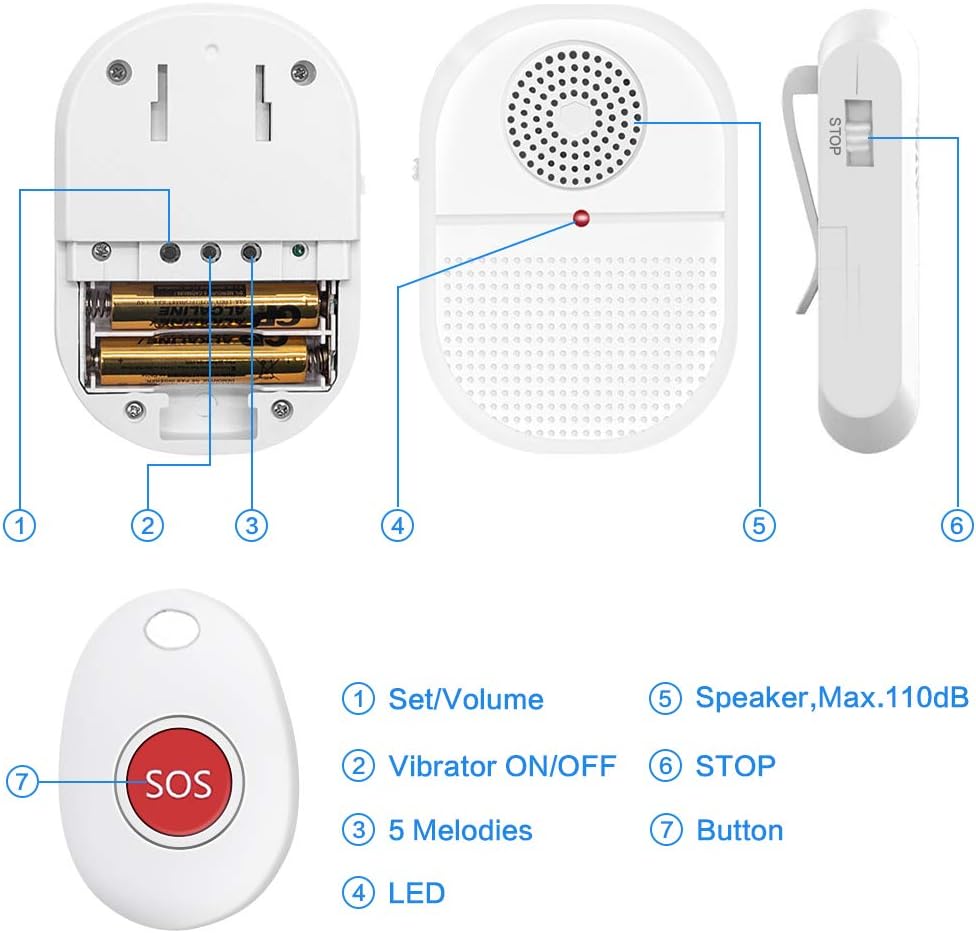
Image 3.1: Labeled components of the receiver and call button.
Ciri-ciri Penerima:
- Set/Volume Button: Adjusts volume levels and enters pairing mode.
- Vibrator ON/OFF Switch: Enables or disables vibration alerts.
- Melodies Button: Cycles through available alert melodies.
- Penunjuk LED: Flashes during alerts and pairing.
- Penceramah: Emits audible alerts (Max. 110dB).
- Butang STOP: Silences an active alert.
Ciri-ciri Butang Panggilan:
- Butang SOS: Activates the alert signal to the receiver.
- Reka bentuk kalis air: IP65 rated for splash resistance.
4. Persediaan
4.1 Pemasangan Bateri (Penerima)
The receiver requires 2 AAA batteries (included). To install:
- Cari petak bateri di bahagian belakang penerima.
- Use the provided accessory (small screwdriver) to open the battery cover.
- Masukkan 2 bateri AAA, pastikan kekutuban (+/-) betul.
- Pasang semula penutup bateri dan selamatkannya.
4.2 Pairing Transmitters (Call Buttons)
Follow these steps to pair the call button with the receiver:

Image 4.1: Step-by-step guide for pairing the call button with the receiver.
- Pastikan penerima dihidupkan.
- Tekan dan tahan butang Set/Volume button on the receiver until you hear a "di-di" sound and the receiver's LED indicator flashes. This indicates pairing mode.
- Cepat tekan SOS button on the call button. The receiver will emit another "di-di" sound and its indicator will flash.
- Tekan ke SOS button on the call button once more to confirm the pairing. The receiver should respond with an alert sound, confirming successful pairing.
5. Arahan Operasi
5.1 Activating an Alert
To send an alert, simply press the large SOS button on the call button. The receiver will then activate its alert (sound, vibration, and flashing LED) according to its current settings.
5.2 Adjusting Volume and Melodies
The receiver offers 4 volume levels (25dB-110dB) and 15 melodies.
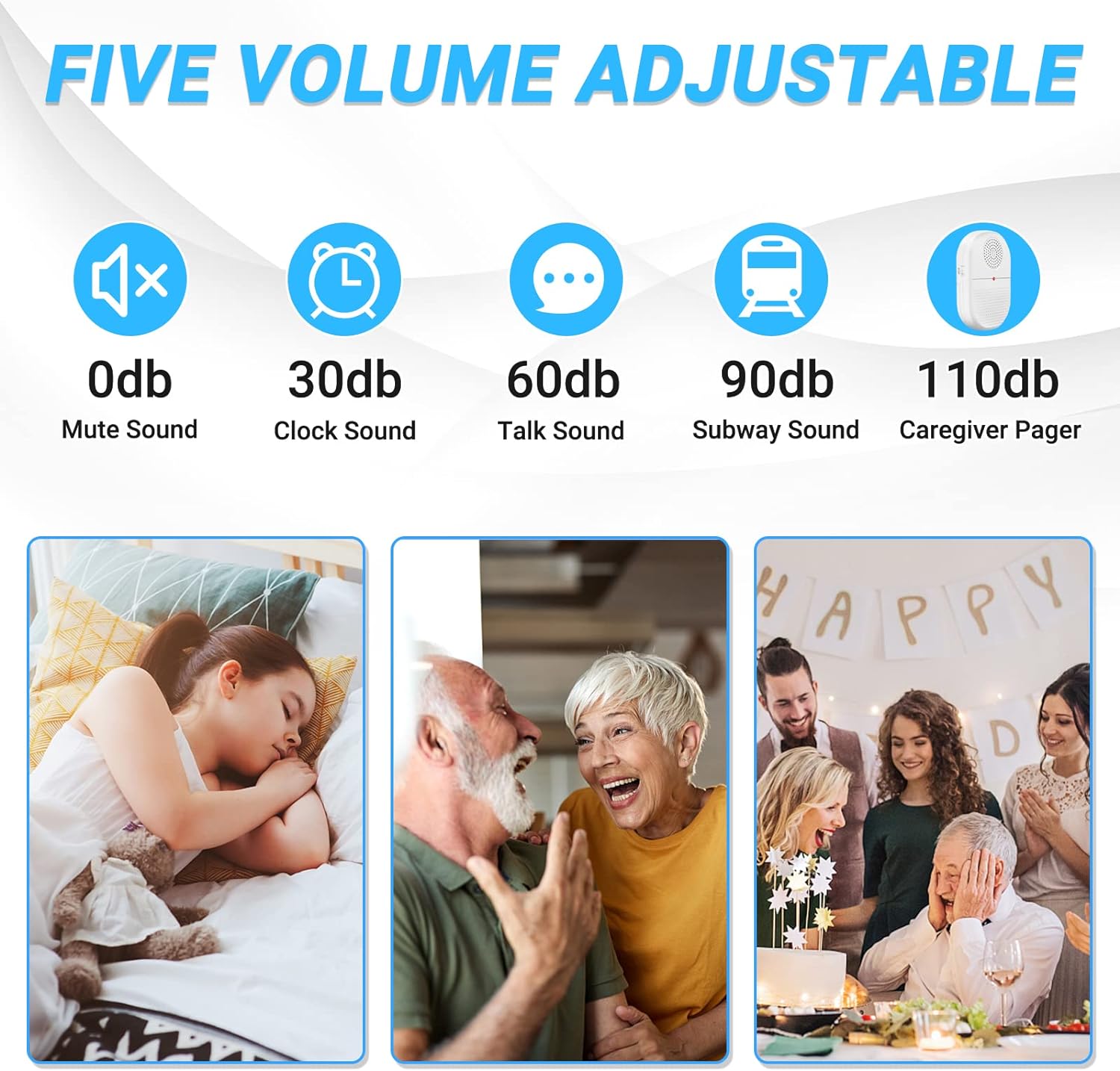
Image 5.1: Visual representation of the adjustable volume levels.
- Kelantangan: Tekan ke Set/Volume button repeatedly to cycle through the 4 volume levels.
- Melodi: Tekan ke melodi button repeatedly to cycle through the 15 available alert tones.
5.3 Mod Getaran
Gunakan Vibrator HIDUP/MATI switch on the side of the receiver to enable or disable the vibration alert. This is useful for silent alerts or for caregivers who are hearing impaired.
5.4 Stopping an Alert
To stop an active alert on the receiver, press the BERHENTI button located on the side of the receiver.
5.5 Julat Tanpa Wayar
The system boasts an operating range of over 800 feet in an open area. Walls and other obstructions may reduce this range.

Image 5.2: Depiction of the system's ultra-long wireless range.
5.6 Kemudahalihan dan Penempatan
The receiver can be carried in a pocket, clipped to a belt, or placed on a table. The call button can be worn around the neck using the lanyard or placed within easy reach.

Imej 5.3: Cthamples of how to carry the portable receiver and call button.
6. Aplikasi
This system is versatile and can be used in various scenarios to provide peace of mind and quick assistance:

Image 6.1: Various users benefiting from the caregiver pager system.
- Penjagaan Warga Emas: Allows seniors to call for help from anywhere in the home.
- Patient Monitoring: Provides a simple way for patients to alert caregivers.
- Wanita Hamil: Offers quick access to assistance during pregnancy.
- Kanak-kanak: Can be used by children to call for parental attention.
- Disabled Individuals: Enhances independence by providing an easy call system.
7. Penyelenggaraan
7.1 Pembersihan
Wipe the devices with a soft, dry cloth. Do not use abrasive cleaners or solvents. The call button is IP65 waterproof, meaning it is protected against water splashes, but it should not be submerged.

Image 7.1: The call button's IP65 waterproof feature.
7.2 Penggantian Bateri
Replace the AAA batteries in the receiver when the low battery indicator activates or when performance diminishes. The call button also has a low battery reminder feature.
8. Penyelesaian masalah
| Masalah | Kemungkinan Punca | Penyelesaian |
|---|---|---|
| Receiver does not alert when button is pressed. | 1. Bateri lemah atau dipasang dengan salah. 2. Call button and receiver are not paired. 3. Out of range. | 1. Replace receiver batteries; check polarity. 2. Re-pair the call button and receiver (refer to Section 4.2). 3. Move receiver closer to the call button. |
| Alert sound is too quiet or too loud. | Volume setting is not optimal. | Laraskan kelantangan menggunakan Set/Volume button on the receiver (refer to Section 5.2). |
| Receiver does not vibrate. | Vibration mode is off. | Togol Vibrator HIDUP/MATI switch on the receiver (refer to Section 5.3). |
| Reduced wireless range. | 1. Environmental interference (walls, electronics). 2. Low battery in either device. | 1. Reposition devices to minimize obstructions. 2. Replace batteries in both the receiver and call button. |
9. Spesifikasi
| Ciri | Perincian |
|---|---|
| Nombor Model | TY |
| Jenama | ChunHee |
| Sumber Kuasa | Dikuasakan Bateri |
| Bateri Penerima | 2 x AAA (Alkaline) |
| Call Button Batteries | Lithium Polymer (built-in, with low battery reminder) |
| Julat Operasi | 800+ kaki (kawasan terbuka) |
| Tahap Kebisingan | 25dB - 110dB (adjustable) |
| melodi | 15 pilihan |
| Penarafan Kalis Air (Butang Panggilan) | IP65 (kalis percikan) |
| Kaedah Kawalan | Touch (button press) |
| Dimensi Produk | Receiver: 4.72 x 5.91 x 3.94 inches Call Button: 3.54 x 1.77 x 0.79 inches (approx.) |
| Berat Barang | 5.3 auns (jumlah) |
10. Waranti dan Sokongan
For warranty information or technical support, please refer to the contact details provided with your purchase or visit the official ChunHee webtapak. Simpan resit pembelian anda untuk tuntutan waranti.