
1. Pengenalan
The RadioMaster TX12 MKII ELRS is a compact and powerful 16-channel remote control transmitter designed for RC drones and other remote-controlled models. It features an internal ExpressLRS module, supports both EdgeTX and OpenTX operating systems, and is equipped with precision hall-effect gimbals. This manual provides essential information for the safe and effective use of your TX12 MKII ELRS transmitter.

Image 1.1: The RadioMaster TX12 MKII ELRS Remote Control Transmitter, highlighting its compact design and key features like EdgeTX, OpenTX, ExpressLRS, and Hall Gimbals.
2. Maklumat Keselamatan
Always operate your remote control transmitter responsibly. Failure to follow safety guidelines can result in injury or damage to property. Keep the transmitter away from children. Do not operate in adverse weather conditions or near crowds.
2.1 Keselamatan Bateri
The TX12 MKII ELRS is designed to operate with 2 x 3.7V Li-ion cells or 2S 7.4V LiPo/LiFe cells. Ensure correct polarity when installing batteries. Only charge 2 x 3.7V Li-ion or 2S 7.4V LiPo/LiFe cells. Do not charge 6.6V LiFe or 3.6V Li-ion cells. Improper battery use or charging can lead to fire, explosion, or other hazards.
Imej 2.1: View of the battery compartment, showing the warning label regarding compatible battery types and charging precautions. An SD card is also visible in its slot.
3. Produk Lebihview
Familiarize yourself with the components of your TX12 MKII ELRS transmitter.

Image 3.1: A detailed diagram illustrating the various components and controls of the TX12 MKII ELRS transmitter, including gimbals, switches, buttons, and ports. Dimensions are also shown.
3.1 Komponen Utama
- Antena: For transmitting radio signals.
- Gimbals (Left & Right): Control sticks for pitch, roll, yaw, and throttle. Equipped with precision hall-effect sensors.
- Switches (SA, SB, SC, SD, SE, SF): Programmable 2-position and 3-position switches.
- Sliders (S1, S2): Proportional sliders for auxiliary functions.
- Buttons (SYS, RTN, PAGE>, PAGE<, TELE, MDL, Power, Trim): Navigation and control buttons for the operating system.
- Menu Wheel: For navigating menus and adjusting settings.
- Skrin LCD: Displays system information, model settings, and telemetry data.
- Port USB TYPE-C: For charging, connecting to a PC for simulator use, and firmware updates.
- Trainer Port: For connecting to another transmitter for training purposes.
- Slot Kad SD: For storing model data, sounds, and firmware.
4. Persediaan
4.1 Pemasangan Bateri
- Open the battery compartment cover on the rear of the transmitter.
- Insert two compatible 18650 Li-ion cells or a 2S 7.4V LiPo/LiFe battery pack, ensuring correct polarity.
- Tutup penutup petak bateri dengan selamat.
4.2 Kad SD
The TX12 MKII ELRS comes with an SD card pre-installed. This card contains the necessary files for the EdgeTX/OpenTX operating system, including model settings, sounds, and images. Do not remove the SD card during operation or firmware updates.

Imej 4.1: Gambar jarak dekat view of the microSD card correctly inserted into its dedicated slot within the battery compartment.
4.3 Mengecas
The transmitter supports USB-C charging with QC3.0 support. Connect a USB-C cable to the TYPE-C USB port on the top of the transmitter and to a suitable USB power source. The charging indicator on the screen will show the charging status.

Imej 4.2: Atas view of the TX12 MKII ELRS, highlighting the USB-C data/charging port and the TRS 3.5mm trainer socket.
4.4 Perisian tegar
The TX12 MKII ELRS comes with the EdgeTX operating system installed from the factory. For information on updating firmware or switching to OpenTX, please refer to the official RadioMaster website or the EdgeTX/OpenTX documentation.
5. Operasi
5.1 Hidupkan/Mati Kuasa
- Untuk Menghidupkan: Tekan dan tahan butang kuasa sehingga skrin menyala.
- Untuk Mematikan: Press and hold the power button. A confirmation prompt will appear; select 'Yes' to power off.
5.2 Pelarasan Gimbal
The precision hall-effect gimbals are adjustable without disassembly. The travel range can be set between 38° and 54° to suit your preference.

Image 5.1: Illustration showing the adjustable range of the Hall Gimbals, from a minimum of 38 degrees to a maximum of 54 degrees.
5.3 Kawalan Asas
- SYS Button: Mengakses tetapan sistem.
- RTN Button: Kembali ke menu atau skrin sebelumnya.
- PAGE> / PAGE< Buttons: Navigates between pages within menus.
- TELE Button: Accesses telemetry screens.
- MDL Button: Accesses model settings.
- Menu Wheel: Scrolls through options and confirms selections.

Imej 5.2: Jarak dekat view of the SYS, RTN, PAGE, and TELE buttons on the transmitter's control panel.
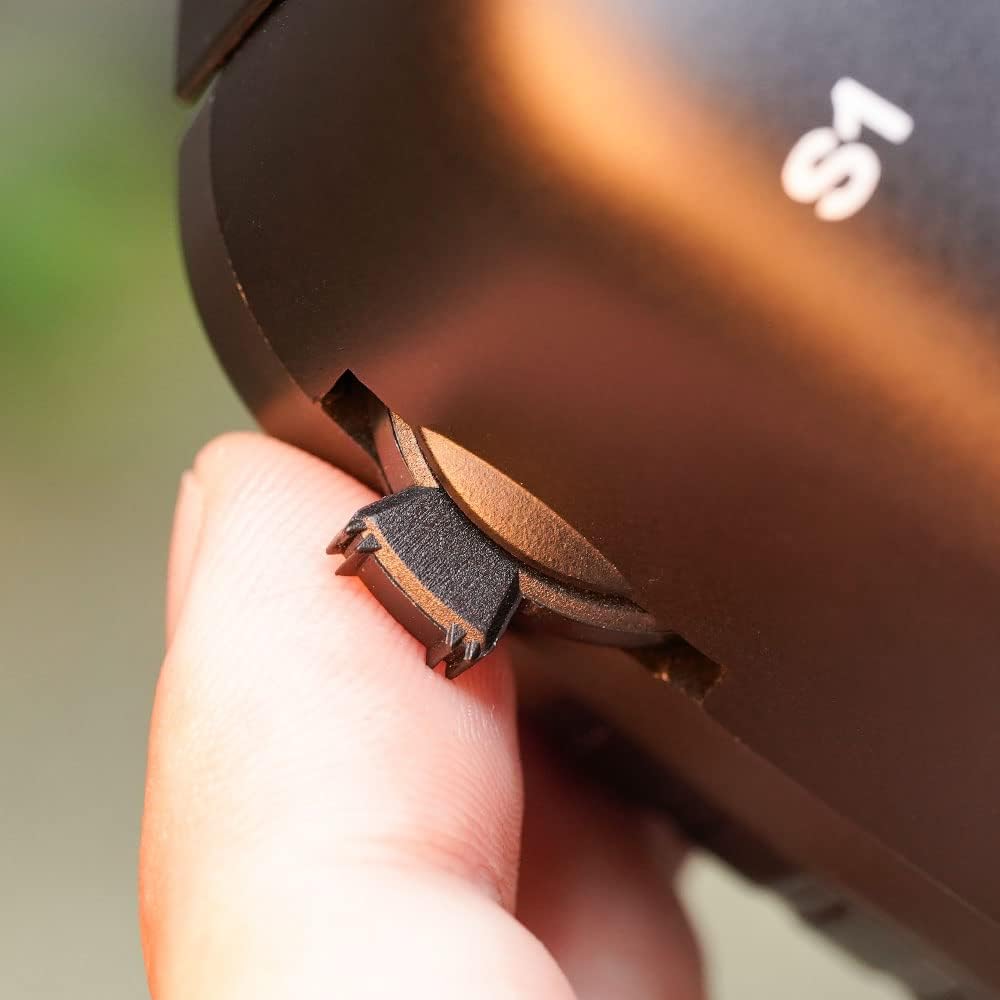
The S1 and S2 slider grips have been improved for better tactile feedback and control.

Imej 5.3: Perincian view of the improved S1/S2 slider grip, designed for enhanced user comfort and control.
5.4 Pengikatan dengan Penerima
The TX12 MKII ELRS features an internal ExpressLRS module. To bind your transmitter with an ExpressLRS receiver, ensure both devices are powered on and in binding mode. Follow the specific binding procedure outlined in your receiver's manual and the EdgeTX/OpenTX documentation for ExpressLRS.
5.5 Simulator Use and BLE Joystick Mode
The transmitter supports USB simulators, allowing you to practice flying on a computer. Additionally, the ExpressLRS version supports BLE (Bluetooth Low Energy) Joystick Mode, enabling wireless connection to PCs, tablets, and phones for simulator use and games.

Image 5.4: Visual representation of the TX12 MKII ELRS connected to a laptop for simulator use via USB, and an icon indicating support for BLE Joystick Mode for wireless connections.
6. Penyelenggaraan
- Pembersihan: Use a soft, dry cloth to clean the transmitter. Avoid using solvents or abrasive cleaners.
- Storan: Simpan pemancar di tempat yang sejuk dan kering, jauh daripada cahaya matahari langsung dan suhu yang melampau. Tanggalkan bateri jika disimpan untuk tempoh yang lama.
- Kemas kini Firmware: Regularly check for and install the latest firmware updates for EdgeTX/OpenTX and the ExpressLRS module to ensure optimal performance and access to new features.
7. Penyelesaian masalah
- Transmitter will not power on: Ensure batteries are correctly installed and fully charged. Check battery compartment for any loose connections.
- Binding issues: Verify that both transmitter and receiver are in binding mode. Ensure the correct ExpressLRS firmware version is installed on both devices. Check the receiver's manual for specific binding steps.
- Controls unresponsive: Check model settings in EdgeTX/OpenTX. Ensure the receiver is properly bound and powered. Inspect physical connections to the receiver.
- Skrin kosong atau beku: Try restarting the transmitter. If the issue persists, consider performing a firmware re-flash (refer to official documentation).
8. Spesifikasi
| Ciri | Spesifikasi |
|---|---|
| Model | RadioMaster TX12 MKII ELRS |
| Saluran | 16 |
| Modul RF Dalaman | ExpressLRS |
| Sistem Operasi | EdgeTX (factory installed), OpenTX compatible |
| Gimbal | Precision Hall-Effect Gimbals |
| Pemproses | STM32F407 |
| Mengecas | USB-C with QC3.0 support |
| Dimensi Produk | 6 x 3 x 7 inci (159 x 108 x 170 mm) |
| Berat Barang | 12.8 auns (362.87 gram) |
| Kad SD | Termasuk |
9. Waranti dan Sokongan
For warranty information, technical support, or service inquiries, please contact RadioMaster customer support through their official webtapak. Simpan bukti pembelian anda untuk tuntutan waranti.