
1. Produk Lebihview
The COSTWAY Home Dehumidifier is designed to efficiently remove excess moisture from your indoor environment, creating a healthier and more comfortable living space. This model can remove up to 50 liters of moisture per day and is suitable for areas up to 60 square meters. It features multiple operating modes, two fan speeds, and can be controlled via a touch panel or a Wi-Fi enabled smartphone application. Key features include a 24-hour timer, overflow protection, and options for both manual and continuous drainage.

Rajah 1: Depan view of the COSTWAY Home Dehumidifier, showcasing reka bentuknya yang padat dan moden.
Practical Details

Figure 2: This image highlights practical design elements including integrated portable handles for easy movement, smooth-rolling wheels for mobility, a clear visible water level indicator on the tank, and a dedicated storage area for the power cord.
2. Arahan Keselamatan Penting
Sila baca semua arahan dengan teliti sebelum menggunakan perkakas ini dan simpannya untuk rujukan masa hadapan. Kegagalan mematuhi arahan ini boleh mengakibatkan renjatan elektrik, kebakaran atau kecederaan serius.
- Pastikan bekalan kuasa voltage sepadan dengan label penarafan pada penyahlembap.
- Jangan kendalikan penyahlembap dengan kord atau palam yang rosak. Jika kord rosak, ia mesti digantikan oleh pengilang atau ejen servis yang berkelayakan.
- Sentiasa letakkan unit di atas permukaan yang stabil dan rata untuk mengelakkan terbalik dan tumpahan air.
- Keep the appliance at least 20 cm away from walls or other objects to ensure proper airflow.
- Jangan masukkan jari atau benda asing ke dalam saluran masuk atau keluar udara.
- Cabut plag penyahlembap sebelum membersihkan, mengalihkan atau melakukan sebarang penyelenggaraan.
- Perkakas ini tidak dimaksudkan untuk digunakan oleh orang (termasuk kanak-kanak) yang kurang keupayaan fizikal, deria, atau mental, atau kurang pengalaman dan pengetahuan, melainkan mereka telah diberi pengawasan atau arahan mengenai penggunaan perkakas oleh orang yang bertanggungjawab untuk keselamatan mereka .
- Jangan gunakan perkakas ini di kawasan yang menyimpan cecair atau gas mudah terbakar.
3. Kandungan Pakej
Selepas membongkar, sila pastikan semua item yang disenaraikan di bawah ada dan tidak rosak:
- 1 x COSTWAY Home Dehumidifier
- 1 x 100 cm Drain Hose
- 1 x Manual Arahan
4. Persediaan
4.1 Membongkar
Keluarkan dehumidifier dengan berhati-hati daripada pembungkusnya. Simpan semua bahan pembungkusan untuk penyimpanan atau pengangkutan masa hadapan.
4.2 Penempatan
Place the dehumidifier on a firm, level surface in the area where dehumidification is desired. Ensure there is at least 20 cm of clear space around the air inlet and outlet for optimal performance. Avoid placing the unit near heat sources or in direct sunlight.

Figure 3: The dehumidifier can be effectively placed in various rooms such as living rooms, bedrooms, bathrooms, and basements to manage humidity.
4.3 Sambungan Kuasa
Pasangkan kord kuasa ke soket elektrik yang dibumikan. Unit ini kini sedia untuk digunakan.
5. Arahan Operasi
5.1 Panel Kawalan Selesaiview

Figure 4: A close-up of the intuitive touch control panel featuring an LED display. Labels indicate functions such as 24-hour timer, fan speed (high/low), 'Water Full' indicator, humidity level adjustment, 4 modes (saving, fan, automatic dehumidification, continuous drying), and power on/off.
5.2 Hidupkan/Mati Kuasa
Tekan ke KUASA butang untuk menghidupkan atau mematikan dehumidifier.
5.3 Setting Humidity Level
In Automatic Dehumidification mode, press the TAMBAH or TOLAK buttons to set your desired humidity level between 30% and 80%.
5.4 Mod Pengendalian
Tekan ke MODE butang untuk melihat mod yang tersedia:
- Penyahlembapan Automatik: The unit will automatically turn on or off based on the difference between the ambient humidity and your set humidity level.
- Continuous Drying: Operates continuously regardless of ambient humidity, ideal for drying clothes.
- Mod tidur: Indicators turn off or dim automatically to ensure a comfortable and undisturbed sleeping environment. The maximum noise level is less than 46 dB.
- Mod Kipas: The fan operates at selected speed, and the display shows the ambient temperature.
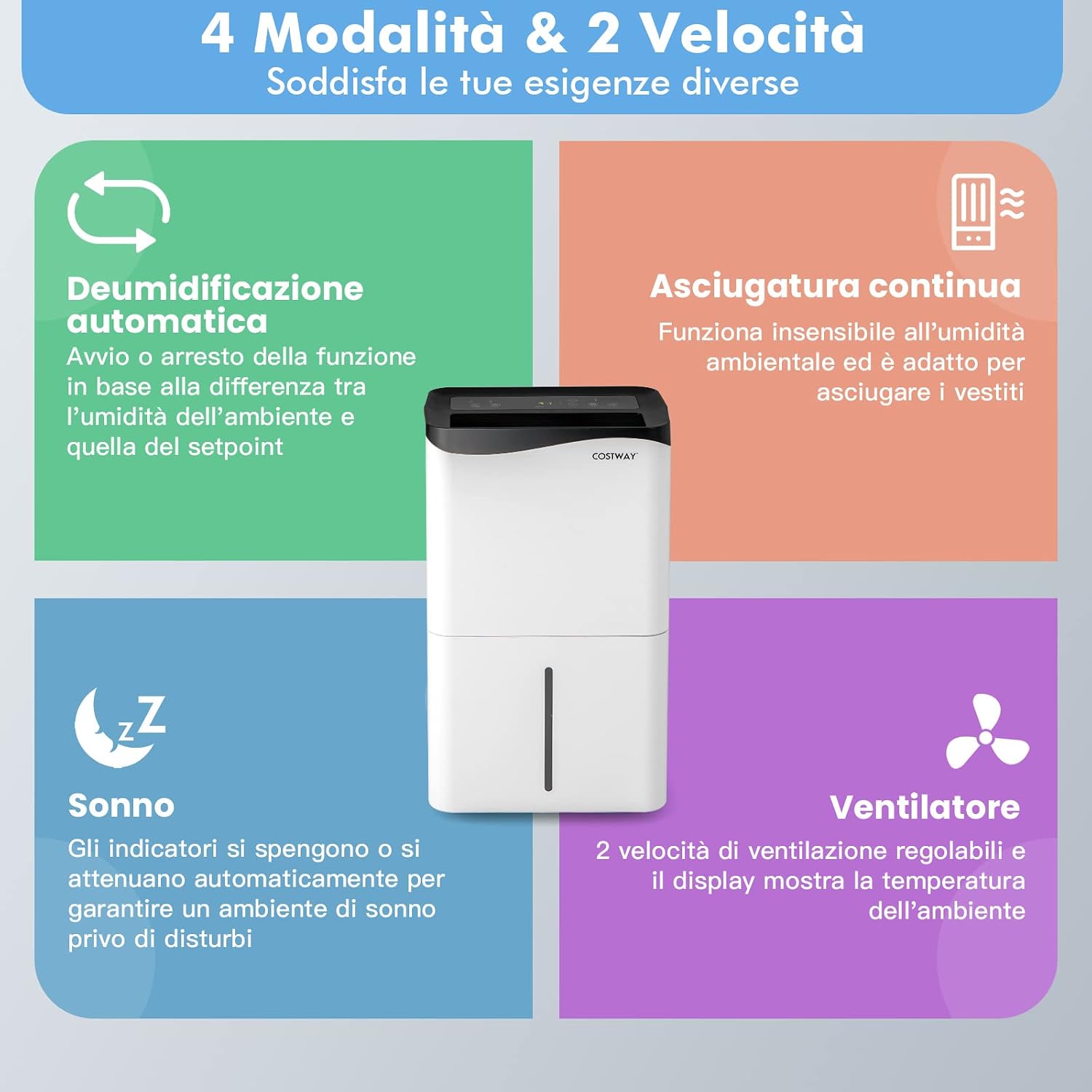
Figure 5: A visual guide detailing the four operating modes: Automatic Dehumidification, Continuous Drying, Sleep Mode, and Fan Mode, along with the two available fan speeds. Each mode is described with its function.

Figure 6: An image depicting the dehumidifier in a bedroom setting, emphasizing its quiet operation (below 46 dB) suitable for peaceful sleep. It compares its noise level to a library, office, and street.
5.5 Kelajuan Kipas
Tekan ke LAJU button to switch between high and low fan speeds.
5.6 Fungsi Pemasa
Tekan ke PEMASA button to set the 24-hour timer for automatic power-on or power-off.
5.7 Kawalan Wi-Fi
The dehumidifier can be controlled remotely using the 'Smart Life' app, available for Android and iOS devices. Follow the app's instructions for pairing and remote operation.

Figure 7: A user interacting with the 'Smart Life' app on a smartphone to control the dehumidifier, highlighting the Wi-Fi connectivity and ease of remote operation.
6. Saliran Air
The dehumidifier offers two drainage options: manual and continuous.
6.1 Manual Drainage
When the 5-liter water tank is full, the unit will automatically shut off and emit an audible alert. Carefully remove the water tank from the unit and empty the collected water. Reinsert the tank firmly until it clicks into place.
6.2 Saliran Berterusan
For continuous operation without needing to empty the tank, attach the included 100 cm drain hose to the continuous drainage port on the back of the unit. Ensure the hose is directed downwards to a suitable drain or container, allowing gravity to facilitate water flow.
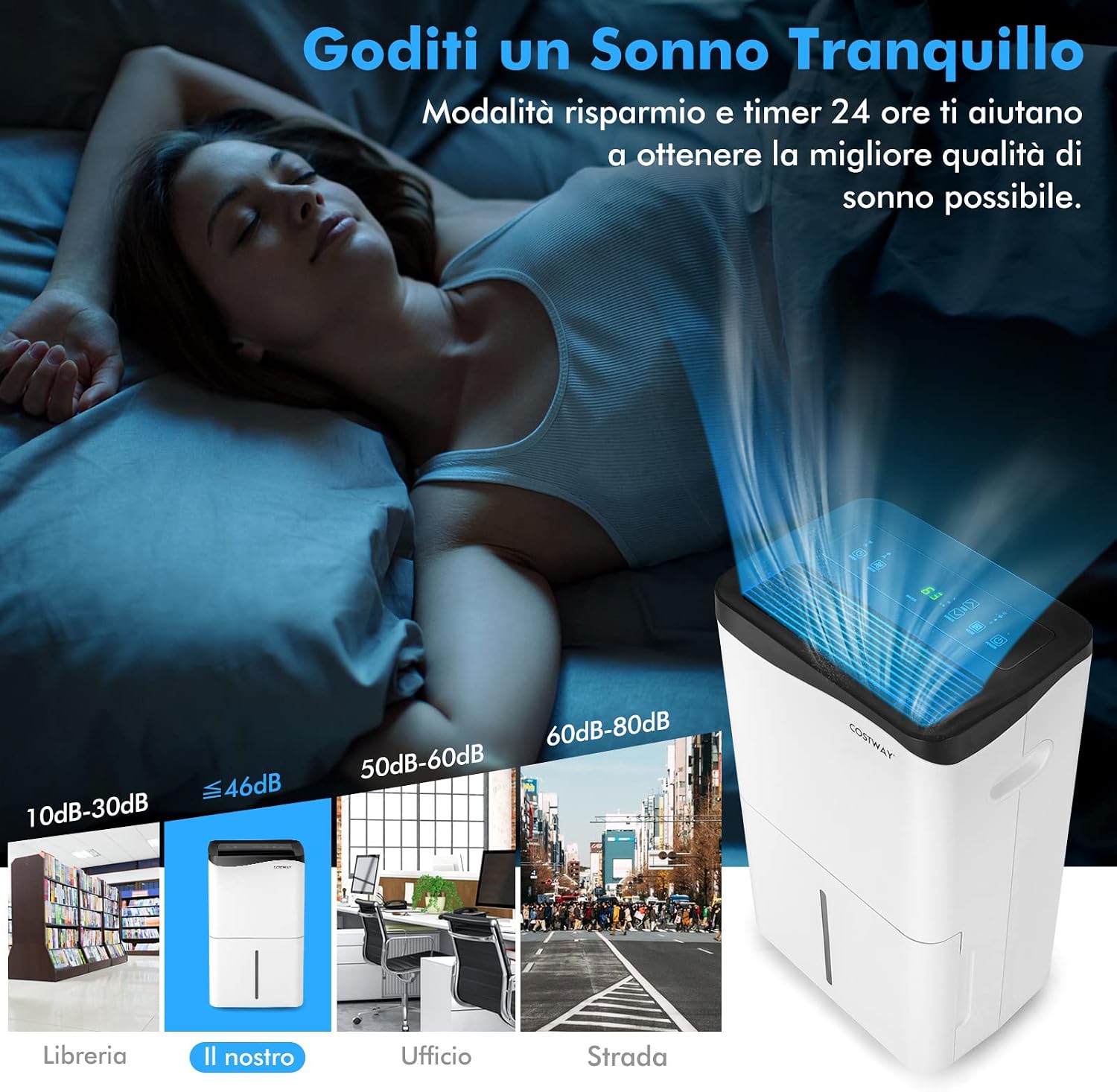
Figure 8: This image illustrates both manual and continuous drainage options. Manual drainage shows the removable 5L water tank being emptied, with an overflow protection feature. Continuous drainage shows the connection point for the included 100cm drain hose.
7. Penyelenggaraan
Penyelenggaraan tetap memastikan prestasi optimum dan memanjangkan jangka hayat penyahlembap anda.
7.1 Membersihkan Penapis Udara
The high-density air filter is removable and washable. It is recommended to clean the filter regularly (e.g., every two weeks or as needed) to prevent dust buildup and maintain air quality. To clean, remove the filter, wash it with mild detergent and water, rinse thoroughly, and allow it to air dry completely before reinserting. You may also use a vacuum cleaner to remove dust from the surface.

Figure 9: This image demonstrates the removable and washable high-density air filter, showing how it can be easily detached for regular cleaning to maintain a healthy and comfortable indoor environment.
7.2 Membersihkan Bahagian Luar
Lap bahagian luar unit dengan lembut, damp kain. Jangan gunakan pembersih atau pelarut yang melelas.
7.3 Penyimpanan
If storing the dehumidifier for an extended period, ensure the water tank is empty and clean, and the filter is clean and dry. Store the unit in a cool, dry place, preferably in its original packaging.
8. Penyelesaian masalah
Jika anda menghadapi masalah dengan penyahlembap anda, sila rujuk kepada masalah dan penyelesaian biasa berikut:
| Masalah | Kemungkinan Punca | Penyelesaian |
|---|---|---|
| Dehumidifier tidak dihidupkan. | No power supply; power cord not plugged in; water tank full or not properly inserted. | Periksa sambungan kuasa; kosongkan dan masukkan semula tangki air dengan betul. |
| Unit berjalan tetapi tidak mengumpul air. | Ambient humidity is too low; temperature is too low; air filter is clogged. | Ensure ambient humidity is above 30%; ensure room temperature is above 5°C; clean the air filter. |
| Unit bising. | Unit tidak berada di atas permukaan yang rata; kipas tersumbat. | Place on a level surface; check for obstructions in the fan area. |
| Isu sambungan Wi-Fi. | Kata laluan Wi-Fi yang salah; penghala terlalu jauh; apl tidak dikemas kini. | Verify Wi-Fi password; move unit closer to router; update 'Smart Life' app. |
Jika masalah berterusan selepas mencuba penyelesaian ini, sila hubungi sokongan pelanggan.
9. Spesifikasi
| Ciri | Perincian |
|---|---|
| Jenama | COSTWAY |
| Nama Model | 50 L/24H 60 sqm |
| Kapasiti Dehumidifikasi | 50 Liter sehari |
| Kawasan Liputan | 60 meter persegi |
| Isipadu Tangki Air | 5 Liter |
| Dimensi Produk (DxWxH) | 25.5P x 37p x 62T cm |
| Bilangan Kelajuan | 2 |
| Mod Pengendalian | Automatic, Continuous Drying, Sleep, Fan |
| Ciri Khas | LED power indicator, Touch Panel, Wi-Fi Control, 24H Timer, Overflow Protection |
| warna | putih |
| Berat Barang | 19 Kilogram |
| Komponen Termasuk | 1 x Penyahlembap, 1 x Hos Saliran |
| Negara Asal | China |
10. Maklumat Waranti
This product comes with a manufacturer's warranty. Please refer to the warranty card included in your product packaging or visit the official COSTWAY weblaman web untuk terma dan syarat jaminan terperinci. Simpan resit pembelian anda sebagai bukti pembelian untuk sebarang tuntutan jaminan.
11. Sokongan Pelanggan
For technical assistance, troubleshooting beyond this manual, or spare parts, please contact COSTWAY customer support. Contact information can typically be found on the product packaging, the official COSTWAY weblaman web atau platform pembelian anda.


