
pengenalan
Thank you for choosing the Varmilo MA Series V2 Summit R2 Mechanical Keyboard. This manual provides essential information for setting up, operating, maintaining, and troubleshooting your new keyboard. Please read this manual thoroughly to ensure optimal performance and longevity of your device.
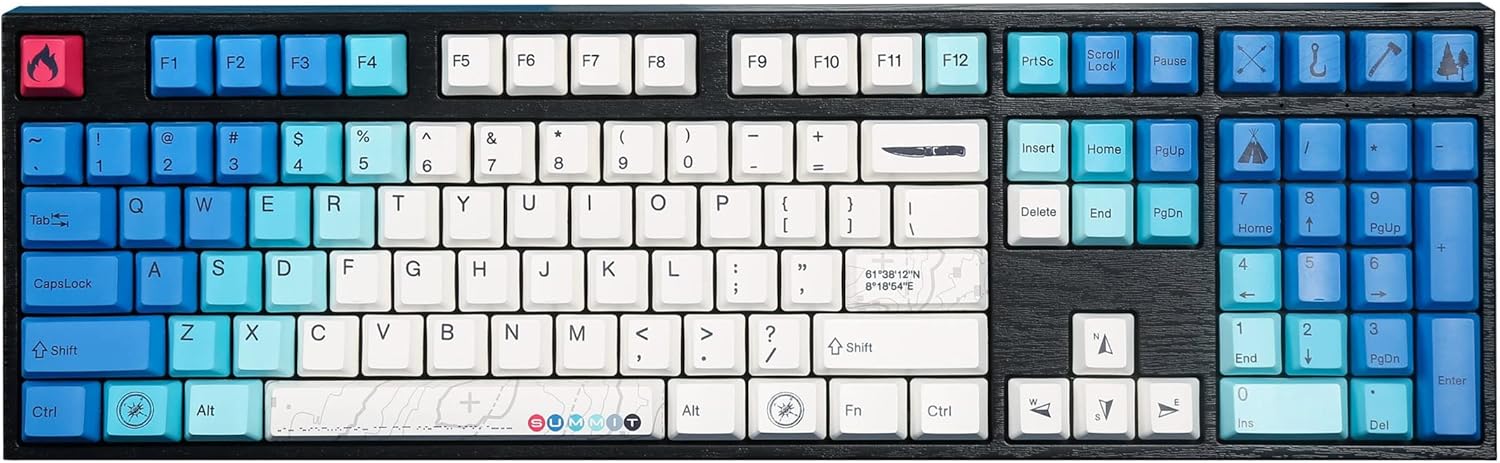
Image: The Varmilo MA Series V2 Summit R2 Mechanical Keyboard, showcasing its full layout and unique keycap design.
Persediaan
1. Tanpa Peti Masuk
Carefully remove the keyboard and all accessories from the packaging. Ensure the following items are present:
- Varmilo MA Series V2 Summit R2 Mechanical Keyboard
- Kabel USB-C
- Penarik Keycap (jika disertakan)
- Manual Pengguna (dokumen ini)
2. Menyambung Papan Kekunci
- Cari port USB-C di bahagian belakang papan kekunci.
- Sambungkan satu hujung kabel USB-C yang disediakan pada papan kekunci.
- Sambungkan hujung kabel USB-C yang satu lagi ke port USB yang tersedia pada komputer anda.
- Papan kekunci ini boleh dipasang dan digunakan dan akan dikenali secara automatik oleh sistem pengendalian anda.
3. Melaraskan Sudut Papan Kekunci
The Varmilo MA Series V2 features a double-section kickstand, allowing for two different typing angles. Gently flip out the desired sections of the kickstand located on the underside of the keyboard to adjust its height and angle for ergonomic comfort.

Imej: Side profile of the Varmilo keyboard, illustrating the adjustable kickstand in an extended position.
Arahan Operasi
1. Fungsi Utama Asas
The keyboard features a standard full-size (104-key) layout. All alphanumeric and standard function keys operate as expected. The Varmilo EC Ivy V2 switches provide a smooth and responsive typing experience.
2. Function (Fn) Key Combinations
The Fn key (typically located near the right Alt key) allows access to secondary functions printed on certain keycaps. Hold down the Fn key and press the desired function key simultaneously.
- Fn + F1-F12: Multimedia controls (e.g., volume, play/pause, stop).
- Fn + Kekunci Anak Panah: LED brightness or effect control (refer to specific keycap legends).
- Fn + Menang: Kunci/Buka Kunci Windows.

Imej: Dari dekat view of the right side of the Varmilo keyboard, highlighting the special function keys and their legends.
3. LED Backlighting Control
The keyboard features White LED backlighting. Use the Fn key combinations to adjust the brightness and switch between various lighting effects. Specific key legends will indicate the corresponding functions for LED control.
Penyelenggaraan
1. Membersihkan Papan Kekunci
Untuk mengekalkan rupa dan fungsi papan kekunci:
- Putuskan sambungan papan kekunci daripada komputer anda sebelum membersihkan.
- Gunakan kain lembut dan tidak berbulu sedikit dampdicairkan dengan air atau larutan pembersih lembut untuk mengelap penutup kekunci danasing.
- Untuk habuk dan serpihan di antara penutup kekunci, gunakan udara termampat.
- Avoid using harsh chemicals, abrasives, or solvents, as these can damage the PBT keycaps and finish.
2. Penanggalan dan Penggantian Penutup Kekunci
The keyboard features durable Dye Sub PBT keycaps. If you need to remove keycaps for deep cleaning or customization:
- Use the provided keycap puller (if applicable) or a similar tool.
- Gently attach the keycap puller to the keycap and pull straight up to remove it. Avoid twisting or excessive force.
- Untuk memasangnya semula, sejajarkan penutup kekunci dengan batang suis dan tekan ke bawah dengan kuat sehingga ia klik pada tempatnya.

Image: A collection of individual Varmilo keycaps, including special design keycaps, demonstrating their PBT material and dye-sublimated legends.
Menyelesaikan masalah
If you encounter issues with your Varmilo keyboard, please refer to the following common solutions:
- Papan Kekunci Tidak Membalas:
- Pastikan kabel USB-C disambungkan dengan selamat pada papan kekunci dan komputer.
- Cuba sambungkan papan kekunci ke port USB lain pada komputer anda.
- Uji papan kekunci pada komputer lain untuk menolak isu khusus sistem.
- Mulakan semula komputer anda.
- LEDs Not Working or Incorrect:
- Ensure the LED brightness is not set to the lowest level using Fn key combinations.
- Check if any specific lighting modes are active that might turn off certain LEDs.
- Kunci Tidak Mendaftar:
- Remove the keycap and inspect the switch for any obstructions.
- Clean around the switch stem with compressed air.
Tetapan Semula Kilang
If issues persist, a factory reset may resolve them. Consult the Varmilo official website or support for specific reset procedures for your model, as these can vary.
Spesifikasi
The following are the technical specifications for the Varmilo MA Series V2 Summit R2 Mechanical Keyboard:
| Ciri | Perincian |
|---|---|
| Jenama | Varmilo |
| Model | MA Series V2 Summit R2 |
| Susun atur | Full-size (104 + 4 keys) |
| Jenis Suis | Varmilo EC Ivy V2 Mechanical Switches |
| Bahan Kekunci | Dye Sub PBT |
| Ketersambungan | USB-C |
| Pencahayaan latar | LED putih |
| bahan | Polybutylene Terephthalate, Silicone |
| Sumber Kuasa | USB Powered |
| Peranti Serasi | Komputer (melalui USB-C) |
Waranti dan Sokongan
Varmilo products are manufactured to high-quality standards. For information regarding warranty coverage, technical support, or service inquiries, please visit the official Varmilo weblaman web atau hubungi khidmat pelanggan mereka secara langsung. Simpan resit pembelian anda sebagai bukti pembelian untuk tuntutan jaminan.
Official Varmilo Store: Varmilo Store on Amazon