
pengenalan
Terima kasih kerana membeliasing the Polarlander 9602G 1 Din Car Stereo. This manual provides detailed instructions for the installation, operation, and maintenance of your new multimedia player. Please read this manual thoroughly before use to ensure proper functionality and to prevent damage.
The Polarlander 9602G features a 7-inch retractable HD touchscreen, GPS navigation, Bluetooth connectivity, FM radio, USB/TF/AUX input, Mirror Link for Android/iOS devices, steering wheel control compatibility, and support for DVR and rear view kamera.
Persediaan dan Pemasangan
1. Kandungan Pakej
Sebelum pemasangan, sila pastikan semua komponen ada:
- Unit Utama (Stereo Kereta)
- Manual Pengguna
- Installation Keys (2)
- Kord Kuasa (3)
- Alat Kawalan Jauh
- Antena GPS
- belakang View Kamera
- DVR
2. Gambarajah Pendawaian Selesaiview
The unit requires a 12V DC power supply. Ensure all connections are secure and correctly matched to your vehicle's wiring harness. Incorrect wiring can cause damage to the unit or vehicle electrical system.
- Kuasa: Connect the yellow wire to the constant 12V supply, the red wire to the accessory 12V supply (switched with ignition), and the black wire to ground.
- Penceramah: Connect the speaker wires to your vehicle's speakers. Ensure correct polarity for optimal sound.
- Antena GPS: Connect the GPS antenna to the dedicated port on the rear of the unit and mount it in a location with a clear view dari langit.
- belakang View kamera: Connect the camera's video output to the 'CAM IN' port and its power to the reverse light circuit for automatic activation.
- DVR: Connect the DVR to the designated USB port or input.
- Kawalan Roda Stereng: Connect the steering wheel control wires to your vehicle's steering wheel control interface, if applicable.
3. Pemasangan Fizikal
Install the 1 Din unit into your vehicle's dashboard opening. Secure it using the provided installation keys or mounting hardware. Ensure the retractable screen mechanism has sufficient clearance to operate freely.

Image: Unit dimensions for installation reference. The unit measures approximately 18.8cm (width) x 5cm (height) x 16.5cm (depth) with the screen retracted, and the screen extends to 7 inches.
Arahan Operasi
1. Kawalan Asas
- Hidupkan/Mati Kuasa: Tekan butang kuasa untuk menghidupkan atau mematikan unit.
- Kelantangan: Gunakan tombol putar atau kawalan skrin sentuh untuk melaraskan kelantangan.
- Penarikan Balik Skrin: The 7-inch screen is retractable. Use the dedicated button or touchscreen option to extend or retract the display.
- Skrin sentuh: Navigasi menu dan fungsi kawalan dengan menyentuh skrin.
2. Navigasi GPS
The unit comes with built-in GPS functionality. Access the navigation application from the main menu. Ensure the GPS antenna is properly installed for accurate positioning.

Image: The car stereo displaying GPS navigation, showing a map with route guidance and traffic information.
3. Kesambungan Bluetooth
Gandingkan telefon mudah alih anda melalui Bluetooth untuk panggilan bebas tangan dan penstriman audio.
- Pergi ke menu Bluetooth pada stereo kereta.
- Dayakan Bluetooth pada telefon mudah alih anda dan cari peranti yang tersedia.
- Select 'Topway(3A30)' or similar device name from your phone's list.
- Enter the PIN '0000' if prompted.
- Setelah berpasangan, anda boleh membuat/menerima panggilan dan memainkan muzik secara wayarles.
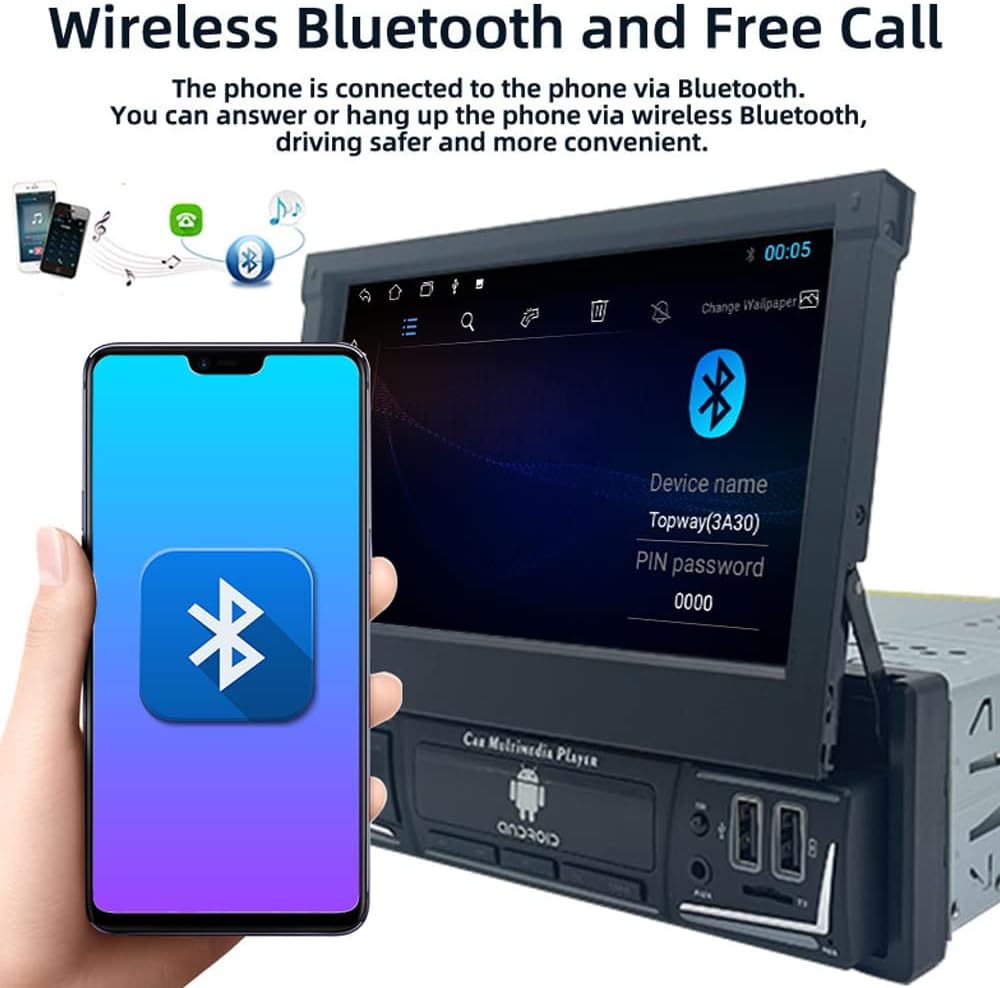
Image: The car stereo displaying the Bluetooth pairing screen, indicating a device name and PIN for connection.
4. Radio FM
Akses fungsi radio FM untuk mendengar stesen kegemaran anda.
- Imbasan Auto: Use the 'AS' button to automatically search and store available stations.
- Penalaan Manual: Use the arrow buttons to manually tune to frequencies.
- Pratetap: Store up to 18 FM stations across three bands (FM1, FM2, FM3).

Image: The car stereo displaying the FM radio interface, showing the current frequency and preset options.
5. Media Playback (USB/SD/AUX)
The unit supports various media sources for audio and video playback.
- USB: Insert a USB flash drive into the USB port. The unit will automatically detect and play compatible media files.
- Kad TF: Insert a TF (microSD) card into the TF card slot.
- AUX masuk: Connect external audio devices using a 3.5mm audio cable to the AUX-in port.

Image: The car stereo displaying music playback, with icons representing USB, SD card, and AUX input options.
6. Fungsi Pautan Cermin
Mirror Link allows you to display your smartphone's screen on the car stereo's display and control it from the stereo.
- Connect your Android or iOS phone to the unit via a USB cable.
- Follow the on-screen prompts to enable Mirror Link.
- For Android, you may need to enable USB debugging in developer options.

Image: The car stereo screen mirroring a smartphone, demonstrating the Mirror Link feature.
7. Kawalan Roda Stereng
Jika kenderaan anda menyokong kawalan stereng, anda boleh mengkonfigurasinya untuk mengendalikan stereo kereta.
- Akses tetapan 'Kawalan Stereng' dalam menu unit.
- Follow the on-screen instructions to program each button on your steering wheel to a corresponding function on the stereo.

Image: The car stereo displaying its main menu with app icons, illustrating the use of steering wheel controls to navigate functions.
8. Backlight Button Colors
Customize the backlight color of the physical buttons on the unit.
- Navigate to the 'Settings' menu and find 'Button Backlight' or similar option.
- Choose from 7 available colors or set it to cycle automatically.

Image: The car stereo unit showcasing its buttons illuminated in various colors, demonstrating the 7-color backlight feature.
9. Belakang View Kamera dan DVR
Unit ini menyokong bahagian belakang view camera and DVR for enhanced safety and recording.
- belakang View kamera: Apabila kenderaan diundurkan, skrin akan memaparkan bahagian belakang secara automatik view suapan kamera.
- DVR: If a DVR is connected, access its functions through the dedicated app on the stereo's interface to record and manage footage.
Penyelenggaraan
- Membersihkan Skrin: Gunakan kain lembut dan tidak berbulu untuk mengelap skrin sentuh dengan lembut. Elakkan pembersih atau pelarut yang kasar.
- Kemas Kini Perisian: Periksa pengeluar secara berkala website for any available software or firmware updates to ensure optimal performance and access to new features.
- Penjagaan Am: Elakkan daripada mendedahkan unit kepada suhu yang melampau, cahaya matahari langsung untuk tempoh yang lama, atau kelembapan yang berlebihan.
Menyelesaikan masalah
Jika anda menghadapi masalah, rujuk kepada masalah dan penyelesaian biasa berikut:
- Tiada Kuasa:
- Check all power connections (yellow, red, black wires) for proper contact and voltage.
- Sahkan fius kenderaan untuk stereo adalah utuh.
- Tiada Bunyi:
- Pastikan wayar pembesar suara disambungkan dengan betul dan tidak litar pintas.
- Periksa tahap kelantangan dan tetapan bisu.
- Verify audio source selection.
- Bluetooth Tidak Bersambung:
- Pastikan Bluetooth diaktifkan pada stereo dan telefon anda.
- Padamkan gandingan sebelumnya dan cuba gandingkan lagi.
- Mulakan semula kedua-dua peranti.
- GPS Not Working / Inaccurate:
- Pastikan antena GPS disambungkan dengan betul dan mempunyai jernih view dari langit.
- Check GPS settings in the unit's menu.
- Skrin Tidak Membalas:
- Perform a soft reset by pressing the reset button (if available) or turning the unit off and on.
- Pastikan skrin bersih dan bebas daripada serpihan.
If problems persist, consult a qualified technician or contact customer support.
Spesifikasi
| Nombor Model | 9602G |
| Saiz Skrin | 7 Inch Retractable HD Touch Screen |
| Bekalan Kuasa | 12V DC |
| Ketersambungan | Bluetooth, Wi-Fi, USB, Auxiliary |
| Jenis Pengawal | Android, iOS (via Mirror Link) |
| Ciri Khas | Touchscreen, GPS Navigation, FM Radio, Mirror Link, Steering Wheel Control, DVR & Rear View Sokongan Kamera |
| Frekuensi radio | FM 87.5MHz - 108MHz |
| Mod Keluaran Audio | Stereo |
| Format yang Disokong | MPEG, WAV, WMA (and others via MP5 player) |
| Dimensi (lebih kurang) | 18.8cm x 5cm x 16.5cm (unit body) |
Maklumat Waranti
This product is covered by a manufacturer's warranty against defects in materials and workmanship. The specific terms and duration of the warranty may vary. Please retain your proof of purchase for warranty claims. For detailed warranty information, refer to the documentation included with your purchase or contact the seller.
Sokongan Pelanggan
If you require further assistance, have questions not covered in this manual, or need technical support, please contact the seller or manufacturer directly. Provide your product model number (9602G) and purchase details when seeking support.
Untuk pertanyaan am, anda boleh melawati Polarlander brand page on Amazon.