pengenalan
This manual provides instructions for the installation, operation, and maintenance of the Generic Chrome Filter Shower Disc Percolator, a replacement part designed for various Philips coffee machines. This component is crucial for proper water distribution during the brewing process, ensuring optimal coffee extraction. Please note that this part is supplied as a spare part and does not include commercial packaging or a retail box.
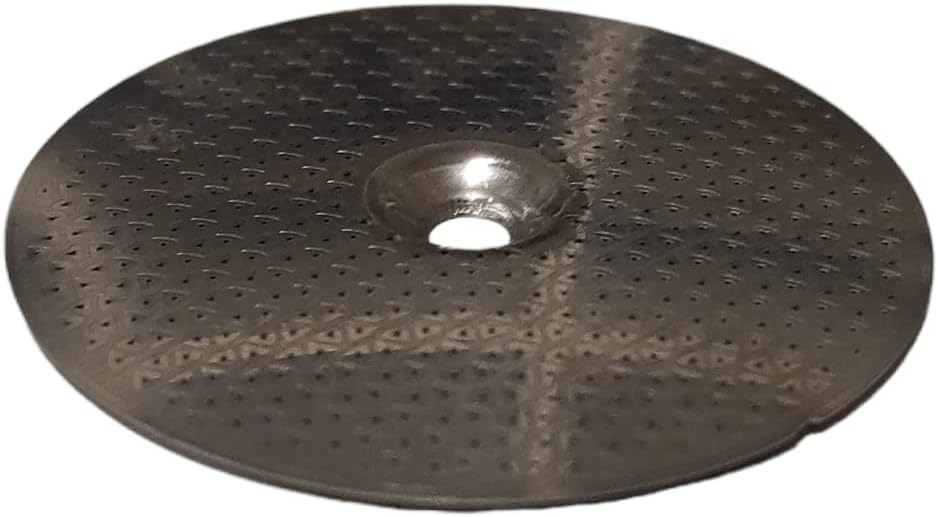
Imej 1: Sisi view of the Chrome Filter Shower Disc Percolator. This image shows the disc's profile and the central opening.
Keserasian
This Chrome Filter Shower Disc Percolator is compatible with a wide range of Philips coffee machine models. It is essential to verify your specific machine's model number against the compatibility list to ensure proper fit and function. Compatible series include, but are not limited to, EP, HD, SM, SUP, and RI series models.
Known Part Numbers: 421945025332, 421945025331, 996530050709, 9161.268
For a comprehensive list of compatible models, please refer to the product listing or your coffee machine's original documentation. Examples of compatible models include: EP0810, EP2220, EP3241, EP5030, HD8642, HD8750, HD8821, HD8900, SM5460, SM6580, SUP037DR, RI8174.
Arahan Pemasangan
Before beginning installation, ensure your coffee machine is unplugged from the power outlet to prevent electrical hazards. Allow the machine to cool down completely if it has recently been in use. This part is typically located within the brew group assembly.

Imej 2: Meletup view diagram of a coffee machine brew group. Item 6, circled in red, indicates the position of the shower disc percolator within the assembly.
- Access the Brew Group: Depending on your Philips coffee machine model, you may need to open a side panel or remove the water tank and drip tray to access the brew group. Consult your machine's specific user manual for instructions on accessing internal components.
- Locate the Existing Shower Disc: Identify the current shower disc percolator within the brew group. Refer to Image 2, where the shower disc is typically represented by item 6.
- Remove the Old Disc: Carefully detach the old shower disc. This may involve unscrewing a central screw or gently prying it out if it is held by clips. Note the orientation of the old disc for correct installation of the new one.
- Bersihkan Kawasan: Before installing the new disc, clean any coffee residue or debris from the brew group area to ensure a proper seal and optimal performance.
- Install the New Disc: Position the new Chrome Filter Shower Disc Percolator (as shown in Image 3 and 4) into place, ensuring it sits flush and is correctly oriented. Secure it using the original screw or clips. Do not overtighten.
- Pasang semula: Reassemble the brew group and any panels or trays that were removed.
- Ujian: Plug in the coffee machine and perform a test brew cycle with water only to check for proper water flow and any leaks before brewing coffee.
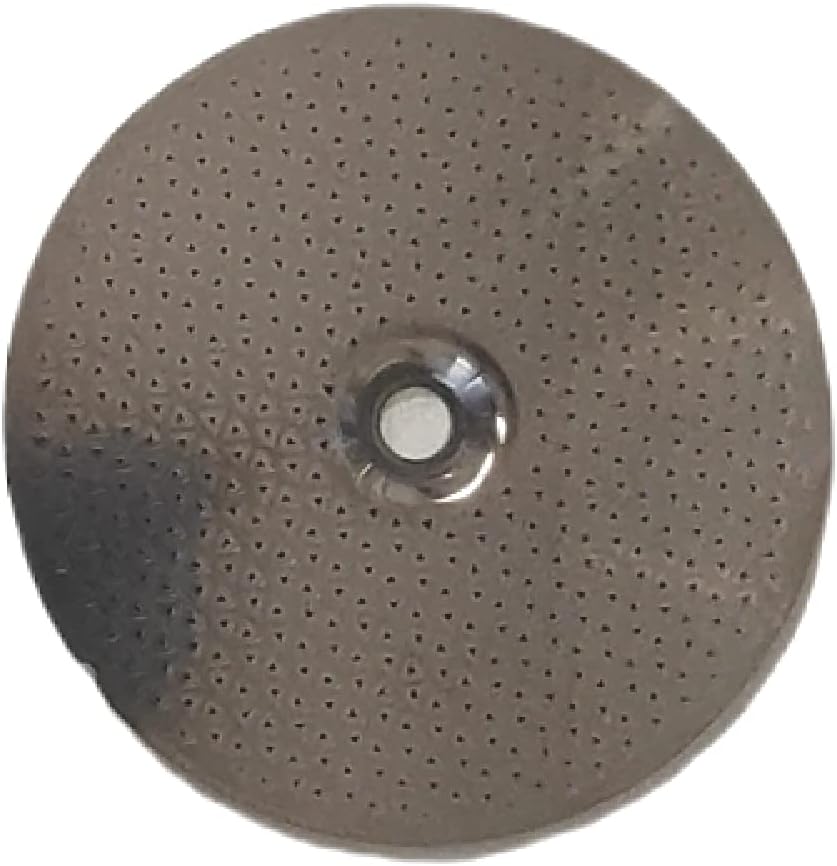
Imej 3: Atas view of the shower disc, showing the fine perforations for water distribution.

Imej 4: Bawah view of the shower disc, featuring a textured pattern for even water dispersion.
Pertimbangan Operasi
Once installed, the shower disc operates as an integral part of your coffee machine's brewing system. Its primary function is to evenly distribute hot water over the ground coffee, which is essential for optimal flavor extraction. No specific user interaction is required with the disc itself during normal operation.
- Ensure the disc is clean and free from blockages before each use to maintain consistent water flow.
- If you notice uneven coffee extraction or a change in coffee flavor, inspect the shower disc for potential issues.
Penyelenggaraan
Regular cleaning of the shower disc is vital for maintaining the performance and longevity of your coffee machine and ensuring the best coffee quality.
- Pembersihan Harian: After each use, if easily accessible, wipe the surface of the shower disc to remove any loose coffee grounds.
- Pembersihan Mingguan: If your machine allows for easy removal of the shower disc without full brew group disassembly, remove it and rinse under warm running water. Use a soft brush (like a toothbrush) to gently scrub away any stubborn coffee oils or grounds from the perforations.
- Deep Cleaning (Monthly/Bi-monthly): For a more thorough cleaning, the disc can be soaked in a solution of warm water and a mild coffee machine cleaning tablet or descaling solution (follow the cleaner's instructions). Ensure to rinse thoroughly afterwards to remove all cleaning agent residues.
- Pemasangan semula: Always ensure the disc is completely dry before reinstalling it into the brew group.
Nota: Always refer to your specific Philips coffee machine's user manual for detailed cleaning instructions for the brew group, as procedures may vary.
Menyelesaikan masalah
If you encounter issues after installing the new shower disc, consider the following troubleshooting steps:
- Uneven Water Flow / Poor Extraction:
- Check if the shower disc is installed correctly and seated flush.
- Inspect the perforations for any blockages from coffee grounds or mineral deposits. Clean as per the Maintenance section.
- Ensure the central screw (if applicable) is tightened appropriately, but not overtightened.
- Leaks from the Brew Group:
- Verify that the shower disc is correctly installed and that any associated gaskets or O-rings (if present and part of the assembly) are properly seated and not damaged.
- Ensure all components of the brew group are reassembled tightly.
- Tiada Aliran Air:
- This is rarely caused by the shower disc itself unless it is severely blocked. Check other components of your coffee machine's water system (e.g., water tank, pump, other filters).
If problems persist, consult the original user manual for your Philips coffee machine or contact a qualified service technician.
Spesifikasi
| bahan | Chrome |
| bentuk | Cakera |
| Bilangan Kepingan | 1 |
| Kiraan Unit | 1.0 Kiraan |
| Jenama yang Serasi | Philips |
| Known Part Numbers | 421945025332, 421945025331, 996530050709, 9161.268 |
Waranti dan Sokongan
As this is a replacement part, warranty coverage may vary. Please refer to the original seller or manufacturer for specific warranty information regarding this component. For technical support related to your Philips coffee machine, please consult your machine's official user manual or contact Philips customer service directly.


