
1. Pengenalan
Thank you for choosing the Acmount P110 Car Jump Starter. This device is designed to provide a powerful and reliable solution for starting vehicles with dead batteries, as well as serving as a portable power bank and emergency light source. Please read this manual thoroughly before use to ensure safe and optimal operation.

Image 1.1: The Acmount P110 Car Jump Starter demonstrating its 6000A peak current for starting vehicles up to 10.0L gas or 8.0L diesel engines.
2. Maklumat Keselamatan
Sentiasa patuhi langkah berjaga-jaga keselamatan berikut untuk mengelakkan kecederaan atau kerosakan pada peranti atau kenderaan:
- Jangan cuba melompat memulakan bateri beku.
- Pastikan sambungan kekutuban yang betul (clamp kepada positif, cl hitamamp kepada negatif) untuk mengelakkan percikan api dan kerosakan.
- Jangan hubungkan cl positif dan negatifampbersama-sama.
- Jauhkan peranti daripada kanak-kanak.
- Jangan dedahkan peranti kepada suhu atau kelembapan yang melampau.
- If the device becomes excessively hot during use, discontinue operation immediately.
- Rujuk manual pemilik kenderaan anda untuk prosedur penghidup enjin yang khusus.

Image 2.1: The Acmount P110 features 10 protection technologies for safe operation, including spark-proof, reverse-charge, high/low-temp, over-charge, short-circuit, reverse-polarity, AI-software monitoring, over-current, over-voltage, dan perlindungan lebihan beban.
3. Kandungan Pakej
Sahkan bahawa semua item terdapat dalam pakej:
- Acmount P110 Jump Starter
- Smart Jump Cables (with integrated battery and intelligent clamps)
- Kabel Pengecasan USB Jenis-C
- Sarung Penyimpanan
- Manual Pengguna

Image 3.1: All components included in the Acmount P110 Car Jump Starter package.
4. Ciri dan Komponen Produk
Familiarize yourself with the main parts of your Acmount P110 Jump Starter:
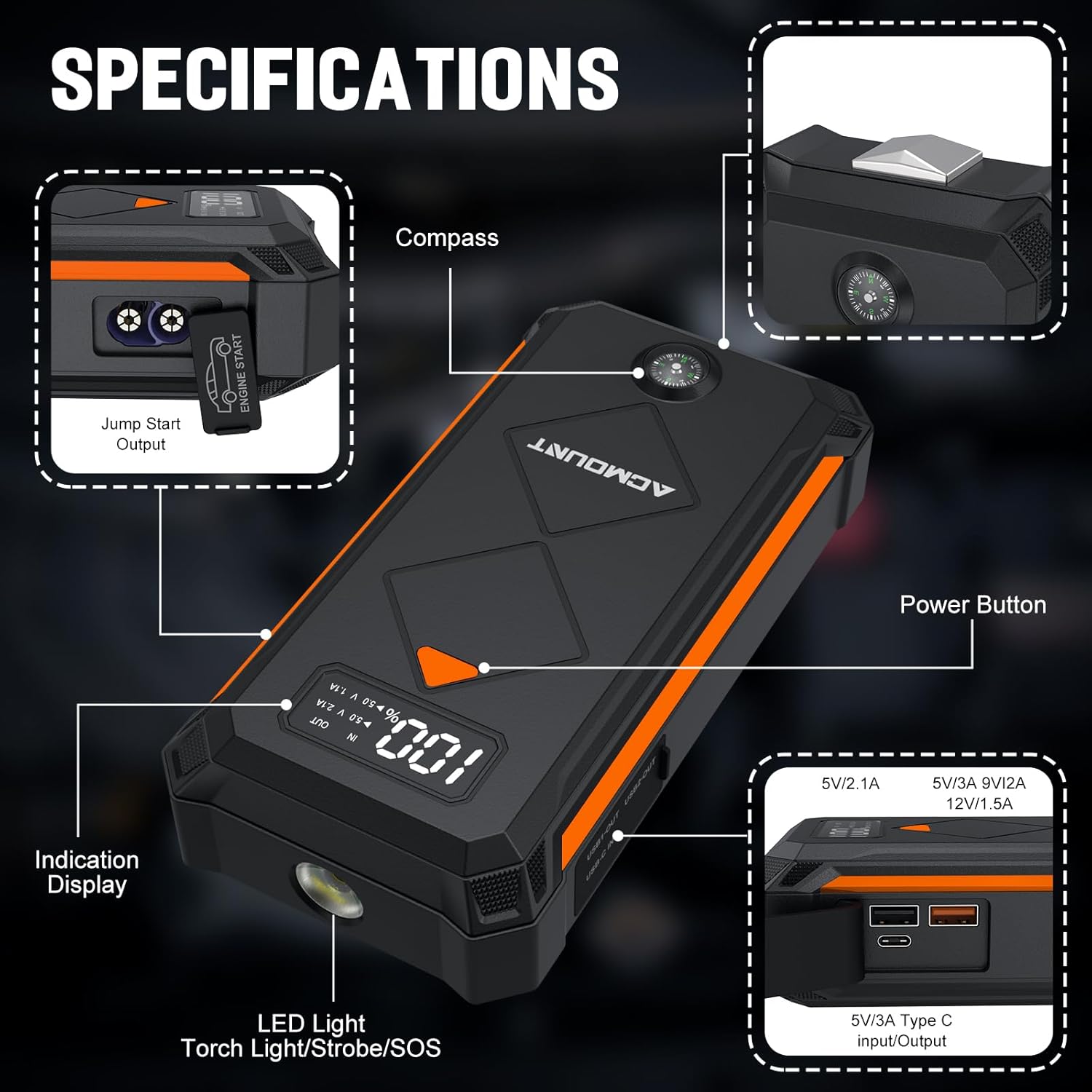
Image 4.1: Key components of the Acmount P110 Jump Starter.
- Output Lompat Mula: Port for connecting the smart jump cables.
- Kompas: Bersepadu untuk bantuan navigasi.
- Butang Kuasa: Activates the device and controls LED light modes.
- Indication Display: Shows battery level and output status.
- Lampu LED: Functions as a flashlight, strobe, and SOS signal.
- Input/Output USB-C: For charging the jump starter and charging external devices.
- USB 3.0 Outputs: Dual ports (5V/3A, 9V/2A, 15V/1.5A) for charging smartphones and other USB devices.
5. Persediaan
5.1 Mengecas Pemula Lompat
Before initial use, fully charge the Acmount P110 Jump Starter. It is recommended to charge the device every 2-3 months to maintain battery health, even when not in use.
- Connect the provided USB Type-C charging cable to the jump starter's USB-C port.
- Connect the other end of the USB Type-C cable to a suitable USB wall adapter (not included) or car charger.
- The indication display will show the charging progress. The device is fully charged when the display indicates 100%.
Note: Do not charge the starter immediately after a jump-starting operation. Allow the starter to cool down first.
6. Arahan Operasi
6.1 Lompat Memulakan Kenderaan
Ikuti langkah-langkah ini untuk menghidupkan kenderaan anda dengan selamat:
- Sediakan Kenderaan: Pastikan penyalaan kenderaan dimatikan dan brek letak kereta dihidupkan.
- Connect the Smart Jump Cables: Insert the blue end of the smart jump cable into the jump start output port on the Acmount P110. Ensure a firm connection.
- Lampirkan Clamps kepada Bateri:
- Sambungkan merah positif (+) clamp to the vehicle's positive (+) battery terminal.
- Sambungkan hitam negatif (-) clamp ke terminal bateri negatif (-) kenderaan.
Amaran: Jangan sentuh kl merah dan hitamamps together once connected to the jump starter.
- Petunjuk Semak: The smart jump cable's indicator light will show its status. A solid green light indicates a safe connection and readiness to jump start. If any other light or sound occurs, refer to the troubleshooting section.
- Mulakan Kenderaan: Once the indicator is green, start your vehicle's engine.
- Keluarkan Clamps: After the engine starts, immediately remove the smart jump cables in reverse order: first the black negative (-) clamp, maka positif merah (+) clamp.
- Disconnect from Jump Starter: Disconnect the smart jump cable from the Acmount P110.

Image 6.1: Visual guide for jump starting your vehicle.
6.2 Charging Electronic Devices
The Acmount P110 can also function as a portable power bank for your electronic devices.
- Connect your device's USB charging cable to one of the USB output ports (USB 3.0 or USB-C) on the Acmount P110.
- The jump starter will automatically begin charging your device. The indication display will show the output status.
- Putuskan sambungan peranti anda setelah pengecasan selesai.

Image 6.2: The Acmount P110 as a portable power supply for various electronic devices.
6.3 Menggunakan Lampu Suluh LED
The integrated LED flashlight has three modes: Flashlight, Strobe, and SOS.
- Untuk menghidupkan lampu suluh: Tekan lama butang kuasa.
- To cycle through modes (Strobe, SOS): Short press the power button while the flashlight is on.
- Untuk mematikan lampu suluh: Long press the power button again.
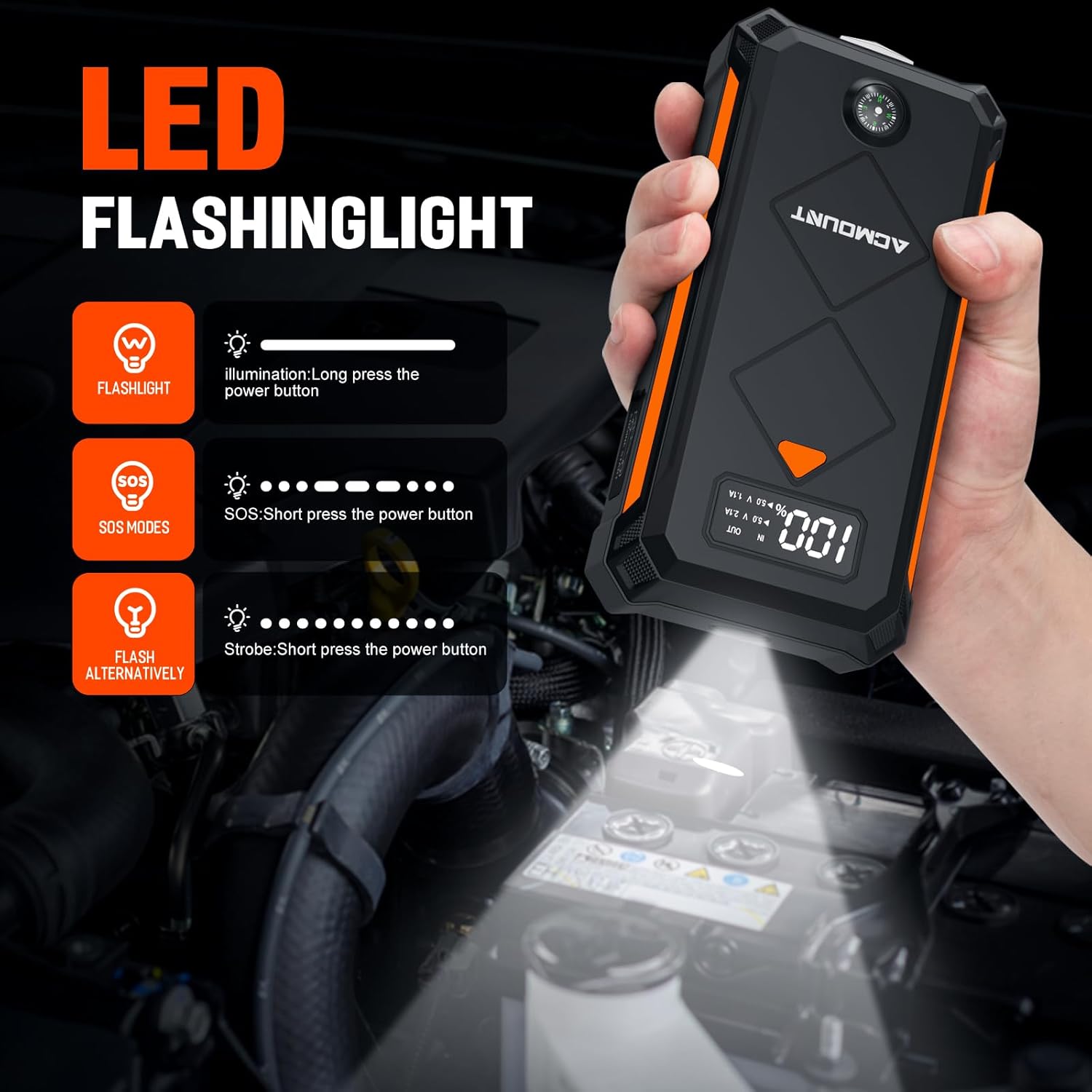
Image 6.3: Instructions for operating the LED flashlight modes.
7. Penyelenggaraan
Proper maintenance ensures the longevity and reliability of your Acmount P110 Jump Starter:
- Pengecasan Biasa: It is recommended to charge the jump starter every 2-3 months to keep the battery in a healthy state, even if not used. This helps prevent deep discharge and extends battery life.
- Storan: Store the device in a cool, dry place, away from direct sunlight and extreme temperatures. The device can hold power for about 12 months when not in use.
- Pembersihan: Lap peranti dengan kain lembut dan kering. Jangan gunakan bahan kimia yang keras atau pembersih yang kasar.
- Julat Suhu: The device is designed to work in extreme environments, from -4°F (-20°C) to +140°F (+60°C).

Image 7.1: The Acmount P110 offers extended standby time, requiring less frequent charging.
8. Penyelesaian masalah
If you encounter issues with your Acmount P110 Jump Starter, refer to the following common problems and solutions:
| Masalah | Kemungkinan Punca | Penyelesaian |
|---|---|---|
| Kenderaan tidak bermula | Low charge on jump starter, incorrect clamp connection, severely discharged vehicle battery, vehicle issue. | Ensure jump starter is fully charged. Verify clamps are connected correctly (red to +, black to -). Try jump starting again after 30 seconds. If the vehicle still doesn't start, there might be another issue with the vehicle. |
| Pintar clamp indicator light is not green | Incorrect connection, short circuit, reverse polarity, or other safety protection activated. | Putuskan sambungan clamps from both the jump starter and the vehicle battery. Re-read safety instructions and reconnect carefully, ensuring correct polarity. If the issue persists, the vehicle battery might be faulty. |
| Jump starter not charging | Kabel, penyesuai atau port pengecasan yang rosak. | Try a different USB-C cable and wall adapter. Ensure the cable is fully inserted into the jump starter's USB-C port. |
| Jump starter gets hot during use | Normal operation under heavy load, or potential overload. | A slight warmth is normal. If it becomes excessively hot, disconnect immediately and allow it to cool down. Ensure the vehicle's engine size is within the jump starter's specifications. |
Jika masalah berterusan selepas mencuba penyelesaian ini, sila hubungi sokongan pelanggan.
9. Spesifikasi
| Ciri | Spesifikasi |
|---|---|
| Jenama | Akaun |
| Nombor Model | P110 |
| Arus Keluaran Puncak | 6000 Amps |
| Kapasiti Bateri | 20000 Miliamp jam |
| Komposisi Sel Bateri | Litium Ion |
| Voltage | 14.8 Volt |
| Keserasian Enjin | Sehingga 10.0L Gas atau Enjin Diesel 8.0L |
| Dimensi Produk (D x W x H) | 4"D x 5"W x 9"H |
| Berat Barang | 1 Kilogram |
| Keluaran USB 1 | 5V/3A |
| Keluaran USB 2 | 9V/2A |
| Keluaran USB 3 | 15V/1.5A |
| Mod Lampu Suluh LED | Lampu suluh, Strob, SOS |
| Suhu Operasi | -4°F (-20°C) hingga +140°F (+60°C) |
10. Waranti dan Sokongan
The Acmount P110 Car Jump Starter comes with a Waranti 12 Bulan. Acmount also provides lifetime reliable technical support.
If you have any questions, concerns, or require assistance with your product, please contact our professional after-sales team. We are committed to providing a satisfactory solution.
For support, please refer to the contact information provided on the Acmount official webtapak atau dokumentasi pembelian anda.