1. Pengenalan dan Lebihview
The TrolMaster HCS-1 Hydro-X Controller is a sophisticated environmental control system designed for horticultural applications. It provides precise monitoring and control over key environmental factors within your grow space, ensuring optimal conditions for plant growth. This system integrates seamlessly with various devices to manage temperature, humidity, and light levels, and can be expanded to control CO2, irrigation, and more.
The HCS-1 comes equipped with a versatile 3-in-1 sensor that measures ambient temperature, relative humidity, and light intensity, providing essential data for environmental management. Its user-friendly interface and mobile application connectivity offer convenient access and control from anywhere.

Rajah 1: Bersudut view of the TrolMaster HCS-1 Hydro-X Controller, showing the display, control buttons, and various ports.
2. Ciri-ciri Produk
- Comprehensive Environmental Control: Manages temperature, humidity, and light for optimal growing conditions.
- Integrated 3-in-1 Sensor: Includes a sensor for real-time monitoring of temperature, humidity, and light.
- Sistem Boleh Diperkembangkan: Supports additional modules for CO2 measurement, grow light control, dehumidifier operation, fan management, and AC/HVAC system integration.
- Antara Muka Mesra Pengguna: Features an intuitive display and control buttons for easy setup and adjustments.
- Kesambungan Aplikasi Mudah Alih: Allows remote monitoring and control via a free phone application.
- Pengelogan Data: Records environmental data for analysis and optimization.
3. Kandungan Pakej
Please verify that all items are present and undamaged upon opening the package:
- 1 x TrolMaster HCS-1 Hydro-X Controller
- 1 x 3-in-1 Sensor (Temperature, Humidity, Light)
- 1 x Cable Set for sensor connection and power
- 1 x Penyesuai Kuasa

Figure 2: The TrolMaster HCS-1 Hydro-X Controller and its packaging.
4. Panduan Persediaan
Follow these steps to set up your HCS-1 Hydro-X Controller:
- Buka Pengawal: Carefully remove the HCS-1 controller, 3-in-1 sensor, and all cables from the packaging.
- Pasang Pengawal: Choose a suitable location for the HCS-1 controller. Ensure it is in a dry area, away from direct water spray or extreme temperatures. Mount it securely using appropriate hardware (not included).
- Connect the 3-in-1 Sensor: Plug the 3-in-1 sensor cable into the designated "SENSORS" port on the HCS-1 controller. Position the sensor in your grow space where it can accurately measure ambient temperature, humidity, and light without being obstructed or directly exposed to water.
- Sambungkan Kuasa: Connect the power adapter to the "DC" port on the HCS-1 controller, then plug the adapter into a standard electrical outlet. The controller display should illuminate.
- Sambungan Rangkaian (Pilihan): For remote monitoring and control via the phone app, connect an Ethernet cable from your router to the "INTERNET" port on the HCS-1 controller.
- Konfigurasi Awal: Upon first power-up, the controller may guide you through an initial setup wizard to set date, time, and basic environmental parameters. Use the navigation buttons (UP, DOWN, LEFT, RIGHT, BACK, ENTER) to navigate the menus.
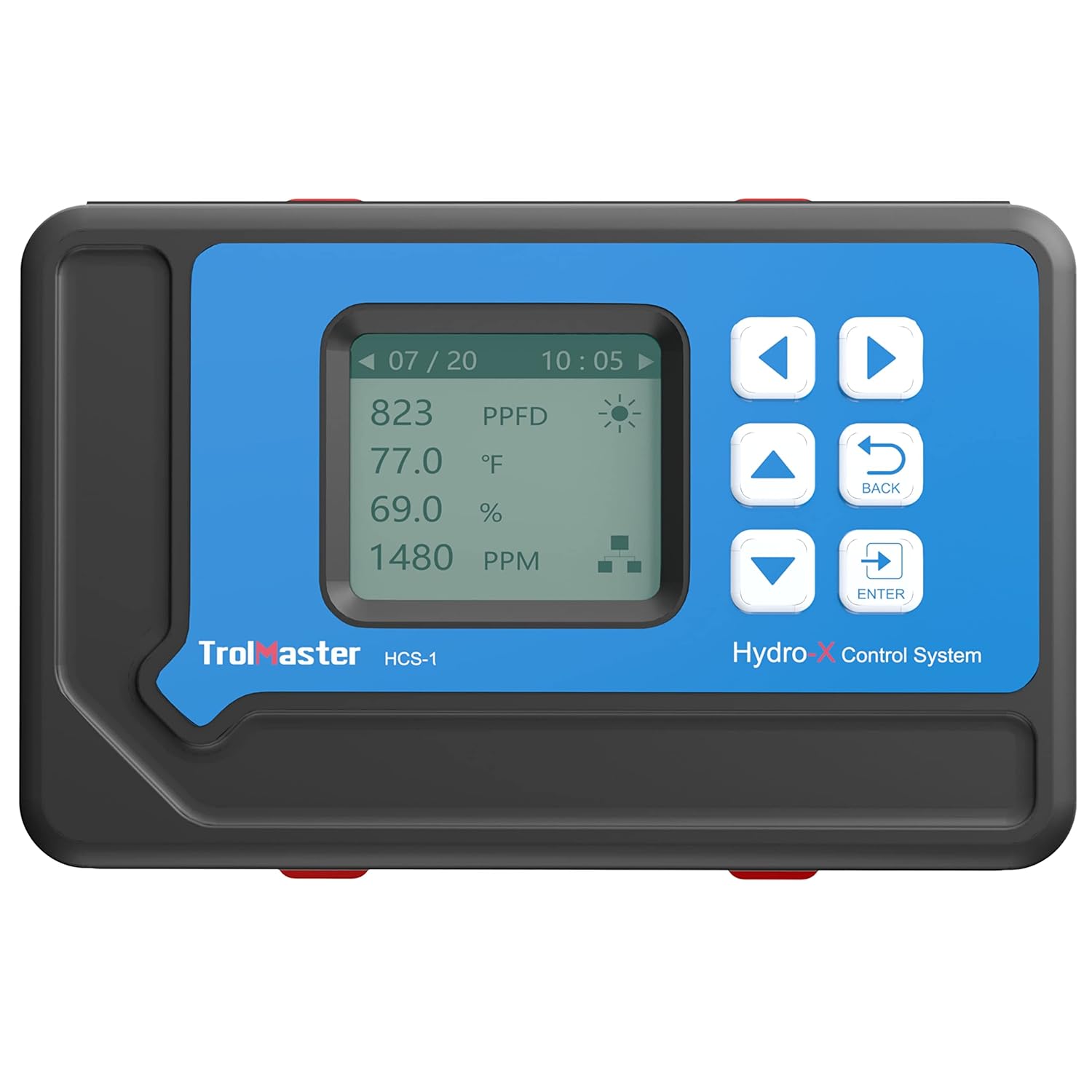
Rajah 3: Depan view of the HCS-1 controller with its display showing environmental readings.
Setup Video Overview
Video 1: Tamatview of the TrolMaster Hydro-X Garden Environment Controllers, demonstrating various control capabilities including CO2 levels, grow lights, dehumidifiers, fans, and HVAC systems. This video provides a visual guide to the system's potential applications.
5. Arahan Operasi
5.1. Menavigasi Antara Muka
The HCS-1 controller features a clear LCD display and a set of intuitive buttons for navigation:
- Anak Panah ATAS/BAWAH: Scroll through menu options or adjust values.
- Anak Panah KIRI/KANAN: Navigate between screens or sub-menus.
- Butang ENTER: Pilih pilihan atau sahkan tetapan.
- Butang KEMBALI: Return to the previous screen or cancel an action.
5.2. Monitoring Environmental Data
The main display screen shows real-time readings from the 3-in-1 sensor, including temperature (Temp), relative humidity (Humid), and light intensity (Light). Additional connected sensors or modules will display their respective data on this screen or accessible sub-screens.
5.3. Setting Control Parameters
To set desired environmental parameters (e.g., target temperature, humidity range, light cycles):
- Dari skrin utama, tekan MASUK untuk mengakses menu utama.
- Gunakan ATAS/BAWAH arrows to navigate to "Settings" or "Control Parameters" and press MASUK.
- Select the specific parameter you wish to adjust (e.g., "Temperature Setpoint", "Humidity Range", "Light Schedule").
- Gunakan ATAS/BAWAH arrows to modify the value, then press MASUK untuk mengesahkan.
- Tekan KEMBALI untuk keluar dari menu tetapan.
5.4. Menggunakan Aplikasi Mudah Alih
Download the official TrolMaster mobile application from your device's app store. Ensure your HCS-1 controller is connected to the internet. Follow the in-app instructions to pair your controller. The app allows you to:
- View real-time environmental data.
- Adjust control parameters remotely.
- Terima makluman dan pemberitahuan.
- Access historical data logs.
6. Penyelenggaraan
Regular maintenance ensures the longevity and accuracy of your HCS-1 controller:
- Pembersihan: Periodically wipe the controller and sensor with a soft, dry cloth. Do not use abrasive cleaners or allow liquids to enter the device.
- Peletakan Sensor: Ensure the 3-in-1 sensor remains free from dust, debris, or direct water exposure, which can affect readings.
- Kemas kini Firmware: Check the TrolMaster website or mobile app for available firmware updates to ensure your controller has the latest features and bug fixes.
7. Penyelesaian masalah
| Masalah | Kemungkinan Punca | Penyelesaian |
|---|---|---|
| Pengawal tidak dihidupkan. | No power to the unit; faulty power adapter. | Check power outlet and connections. Ensure the power adapter is securely plugged into both the controller and the wall. Try a different outlet. |
| Sensor readings are inaccurate or erratic. | Sensor obstructed or dirty; sensor cable loose or damaged; sensor malfunction. | Ensure sensor is clean and unobstructed. Check sensor cable connection. If issues persist, contact support. |
| Cannot connect to mobile app. | No internet connection; incorrect network settings; app not updated. | Verify Ethernet cable connection and router status. Check controller's network settings. Update the mobile app to the latest version. |
| Connected devices (fans, lights) are not responding. | Incorrect module connection; incorrect control settings. | Ensure all modules are correctly connected to the HCS-1. Verify control settings and schedules within the controller or app. |
8. Spesifikasi
| Spesifikasi | Nilai |
|---|---|
| Nombor Model | HCS1 |
| Dimensi Produk | 9 x 3 x 6 inci |
| Berat Barang | 2.4 paun |
| Jenis Paparan | LCD |
| Suhu Operasi | 75 Degrees Fahrenheit (optimal) |
| UPC | 311778426764 |

Figure 4: Dimensions of the TrolMaster HCS-1 Hydro-X Controller.
9. Waranti dan Sokongan
For warranty information or technical support regarding your TrolMaster HCS-1 Hydro-X Controller, please contact FGI customer service. Refer to your purchase documentation for specific warranty terms and contact details. You can also visit the official TrolMaster webtapak untuk sumber tambahan dan Soalan Lazim.