
1. Pengenalan
This manual provides essential instructions for the installation, operation, and maintenance of your PowMr MPPT 60A Solar Charge Controller. This controller is designed to efficiently manage power flow from your solar panels to your battery bank, ensuring optimal charging and system protection. Please read this manual thoroughly before installation and use to ensure safe and correct operation.
Kandungan Pakej:
- 1 x PowMr MPPT 60A Solar Charge Controller
- 1 x Manual Pengguna (Bahasa Inggeris)
2. Arahan Keselamatan
Always observe the following safety precautions to prevent personal injury and damage to the controller or other components:
- Ensure all connections are correct and secure before applying power.
- The correct connection sequence for the solar controller is to connect the battery first, then the solar panel. Always adhere to this specific order. When disconnecting, follow the reverse order: disconnect solar panel, then battery.
- Jangan buka atau cuba membaiki alat kawalan sendiri. Hubungi kakitangan yang berkelayakan untuk servis.
- Pasang pengawal di kawasan yang mempunyai pengudaraan yang baik, jauh daripada bahan mudah terbakar dan cahaya matahari langsung.
- The solar charge controller is equipped with electronic protections against overcharge, over-discharge, overload, and short circuit. It also features battery temperature compensation, enhancing overall operational safety.
- Use appropriate circuit breakers or fuses for all connections to prevent damage from overcurrent.
3. Ciri-ciri Produk
- Teknologi MPPT Lanjutan: The 60A MPPT solar charge controller features automatic battery voltage detection for 12V, 24V, 36V, and 48V systems. It utilizes advanced Maximum Power Point Tracking (MPPT) technology, ensuring a tracking efficiency of no less than 99.5% and a maximum conversion efficiency of up to 97%.
- Keserasian Bateri Universal: Supports various battery types for charging, including sealed, gel, flooded, LiFePO4, and Li(NiCoMn)O2 cells. User-defined battery parameters are available for custom battery types.
- Perlindungan Komprehensif: Equipped with electronic protections against overcharge, over-discharge, overload, and short circuit. Includes battery temperature compensation for enhanced safety and battery longevity.
- Multifunctional LCD Display: Provides real-time system information, including solar panel voltage/power, charging current, battery voltage, dan status beban.
- Penyejukan yang cekap: Features forced air cooling with an aluminum alloy construction for effective heat dissipation, maintaining optimal performance even under high temperatures.
- Dual PV and Battery Connection: Designed for straightforward connection of both photovoltaic arrays and battery banks.
- Multiple Load Working Modes: Offers various load control options, including Load OFF, Load always ON, and Time Control.
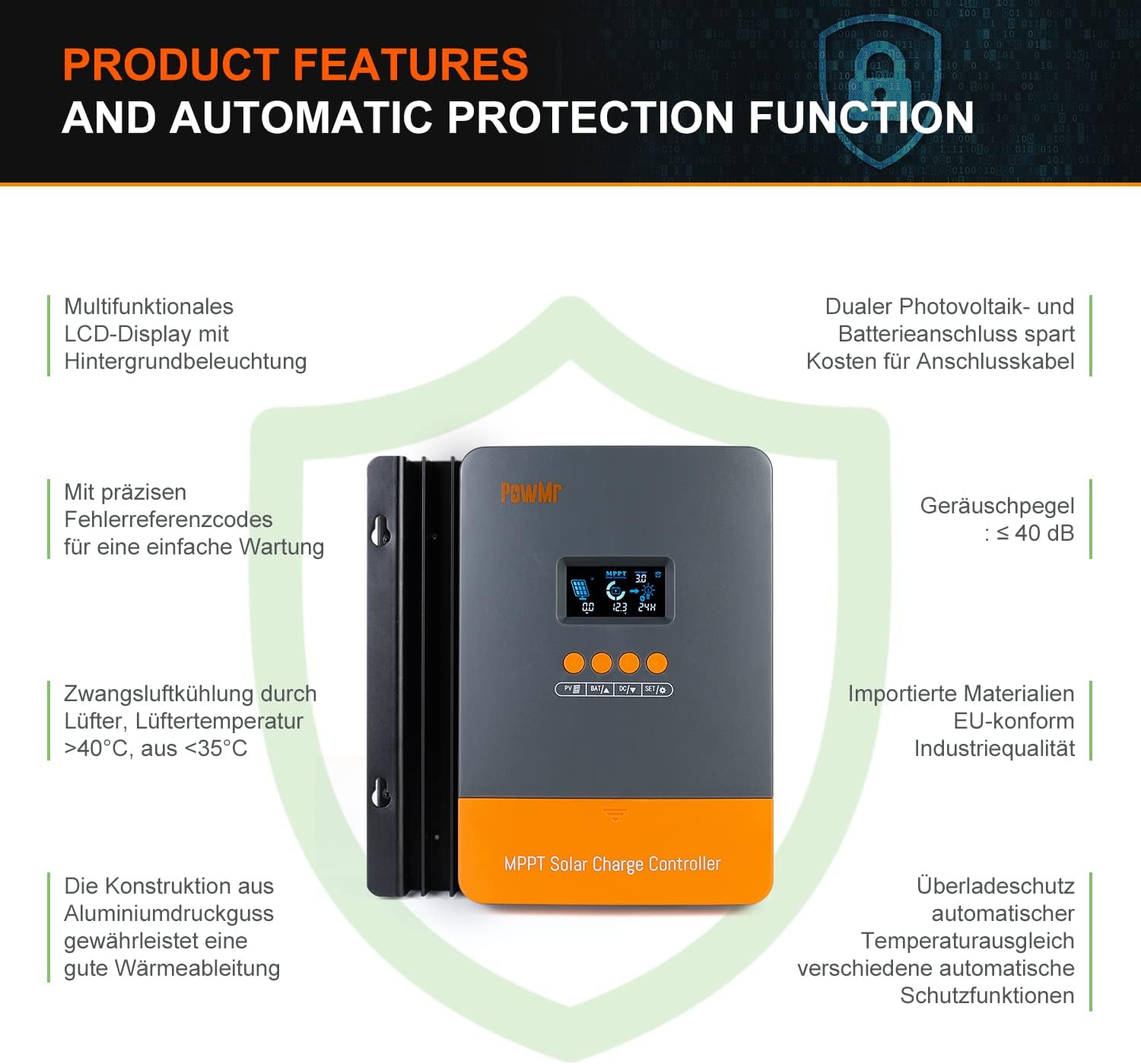
Image: Product features and automatic protection functions. Highlights include a multifunctional LCD display, dual PV and battery connection, precise error codes, forced air cooling, aluminum alloy construction for heat dissipation, and electronic protections.
4. Produk Lebihview

Image: PowMr MPPT 60A Solar Charge Controller dimensions (165mm x 230mm x 72mm) and its LCD display interface. The display shows solar panel voltage/power, charging current, battery voltage, and load information. Key buttons for PV, Battery, DC Load, and Settings are also visible.
The controller features an intuitive LCD display and control buttons for easy monitoring and configuration. The display provides real-time data on solar input, battery status, and load output.
- Ikon penunjuk siang atau malam
- Battery icon and SOC (State of Charge)
- Mod Kerja
- State and Warning indication
- Panel solar voltage/power/current
- Charging power/charging current/battery voltage
- Load working Mode / Load power / Load current / Load voltage
5. Pemasangan dan Persediaan
5.1 Memasang Pengawal
- Choose a dry, well-ventilated location, protected from direct sunlight, high temperatures, and water.
- Ensure there is sufficient airflow around the controller for proper cooling.
- Mount the controller vertically on a wall or suitable surface using appropriate fasteners.
5.2 Sambungan Pendawaian
Penting: Always connect the battery first, then the solar panel, and finally the load. Disconnect in reverse order.
- Sambungkan Bateri: Connect the positive and negative terminals of your battery bank to the corresponding battery terminals on the controller. Ensure correct polarity. The controller will automatically detect the battery voltage (12V/24V/36V/48V).
- Sambungkan Panel Suria: Connect the positive and negative terminals of your solar panel array to the corresponding PV input terminals on the controller. Ensure correct polarity. The maximum open circuit voltage (Voc) from the PV array should not exceed 160V.
- Sambungkan Beban DC (Pilihan): If using a DC load directly from the controller, connect its positive and negative terminals to the load terminals on the controller.

Image: Diagram illustrating recommended wiring configurations for 12V, 24V, 36V, and 48V battery systems, including corresponding input solar power and voltage ranges. Also shows the three load working modes (Load OFF, Load always ON, Time control).
5.3 Pemilihan Jenis Bateri
The controller supports various battery types. You can select the appropriate type through the controller's settings menu. For lithium batteries (LiFePO4, Li(NiCoMn)O2), it is essential to set the specific start and end charging voltages according to the battery manufacturer's specifications. Refer to the detailed instructions in the user manual for proper configuration.

Image: Illustration detailing the supported battery types (Sealed, GEL, Flooded, AGM, Lithium, User Custom Battery) and a graph depicting the four-stage battery charging process: Bulk Charge, Constant Charging (Boost/Equalize), and Float Charge.
6. Arahan Operasi
6.1 Paparan LCD dan Butang
The LCD display provides real-time system status. Use the buttons (PV, BAT, DC, SET) to navigate through menus and adjust parameters. Refer to the detailed manual for specific button functions and menu navigation.
6.2 Mengecas Stages
The controller employs a multi-stage charging algorithm to optimize battery life and performance:
- Caj Pukal: Mengecas bateri pada arus maksimum sehingga volumtage meningkat ke aras penyerapan.
- Constant Charging (Boost/Equalize): Mengekalkan volum yang malartage, allowing the current to gradually decrease. Equalization is a controlled overcharge for flooded batteries to balance cell voltages.
- Caj Terapung: Mengurangkan volumtage to a lower level once the battery is fully charged, maintaining it at a safe level to prevent self-discharge.
6.3 Load Working Modes
The DC load output can be configured with different working modes:
- Load OFF: The load output is always off.
- Load Always ON: The load output is continuously on.
- Kawalan Masa: The load output operates for a specified duration after sunset.
7. Penyelenggaraan
Penyelenggaraan berkala memastikan prestasi optimum dan jangka hayat pengawal cas solar anda:
- Periksa secara berkala semua sambungan pendawaian untuk kesesakan dan kakisan.
- Clean the controller's exterior with a dry cloth. Do not use liquids or solvents.
- Ensure the ventilation openings are clear of dust and debris to allow for proper heat dissipation.
- Monitor the LCD display for any error codes or unusual readings.
8. Penyelesaian masalah
If you encounter issues, refer to the following common problems and solutions. For more complex issues, contact customer support.
| Masalah | Kemungkinan Punca | Penyelesaian |
|---|---|---|
| Tiada paparan/Tiada kuasa | Bateri tidak disambungkan atau volum rendahtage; kekutuban terbalik. | Semak sambungan bateri dan voltage. Pastikan polariti yang betul. |
| Bateri tidak dicas | Solar panel not connected; low solar input; PV reversed polarity; battery type misconfigured. | Check solar panel connections and polarity. Verify sufficient sunlight. Confirm correct battery type settings. |
| Beban tidak berfungsi | Load mode set to OFF; overload; short circuit; low battery voltage. | Check load mode settings. Reduce load. Inspect for short circuits. Charge battery. |
| Kod ralat dipaparkan | Kesalahan sistem tertentu. | Rujuk manual pengguna penuh untuk senarai kod ralat dan penyelesaian yang sepadan. |
9. Spesifikasi
| Parameter | Nilai |
|---|---|
| Nombor Model | POW-M60-PRO |
| Jenama | PowMr |
| Kadar Caj Semasa | 60A |
| Sistem Voltage | 12V/24V/36V/48V Auto-Identify |
| Maks. Input PV Voltage (Voc) | 160V DC |
| Max. Solar Panel Power (for 48V system) | 2880W (12V: 720W, 24V: 1440W, 36V: 2160W) |
| Kecekapan Penjejakan | ≥99.5% |
| Kecekapan Penukaran | Sehingga 97% |
| Jenis Bateri yang Disokong | Sealed, Gel, Flooded, LiFePO4, Li(NiCoMn)O2, User-defined |
| Jenis Paparan | LCD dengan lampu latar |
| Dimensi Produk (L x W x H) | 16.5 cm x 7.1 cm x 23.1 cm |
| Berat Produk | 1.3 kg |
| Suhu Operasi | -20°C to +50°C (Max. 60°C ambient) |

Image: Universal compatibility of the PowMr 60A MPPT controller compared to other controllers. It highlights higher maximum input solar power and voltage for 12V, 24V, 36V, and 48V systems, supporting SLA, SLD, GEL, AGM, and LiFePO4 battery types.
10. Waranti dan Sokongan
For warranty information, technical support, or any questions regarding your PowMr MPPT 60A Solar Charge Controller, please contact PowMr customer service. Refer to the product packaging or the official PowMr weblaman web untuk maklumat hubungan.