
Crony SD-306Plus
Crony SD-306Plus Karaoke Speaker System User Manual
Model: SD-306Plus
1. Pengenalan
Terima kasih kerana membeliasing the Crony SD-306Plus Karaoke Speaker System. This device is designed to provide a high-quality audio experience for family entertainment, featuring dual Bluetooth 4.2 connectivity, a powerful 30W speaker, and two wireless microphones. Please read this manual carefully before use to ensure proper operation and to maximize the lifespan of your product.
2. Maklumat Keselamatan
- Jangan dedahkan peranti kepada air atau kelembapan berlebihan.
- Elakkan meletakkan peranti berhampiran sumber haba atau di bawah cahaya matahari langsung.
- Jangan cuba membuka atau membaiki peranti ini sendiri. Rujuk semua servis kepada kakitangan yang berkelayakan.
- Use only the provided charging cable and adapter (5V-2A) to charge the speaker and microphones.
- Jauhkan daripada kanak-kanak.
3. Kandungan Pakej
Sila semak pakej untuk memastikan semua item ada:
- 1 x Crony SD-306Plus Speaker
- 2 x Mikrofon Tanpa Wayar
- 1 x Kabel Pengecas USB
- 1 x Kabel Audio
- 1 x Manual Pengguna (dokumen ini)
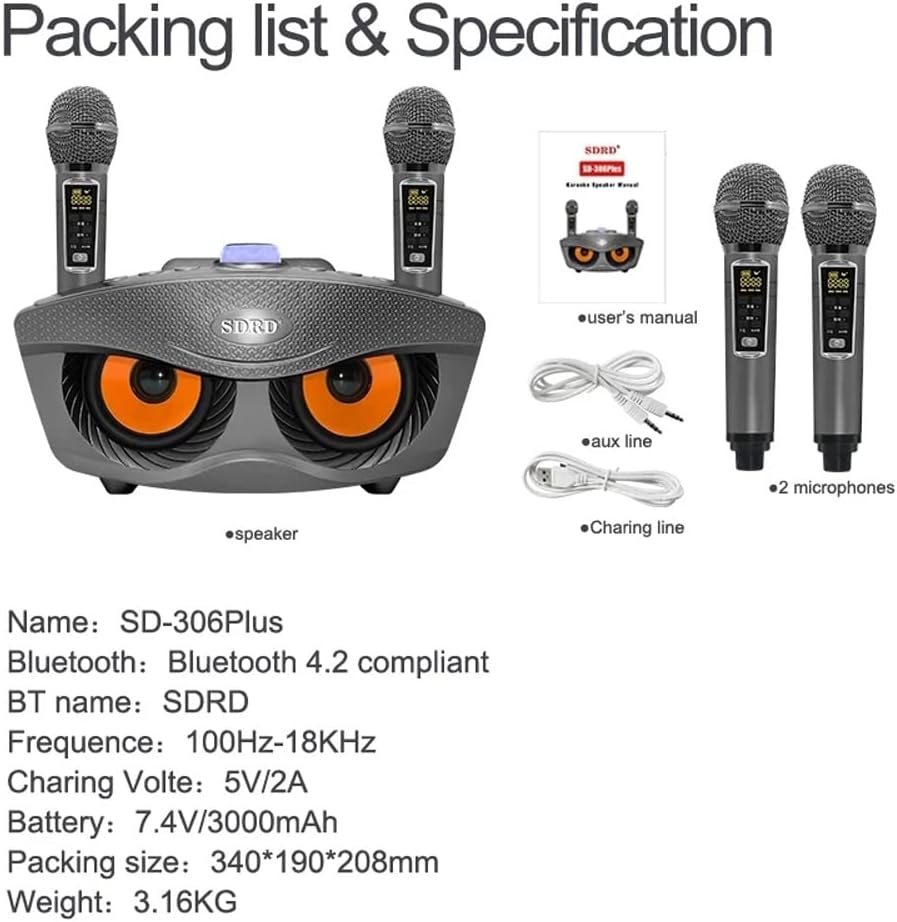
Image: Contents of the Crony SD-306Plus package, including the speaker, two microphones, charging cable, audio cable, and user manual.
4. Ciri-ciri Produk
- Dual Bluetooth 4.2 Connectivity: Seamless wireless connection up to 10 meters.
- Output Bunyi Kuat: Two 15W speakers (total 30W) for rich, clear audio.
- Integrated Sound Card Functions: Features for voice changing (Men, Women, Child), Mic Priority, KTV Mode, and Concert Mode.
- Hayat Bateri yang Panjang: Built-in 3000mAh 7.4V battery for 2-3 hours of playing time.
- Mikrofon tanpa wayar: Two wireless microphones with a range of 10 meters.
- Berbilang Mod Main Semula: Supports USB, TF card, Bluetooth, and AUX input.
- Peningkatan Bass: Enhanced bass for a more immersive audio experience.

Image: Illustration emphasizing the dual 15W speaker power and sound quality of the Crony SD-306Plus.
5. Pengenalan Komponen
Familiarize yourself with the various buttons and ports on your SD-306Plus speaker:

Imej: Terperinci view of the speaker's control panel, showing buttons for EQ, Music Original, Mode, Volume, Mic Priority, KTV, Concert Hall, Previous/Volume Down, Play/Pause, and Next/Volume Up. Also indicates voice change functions (Men, Women, Child).
- EQ: Tetapan penyama.
- MUSIC ORIG: Toggles original music sound.
- ARAHAN: Switches between USB, TF, Bluetooth, and AUX input modes.
- VOL-/VOL+: Melaraskan kelantangan utama.
- KEUTAMAAN MIC: Prioritizes microphone audio over music.
- KTV MODE: Activates KTV (Karaoke) specific sound effects.
- CONCERT HALL: Simulates a concert hall acoustic environment.
- PREV/VOL-: Skips to the previous track or decreases volume.
- JEDA/MAIN: Memainkan atau menjeda trek semasa.
- SETERUSNYA/VOL+: Skips to the next track or increases volume.
- Voice Change Buttons: Buttons for Men Voice, Women Voice, and Child Voice effects.
6. Persediaan
6.1 Pengecasan Awal
Before first use, fully charge the speaker and both microphones. Refer to Section 8 for charging instructions.
6.2 Menghidupkan/Mematikan
Locate the power switch on the speaker and microphones. Toggle to turn on or off.
6.3 Sambungan Bluetooth
Untuk menyambungkan peranti anda melalui Bluetooth:
- Turn on the Crony SD-306Plus speaker. It will automatically enter Bluetooth pairing mode.
- Pada telefon bimbit anda atau peranti lain yang didayakan Bluetooth, buka tetapan Bluetooth.
- Cari untuk available devices and select "SDRD" (the Bluetooth name for the speaker).
- Setelah disambungkan, anda akan mendengar bunyi pengesahan daripada pembesar suara.

Image: Visual representation of connecting the speaker to a smartphone via Bluetooth for wireless music playback.
7. Arahan Operasi
7.1 Memainkan Muzik
- Bluetooth: Selepas pasangan berjaya, mainkan muzik daripada peranti anda yang disambungkan.
- Kad USB/TF: Insert a USB drive or TF card into the respective port. The speaker will automatically switch to the corresponding mode and begin playing.
- Input AUX: Connect an external audio source using the provided audio cable to the AUX port. Press the MODE button to select AUX input.
7.2 Using Microphones
Turn on both wireless microphones. They will automatically connect to the speaker. Adjust microphone volume directly on the microphone or through the speaker's controls if available.
7.3 Sound Card Functions
Utilize the dedicated buttons on the speaker's control panel for various sound effects:
- Perubahan Suara: Press the 'Man', 'Girl', or 'Child's voice' buttons to alter your microphone voice.
- Keutamaan mikrofon: Press 'MIC Priority' to lower music volume automatically when speaking into the microphone.
- Mod KTV: Press 'KTV' for a typical karaoke sound effect.
- Concert Hall: Press 'Concert Hall' to simulate a larger acoustic space.
8. Mengecas
8.1 Mengecas Speaker
Connect the provided USB charging cable to the speaker's charging port and the other end to a 5V-2A USB power adapter (not included). The charging indicator will show the charging status. A full charge takes approximately 3-4 hours.
8.2 Charging the Microphones
The microphones can be charged in two ways:
- Via USB Charging Line: Connect the microphone directly to a USB power source using a USB charging cable.
- With Speaker: Place the microphone into its designated slot on the speaker. The speaker will charge the microphone when connected to power or if the speaker has sufficient battery.

Image: Instructions for charging the wireless microphones, either independently via USB or by docking them into the main speaker unit.
Microphone charging time is approximately 1-2 hours.
9. Penyelenggaraan
- Clean the speaker and microphones with a soft, dry cloth. Do not use abrasive cleaners or solvents.
- Simpan peranti di tempat yang sejuk dan kering jauh dari cahaya matahari langsung dan suhu yang melampau.
- If not used for extended periods, charge the battery every 3 months to maintain its lifespan.
10. Penyelesaian masalah
| Masalah | Kemungkinan Punca | Penyelesaian |
|---|---|---|
| Tiada kuasa | Bateri habis | Charge the speaker/microphones fully. |
| Tiada bunyi | Kelantangan terlalu rendah; Mod salah; Peranti tidak disambungkan | Increase volume; Select correct input mode (Bluetooth, USB, AUX); Reconnect Bluetooth device. |
| Mikrofon tidak berfungsi | Microphone off; Battery low; Out of range | Turn on microphone; Charge microphone; Move closer to speaker (within 10m). |
| Pemutusan Bluetooth | Device out of range; Interference | Move Bluetooth device closer to speaker; Avoid obstacles; Turn off other Bluetooth devices. |
11. Spesifikasi
| Ciri | Perincian |
|---|---|
| Model | SD-306Plus |
| Versi Bluetooth | Bluetooth 4.2 |
| Jarak Bluetooth | 10 meter |
| Kuasa Speaker | 2 x 15W (Total 30W) |
| Spesifikasi Speaker | 4 inch external magnetic |
| Respons Kekerapan | 100Hz-18KHz |
| Spesifikasi Bateri | Built-in 18650 3000mAh 7.4V |
| Masa Bermain | 2-3 jam |
| Spesifikasi Pengecas | 5V-2A |
| Charging Time (Speaker) | 3-4 jam |
| Jarak Mikrofon | 10 meter |
| Masa Pengecasan Mikrofon | 1-2 jam |
| Dimensi Produk | 340 x 190 x 208 mm (19D x 34W x 20.8H cm) |
| Berat Produk | 2 kg (3.16 kg dibungkus) |
12. Waranti dan Sokongan
Crony products are manufactured to high quality standards. For warranty information or technical support, please refer to the warranty card included with your purchase or contact your local retailer or Crony customer service. Please retain your proof of purchase for any warranty claims.
Dokumen Berkaitan - SD-306Plus
 |
Panduan Pengguna Pemain Karaoke DVD/CD+G/MP3+G Karaoke USA GP978 Profesional Panduan pengguna yang komprehensif untuk Karaoke USA GP978, memperincikan ciri, persediaan, operasi, penyelesaian masalah dan spesifikasi untuk pemain karaoke DVD/CD+G/MP3+G profesional ini. Ketahui cara menyambung, memainkan cakera, menggunakan Bluetooth, merakam dan mengakses pelbagai tetapan sistem. |
 |
ACE All-in-one Karaoke Player User Guide Comprehensive user guide for the ACE All-in-one Karaoke Player, detailing features, setup, song management, and operation for an enhanced karaoke experience. Learn how to select songs, manage your library, and customize settings. |
 |
Ankuka WS-858L Bluetooth Karaoke Microphone User Manual Comprehensive instructions for the Ankuka WS-858L Bluetooth Karaoke Microphone, covering basic button operations, multi-functionality for wireless karaoke and Bluetooth speaker use, mobile phone recording, radio mode, technical specifications, and frequently asked questions. |
 |
Panduan Pengguna Pemain Karaoke Mudah Alih Karaoke USA SD517 | Manual & Ciri Terokai Pemain Karaoke Mudah Alih Karaoke USA SD517 dengan panduan pengguna yang komprehensif ini. Ketahui tentang ciri-cirinya, operasi, arahan keselamatan, penyelesaian masalah dan cara memuatkan lagu. |
 |
Panduan Pengguna Pemain Karaoke DVD/CDG/MP3G Karaoke USA GF839 Panduan pengguna yang komprehensif untuk Pemain Karaoke DVD/CDG/MP3G Karaoke USA GF839, merangkumi persediaan, operasi, ciri, penyelesaian masalah dan spesifikasi. |
 |
Sistem Karaoke KTV Auna dengan WiFi & Manual Pengguna Skrin Sentuh Manual pengguna yang komprehensif untuk Sistem Karaoke KTV Auna, yang memperincikan persediaan, operasi, ciri, penyelesaian masalah dan garis panduan keselamatan. Ketahui cara menyambung, memainkan muzik, menggunakan mikrofon dan banyak lagi. |
Ask a question about this manual
Ask about setup, troubleshooting, compatibility, parts, safety, or missing instructions. Manuals+ will review the question and use this page’s manual context to help answer it.