
PowerDrive PWD2000P
Manual Pengguna Inverter Kuasa PowerDrive 2000 Watt
Model: PWD2000P
pengenalan
This manual provides detailed instructions for the safe and efficient operation, installation, and maintenance of your PowerDrive 2000 Watt Power Inverter, Model PWD2000P. This device converts 12V DC power from your vehicle battery into 110V AC power, allowing you to operate various AC devices and charge electronic devices on the go. Please read this manual thoroughly before using the inverter.
Maklumat Keselamatan Penting
Sentiasa patuhi langkah keselamatan berikut untuk mengelakkan kecederaan atau kerosakan pada penyongsang atau peranti yang disambungkan:
- Jangan buka penyongsang casing. Tiada bahagian yang boleh diservis pengguna di dalamnya.
- Pastikan pengudaraan yang betul di sekitar inverter. Jangan halang lubang penyejukan.
- Jauhkan penyongsang daripada air, lembapan dan bahan mudah terbakar.
- Sambungkan inverter hanya kepada sumber kuasa 12V DC.
- Do not exceed the inverter's rated power output (2000 Watts continuous, 4000 Watts surge).
- Always connect the inverter to the battery before plugging in AC devices.
- Disconnect the inverter from the battery when not in use.
- Produk ini mengandungi bahan kimia yang diketahui oleh Negeri California untuk menyebabkan kanser dan kecacatan kelahiran atau bahaya pembiakan lain. Basuh tangan selepas mengendalikan.
Komponen Produk
The PowerDrive 2000 Watt Power Inverter comes with the following components:
- PowerDrive 2000 Watt Power Inverter unit
- 39-inch heavy-duty installation cables (red for positive, black for negative)
- Skrin LCD boleh tanggal
- Kurungan pemasangan

Rajah 1: Depan view of the PowerDrive 2000 Watt Power Inverter, showing the digital display, power button, Bluetooth indicator, four AC 120V outlets, one USB-C port, and one USB-A port. The unit features a durable yellow and black casing dengan gril pengudaraan.

Rajah 2: Berakhirview of the PowerDrive 2000 Watt Power Inverter with key dimensions (14.54" length, 9.8" width, 4.25" height) and included accessories. The image displays the inverter unit, red and black 39-inch battery cables, and a 12-foot remote LCD cable.
Persediaan dan Pemasangan
Proper installation is crucial for the inverter's performance and safety. Follow these steps carefully:
- Pilih Lokasi: Select a dry, well-ventilated area for mounting the inverter. Ensure it is away from direct sunlight, heat sources, and any flammable materials. The mounting brackets can be used to secure the unit.
- Sediakan Bateri: Ensure your vehicle's battery is a 12V DC system. Turn off the vehicle and any accessories.
- Sambungkan Kabel:
- Sambungkan merah (positive) cable to the positif (+) terminal of the inverter.
- Sambungkan hitam (negative) cable to the negatif (-) terminal of the inverter.
- Sambungkan hujung yang satu lagi merah kabel ke positif (+) terminal bateri kenderaan.
- Sambungkan hujung yang satu lagi hitam kabel ke negatif (-) terminal bateri kenderaan.
Penting: Always connect the inverter terminals first, then the battery terminals. Ensure connections are tight and secure.
- Connect Remote LCD (Optional): If desired, connect the removable LCD screen to the inverter using the provided cable. This allows for remote monitoring and control.
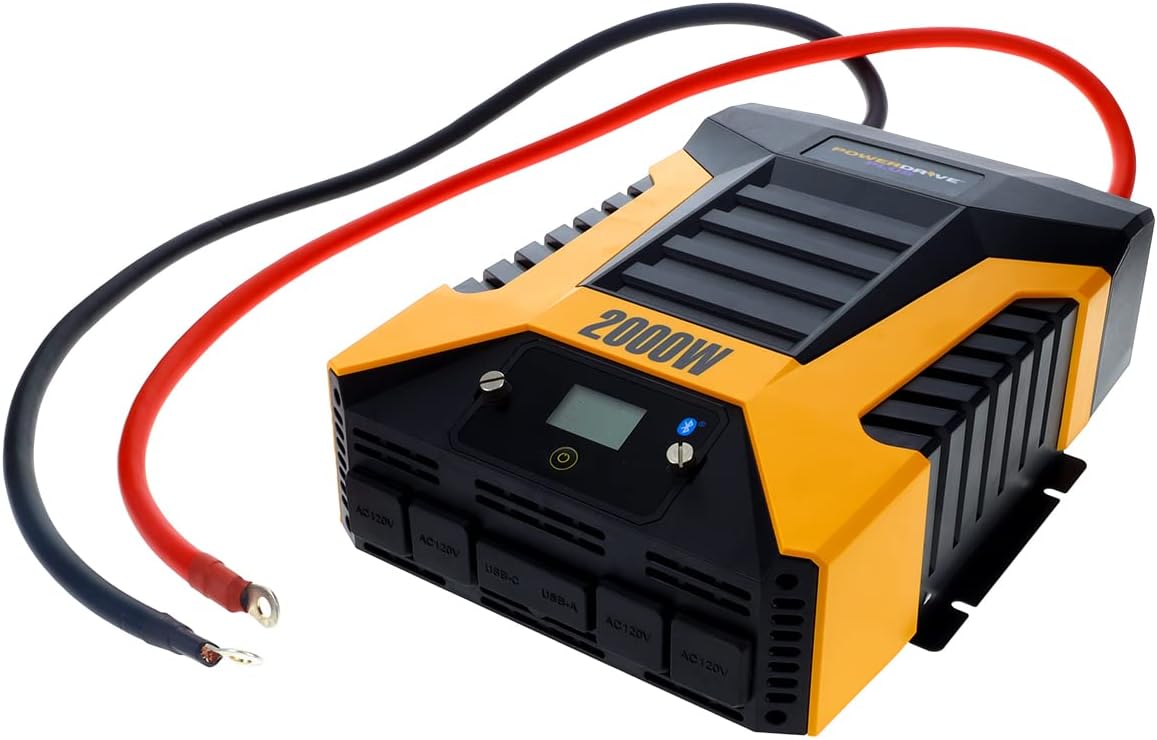
Rajah 3: The PowerDrive 2000 Watt Power Inverter with the red positive and black negative battery cables securely connected to its terminals, ready for connection to a vehicle battery. This illustrates the correct cable attachment for power input.
Arahan Operasi
Once installed, the inverter is ready for operation:
- Menghidupkan: Press the power button on the inverter's front panel or on the remote LCD screen. The digital display will illuminate, showing battery voltage dan output wattage.
- Menyambung Peranti: Plug your AC devices into the four 3-prong AC outlets. For charging smartphones and tablets, use the standard USB 2.4 Amp port or the fast-charging USB-C 3.0 Amp pelabuhan.
- Pemantauan: The digital display provides real-time information on battery voltage, output power (watts), and any error codes.
- Teknologi Wayarles Bluetooth:
- Muat turun percuma PowerDrive Plus app from your smartphone's app store (compatible with Android and iOS).
- Enable Bluetooth on your smartphone and pair it with the inverter.
- The app allows you to remotely monitor battery voltage, output power, and product temperature. You can also set up protections like undervoltage and overload, and power the inverter on/off from a distance.
- Matikan kuasa: Press and hold the power button until the display turns off, or use the PowerDrive Plus app. Disconnect devices before turning off the inverter.

Rajah 4: Muka dekat view of the PowerDrive 2000 Watt Power Inverter, highlighting its four AC 120V outlets, one USB-C port, and one USB-A port. These ports provide versatile power options for various electronic devices and appliances.

Rajah 5: A smartphone screen showing the PowerDrive Plus application interface. The app displays real-time data such as output power (842 watts), battery power percentage (88%), battery voltage (12.6 VDC), and output voltage (120 VAC), along with temperature readings and control options.
Penyelenggaraan
To ensure the longevity and optimal performance of your PowerDrive inverter, follow these maintenance guidelines:
- Jaga kebersihan: Lap bahagian luar inverter dengan kain kering dan lembut secara berkala. Jangan gunakan pembersih cecair atau pelarut.
- Pengudaraan: Ensure the cooling fan vents are clear of dust and debris. The high-speed cooling fan automatically activates when needed and is designed for quiet operation.
- Sambungan Kabel: Periodically check that all cable connections to the battery and inverter terminals are secure and free from corrosion.
- Storan: When not in use for extended periods, store the inverter in a cool, dry place, disconnected from the battery.

Rajah 6: belakang view of the PowerDrive 2000 Watt Power Inverter, showcasing its two high-speed cooling fans and the robust battery input terminals. Proper airflow through these fans is essential for maintaining optimal operating temperature.
Menyelesaikan masalah
Jika anda menghadapi masalah dengan penyongsang anda, rujuk kepada masalah dan penyelesaian biasa berikut:
| Masalah | Kemungkinan Punca | Penyelesaian |
|---|---|---|
| Tiada output kuasa / Inverter tidak dihidupkan |
|
|
| Inverter kerap dimatikan |
|
|
| Digital display shows error code | Specific error condition (e.g., over-voltage, bawah-voltage, overload, short circuit) | Refer to the PowerDrive Plus app or contact customer support for specific error code interpretations and solutions. Address the underlying issue (e.g., reduce load, check battery). |
Spesifikasi Produk
| Ciri | Perincian |
|---|---|
| Jenama | PowerDrive |
| Nombor Model | PWD2000P |
| Kuasa Berterusan | 2000 Watt |
| Kuasa Lonjakan | 4000 Watt |
| Input Voltage | 12V DC |
| Keluaran Voltage | 110V AC |
| Kedai AC | Four 3-prong outlets |
| Port USB | Satu USB 2.4 Amp, One USB-C 3.0 Amp |
| Ketersambungan | Bluetooth Wireless Technology (PowerDrive Plus App compatible) |
| Paparan | Digital display (removable LCD screen) |
| Menyejukkan | Kipas penyejuk berkelajuan tinggi |
| Berat Barang | 9 paun |
| Dimensi Produk | 5.7 x 17 x 12 inci |
Waranti dan Sokongan
For warranty information, technical support, or service inquiries, please contact PowerDrive customer service. Keep your purchase receipt as proof of purchase.
For additional resources and frequently asked questions, visit the official PowerDrive website or refer to the PowerDrive Plus app.
Ask a question about this manual
Ask about setup, troubleshooting, compatibility, parts, safety, or missing instructions. Manuals+ will review the question and use this page’s manual context to help answer it.