
Lavaudio DS220
Manual Pengguna Penerima Bluetooth HiFi Lavaudio DS220
Model: DS220 | Brand: Lavaudio
1. Pengenalan
This manual provides detailed instructions for the setup, operation, and maintenance of your Lavaudio DS220 HiFi Bluetooth Receiver. Please read this manual thoroughly before using the device to ensure proper functionality and to maximize your audio experience. The DS220 is designed to seamlessly integrate high-resolution Bluetooth audio into your existing home stereo system.
2. Maklumat Keselamatan
- Jangan dedahkan peranti kepada air atau kelembapan berlebihan.
- Elakkan meletakkan peranti berhampiran sumber haba atau di bawah cahaya matahari langsung.
- Gunakan hanya penyesuai kuasa dan kabel yang disediakan.
- Jangan cuba membuka atau membaiki peranti ini sendiri. Rujuk semua servis kepada kakitangan yang berkelayakan.
- Pastikan pengudaraan yang betul di sekeliling peranti semasa operasi.
3. Kandungan Pakej
Sahkan bahawa semua item yang disenaraikan di bawah disertakan dalam pakej anda:
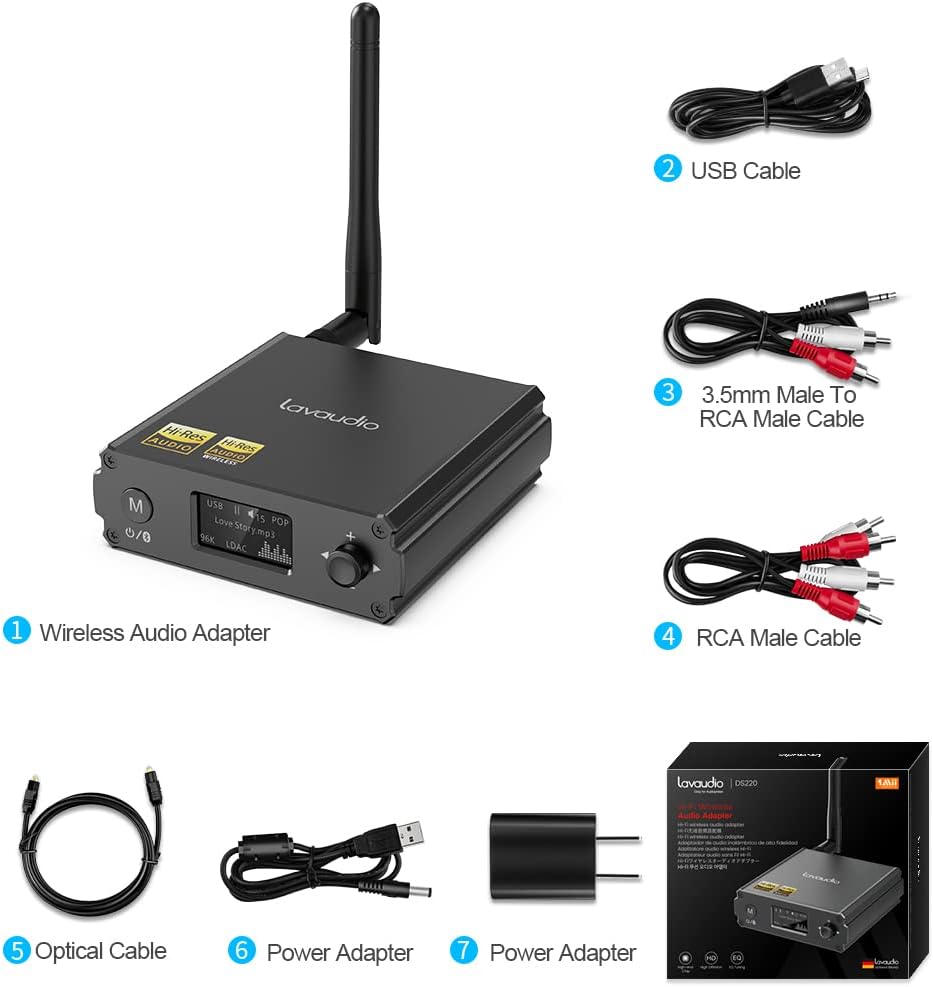
Image: Contents of the Lavaudio DS220 package, including the receiver, cables, and power adapter.
- Lavaudio DS220 HiFi Bluetooth Receiver x 1
- Kabel Pengecasan USB x 1
- 3.5mm Female to 2RCA Splitter Cable x 1
- 2RCA to 2RCA Stereo Audio Cable x 1
- Kabel Audio Optik x 1
- Penyesuai Kuasa x 1
- Manual Pengguna x 1
4. Produk Lebihview
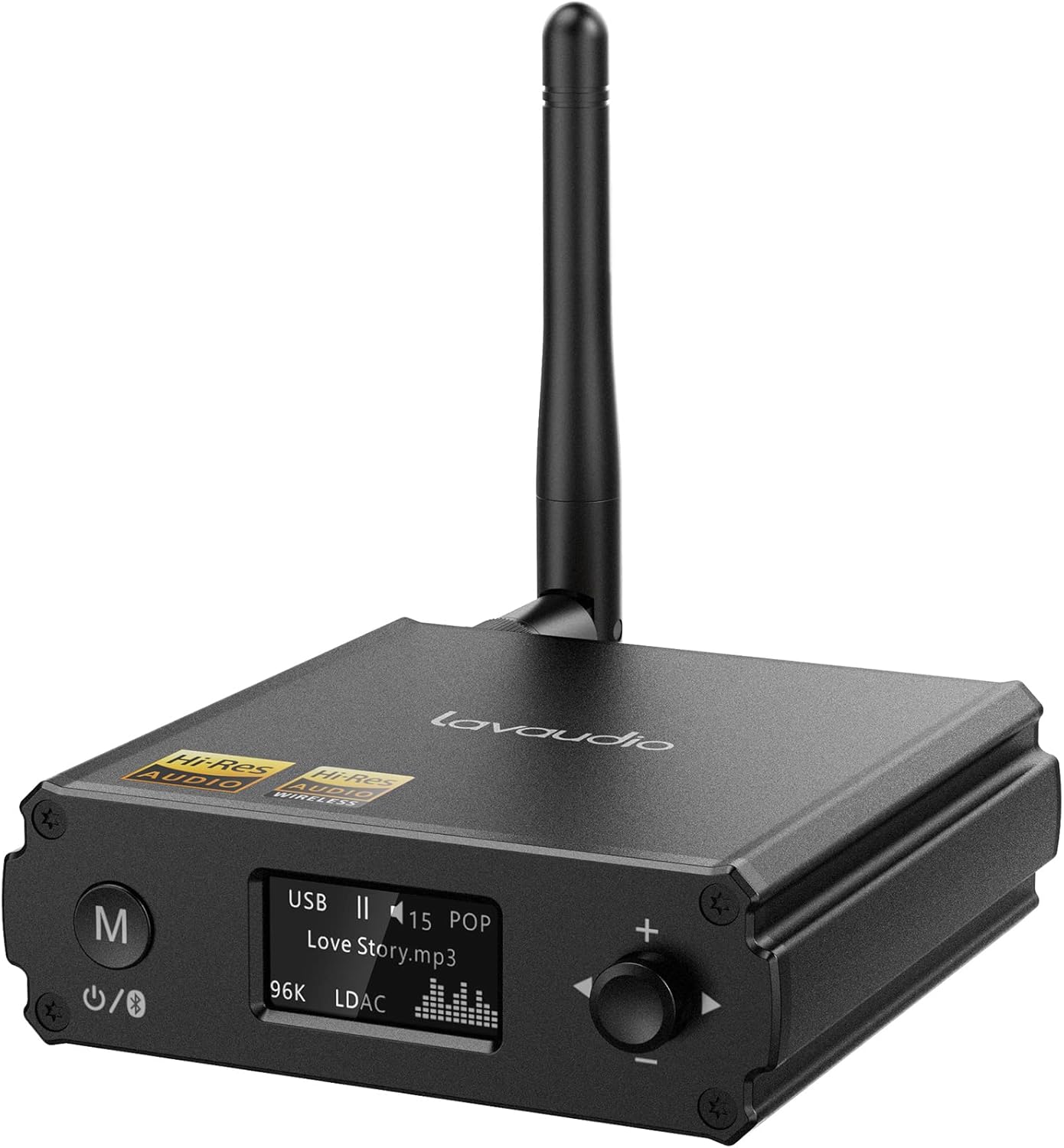
Imej: Depan view of the Lavaudio DS220 HiFi Bluetooth Receiver with its antenna.
4.1 Kawalan dan Paparan Panel Hadapan

Image: Close-up of the DS220's OLED display and control buttons.
- Butang M: Press and hold for 2 seconds to enter pairing mode. Press and hold for 4 seconds to power off. Press and hold for 10 seconds to perform a factory reset.
- Paparan OLED: Shows current mode (USB, Bluetooth), track information, volume level, and EQ mode.
- Rotary Knob (+/-): Adjusts volume. Press to cycle through EQ modes.
4.2 Pelabuhan Panel Belakang

Imej: Belakang view of the DS220 showing its various output and input ports.
- DC 5V: Port input kuasa.
- TINGGAL KELUAR: Output audio digital optik.
- R-RCA OUT-L: Analog RCA stereo audio output.
- USB DALAM: USB Type-C input for connecting to a computer or other audio source.
5. Persediaan
5.1 Hidupkan Kuasa Awal
Connect the provided power adapter to the DC 5V port on the DS220 and plug it into a power outlet. The device will automatically power on and enter pairing mode for first-time use.
5.2 Menyambung ke Sistem Audio Anda
The DS220 offers flexible output options to connect to your amplifier or powered speakers:
- Menggunakan Kabel RCA: Connect the 2RCA to 2RCA stereo audio cable from the R-RCA OUT-L ports on the DS220 to the corresponding RCA input ports (e.g., AUX IN) on your amppembesar atau pembesar suara berkuasa.
- Using Optical Cable: Connect the optical audio cable from the OPT OUT port on the DS220 to the optical input port on your amppenguat atau DAC.
Pastikan anda amplifier or audio system is set to the correct input mode (e.g., AUX, Optical) corresponding to your connection.
6. Arahan Operasi

Image: Step-by-step visual guide for connecting, pairing, playing, and adjusting EQ.
6.1 Bluetooth IN Mode

Image: Detailed guide for Bluetooth IN mode setup.
- Hidupkan kuasa: Ensure the DS220 is powered on. For first-time use, it will automatically enter pairing mode, indicated by a quickly flashing Bluetooth icon on the OLED display.
- Enter Pairing Mode (if not first-time use): If the device is already connected or in standby, press and hold the 'M' button for 2 seconds until the Bluetooth icon flashes rapidly.
- Berpasangan: On your smartphone, tablet, or other Bluetooth audio source, enable Bluetooth and search for available devices. Select "DS220" from the list to connect.
- Main Muzik: Once connected, the Bluetooth icon will stop flashing and remain solid. You can now play audio from your connected device through the DS220.
6.2 USB IN Mode

Image: Diagram illustrating USB IN mode setup.
To use the DS220 as a USB DAC:
- Connect the provided USB cable from your computer/laptop or other audio source device to the USB IN port on the DS220.
- Connect the DS220's RCA or Optical output to your amppembesar atau pembesar suara berkuasa.
- The DS220 will automatically switch to USB audio mode. You can now play audio from your computer through the DS220.
6.3 EQ Mode and Volume Control
- Mod EQ: Press the rotary knob to cycle through various EQ modes such as Rock, Pop, Jazz, etc. The selected EQ mode will be displayed on the OLED screen. You can also adjust Bass and Treble settings within the EQ menu.
- Kawalan Kelantangan: Rotate the knob clockwise to increase volume and counter-clockwise to decrease volume.
7. Audio Quality and Codecs
The Lavaudio DS220 supports various high-definition audio codecs to ensure optimal sound quality:

Image: Comparison of audio bitrates for various codecs supported by the DS220.
- LDAC: Supports up to 24bit/96 kHz sampling rate with a bitrate of 990 kbps, offering high-resolution wireless audio.
- aptX HD: Supports up to 24bit/48 kHz sampling rate with a bitrate of 576 kbps, providing high-definition audio over Bluetooth.
- CCA: Supports up to 16bit/96 kHz sampling rate with a bitrate of 264 kbps.
- SBC: Supports up to 16bit/48 kHz sampling rate with a bitrate of 328 kbps, a standard Bluetooth audio codec.

Image: The DS220 integrated into a home stereo setup for high-definition audio.
The DS220 features a Qualcomm 5125 Bluetooth chip and an ESS ES9018K2M DAC chip for superior audio processing.
8. Penyelesaian masalah
Rujuk isu dan penyelesaian biasa berikut:
- Q1: How to enter pairing mode?
- A: For first-time use, the Lavaudio DS220 automatically enters pairing mode after power-on. To manually enter pairing mode, press and hold the 'M' button for 2 seconds until the Bluetooth icon on the display flashes rapidly.
- Q2: What does it mean when the Bluetooth icon slowly flashes?
- A: A slowly flashing Bluetooth icon indicates that the DS220 is in standby mode.
- Q3: Why do I have a sound problem when connecting DS220 by optical output?
- A: If your device does not support a 96K sample rate, try switching LDAC off. This often resolves sound issues. To do this, find DS220 in your phone's Bluetooth list, click to open the drop-down list, and switch LDAC to off. Ensure you use a power adapter for power supply to eliminate ground loop noise.
9. Spesifikasi
| Jenama | Lavaudio |
| Nombor Model | DS220 |
| Teknologi Ketersambungan | Bluetooth |
| Jenis Pengawal | Kawalan Butang |
| Peranti Serasi | Komputer Peribadi, Telefon Pintar |
| Mod Keluaran Audio | Stereo |
| Konfigurasi Saluran Bunyi Sekeliling | 2.0 |
| Kuasa Keluaran | 5 Watt |
| Bilangan Saluran | 2 |
| Berat Barang | 12.6 auns |
| Dimensi Pakej | 5.63 x 4.92 x 2.4 inci |
10. Penyelenggaraan
To ensure the longevity and optimal performance of your Lavaudio DS220, follow these maintenance guidelines:
- Pembersihan: Gunakan kain lembut dan kering untuk membersihkan bahagian luar peranti. Jangan gunakan pembersih cecair atau aerosol.
- Storan: Apabila tidak digunakan untuk tempoh yang lama, simpan peranti di tempat yang sejuk dan kering jauh dari cahaya matahari langsung dan suhu yang melampau.
- Pengendalian: Kendalikan peranti dengan berhati-hati. Elakkan daripada menjatuhkannya atau terkena impak yang kuat.
11. Waranti dan Sokongan
For warranty information and technical support, please refer to the official Lavaudio webtapak atau hubungi perkhidmatan pelanggan mereka. Simpan resit pembelian anda sebagai bukti pembelian untuk sebarang tuntutan waranti.
Nota: Tiada video produk rasmi tersedia untuk dibenamkan berdasarkan data yang diberikan.
Ask a question about this manual
Ask about setup, troubleshooting, compatibility, parts, safety, or missing instructions. Manuals+ will review the question and use this page’s manual context to help answer it.