
ELAMOR 0697508259018
ELAMOR Wi-Fi Gateway User Manual
Model: 0697508259018
1. Pengenalan
The ELAMOR Wi-Fi Gateway is designed to enhance the functionality of your smart door locks and other compatible smart devices that utilize the Smart Life App. This gateway acts as a bridge, enabling remote control and management of your Bluetooth door locks from any location, overcoming the limitations of Bluetooth unlocking distance. It also facilitates voice control integration with popular smart home assistants like Alexa and Google Home.

Rajah 1: Depan view of the ELAMOR Wi-Fi Gateway, showing its compact white design with indicator lights and the "Gateway" label.
2. Kandungan Pakej
Sila sahkan bahawa semua item yang disenaraikan di bawah disertakan dalam pakej anda:
- 1 x ELAMOR Wi-Fi Gateway
- 1 x Kabel USB Jenis-C
- 1 x Penyesuai Kuasa
- 1 x Manual Pengguna

Figure 2: All components included in the ELAMOR Wi-Fi Gateway package: User Manual, BLE MESH (SIG) Gateway, Data Cable, and Adapter.
3. Produk Lebihview
Familiarize yourself with the different parts and indicators of your ELAMOR Wi-Fi Gateway:
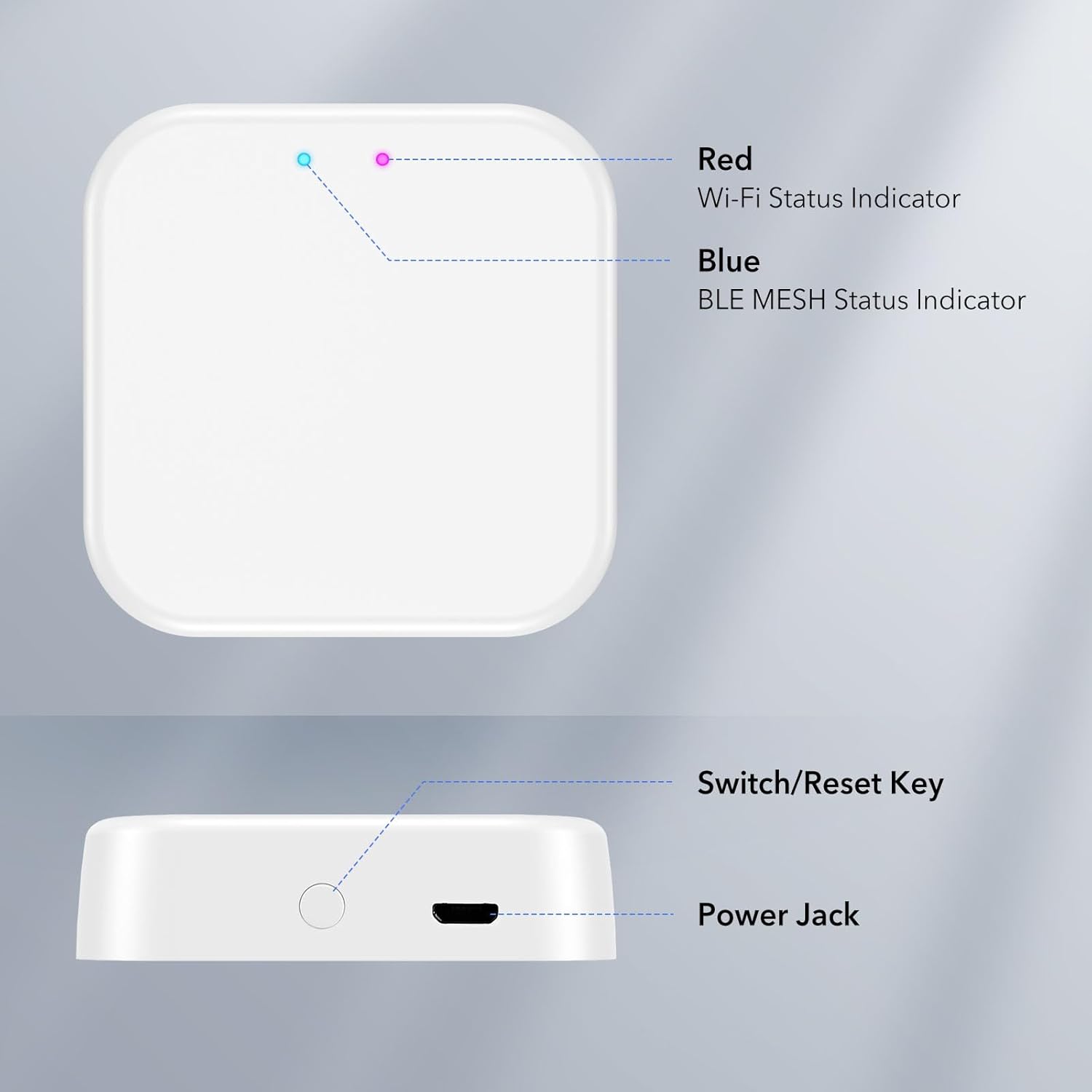
Rajah 3: Atas dan sisi view of the ELAMOR Wi-Fi Gateway, highlighting its key features: Red Wi-Fi Status Indicator, Blue BLE MESH Status Indicator, Switch/Reset Key, and Power Jack.
- Red Wi-Fi Status Indicator: Menunjukkan status sambungan Wi-Fi.
- Blue BLE MESH Status Indicator: Indicates the status of the Bluetooth Mesh connection.
- Switch/Reset Key: Used for various functions, including resetting the device.
- Bicu Kuasa: Connects the gateway to the power adapter using the provided USB cable.
4. Persediaan dan Pemasangan
Setting up your ELAMOR Wi-Fi Gateway is a straightforward process, typically completed in under 2 minutes with just 3 easy steps:
- Hidupkan kuasa: Connect the gateway to a power source using the provided USB cable and adapter.
- Muat turun Aplikasi Smart Life: Ensure you have the Smart Life App installed on your smartphone. This gateway is specifically designed for smart door locks that utilize the Smart Life App.
- Berpasangan: Open the Smart Life App and follow the on-screen instructions to pair the gateway with your smart door lock. Important: Ensure both your smartphone and the gateway are connected to the same 2.4GHz Wi-Fi network during the pairing process.
Once paired, the gateway will connect your Bluetooth door locks to the internet, enabling enhanced management convenience.
5. Operasi
5.1 Alat Kawalan Jauh
The ELAMOR Wi-Fi Gateway empowers you to control your smart lock from any location, eliminating the constraints of Bluetooth unlocking distance. Through the Smart Life App, you can:
- Remotely share, modify, and delete passcodes.
- Access real-time information such as unlocking records, door status, and battery life.

Figure 4: Illustration of the Smart Life App interface demonstrating remote control capabilities for a smart lock.
5.2 Kawalan Suara
For added convenience, the gateway supports voice control through integration with Alexa and Google Home (devices sold separately). Simply use voice commands to unlock, lock, and perform other actions on your smart door locks, providing a secure and intelligent lifestyle.
A single gateway can pair with multiple smart door locks, offering flexibility and convenience without device limitations.
5.3 Connectivity and Coverage
The gateway connects via Wi-Fi to your Bluetooth lock and your phone, achieving true remote control. The effective coverage range for the Bluetooth connection between the gateway and the smart lock is no more than 32 feet (10 meters).
6. Penyelenggaraan
To ensure optimal performance and longevity of your ELAMOR Wi-Fi Gateway, consider the following maintenance tips:
- Simpan peranti dalam persekitaran yang kering, jauh daripada kelembapan dan suhu yang melampau.
- Bersihkan bahagian luar dengan kain lembut dan kering. Elakkan menggunakan bahan kimia yang keras atau pembersih yang kasar.
- Pastikan pengudaraan yang betul di sekeliling peranti untuk mengelakkan terlalu panas.
- Regularly check for firmware updates through the Smart Life App to ensure the gateway is running the latest software.
7. Penyelesaian masalah
If you encounter issues with your ELAMOR Wi-Fi Gateway, please refer to the following common troubleshooting steps:
- Gateway Offline:
- Check if the power adapter is securely connected and the gateway is powered on.
- Verify that your Wi-Fi network is active and stable.
- Ensure the gateway is within range of your Wi-Fi router.
- Try restarting the gateway by unplugging and re-plugging it.
- Unable to Pair with Smart Lock:
- Confirm that both your smartphone and the gateway are connected to the same 2.4GHz Wi-Fi network during pairing.
- Ensure the smart lock is within the 32-foot (10-meter) Bluetooth range of the gateway.
- Reset the gateway using the Switch/Reset Key and attempt pairing again.
- Verify that your smart lock is compatible with the Smart Life App.
- Kawalan Suara Tidak Berfungsi:
- Ensure your Alexa or Google Home device is properly linked to your Smart Life account.
- Semak sambungan internet anda.
- Verify that the smart lock is successfully connected to the gateway and online in the Smart Life App.
If the problem persists, please contact ELAMOR customer support for further assistance.
8. Spesifikasi
| Jenama | ELAMOR |
| Nombor Model | 0697508259018 |
| Dimensi (L x W x H) | 2.44 x 2.48 x 1.65 inci |
| bahan | ABS WiFi Gateway |
| Protokol Ketersambungan | Wi-Fi, Bluetooth (BLE MESH) |
| Coverage (Bluetooth) | No more than 32 feet (10 meters) |
| Kaedah Kawalan | Remote, Voice |
| warna | putih |
9. Waranti dan Sokongan
ELAMOR provides a Waranti 12 bulan for this product. Our dedicated 24-hour service team is available to assist you with any inquiries or concerns you may have.
Should you require assistance, please do not hesitate to reach out to us. We are committed to providing you with the best possible service and support.