
1. Pengenalan
The Gustard R26 is a high-performance Discrete R2R DAC (Digital-to-Analog Converter) designed for audiophiles seeking exceptional sound quality. It features advanced technologies such as R2R-1Bit architecture, DSD512 and PCM768kHz support, K2 Clock, and balanced preamp capabilities. This manual provides detailed instructions for setting up, operating, and maintaining your Gustard R26 to ensure optimal performance and longevity.
2. Produk Lebihview
2.1. Panel hadapan
The front panel of the Gustard R26 features a clean design with essential controls and indicators.

Penerangan: A black Gustard R26 DAC unit is shown from the front-right angle, accompanied by its remote control. The unit has a sleek, minimalist design with a central display and a multi-function knob on the right.
2.2. Sambungan Panel Belakang
The rear panel provides a comprehensive array of input and output options for versatile connectivity within your audio system.

Penerangan: A terperinci view of the Gustard R26's rear panel, highlighting various input and output ports including RCA, XLR, USB, LAN, IIS-H, Coaxial, Optical, Bluetooth antenna, Clock input, and power input with voltage switching and fuse. A diagram labels each port.
2.3. Internal Architecture and Key Components
The Gustard R26 incorporates sophisticated internal components for superior audio processing.

Penerangan: A close-up of the internal circuit board, illustrating the Complex Programmable Logic Device (CPLD) and its functions such as signal routing, clock management, 2nd order PLL, DOP decoding, and Depop for PCM&DSD.
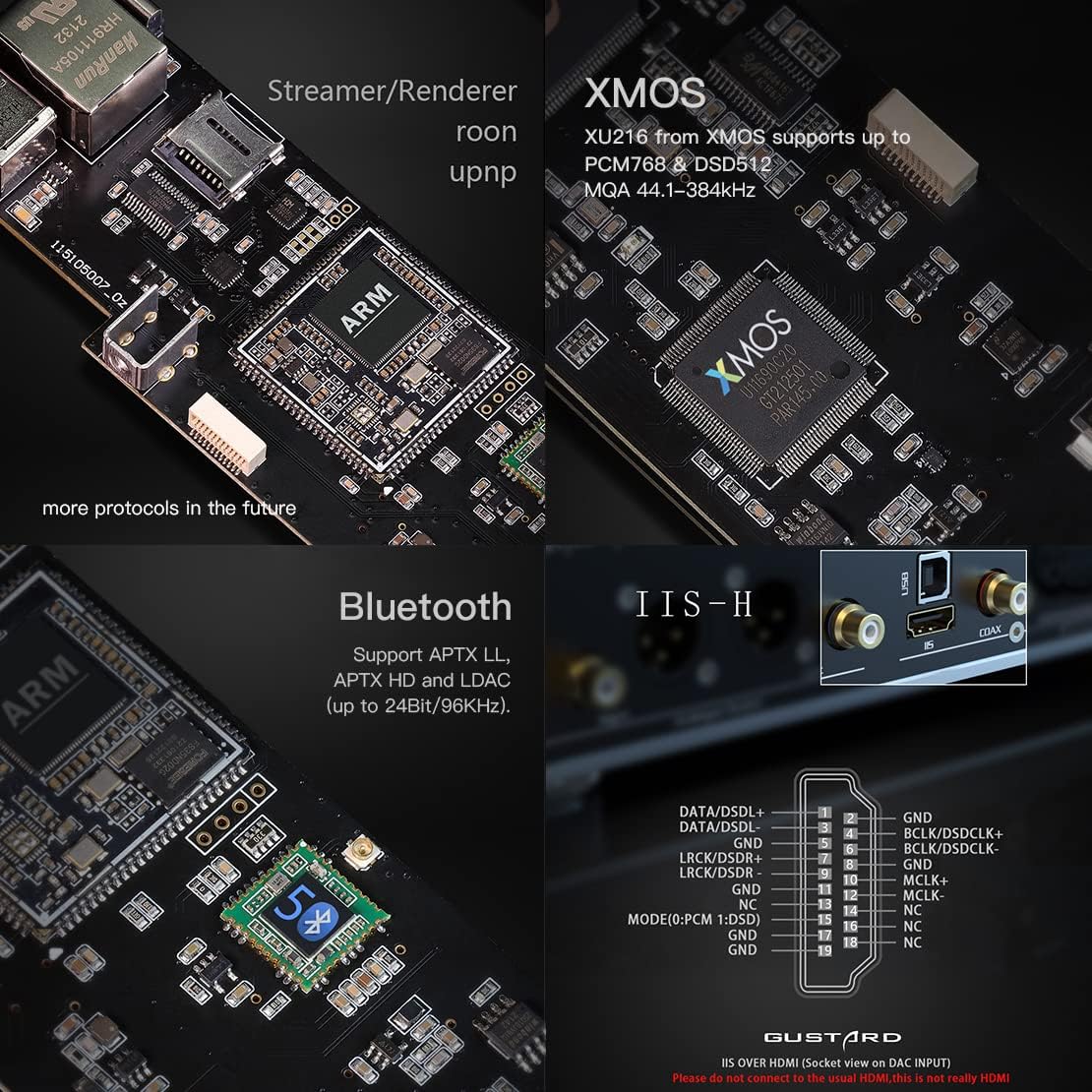
Penerangan: Another internal view focusing on the XMOS XU216 chip (supporting PCM768 & DSD512), the Bluetooth 5.0 module (supporting APTX LL, APTX HD, and LDAC up to 24Bit/96kHz), and the IIS-H input interface.

Penerangan: A detailed shot of the Low Pass Filter (LPF) section and the K2 Ultra Low Noise Clock Synthesizer, emphasizing the precision components used for signal processing and clocking.
2.4. Ciri-ciri Utama Lebihview
The Gustard R26 is packed with features designed to enhance your listening experience.

Penerangan: A grid of icons representing key features: R2R Discrete DAC, 1 Bit DSD, Native PCM, Native DSD, DSD to PCM, Streamer/Renderer ROON Upnp, XMOS DSD512 PCM768K, Gustard Femto Clock fs Jitter Oscillators, CPLD, 10M k2 Clock in, DSD 1bit DSD512, PCM 768K, MQA 44.1-384kHz, Bluetooth, IIS (Via HDMI), Single-end Balanced, Independent Power Supplies, and Remote.
2.5. Video Produk Rasmi
Penerangan: Video ini menyediakan visual overview of the Gustard R26 Decoder and its remote control, showcasing its design and various features.
3. Panduan Persediaan
3.1. Membongkar
Carefully remove the Gustard R26 from its packaging. Ensure all accessories are present.

Penerangan: A cardboard box for the Gustard R26, showing a label with model R26, serial number, manufacture date, color (black checked), and voltage selection (100-120V / 220-240V).
Penerangan: The top of the Gustard R26 cardboard box, featuring the 'GUSTARD' logo and the slogan 'High-Fidelity for You'.
3.2. Sambungan
- Sambungan Kuasa: Connect the supplied AC cable to the power input on the rear panel. Ensure the voltage switch (115V/230V) is set correctly for your region.
- Output Audio: Connect the R26 to your amplifier or active speakers using either the RCA (single-ended) or XLR (balanced) outputs. XLR connections are recommended for optimal performance.
- Input Digital: Connect your digital audio sources (e.g., CD player, computer, streamer) to the appropriate inputs: USB, Coaxial, Optical, AES/EBU, or IIS.
- Sambungan Rangkaian (Pilihan): For streaming features, connect an Ethernet cable to the LAN port.
- Antena Bluetooth: Attach the provided Bluetooth antenna to the designated port for wireless connectivity.
- 10M Clock Input (Optional): If using an external master clock, connect it to the 10M Clock In BNC port.
3.3. Hidupkan kuasa
After making all necessary connections, flip the power switch on the rear panel to the 'ON' position. The front display will illuminate.
4. Arahan Operasi
4.1. Operasi Asas
Use the multi-function knob on the front panel or the remote control to navigate the menu and adjust settings.
4.2. Pemilihan Input
Press the function button or use the remote to cycle through available digital inputs (USB, COAX, OPT, AES, IIS, LAN, Bluetooth).
4.3. Kawalan Kelantangan
The R26 can operate with fixed or variable volume output. In variable mode, use the front knob or remote to adjust the output volume. Note that volume is fixed under Native 1 Bit DAC mode.
4.4. Tetapan Lanjutan
The R26 offers various advanced settings accessible through its menu, including PCM filters, DSD modes, and clock synchronization options. Refer to the detailed user manual (PDF) for comprehensive instructions on configuring these settings to suit your preferences.
4.5. MQA Decoding
The Gustard R26 supports full MQA decoding across USB, Optical, Coaxial, AES, and IIS inputs, up to PCM44.1kHz-384kHz. This allows for the playback of Master Quality Authenticated audio files, delivering the original master recording quality.

Penerangan: An infographic explaining the MQA (Master Quality Authenticated) technology, detailing how it cleans the recording, its benefits over traditional digital audio, and how it unfolds the full studio sound.
5. Penyelenggaraan
- Pembersihan: Gunakan kain lembut dan kering untuk membersihkan bahagian luar unit. Elakkan menggunakan pembersih atau pelarut yang kasar.
- Pengudaraan: Ensure adequate ventilation around the unit to prevent overheating. Do not block the ventilation slots.
- Storan: Jika menyimpan unit untuk tempoh yang lama, putuskan sambungannya daripada kuasa dan simpan di tempat yang sejuk dan kering.
6. Penyelesaian masalah
| Masalah | Kemungkinan Punca | Penyelesaian |
|---|---|---|
| Tiada kuasa | Power cable disconnected; Power switch off; Fuse blown | Check power cable connection; Turn on power switch; Replace fuse (refer to manual for type) |
| Tiada keluaran bunyi | Incorrect input selected; Cables loose; Amplifier off/muted; Volume too low | Select correct input; Check all audio cable connections; Ensure amplifier is on and not muted; Increase volume |
| Bunyi herot | Poor cable connection; Source issue; Incorrect settings | Check cable integrity; Test with different source; Verify DAC settings (e.g., filter mode) |
| Isu sambungan Bluetooth | Antenna not connected; Device out of range; Interference | Ensure Bluetooth antenna is connected; Move device closer; Reduce interference from other wireless devices |
7. Spesifikasi
Detailed technical specifications for the Gustard R26 DAC.
| kategori | Spesifikasi |
|---|---|
| Bekalan Kuasa | AC 115V/230V 50/60Hz |
| Penggunaan Kuasa | <30W |
| Saiz (L*P*T) | 330mm * 260mm * 65mm (Protrusion not included) |
| Berat badan | 7KG (with package) |
| Bahan Kes | Sandblasted aluminum alloy |
| COAX/AES/OPT Input | PCM 16-24bit/44.1-192kHz; DSD DOP64 |
| Input USB | PCM 16-32bit/44.1-768kHz; DSD DOP64-DOP256; NATIVE DSD: DSD64-DSD512 |
| USB OS Support | Windows 7~11 32/64bit; iOS; Linux |
| IIS Input | PCM 16-32bit/44.1-768kHz; DSD DOP64-DOP256; NATIVE DSD: DSD64-DSD1024 |
| 10M Clock In | 50 Ohm BNC, 0dBm-20dBm, Square Wave 0.2V-3.3V, Sinewave 0.5-3.3V |
| Respons Kekerapan | 20-20kHz /+-0.2dB (Oversampling) |
| Julat Dinamik | > 115dB |
| Nisbah Isyarat-ke-Bunyi | >122dB |
| Crosstalk | -134dB @ 1kHz |
| THD+N | <=0.003% @1kHz |
| IMD | ≈0.008% @ 0dbfs |
| Keluaran RCA | 2.5Vrms (VOLUME FIXED) 100Ω |
| Keluaran XLR | 5.0Vrms (VOLUME FIXED) 100Ω |
| Pinout XLR | 1-Ground 2-Hot 3-Cold |
| Sokongan MQA | USB/OPT/COAX/AES/IIS: PCM44.1-384kHz |

Penerangan: A visual representation of the input, output, and other specifications of the Gustard R26 DAC, presented in a clear table format.
8. Waranti dan Sokongan
For detailed warranty information and technical support, please refer to the official user manual or contact AOSHIDA customer service.
Manual Pengguna (PDF): Muat turun Manual Pengguna
AOSHIDA Audio specializes in the supply and production of high-fidelity audio products. As an exclusive agent for the Musician brand and a Chinese agent for several other reputable brands like TOPPING, SMSL, and Gustard, AOSHIDA is committed to providing professional audio solutions including DACs, headphone amplifiers, and IEMs to enhance your music journey.