
1. Pengenalan
The Redodo 29.2V 20A LiFePO4 Lithium Battery Charger is specifically designed for efficient and safe charging of 24V Lithium Iron Phosphate (LiFePO4) batteries. This manual provides essential information for the proper installation, operation, maintenance, and troubleshooting of your charger. Please read this manual thoroughly before using the product to ensure optimal performance and safety.
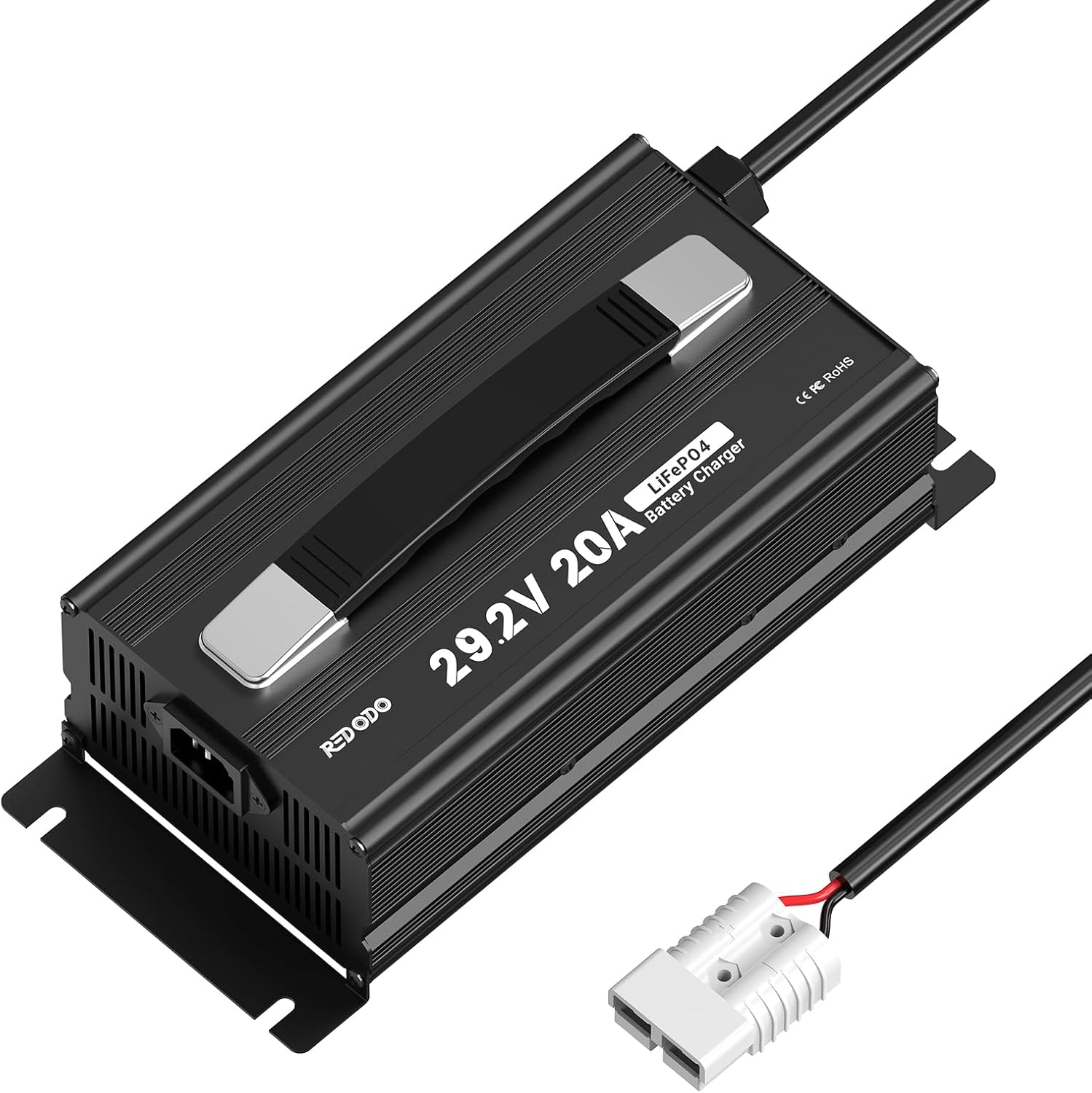
Image 1: Redodo 29.2V 20A LiFePO4 Lithium Battery Charger. This image displays the charger unit with its handle, input power cable, and output cable with an Anderson connector.
2. Arahan Keselamatan
Sentiasa patuhi langkah berjaga-jaga keselamatan berikut untuk mengelakkan kecederaan atau kerosakan:
- Read all instructions carefully before operating the charger.
- Ensure the charger is compatible with your battery's voltage and chemistry (29.2V for 24V LiFePO4).
- Operate the charger in a well-ventilated area to prevent overheating.
- Keep the charger away from flammable or explosive materials.
- Do not touch the AC input or DC output terminals during operation to avoid electric shock.
- Do not attempt to disassemble or modify the charger. This voids the warranty and may cause hazards.
- Pastikan semua sambungan selamat sebelum menggunakan kuasa.
- Disconnect the AC power before connecting or disconnecting the battery.
3. Ciri-ciri Produk
- Fast Charging with High Efficiency: Designed for 24V LiFePO4 batteries, this 20A charger can fully charge a 24V 100Ah LiFePO4 battery in approximately 5 hours, significantly faster than lower amperage chargers.
- Perlindungan Keselamatan Komprehensif: Equipped with multiple protection functions including over-temperature protection, output short-circuit protection, reverse polarity connection protection, and output over-voltage perlindungan untuk memastikan pengecasan yang selamat.
- Exclusive Pre-charge Mode: Features a pre-charge mode that can activate deeply discharged or long-unused batteries, helping to restore and extend battery life.
- High Quality and Reliability: Constructed with military and industrial-grade components, advanced circuit design, and manufactured under ISO9001:2008 quality management standards for durability and low failure rate.
- Reka Bentuk Mudah Alih: Includes a convenient handle for easy transport and a control switch at the output end for enhanced user convenience.

Image 2: Fast Charging Efficiency Comparison. This graphic illustrates the charger's ability to fully charge a battery in approximately 5 hours compared to other chargers.

Image 3: Safety Protection Functions. This image highlights the charger's built-in protections: output short-circuit, temperature, output over-voltage, and reverse polarity connection protection.

Image 4: Exclusive Pre-charge Mode. This graphic demonstrates how the pre-charge mode activates a deeply discharged battery, bringing it from 0V to a functional voltage.
4. Apa yang ada di dalam Kotak
Your Redodo 29.2V 20A LiFePO4 Lithium Battery Charger package includes:
- 1 x Redodo 29.2V 20A LiFePO4 Battery Charger
- 1 x Kabel Kuasa AC
- 1 x Output Cable with Anderson Connector (and optional M8 O-shaped terminals or alligator clamps)
- 1 x Manual Pengguna

Image 5: What's in the Box. This image shows the charger unit, AC power cord, and the output cable with an Anderson connector and M8 O-shaped terminals.
5. Arahan Persediaan
Ikuti langkah ini untuk menyediakan pengecas anda:
- Connect the DC Output Cable: Connect the DC output cable (with Anderson connector, or attached M8 O-shaped terminals/alligator clamps) to your 24V LiFePO4 battery. Ensure the positive (+) terminal of the charger connects to the positive terminal of the battery, and the negative (-) terminal of the charger connects to the negative terminal of the battery.
- Connect the AC Input Cable: Plug the AC power cord into the charger's AC input port.
- Sambung ke Alur Kuasa: Plug the other end of the AC power cord into a standard 100-240V AC wall outlet.
- Sahkan Sambungan: Double-check all connections to ensure they are secure and correctly polarized before proceeding.

Image 6: Easy Connection Diagram. This diagram illustrates the correct connection sequence from the power socket to the charger and then to the battery using an Anderson connector.
6. Arahan Operasi
Once properly connected, the charger will automatically begin the charging process. Monitor the LED indicators for status updates.
6.1 Penunjuk LED
The charger features LED indicators to display its operational status:
- LED1 (Red) / LED2 (Red): Pengecasan sedang dijalankan.
- LED1 (Green) / LED2 (Green): Battery fully charged or charger in standby mode (no battery connected).
- LED1 (Red, flashing) / LED2 (Red, flashing): Charger malfunction or protection function activated.
6.2 Three Charging Stages
The charger utilizes a smart 3-stage charging process to optimize battery life:
- Stage 1: Pre-charge (T1): If the battery is deeply discharged, the charger will apply a gentle trickle charge to activate the battery and safely raise its voltage. This protects both the charger and the battery from sudden stress.
- Stage 2: Constant Current (CC) (T2): Once the battery's voltage is within a safe range, the charger delivers its full rated current (20A) to rapidly charge the battery.
- Stage 3: Constant Voltage (CV) (T3): As the battery approaches full charge, the charger maintains a constant voltage while gradually reducing the charging current. This prevents overcharging and ensures the battery is fully and safely charged.

Image 7: Three Charging Stages Diagram. This graph illustrates the voltage and current curves during the pre-charge, constant current, and constant voltagestages of battery charging.
Video 1: Redodo 29.2V 20A LiFePO4 Battery Charger OverviewVideo ini menyediakan visual keseluruhanview of the charger's features and components.
Video 2: Inside a LiFePO4 Charger: What Happens from 0% to 100%. This video explains the internal processes and stages of charging a LiFePO4 battery.
7. Penyelenggaraan
To ensure the longevity and optimal performance of your Redodo charger and batteries:
- Keep the charger clean and dry. Avoid exposure to moisture, dust, and extreme temperatures.
- Simpan pengecas di tempat yang sejuk dan kering apabila tidak digunakan.
- If the battery is not used for an extended period, it is recommended to recharge it every 3 months to maintain its health.
- Regularly inspect cables and connectors for any signs of wear or damage. Replace if necessary.
8. Penyelesaian masalah
Jika anda menghadapi masalah dengan pengecas anda, rujuk kepada masalah dan penyelesaian biasa berikut:
- Pengecas Tidak Dihidupkan:
- Check if the AC power cord is securely plugged into both the charger and the wall outlet.
- Sahkan bahawa soket dinding berfungsi.
- Battery Not Charging / Fault LED Flashing:
- Ensure the DC output cable is correctly connected to the battery terminals (positive to positive, negative to negative).
- Periksa sebarang sambungan yang longgar atau kabel yang rosak.
- The battery's Battery Management System (BMS) might have shut down due to deep discharge (voltage below 18V for a 24V battery).
- For deeply discharged 24V batteries (below 18V): Disconnect all devices from the battery and let it rest for 30 minutes. If the voltage recovers above 20V, proceed with normal charging. If not, use a charger with a lithium battery activation function (like this Redodo charger's pre-charge mode) or connect it to a solar charge controller for 3-10 seconds to attempt activation.
- Pengecas Terlalu Panas:
- Pastikan pengecas berada di kawasan pengudaraan yang baik dan tidak bertutup.
- Check if the cooling fan is obstructed.
Video 3: Battery Not Working What to do. This video provides steps to revive a LiFePO4 battery that has entered protection mode due to low voltage. Note: For 24V batteries, double the voltage values mentioned for 12V systems (e.g., if a 12V battery is below 9V, a 24V battery would be below 18V).
9. Spesifikasi
| Parameter | Nilai |
|---|---|
| Jenama | Buat semula |
| Nombor Model | R24V20A-BCHA |
| Input Voltage | 100-240V AC |
| Keluaran Voltage | 29.2V DC |
| Arus Keluaran | 20A |
| Jenis Bateri yang Serasi | 24V LiFePO4 (Lithium Iron Phosphate) |
| Berat Barang | 5.07 paun (lebih kurang 2.3 kg) |
| Dimensi Produk (L x W x H) | 10.87 x 4.75 x 3.52 inci (lebih kurang 276 x 121 x 90 mm) |
| Fungsi Perlindungan | Over Temperature, Output Short-Circuit, Reverse Polarity, Output Over-Voltage |
10. Waranti dan Sokongan
Redodo stands by the quality of its products:
- Waranti: Produk ini disertakan dengan jaminan 2 tahun.
- Perkhidmatan Pelanggan: Redodo offers 24-hour one-on-one customer service.
- Sokongan Teknikal: Lifetime technical support is provided for this product.
For any questions, concerns, or technical assistance, please contact Redodo customer support through the provided channels in your product packaging or on the official Redodo webtapak.