
pengenalan
This manual provides comprehensive instructions for the setup, operation, maintenance, and troubleshooting of your T-WOLF X9 Bluetooth Mouse. Please read this manual carefully before using the product to ensure optimal performance and longevity.
Kandungan Pakej
- 1 x T-WOLF X9 Bluetooth Mouse
- 1 x Bateri AA
- 1 x Manual Pengguna (dokumen ini)
Produk Selesaiview

Imej 1: Atas view of the T-WOLF X9 Bluetooth Mouse, showing the left and right click buttons, scroll wheel, and DPI switch button. The T-WOLF logo and Bluetooth icon are visible.
The T-WOLF X9 is a portable Bluetooth mouse designed for convenience and performance. It features a sleek design, Bluetooth 5.2 connectivity, and a 10-meter operating range. The mouse includes four buttons: left-click, right-click, scroll wheel (which also functions as a button), and a dedicated DPI switch button for adjusting cursor sensitivity.
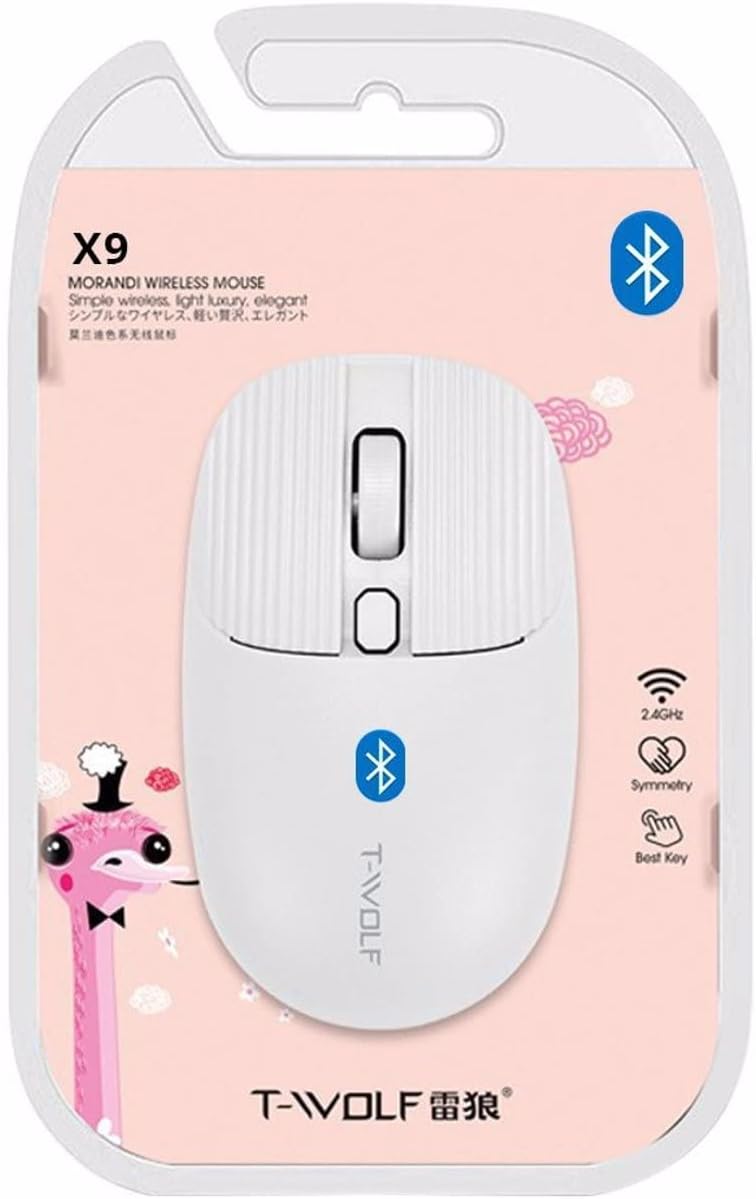
Imej 2: Packaging of the T-WOLF X9 Bluetooth Mouse, highlighting key features such as 2.4GHz (though product is Bluetooth, this might be a generic packaging element), symmetry, and "Best Key".

Imej 3: sebelah view of the T-WOLF X9 Bluetooth Mouse, illustrating its ergonomic profile and non-slip roller design.
Persediaan
1. Pemasangan Bateri
- Cari petak bateri di bahagian bawah tetikus.
- Buka penutup petak bateri.
- Masukkan bateri AA yang disediakan, pastikan kekutuban (+/-) betul.
- Tutup penutup petak bateri dengan selamat.
2. Berpasangan Bluetooth
- Ensure the mouse is powered on. There may be a power switch on the underside.
- Pada komputer atau peranti anda, navigasi ke tetapan Bluetooth.
- Dayakan Bluetooth dan cari peranti baharu.
- The mouse should appear as "T-WOLF X9" or similar. Select it to initiate pairing.
- Once paired, the mouse is ready for use.
Arahan Operasi
1. Penukaran DPI
The T-WOLF X9 mouse features 3-gear DPI switching. Press the dedicated DPI button (located behind the scroll wheel) to cycle through the available DPI settings. Each press will change the cursor sensitivity, allowing you to adjust it to your preference for different tasks.
2. Fungsi Butang
- Butang Klik Kiri: Primary selection and interaction.
- Butang Klik Kanan: Opens contextual menus.
- Roda Tatal: Menatal kandungan secara menegak. Boleh juga ditekan untuk fungsi klik tengah.
- Butang Suis DPI: Adjusts cursor sensitivity (DPI).
Penyelenggaraan
- Pembersihan: Gunakan kain lembut dan kering untuk membersihkan tetikus. Untuk kotoran degil, sedikit dampen kain dengan air. Elakkan menggunakan bahan kimia yang keras atau bahan yang melelas.
- Penggantian Bateri: Replace the AA battery when the mouse performance degrades or it stops responding.
- Storan: Simpan tetikus di tempat yang sejuk dan kering apabila tidak digunakan untuk tempoh yang lama.
Menyelesaikan masalah
| Masalah | Penyelesaian |
|---|---|
| Tetikus tidak bertindak balas |
|
| Pergerakan kursor tidak menentu atau perlahan |
|
| Cannot pair the mouse |
|
Spesifikasi
| Ciri | Perincian |
|---|---|
| Model | X9 |
| Ketersambungan | Bluetooth 5.2 |
| Julat Operasi | Sehingga 10 meter |
| Butang | 4 (Left, Right, Scroll Wheel/Middle, DPI Switch) |
| Tetapan DPI | 3-Gear Switching |
| Sumber Kuasa | 1 x Bateri AA |
| Orientasi Tangan | Ambidextrous |
| Peranti Serasi | Komputer riba, Komputer Peribadi |
| Sistem Operasi | Linux, Windows 7, Windows XP (and newer OS with Bluetooth support) |
| Dimensi | 20 x 13 x 7.5 cm (Pakej) |
| Berat badan | 150 g (Pakej) |
Waranti dan Sokongan
This product is covered by a standard manufacturer's warranty. For specific warranty details, please refer to the documentation provided at the time of purchase or contact your retailer. For technical support or further assistance, please reach out to the seller or manufacturer's customer service.


