
1. Pengenalan
Thank you for choosing the Rollei DF-S 1600 SE Film and Slide Scanner. This device is designed to digitize your precious film negatives and slides with high resolution, preserving your memories for years to come. This manual provides detailed instructions for the proper setup, operation, and maintenance of your scanner. Please read this manual thoroughly before using the device to ensure optimal performance and safety.
2. Arahan Keselamatan
- Always use the provided power adapter. Using an incorrect adapter may damage the device and void the warranty.
- Jangan dedahkan pengimbas kepada air atau kelembapan berlebihan.
- Avoid placing the scanner in direct sunlight or near heat sources.
- Keep the scanner away from strong magnetic fields.
- Do not attempt to disassemble or repair the scanner yourself. Refer to qualified service personnel.
- Clean the scanner with a soft, dry cloth. Do not use liquid cleaners or solvents.
- Pastikan pengudaraan yang betul di sekeliling peranti semasa operasi.
3. Kandungan Pakej
Please check the contents of your package upon unpacking. If any items are missing or damaged, contact your retailer.
- Rollei DF-S 1600 SE Film and Slide Scanner
- Penyesuai Kuasa
- Kabel USB
- Film Holder for 135/126/110 mm Negatives
- Slide Holder for 135/126/110/8 mm Slides
- Berus Pembersih
- Manual Pengguna (dokumen ini)

Image: Included film and slide holders for different media types.
4. Produk Lebihview
Familiarize yourself with the main components of your Rollei DF-S 1600 SE scanner.

Imej: Bersudut view of the Rollei DF-S 1600 SE scanner, highlighting the display and film input.

Imej: Depan view of the scanner, showing the power button and film output slot.
- Paparan LCD: 3.5-inch TFT LCD color screen for previewing images and navigating menus.
- Butang Kawalan: Buttons for navigation, capture, and menu access.
- Film/Slide Input Slot: Where film holders are inserted.
- Butang Kuasa: Untuk menghidupkan/mematikan peranti.
- Slot Kad SD: For inserting an SD/SDHC/MMC memory card to save scanned images.
- Port USB: For connecting to a computer or power adapter.
- HDMI/TV Out Port: Untuk menyambung ke paparan luaran atau TV.
5. Persediaan
Follow these steps to set up your scanner for first use.
- Sambungkan Kuasa: Connect the provided power adapter to the scanner's USB port and then to a power outlet. The scanner can also be powered via a computer's USB port.
- Masukkan Kad Memori: Insert an SD/SDHC/MMC memory card (not included) into the designated slot on the scanner. Ensure it is inserted correctly until it clicks into place.
- Hidupkan kuasa: Press and hold the Power button until the LCD display turns on.
- Pilih Bahasa: If prompted, use the navigation buttons to select your preferred language and confirm.
- Prepare Film/Slide: Choose the appropriate film or slide holder for your media type. Carefully insert your negatives or slides into the holder. Ensure they are clean and free of dust.

Image: Preparing a film strip for insertion into the scanner using a film holder.
6. Arahan Operasi
6.1 Scanning Negatives (135, 126, 110 mm)
- Insert the negative film strip into the appropriate negative film holder. Ensure the film is flat and correctly aligned.
- Insert the loaded film holder into the scanner's film input slot. Push it gently until it locks into position.
- On the scanner's LCD, select "Negative Film" as the media type.
- Use the navigation buttons to preview the image. Adjust exposure and color settings if necessary (refer to Section 6.3).
- Press the "Capture" button to scan the image. The scanned image will be saved to the memory card.
- Remove the film holder and advance the film to the next frame, or replace with a new film strip.
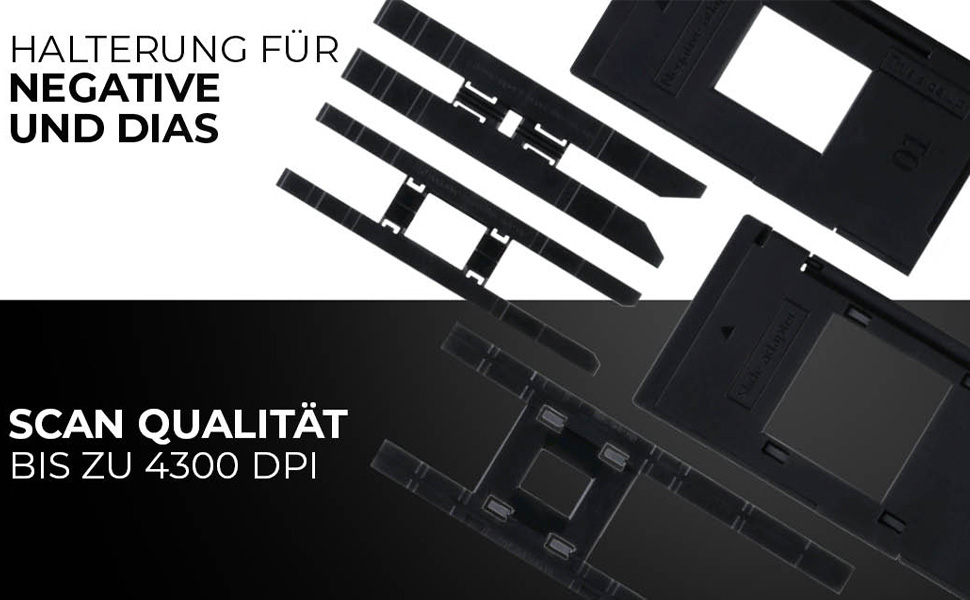
Image: Scanning a negative film strip with the Rollei DF-S 1600 SE.
6.2 Scanning Slides (135, 126, 110, 8 mm)
- Place your mounted slide into the appropriate slide holder. Ensure the slide is clean and correctly oriented.
- Insert the loaded slide holder into the scanner's film input slot.
- On the scanner's LCD, select "Slide" as the media type.
- Praview the image on the display. Adjust settings as needed (refer to Section 6.3).
- Press the "Capture" button to scan the image. The scanned image will be saved to the memory card.
- Remove the slide holder and replace with the next slide.

Image: Scanning a mounted slide with the Rollei DF-S 1600 SE.
6.3 Melaraskan Tetapan
The Rollei DF-S 1600 SE offers 7 manual adjustment levels for optimal image results. Access the menu to adjust settings such as:
- Dedahan: Penyesuaian kecerahan.
- Imbangan Warna: Adjust red, green, and blue channels.
- Resolusi: Select scanning resolution (up to 16 MP interpolated, 4300 DPI optical).
- Jenis Filem: Ensure the correct film type (color negative, black & white negative, slide) is selected for accurate color reproduction.
6.4 Connecting to PC/TV
- Sambungan USB (PC): Connect the scanner to your computer using the USB cable. The scanner will appear as a mass storage device, allowing you to transfer scanned images.
- HDMI/TV Connection: Use an HDMI cable (not included) to connect the scanner to a TV or external monitor. This allows for a larger view of your images during scanning or playback.
7. Penyelenggaraan
Regular maintenance ensures the longevity and performance of your scanner.
- Membersihkan Pengimbas: Use the provided cleaning brush to gently remove dust from the film input slot and the internal light source. Do not use compressed air, as it may push dust further inside.
- Cleaning Film/Slide Holders: Wipe the holders with a soft, dry, lint-free cloth. Ensure they are free of dust and debris before inserting film or slides.
- Storan: When not in use, store the scanner in a cool, dry place, away from direct sunlight and dust.
8. Penyelesaian masalah
Jika anda menghadapi masalah, rujuk jadual di bawah untuk masalah dan penyelesaian yang biasa.
| Masalah | Penyelesaian yang Mungkin |
|---|---|
| Pengimbas tidak dihidupkan. | Ensure the power adapter is securely connected to both the scanner and a working power outlet. Try a different USB port or power outlet. |
| Images appear blurry or dusty. | Clean the film/slides and the scanner's internal light source using the provided brush. Ensure film/slides are inserted correctly and flat. |
| Warna tidak betul. | Verify that the correct film type (negative, slide) is selected in the scanner's menu. Adjust color balance settings manually. |
| Memory card error / Cannot save images. | Ensure the memory card is inserted correctly and is not full. Try formatting the card (this will erase all data) or use a different card. Check if the card is locked (write-protected). |
| Scanner freezes or is unresponsive. | Turn off the scanner, disconnect the power, wait a few seconds, then reconnect and power on again. |
9. Spesifikasi
| Ciri | Nilai |
|---|---|
| Jenama | Rollei |
| Nama Model | Rollei DF-S 1600 SE |
| Nombor Model Item | 20699 |
| Jenis Pengimbas | Pengimbas Filem |
| Resolusi | 4300 DPI (Optical) |
| Teknologi Ketersambungan | HDMI, USB |
| Berat Barang | 513 Gram |
| Kedalaman Warna | 2.8 megabit |
| Teknologi Penderia Optik | CCD, CMOS |
| Keperluan Sistem Minimum | Windows, macOS |
| Jenis Media | Negative, Slide, 110 mm Film, 8 mm/Super8 Film |
| Jenis Sumber Cahaya | LED |
| Kod Artikel Antarabangsa | 04048805206995 |
10. Waranti dan Sokongan
Rollei is committed to providing high-quality products and customer satisfaction.
- Exchange Guarantee: Your Rollei DF-S 1600 SE scanner comes with an exchange guarantee for a full 24 months from the date of purchase.
- Free Return Shipping: Enjoy free return shipping within 14 days of purchase.
- Bantuan & Sokongan: Our expert team is available to assist you with any questions or issues.
- Maklumat Hubungan: You can reach us Monday-Friday from 10:00 AM to 4:00 PM at +49 40 270 750 277.