
pengenalan
Thank you for choosing the Tailcas USB Rechargeable Motion Sensor Cabinet Light. This manual provides detailed instructions for the safe and efficient use of your new light. Please read it thoroughly before installation and operation, and retain it for future reference.
Maklumat Keselamatan
- This product is designed for indoor use only. Do not expose it to rain or moisture.
- Do not disassemble, repair, or modify the product. This may cause damage, electric shock, or fire.
- Jauhkan peranti daripada sumber haba, cahaya matahari langsung dan bahan mudah terbakar.
- Gunakan hanya volum pengecasan yang dinyatakantage (USB 5V).
- Do not look directly into the LED light when it is on, as it may cause eye strain.
- Jauhkan daripada kanak-kanak.
Kandungan Pakej
Sila semak pakej untuk item berikut:
- Tailcas Motion Sensor Cabinet Light (3 units)
- Jalur Magnetik
- Pita Pelekat dua muka
- USB Charging Cable (not explicitly listed but implied by 'USB Rechargeable')
Ciri-ciri Produk
- Penderia Gerakan dan Cahaya: Automatically turns on when motion is detected in dark environments.
- USB boleh dicas semula: Built-in 2000mAh high-capacity battery.
- Tiga Mod Operasi: Sensor Mode, Always On Mode, Always Off Mode.
- Kecerahan boleh laras: Dimmable from 5% to 100% in Always On Mode.
- Fungsi Memori: Remembers the last brightness setting.
- Pemasangan Mudah: Multiple mounting options including magnetic, adhesive, and hanging.

Image: Comparison highlighting the 26 LED design and USB rechargeable battery of the Tailcas light.
Pemasangan
The Tailcas Motion Sensor Cabinet Light offers three convenient installation methods:
- Lampiran Magnetik: The light has built-in magnets. Simply attach it to any ironwork surface.
- Pemasangan pelekat: For non-metallic surfaces, use the provided magnetic strip with double-sided adhesive tape. Peel off the protective film from one side of the adhesive tape and attach it to the magnetic strip. Then, peel off the other side and firmly press the magnetic strip onto your desired clean, dry surface. The light can then be magnetically attached to this strip.
- digantung: The light features hanging holes on the back. You can hang it on nails or hooks for a secure fit.

Image: Visual guide demonstrating magnetic, adhesive, and hanging installation options.
Ensure the installation surface is clean and dry for optimal adhesion.
Operasi
The light features a push-button switch to cycle through its three operating modes and adjust brightness.
Mod Pengendalian:
- Mode 1: Sensor Mode (Automatic)
In this mode, the light will automatically turn on when motion is detected within a 10-foot (3-meter) range and 120-degree angle in a dark environment. It will automatically turn off after approximately 20 seconds of no motion. - Mode 2: Always On Mode
The light remains continuously on, regardless of motion or ambient light conditions. - Mode 3: Always Off Mode
Lampu tetap padam.
Pelarasan Kecerahan:
In Sentiasa Hidupkan Mod, you can adjust the brightness from 5% to 100% by pressing and holding the control button. The light has a memory function that will recall your last brightness setting when you switch back to Always On Mode.

Image: Visual representation of the Sensor, Always On, and Always Off modes.
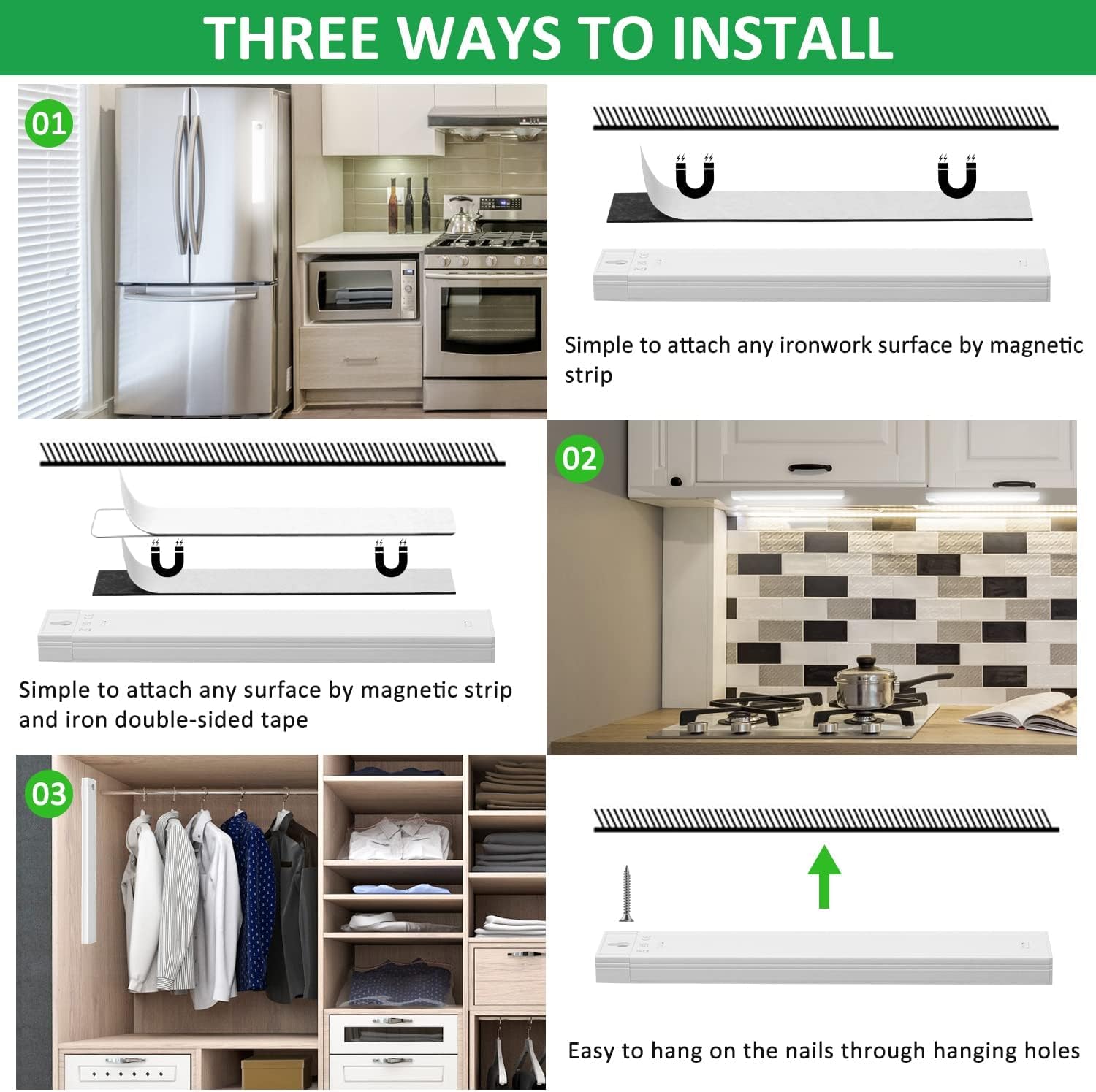
Image: Illustration of the motion and light sensor's detection capabilities.
Mengecas
The Tailcas Motion Sensor Cabinet Light is equipped with a 2000mAh rechargeable lithium-polymer battery.
- Connect the provided USB charging cable to the light's charging port and to a 5V USB power source (e.g., power bank, USB charger, laptop).
- A red indicator light typically signifies that the device is charging.
- The indicator light will turn green or off when the battery is fully charged.
- Pengecasan penuh mengambil masa kira-kira 2-3 jam.
- Once fully charged, the light can last up to 50 days in Sensor Mode or 5-6 hours in Always On Mode, depending on usage.

Image: Details on the 2000mAh rechargeable battery, charging process, and battery life.
Penyelenggaraan
- Clean the light with a soft, dry cloth. Do not use abrasive cleaners or solvents.
- Ensure the motion sensor lens is clear of dust and obstructions for optimal performance.
- Jika menyimpan untuk tempoh yang lama, cas bateri secara berkala untuk mengekalkan jangka hayatnya.
Menyelesaikan masalah
| Masalah | Kemungkinan Punca | Penyelesaian |
|---|---|---|
| Light does not turn on in Sensor Mode. | 1. Insufficient ambient light (sensor mode only activates in dark). 2. No motion detected. 3. Bateri hampir habis atau habis. | 1. Uji dalam persekitaran yang lebih gelap. 2. Ensure motion is within the detection range. 3. Charge the light. |
| Light stays on constantly in Sensor Mode. | Continuous motion within detection range. | Relocate the light to an area with less constant activity or switch to Always Off Mode. |
| Cahaya tidak mengecas. | 1. Faulty USB cable or power adapter. 2. Port pengecasan rosak. | 1. Try a different USB cable and power adapter. 2. Contact customer support if the port is damaged. |
| Brightness adjustment not working. | Not in Always On Mode. | Switch the light to Always On Mode to adjust brightness. |
Spesifikasi
| Jenama | Tailcas |
| Nombor Model | 582ff97f-c4e1-494d-b473-05c1bf189514 |
| Dimensi (L x W x H) | 20 x 3.3 x 1.5 cm |
| Berat badan | 290 gram |
| bahan | besi |
| Sumber Kuasa | Rechargeable Battery (2 Lithium-polymer, 2000mAh) |
| Voltage | 5 Volt |
| Wattage | 1.5 Watt |
| Jenis Cahaya | LED (26 mentol) |
| Warna Cerah | putih |
| Kecekapan Berkilau | 260 lumens (90 lm/W) |
| Kaedah Kawalan | Touch (Push-button) |
| Julat Penderia Pergerakan | 10 feet (3 meters), 120 degrees |
| Tahap Kalis Air | Not waterproof (Indoor use only) |
| Jenis Pemasangan | Adhesive/Magnet Mounting |
Waranti dan Sokongan
Tailcas products are manufactured to high-quality standards. For any questions, concerns, or technical support regarding your product, please refer to the retailer's return policy or contact Tailcas customer service through the platform where you purchased the item. Please have your purchase details and model number ready.