
pengenalan
This manual provides essential instructions for the safe and efficient use of your Scangrip WORK LITE M rechargeable LED work lamp. Please read this manual thoroughly before operating the device and retain it for future reference.
The Scangrip WORK LITE M is a lightweight, ergonomic, and rechargeable LED work flashlight designed for various inspection and work tasks. It features adjustable light output, flexible positioning options, and a durable design.
Persediaan dan Penggunaan Awal
1. Mengecas Peranti
The WORK LITE M comes with a built-in rechargeable Lithium-Ion battery. Before first use, fully charge the device.
- Cari port pengecasan USB pada peranti.
- Connect the included USB charging cable to the lamp and to a compatible USB power source (e.g., computer, USB wall adapter).
- The charging indicator light will show the charging status. Refer to the device for specific indicator behavior (e.g., red for charging, green for fully charged).
- Pengecasan penuh biasanya mengambil masa beberapa jam.
Nota: Only use the provided charging cable or a compatible USB cable. Do not attempt to charge with damaged cables or chargers.

Rajah 1: Depan view of the Scangrip WORK LITE M work lamp, showing the main LED light panel.
Arahan Operasi
1. Power On/Off and Dimming Function
- Untuk menghidupkan lamp on, press the power button located on the side of the device.
- To adjust the light output (dimming function), press and hold the power button. The light intensity will cycle between 10% and 100%. Release the button at your desired brightness level.
- Untuk menghidupkan lamp padam, tekan butang kuasa sekali lagi.

Figure 2: The WORK LITE M being held in hand, demonstrating its use as a handheld flashlight.
2. Flexible Positioning with SMART CLIP 4-in-1 System
The WORK LITE M is equipped with a versatile SMART CLIP system for hands-free operation and flexible positioning.
- Magnet Bersepadu: Lamp features a powerful built-in magnet on its base. This allows you to securely attach the lamp to metallic surfaces for hands-free illumination.
- Retractable Swivel Hook: A retractable swivel hook is integrated into the SMART CLIP. Pull out the hook to hang the lamp from various objects or structures. The hook can swivel for optimal light direction.
- Stand Bersepadu: The SMART CLIP can also function as a stand. Fold out the clip to create a stable base, allowing the lamp to stand upright on any flat surface.
- Klip tali pinggang: The SMART CLIP is designed to fit onto a work belt, allowing you to carry the lamp conveniently and have it readily accessible for inspection tasks.
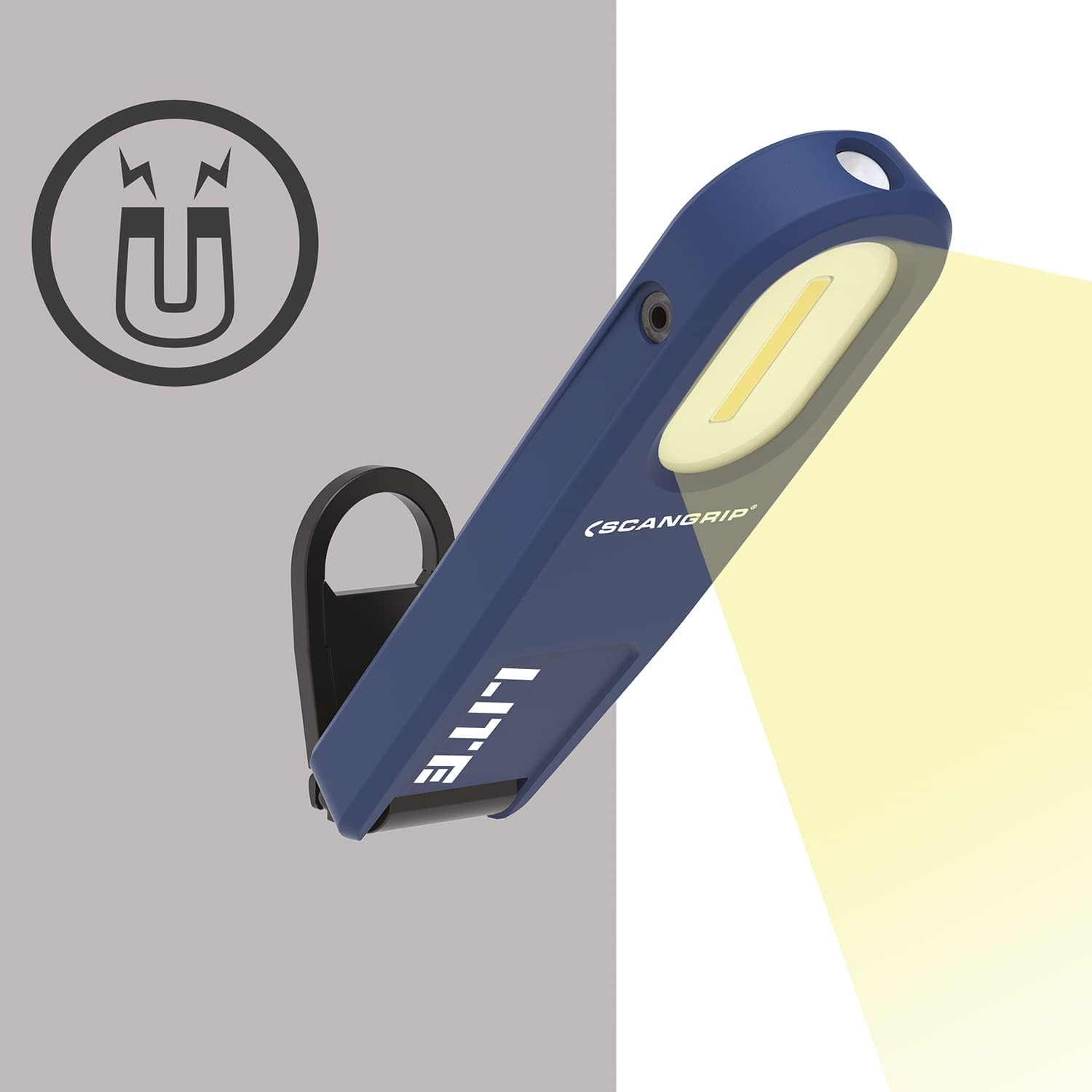
Rajah 3: Ilustrasi lamp's magnetic attachment feature, showing it secured to a metal surface.

Figure 4: The WORK LITE M with its swivel hook extended, ready for hanging.

Rajah 5: Sisi view of the WORK LITE M demonstrating the Smart Clip deployed as a stand.

Figure 6: The WORK LITE M attached to a work belt using its integrated Smart Clip.
Penyelenggaraan
- Pembersihan: Bersihkan lamp kerap dengan lembut, damp kain. Jangan gunakan bahan kimia yang keras atau pembersih yang kasar, kerana ini boleh merosakkan permukaan atau komponen dalaman.
- Storan: Apabila tidak digunakan untuk tempoh yang lama, simpan lamp in a cool, dry place. It is recommended to charge the battery periodically (e.g., every 3-6 months) to maintain battery health.
- Penjagaan Bateri: The integrated Lithium-Ion battery is not user-replaceable. Do not attempt to open the device or replace the battery yourself.
Menyelesaikan masalah
| Masalah | Kemungkinan Punca | Penyelesaian |
|---|---|---|
| Lamp tidak menyala. | Bateri habis. | Cas lamp menggunakan kabel USB yang disediakan. |
| Keluaran cahaya adalah malap. | Battery is low or dimming function is active. | Cas lamp. Press and hold the power button to adjust brightness to 100%. |
| Lamp tidak mengenakan bayaran. | Kabel atau punca kuasa rosak. | Cuba kabel USB atau penyesuai kuasa yang lain. Pastikan sambungannya selamat. |
If you encounter issues not listed here or if solutions do not resolve the problem, please contact Scangrip customer support.
Spesifikasi
| Ciri | Perincian |
|---|---|
| Nombor Model | 35668 |
| Output Cahaya | Sehingga 350 lumen |
| Fungsi Peredupan | 10% hingga 100% boleh laras |
| Jenis Bateri | Litium Ion (termasuk) |
| Sumber Kuasa | Dikuasakan Bateri |
| Mengecas | Kabel pengecas USB disertakan |
| Berat badan | 5.6 auns |
| Komponen yang Disertakan | Tangan lamp, charging cable |
| Pengeluar | Scangrip |
Maklumat Waranti
For detailed warranty information regarding your Scangrip WORK LITE M, please refer to the warranty card included with your product or visit the official Scangrip webtapak. Simpan bukti pembelian anda untuk tuntutan waranti.
Sokongan Pelanggan
If you have any questions, require technical assistance, or need to report a problem with your Scangrip WORK LITE M, please contact Scangrip customer support through their official webtapak atau maklumat hubungan yang diberikan dalam pembungkusan produk anda.
Lawati Kedai Scangrip di Amazon untuk maklumat lanjut.