
Clear Power DCOT-0004-DC
Clear Power Outdoor Digital Programmable Timer
Model: DCOT-0004-DC
Brand: Clear Power
pengenalan
Thank you for choosing the Clear Power Outdoor Digital Programmable Timer. This manual provides detailed instructions for the safe and efficient operation of your new timer. Designed for outdoor use, this digital timer offers convenient control over your outdoor lighting and electrical devices, featuring two grounded outlets and a user-friendly interface.
Maklumat Keselamatan Penting
WARNING: To reduce the risk of electric shock, fire, or injury, always follow basic safety precautions when using electrical products.
- Untuk kegunaan luar sahaja.
- Jangan rendam dalam air.
- Always ensure the timer is securely mounted vertically and not laid on the ground.
- Works with Incandescent, Compact Fluorescent, and LED light sources.
- Ensure the connected devices do not exceed the timer's maximum electrical rating.
- Keep children away from the timer and connected devices.
For more detailed safety guidelines, please refer to the official PDF Maklumat Keselamatan.
Ciri-ciri Utama
- 2 Cawangan Grounded: Allows control of two devices simultaneously.
- 24-Hour Repeating Cycle: Programs turn on/off at the same time daily.
- Simple Digital Programming: Easy to set with only three buttons.
- Random Vacation Mode: Turns devices on/off +/- 30 minutes from programmed times for a "lived-in" appearance.
- Suis Override Manual: Enables bypassing the timer to manually control connected items.
- Reka Bentuk Tahan Cuaca: Safe for year-round outdoor use in various weather conditions.
- Flat Grounded Plug: Patented reversed ground pin enables use with right angle & lo-profile palam.
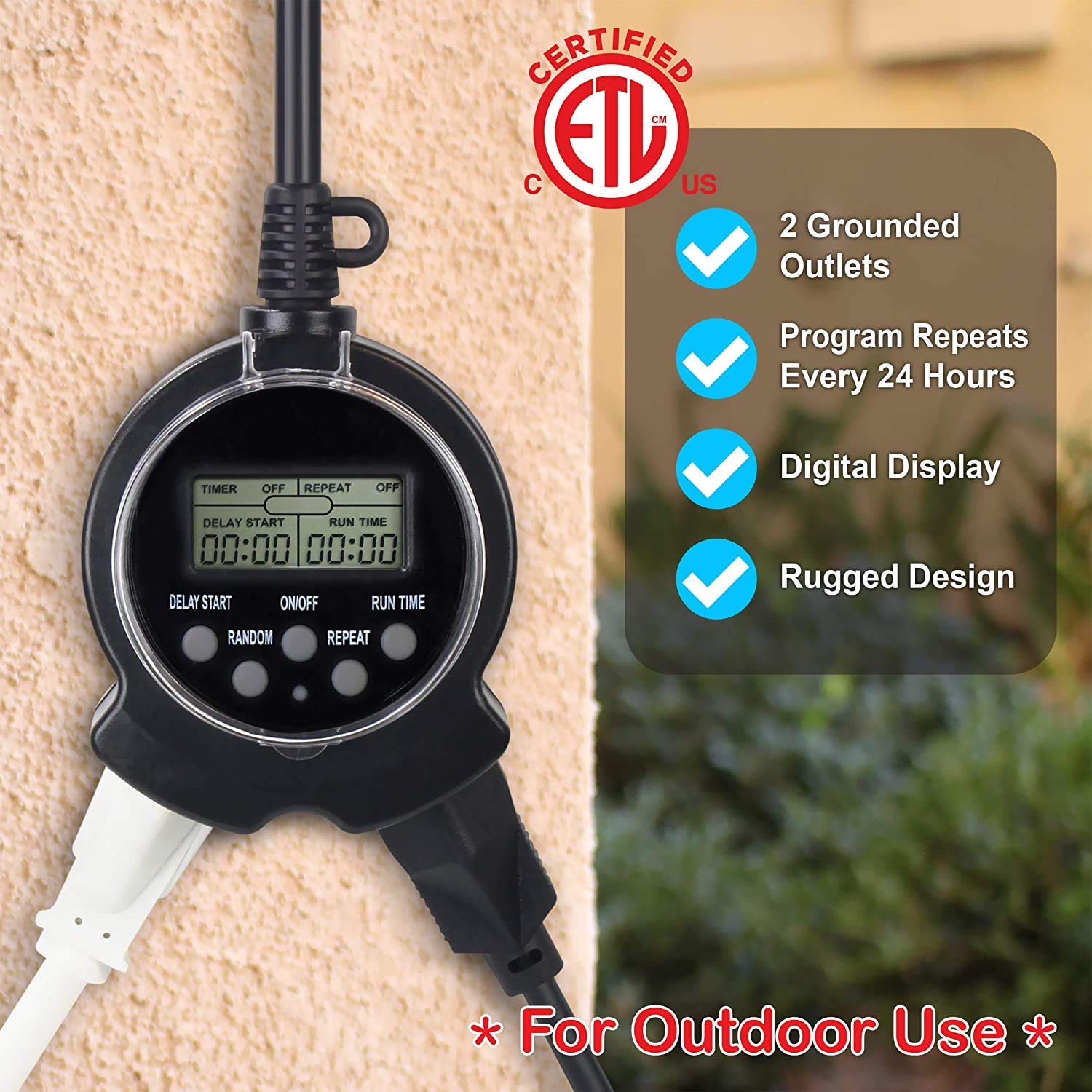
Kandungan Pakej
- 1 x Clear Power Outdoor Digital Programmable Timer (Model: DCOT-0004-DC)
- 1 x Manual Arahan (dokumen ini)
Arahan Persediaan
- Caj Permulaan: To fully charge the internal battery and ensure proper operation, plug the timer into a standard 120V AC outlet for at least 30 minutes before first use or after prolonged storage.
- Menetapkan semula Pemasa: Before programming, it is recommended to reset the timer. Use a small pointed object (like a pen tip) to press the recessed "RESET" button located on the timer's face. The display will clear.
- Pemasangan: Install the timer vertically close to an outdoor-rated grounded receptacle. Use the integrated eye-hole on the cord to secure the timer to a wall or suitable surface with a screw. Do not lay the timer on the ground.


Arahan Operasi
Programming the Timer (Easy 3-Step Process)
The Clear Power Digital Timer is designed for simple programming with only three main buttons: DELAY START, ON/OFF, and RUN TIME.
- Step 1: Turn Timer ON. Tekan ke HIDUP/MATI button to activate the timer. The display will show "TIMER ON".
- Step 2: Set Delay Start Time. Tekan dan tahan butang KELEWATAN MULA button to quickly advance the time in hours. Lightly touch and release the button to move the time in 1-minute intervals. This sets how many hours and minutes from the current moment the timer will turn ON. For example, if the current time is 1:00 PM and you want the timer to turn ON at 6:00 PM, set DELAY START for 5:00 (5 hours).
- Step 3: Set Run Time. Tekan dan tahan butang JALANKAN MASA button to quickly advance the time in hours. Lightly touch and release the button to move the time in 1-minute intervals. This sets how long the timer will remain ON after it activates. For example, if the timer turns ON at 6:00 PM and you want it to turn OFF at 10:30 PM, set RUN TIME for 4:30 (4 hours and 30 minutes).

Fungsi Ulangan
To have the timer turn ON/OFF at the same programmed times every day, press the ULIKAN button. The display will show "REPEAT ON". This is ideal for daily routines like garden lights or holiday decorations.
Random Mode (Vacation Mode)
For a more "lived-in" appearance when you are away, use the RANDOM mod. Tekan ke RANDOM button. The display will show "RANDOM ON". In this mode, the timer will randomly turn ON/OFF up to +/- 30 minutes from your programmed DELAY START and RUN TIME settings. For example, if DELAY START is 6:00 PM, it might turn on as early as 5:30 PM or as late as 6:30 PM. Similarly, the RUN TIME will randomly vary by up to 30 minutes.
Manual Override
To bypass the timer's program and manually control the attached device, press the HIDUP/MATI button again. The timer will hold its program until you change it. To return control of the device to the timer, press the HIDUP/MATI butang sekali lagi.
Video Guide: Programming and Features
Penyelenggaraan
- Pembersihan: Disconnect the timer from the power outlet before cleaning. Wipe the exterior with a soft, damp kain. Jangan gunakan bahan kimia yang keras atau pembersih yang kasar.
- Storan: Apabila tidak digunakan untuk tempoh yang lama, simpan pemasa di tempat yang sejuk dan kering, jauh daripada cahaya matahari langsung dan suhu yang melampau.
- Pemeriksaan: Periodically inspect the timer and its cord for any signs of damage, such as cuts, fraying, or exposed wires. If damage is found, discontinue use immediately and replace the unit.
Menyelesaikan masalah
| Masalah | Kemungkinan Punca | Penyelesaian |
|---|---|---|
| Paparan pemasa kosong atau malap. | Bateri dalaman rendah atau kehabisan kuasa. | Plug the timer into a live outlet for at least 30 minutes to charge the battery. |
| Pemasa tidak HIDUP/MATI pada waktu yang diprogramkan. | Incorrect programming; Timer is in manual override mode; Power outage. | Review programming steps carefully. Ensure the timer is not in manual override (press ON/OFF button). If there was a power outage, the internal battery should maintain the program, but verify settings. |
| Connected device does not turn ON. | Device is not properly plugged in; Device is faulty; Timer is not receiving power. | Ensure the device is securely plugged into the timer. Test the device in another outlet. Check the power outlet the timer is plugged into. |
| Random mode not working as expected. | Misunderstanding of random mode function. | Random mode varies ON/OFF times by +/- 30 minutes from programmed settings, it does not completely randomize. This is normal operation. |
Spesifikasi
- model: DCOT-0004-DC
- Jenama: Kuasa Jelas
- Dimensi Produk: 1"D x 2"W x 3"H
- Bilangan Outlet: 2 Dibumikan
- Saiz Skrin: 6 Inches (display area)
- warna: Hitam
- Pengeluar: Kuasa Jelas
- Pertama Tersedia: 17 Jun 2020
Waranti dan Sokongan
Clear Power products are designed for reliability and performance. For specific warranty information and customer support, please refer to the documentation included with your purchase or visit the official Clear Power website. You can also contact the seller, DATACONCT SOLUTIONS INC, for assistance.
For additional resources, you may find the Manual Pengguna (PDF) membantu.
Ask a question about this manual
Ask about setup, troubleshooting, compatibility, parts, safety, or missing instructions. Manuals+ will review the question and use this page’s manual context to help answer it.