
1. Pengenalan
This manual provides essential information for the safe and efficient operation of the Jectse AT904-7.5KW Variable Frequency Drive (VFD). This device is designed to control the speed of three-phase AC motors by varying the frequency and voltage of the power supplied to the motor. Please read this manual thoroughly before installation, operation, or maintenance to ensure proper use and prevent potential hazards.
2. Maklumat Keselamatan
WARNING: Improper installation or operation can lead to serious injury or death. Only qualified personnel should install, operate, and maintain this equipment.
- Always disconnect power before performing any wiring, maintenance, or inspection.
- Ensure proper grounding of the VFD and the motor.
- Do not touch electrical components immediately after power-off; wait at least 10 minutes for capacitors to discharge.
- Protect the VFD from moisture, dust, and corrosive gases.
- Sahkan bahawa input voltage matches the VFD's specifications.
- Do not connect the VFD output directly to a single-phase motor or a power grid.
3. Produk Lebihview
The Jectse AT904-7.5KW VFD is a robust and reliable frequency converter designed for various industrial applications requiring precise motor speed control. It features a durable ABS plastic shell and a user-friendly control panel.


Ciri-ciri Utama:
- Input/Output: Single-phase 220V AC input, three-phase 0-380V AC output.
- Keserasian Motor: Suitable for 7.5KW (10HP) three-phase motors.
- Kestabilan: Integrated filter and V/F open-loop control for stable performance.
- Keselamatan: Anti-trigger design for resilience against power grid interference, temperature fluctuations, and dust.
- Prestasi: Delivers high torque, high accuracy, and wide speed regulation range.
- Permohonan: Ideal for fans, pumps, air compressors, and other motor-driven equipment.
4. Spesifikasi
| Spesifikasi | Nilai |
|---|---|
| Jenis Produk | Penukar Frekuensi |
| Model | AT904-7.5KW |
| Input Voltage | Single Phase 220V AC 50/60Hz |
| Keluaran Voltage | Three Phase 0-380V AC 0-400Hz |
| Arus Keluaran Maksimum | 40A |
| Kuasa Motor yang Sesuai | 7.5KW (10HP) |
| Penapis | Penapis Terbina dalam |
| Mod Kawalan | Gelung Terbuka V/F |
| Keluaran Voltage Mod Peraturan | Kawalan PWM |
| Bahan Penampilan | Cangkang Plastik ABS |
| Saiz Produk (Anggaran) | 25 × 18 × 16.5 cm / 9.8 × 7.1 × 6.5 inches |
| Berat Barang | 4.13 kg |
| Kecekapan | Kecekapan Tinggi |
| Bentuk Gelombang Output | Gelombang Sinus Tulen |
| Kekerapan | 60 Hz |
| Nombor Bahagian | Jectsepsctoya7hk5178 |
5. Persediaan
Careful installation is crucial for the performance and safety of the VFD. Ensure all safety precautions are followed.
5.1 Membongkar dan Pemeriksaan
- Unpack the VFD and inspect it for any physical damage during transit.
- Sahkan bahawa semua komponen yang disenaraikan dalam kandungan pakej ada.
5.2 Pemasangan
- Mount the VFD vertically on a stable, non-flammable surface.
- Ensure adequate ventilation space around the unit (minimum 10 cm on all sides) to prevent overheating.
- Avoid mounting in direct sunlight, high humidity, or dusty environments.
5.3 Pendawaian
Refer to the detailed wiring diagrams provided in the included user manual for specific connection points. The following are general guidelines:
- Input Kuasa: Connect the single-phase 220V AC power supply to the designated input terminals (typically L1, L2).
- Keluaran Motor: Connect the three-phase 380V motor to the output terminals (typically U, V, W). Ensure the motor is rated for 380V and has a power rating less than or equal to 7.5KW.
- Pembumian: Connect the ground terminal of the VFD to a reliable earth ground.
- Pendawaian Kawalan: If external control (e.g., potentiometer, external switches) is used, connect according to the manual's control terminal diagrams.


6. Arahan Operasi
The VFD allows for precise control over motor speed and direction. Familiarize yourself with the control panel before operation.
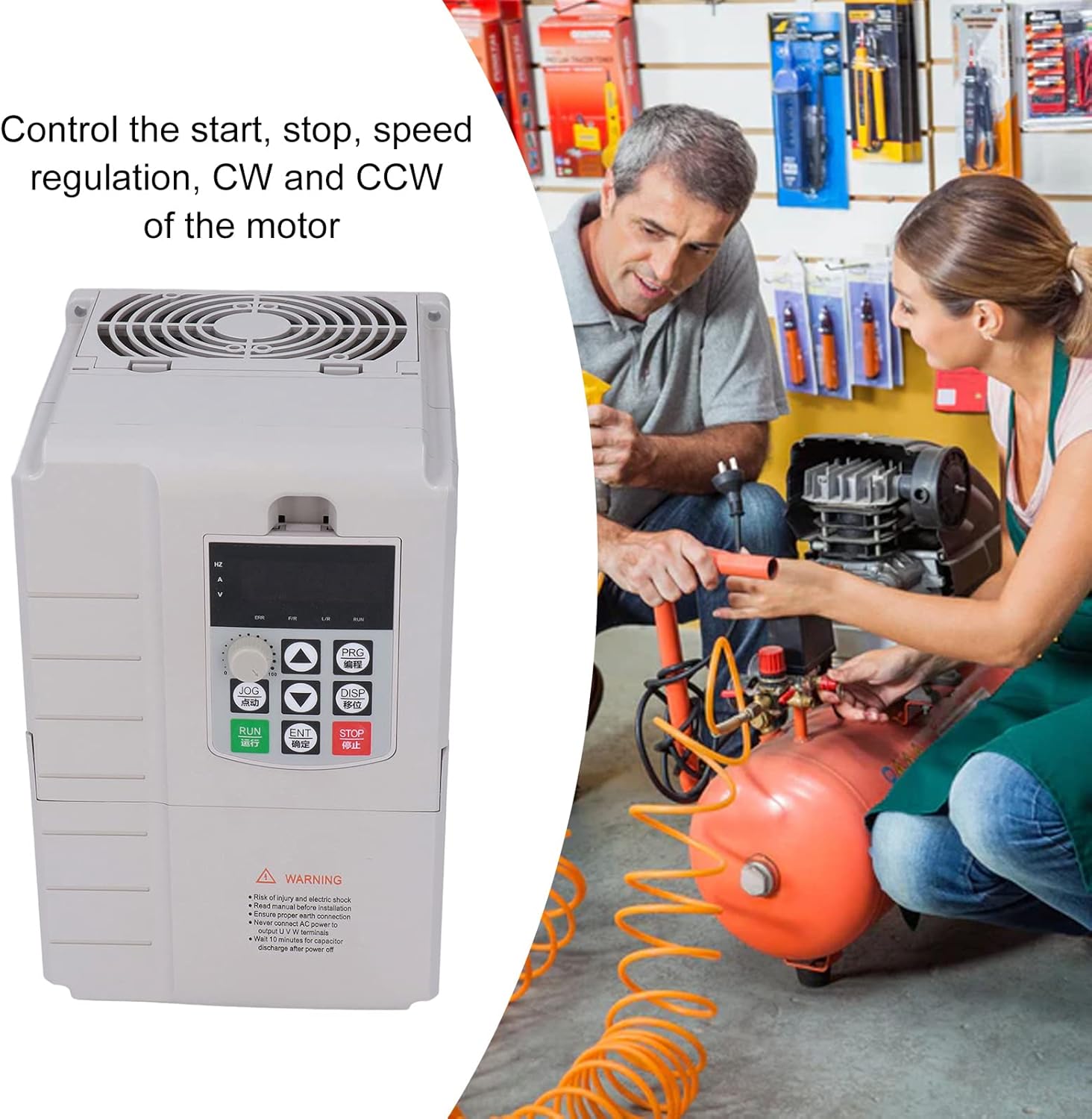

6.1 Fungsi Panel Kawalan

- Butang RUN: Memulakan operasi motor.
- Butang STOP: Menghentikan operasi motor.
- Butang JOG: For momentary or step-by-step operation.
- Butang PRG: Enters programming mode to adjust parameters.
- Butang ENT: Confirms selections or parameter changes.
- Anak panah atas/bawah: Adjust frequency, speed, or navigate menu options.
- Tombol Putar: Provides fine adjustment for frequency or other parameters.
6.2 Operasi Asas
- Hidupkan kuasa: Ensure all wiring is correct and secure, then apply power to the VFD.
- Persediaan Parameter: If necessary, enter programming mode (PRG) to set motor parameters (e.g., rated frequency, maximum frequency, acceleration/deceleration times) according to your motor and application requirements. Refer to the detailed parameter list in the full user manual.
- Mulakan Motor: Tekan ke LARI butang untuk menghidupkan motor.
- Laraskan Kelajuan: Use the Up/Down arrows or the rotary knob to adjust the motor speed (frequency).
- Berhenti Motor: Tekan ke BERHENTI butang untuk menghentikan motor.
- Putaran Terbalik: The VFD supports forward and reverse rotation. Specific instructions for changing direction are typically found in the parameter settings or via dedicated control terminals, as detailed in the comprehensive manual.
7. Penyelenggaraan
Regular maintenance ensures the longevity and reliable operation of your VFD.
- Pembersihan: Periodically clean the VFD's exterior and cooling fins to prevent dust accumulation, which can hinder heat dissipation. Use a soft, dry cloth. Do not use liquid cleaners.
- Pemeriksaan Kipas: Check the cooling fan for proper operation and ensure it is free from obstructions.
- Keketatan Terminal: Periodically check all wiring terminals for tightness. Loose connections can cause overheating and malfunction.
- Pemeriksaan Alam Sekitar: Pastikan persekitaran operasi kekal dalam julat suhu dan kelembapan yang ditetapkan.

8. Penyelesaian masalah
This section provides basic troubleshooting steps for common issues. For complex problems, consult a qualified technician or contact customer support.
| Masalah | Kemungkinan Punca | Penyelesaian |
|---|---|---|
| VFD tidak dihidupkan | No input power; incorrect wiring | Check power supply and input wiring. Ensure circuit breaker is on. |
| Motor tidak hidup | Incorrect motor wiring; VFD fault; parameter settings incorrect | Verify motor wiring (U, V, W). Check VFD display for error codes. Review motor parameters. |
| Motor speed is unstable | Load fluctuations; incorrect V/F curve setting | Check motor load. Adjust V/F curve or other speed control parameters. |
| Kesalahan arus lebih/lebihan | Motor overload; short circuit in motor wiring | Reduce motor load. Inspect motor and wiring for short circuits. Check motor parameters. |
| Overvoltage/Undervoltage kesalahan | Masukan voltage outside range; regenerative braking issue | Check input power supply voltage. Consider adding a braking resistor if applicable. |
9. Waranti dan Sokongan
Jectse products are manufactured to high-quality standards. For warranty information, please refer to the warranty card included with your product or contact your local distributor.
Sokongan Pelanggan:
If you encounter any issues or have questions not covered in this manual, please contact Jectse customer support or your authorized dealer. When contacting support, please have your product model (AT904-7.5KW) and purchase details ready.