pengenalan
This manual provides instructions for the Hotsmtbang replacement remote control. This remote is designed to be compatible with various Skyworth Smart LED LCD HDTV models, including 32E380I, 40E380I, 43E380I, 49E380I, 50E3000, 55E3300, 32E200A, and 32E2000D. It is pre-programmed and requires no additional setup or coding.
Persediaan
To begin using your replacement remote control, follow these simple steps for battery installation:
- Cari petak bateri di belakang alat kawalan jauh.
- Slide the battery compartment cover downwards or press the latch and lift to open it.
- Masukkan dua (2) bateri AAA, pastikan terminal positif (+) dan negatif (-) sejajar dengan tanda di dalam petak.
- Gantikan penutup petak bateri dengan menggelongsorkannya semula ke tempatnya sehingga ia berbunyi dengan selamat.

Image: Back of the remote control with the battery cover removed, illustrating the battery insertion process.
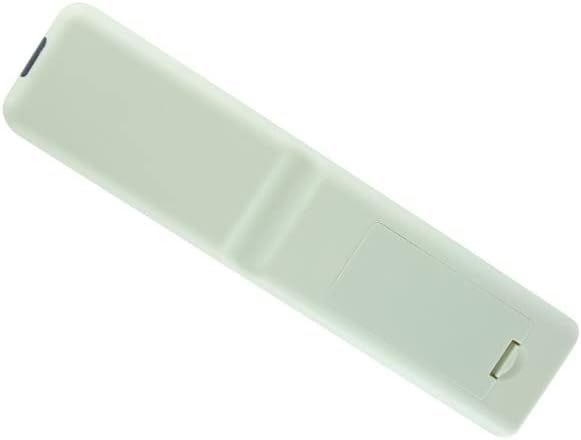
Image: Back of the remote control with the battery cover securely in place.
Arahan Operasi
This Hotsmtbang replacement remote control is pre-programmed and requires no additional setup or coding. Once batteries are correctly installed, it will function immediately with compatible Skyworth TV models.
- Hidupkan/Mati Kuasa: Tekan ke kuasa butang untuk menghidupkan atau mematikan TV anda.
- Pemilihan Saluran: Use the number buttons to directly enter channel numbers or the CH + / CH- buttons to cycle through channels.
- Kawalan Kelantangan: Laraskan kelantangan menggunakan VOL + / VOL- butang.
- Redam: Tekan ke bisu button to silence the TV audio.
- Pemilihan Input: Gunakan Input or Sumber button to switch between different video inputs (e.g., HDMI, AV).
- Navigasi: Use the directional arrow buttons (Atas bawah kiri kanan) dan OK/Masuk button to navigate menus and make selections.
Ensure there is a clear line of sight between the remote control and the TV's infrared sensor for optimal performance.
Penyelenggaraan
Untuk memastikan jangka hayat alat kawalan jauh anda dan berfungsi dengan baik, sila patuhi garis panduan penyelenggaraan berikut:
- Pembersihan: Wipe the remote control periodically with a soft, dry cloth. Avoid using liquid cleaners, aerosols, or harsh chemicals, as these can damage the remote's surface or internal components.
- Penggantian Bateri: Replace batteries promptly when the remote's performance degrades. Always replace both batteries at the same time with new ones of the same type (AAA).
- Storan: Simpan alat kawalan jauh di tempat yang sejuk dan kering, jauh daripada cahaya matahari langsung, suhu ekstrem dan kelembapan yang tinggi.
- Elakkan Titisan: Protect the remote from physical impact, as drops can cause internal damage.
Menyelesaikan masalah
If you encounter issues with your remote control, please refer to the following troubleshooting steps:
- Jauh Tidak Menjawab:
- Periksa sama ada bateri dimasukkan dengan betul dengan polariti yang betul (+/-).
- Gantikan bateri lama dengan bateri AAA baharu.
- Pastikan tiada halangan antara alat kawalan jauh dan penderia inframerah TV.
- Confirm you are within the effective operating range of the TV.
- Fungsi Selang-seli:
- Ini mungkin menunjukkan kuasa bateri yang rendah. Gantikan bateri.
- Ensure no strong light sources (like direct sunlight or bright fluorescent lights) are interfering with the remote's signal.
- Butang Khusus Tidak Berfungsi:
- Clean the remote control surface, especially around the buttons, to remove any dirt or debris that might be obstructing button presses.
- If only specific buttons fail, and other troubleshooting steps do not resolve the issue, the remote may be faulty.
If problems persist after attempting these steps, please contact the seller for further assistance.
Spesifikasi
| Ciri | Perincian |
|---|---|
| Jenis Produk | Alat kawalan jauh penggantian |
| Jenama | Generic (Hotsmtbang) |
| Keserasian | Skyworth 32E380I, 40E380I, 43E380I, 49E380I, 50E3000, 55E3300, 32E200A, 32E2000D Smart LED LCD HDTV TVs |
| Bateri Diperlukan | 2 x AAA (tidak termasuk) |
| Pengaturcaraan | Tiada pengaturcaraan diperlukan |
| ASIN | B0B2P2B753 |
| Pertama Tersedia | 30 Mei 2022 |
Waranti dan Sokongan
This product is typically covered by the seller's return policy. For specific warranty information, returns, or technical support, please refer to the purchase platform or contact the seller directly. Keep your purchase receipt for any warranty claims.


