
1. Pengenalan
Thank you for choosing the iulock Keypad & Key Smart Door Lock, Model IU-30. This advanced door lock provides secure and convenient keyless entry for your home, office, or rental property. Designed for durability and ease of use, it offers multiple access options including keypad codes and traditional keys. This manual will guide you through the installation, setup, operation, and maintenance of your new smart door lock.

Figure 1: The iulock Keypad & Key Smart Door Lock in Matte Black.
2. Ciri-ciri Produk
The iulock IU-30 is engineered with a range of features to enhance security and convenience:
- Kemasukan tanpa kunci: Supports up to 50 customizable 1-15 digit user codes for flexible access.
- Pembinaan Tahan Lama: Heavy-duty design with premium metal construction and plating finish for enhanced security and longevity.
- Rintangan Cuaca: IP65 rated for weather resistance, operating effectively in temperatures from -22°F to 176°F, suitable for outdoor use in various climates.
- Hayat Bateri yang Panjang: Powered by 4 AAA batteries (not included) providing up to 18 months of use, with a low battery alarm for timely replacement.
- Kuasa Kecemasan: Features a Type-C USB backup port for emergency power in case batteries run out.
- Pad Kekunci Mesra Pengguna: Clear numbers and soft backlight for day and night operation.
- Mod Fleksibel: Includes Passage Mode (for unlocked access during specific times) and Silent Mode (to disable keypad beeps).
- Kunci Automatik Boleh Diprogram: Automatically locks the door after a set period, enhancing security.
- Anti-Peeping Code Protection: Allows entry of random digits before or after the actual code to prevent code exposure.
- Detachable Silicone Grip: Provides a more comfortable and secure hold on the knob.
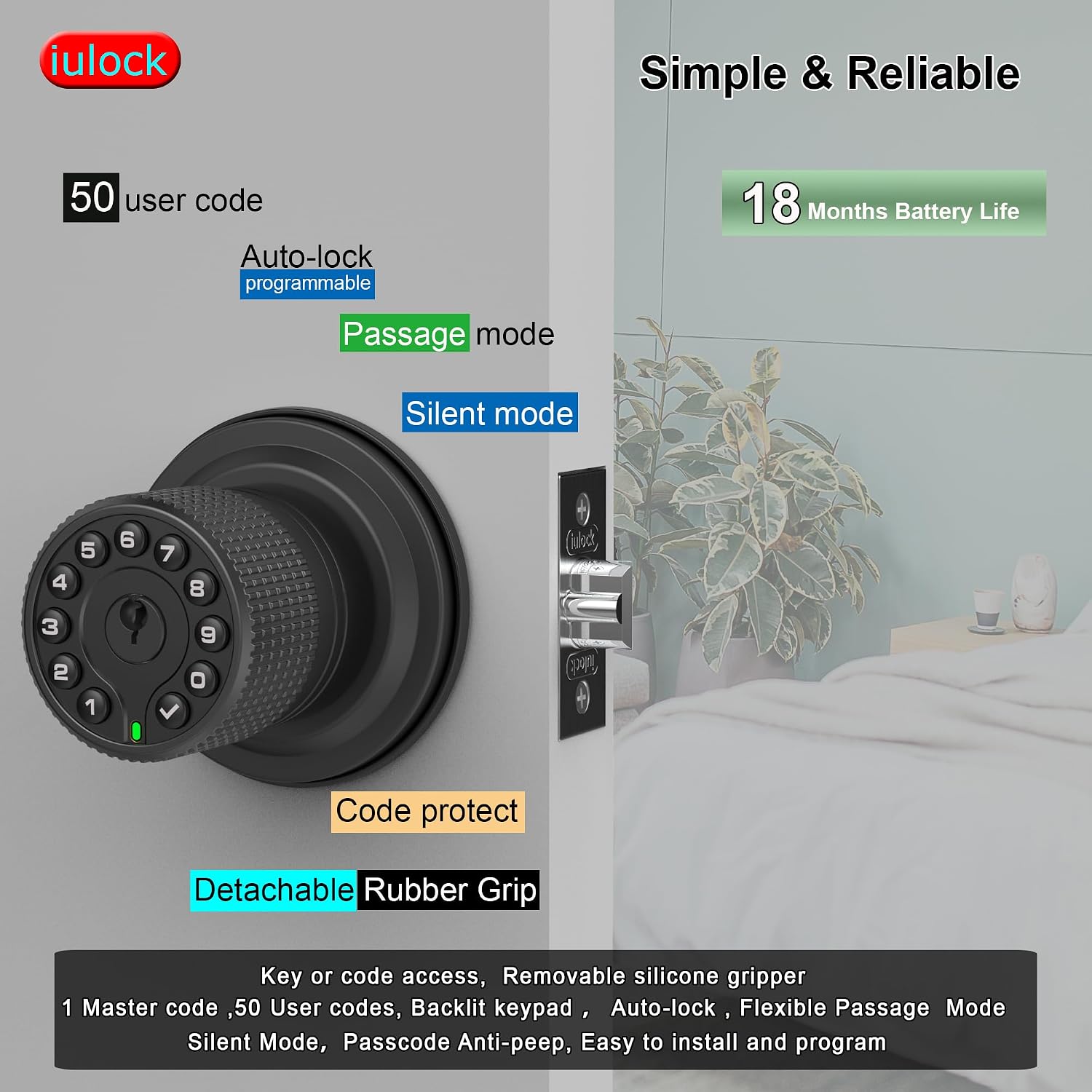
Gambar 2: Lebihview of key features including user code capacity and battery life.

Rajah 3: Terperinci view of the lock's internal structure, highlighting its robust design and waterproof features.
3. Apa yang ada di dalam Kotak
Before beginning installation, please verify that all components are present:
- Keypad Door Knob Assembly (Exterior)
- Perhimpunan Tombol Dalaman
- Selak Bolt
- Pukulan Pukulan
- Set Skru
- Kekunci (2)
- Kotak Plastik
- Rubber Grips (2)
- Rubber Seals (2)
- Pemutar skru
Note: 4 AAA batteries are required and are not included in the package.

Figure 4: All components included in the iulock IU-30 package.
4. Pemasangan
The iulock IU-30 is designed for easy installation with just a screwdriver. It fits doors with a thickness of 1-3/8" to 2-1/2" and features an adjustable latch for 2-3/8" or 2-3/4" backsets. It is suitable for both left and right-handed doors.
4.1 Penyediaan Pintu
- Ensure your door meets the thickness requirements (1-3/8" to 2-1/2").
- Verify the backset measurement (distance from door edge to center of bore hole) is either 2-3/8" or 2-3/4". Adjust the latch if necessary.

Figure 5: Door thickness and latch adjustment guide.
4.2 Langkah Pemasangan
- Install the Latch Bolt into the door edge, ensuring the bevel faces the door frame. Secure with screws.
- Insert the Exterior Keypad Knob Assembly through the door, aligning the spindle with the latch bolt. Ensure the rubber seal is properly seated against the door surface.
- Attach the Interior Knob Assembly, connecting the wires and aligning the mounting posts. Secure with the provided screws.
- Install the Strike Plate on the door frame, aligning it with the latch bolt.
- Test the lock's mechanical function before proceeding to programming.

Rajah 6: Panduan visual untuk proses pemasangan.
5. Persediaan dan Pengaturcaraan
After installation, you will need to program your lock. All programming is done directly on the keypad.
5.1 Initial Setup: Master Code
The first step is to set a Master Code. This code is used for all programming functions and should be kept confidential.
- Open the battery cover on the interior knob.
- Press the 'Program' button (usually located near the battery compartment).
- Enter your desired new Master Code (4-10 digits) on the keypad.
- Press the 'Lock' button (checkmark symbol) to confirm.
- The lock will beep and the keypad will flash to indicate successful programming.
5.2 Adding User Codes
You can add up to 50 unique user codes for family members or guests.
- Press the 'Program' button.
- Enter your Master Code, then press the 'Lock' button.
- Press '1' (or the designated key for adding user codes).
- Enter the new User Code (4-10 digits).
- Press the 'Lock' button to confirm.
- Repeat for additional user codes.
5.3 Memadam Kod Pengguna
To remove a user code:
- Press the 'Program' button.
- Enter your Master Code, then press the 'Lock' button.
- Press '2' (or the designated key for deleting user codes).
- Masukkan Kod Pengguna yang ingin anda hapuskan.
- Press the 'Lock' button to confirm.
6. Mengendalikan Kunci
6.1 Membuka Kunci Pintu
- Menggunakan Kod: Enter a valid user code or the Master Code, then press the 'Lock' button. The knob will unlock, allowing you to turn it to open the door.
- Menggunakan Kunci: Masukkan kunci fizikal ke dalam lubang kunci dan putar untuk membuka kunci.
6.2 Mengunci Pintu
- Kunci Manual: Press the 'Lock' button on the keypad. The door will lock immediately.
- Kunci Auto: The lock will automatically re-lock after a programmed delay (default or user-defined).
6.3 Mod Khas
- Mod Laluan: To keep the door unlocked for continuous access, activate Passage Mode. This is useful for high-traffic periods. Refer to your programming instructions for activating and deactivating this mode.
- Mod senyap: To disable the keypad's beeping sounds during code entry, activate Silent Mode. This can be useful in quiet environments.
- Fungsi Anti-Mengintip: When entering your code, you can input random digits before or after your actual code. For example, if your code is 1234, you can enter 567123489. The lock will still recognize the correct sequence within the longer string.
7. Penyelenggaraan
7.1 Penggantian Bateri
The lock requires 4 AAA alkaline batteries. When the battery is low, the lock will emit a low battery warning. Replace all four batteries promptly.
- Remove the battery cover on the interior knob.
- Keluarkan bateri lama.
- Insert four new AAA alkaline batteries, ensuring correct polarity.
- Gantikan penutup bateri.
Note: In case of complete battery depletion, use a Type-C USB cable to connect to the emergency power port on the exterior knob to temporarily power the lock and gain entry.
7.2 Pembersihan
Bersihkan bahagian luar kunci dengan lembut, damp kain. Elakkan menggunakan pembersih atau pelarut yang melelas, kerana ini boleh merosakkan kemasan dan komponen elektronik.
8. Penyelesaian masalah
If you encounter issues with your iulock smart door lock, refer to the following common problems and solutions:
| Masalah | Kemungkinan Punca | Penyelesaian |
|---|---|---|
| Keypad does not light up or respond. | Bateri mati. | Replace all 4 AAA batteries. Use the USB-C backup power if needed to gain entry. |
| Lock does not unlock with a valid code. | Incorrect code entered; Lock is in a specific mode (e.g., Passage Mode off); Mechanical issue. | Ensure the correct code is entered followed by the 'Lock' button. Check if Passage Mode is active. Try using the physical key. |
| Ciri kunci automatik tidak berfungsi. | Auto-lock is disabled or set to a long delay. | Refer to the programming instructions to enable or adjust the auto-lock delay. |
| Knob is difficult to turn or feels loose. | Pemasangan yang tidak betul; Skru longgar. | Check all mounting screws and ensure they are tightened properly. Re-verify installation steps. |
| Keypad beeps are too loud or not present. | Silent Mode is enabled/disabled. | Refer to programming instructions to toggle Silent Mode on or off. |
9. Spesifikasi
| Ciri | Perincian |
|---|---|
| Nama Model | IU-30 |
| Jenama | iulock |
| Jenis Kunci | Papan kekunci |
| bahan | Rubber, Zinc Alloy |
| warna | Hitam Matte |
| Dimensi Item (L x W x H) | 7 x 4.5 x 3.1 inci |
| Berat Barang | 2.29 paun |
| Keserasian Ketebalan Pintu | 1-3/8" to 2-1/2" |
| Selak Boleh Laras | 2-3/8" or 2-3/4" |
| Sumber Kuasa | 4 bateri AAA (tidak termasuk) |
| Hayat Bateri | Sehingga 18 bulan |
| Suhu Operasi | -22°F hingga 176°F |
| Penilaian Kalis Air | IP65 |
| Kapasiti Kod Pengguna | 1 Master Passcode, 50 User Passcodes |
| Panjang Kod | 1-15 digit |
| Sandaran Kecemasan | USB-C type backup |
10. Waranti dan Sokongan
10.1 Maklumat Waranti
iulock extends a lifetime limited mechanical and finish warranty and a one-year limited electronics warranty to the original consumer user ("Original User") of our iulock brand product ("Product") against defects in material and workmanship, as long as the Original User occupies the residential premises upon which the Product was originally installed. This warranty is subject to specific terms and conditions. For detailed warranty information and limitations, please refer to the official iulock webtapak di www.iulock.com.
10.2 Sokongan Pelanggan
For any questions, technical assistance, or warranty claims, please contact iulock customer support. Refer to the contact information provided on the iulock website or your purchase documentation for the most current support channels. iulock offers 7x24 efficient service to assist you.