
pengenalan
The Autel PowerScan PS100 is a versatile diagnostic tool designed for testing electrical systems in 6 to 30 volt vehicles. It provides a comprehensive solution for various electrical tests, including voltage and polarity testing, continuity testing, signal circuit testing, component activation, and short circuit location. This manual provides instructions for the proper use and maintenance of your PowerScan PS100.
Kandungan Pakej
Verify that all items are present in your PowerScan PS100 kit:
- Autel PowerScan PS100 Unit
- Kabel Sambungan 20 kaki
- Battery Clip Set
- Penyesuai Kuasa Kereta
- Manual Pengguna
- Kes Pelindung

Image: Contents of the Autel PowerScan PS100 kit.
Produk Selesaiview (Komponen)
Familiarize yourself with the main components of the PowerScan PS100:
- Petua Siasatan: Used for making contact with circuits.
- Lampu Kepala: Menerangi kawasan kerja.
- Red/Green Polarity Indicator: LEDs indicating positive (red) or negative (green) circuits.
- Paparan LCD: Pertunjukan voltage, resistance, and other test results.
- Set Semula Pemutus Litar: Resets the internal circuit breaker after an overload.
- Suis kuasa: Controls power to the probe tip for component activation.
- Butang Mod: Berkitar melalui mod ujian yang berbeza.
- Penceramah: Provides audible tones for certain test results.
- Penyesuai: Connects the main unit to the power source.
- Plumbum Tanah Bantu: Provides an additional ground connection for testing.

Image: Labeled components of the PowerScan PS100.
Maklumat Keselamatan
Always observe the following safety precautions when using the PowerScan PS100:
- Pakai pelindung mata yang sesuai.
- Do not use the tool if the cable or unit is damaged.
- Ensure proper ventilation when working on vehicles.
- Elakkan sentuhan dengan bahagian enjin yang bergerak.
- Do not connect the tool to voltages exceeding 30 volts.
- The tool is equipped with a circuit breaker for overload protection. If the circuit breaker trips, reset it before continuing.
Persediaan dan Sambungan
To begin using the PowerScan PS100:
- Connect the red battery clip to the positive (+) terminal of the vehicle's battery.
- Connect the black battery clip to the negative (-) terminal of the vehicle's battery or a good chassis ground.
- The tool will power on automatically once connected.
- Before testing any circuit or component, perform a quick self-check by flipping the power switch forward and backward. The LED lights and tone should respond, indicating proper operation.

Image: Performing a quick self-test on the PowerScan PS100.
Mod Pengendalian
The PowerScan PS100 features four primary operating modes, accessible by pressing the Butang Mod:
- DC Voltage: Memaparkan volum DCtage with a resolution of 0.1 volts.
- Vol. ACtage: Menunjukkan vol maksimumtage, vol minimumtage, and duty cycle of an AC signal.
- Rintangan: Mengukur rintangan antara hujung prob dan wayar pembumian tambahan.
- Tone On/Off: Activates or deactivates an audible tone for test results. This is useful in dark environments.

Image: Display modes for DC Voltage, Vol. ACtage, Rintangan dan Nada Hidup/Mati.
Video: An introduction to the functions of the Autel PowerScan PS100 Circuit Tester, demonstrating various operating modes.
Pengaktifan Komponen
The PowerScan PS100 can activate components by supplying positive or negative voltage directly to them. This allows for testing components like lights, motors, wipers, radiator fans, and relays both on and off the vehicle.
- To activate a component, connect the probe tip to the component's terminal.
- Tekan ke Suis Kuasa forward for positive voltage or backward for negative voltage.
- Observe the component's operation to determine its condition.
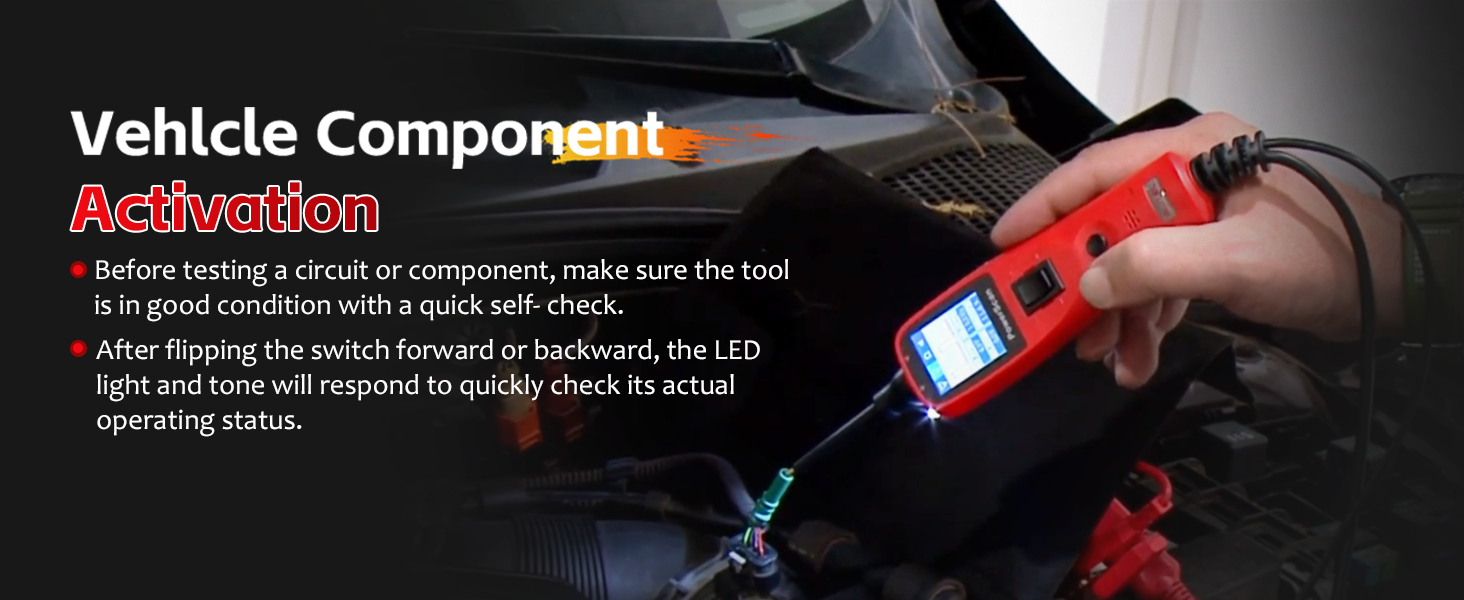
Image: Activating a vehicle component using the PowerScan PS100.
Polarity and Circuit Indication
The tool provides visual and audible indications for circuit polarity:
- When the probe tip contacts a positive circuit, yang LED merah illuminates, and a high-pitched tone sounds.
- When the probe tip contacts a litar negatif (ground), the LED hijau illuminates, and a low-pitched tone sounds.
- If the circuit is terbuka, neither LED will light.

Image: Red and Green Polarity LEDs indicating circuit status.
Short Circuit Detection and Protection
The PowerScan PS100 is designed to help locate short circuits and includes built-in protection:
- When a short circuit is detected, the tool's internal circuit breaker will trip to protect the device and the vehicle's electrical system.
- To reset the circuit breaker, press the Set Semula Pemutus Litar butang.
- Use the tool to trace the short circuit by following the change in voltage readings or LED indications.
Video: Demonstrating the circuit breaker reset function on the Autel PowerScan PS100.
Kabel Sambungan
The included 20-foot (6-meter) extension cable provides extended reach, allowing you to test circuits across various parts of the vehicle without needing to reposition the power source connection.

Image: The 20-foot extension cable for enhanced accessibility.
Aplikasi
The Autel PowerScan PS100 is compatible with 6 to 30 volt electrical systems, making it suitable for a wide range of vehicles and applications, including:
- kereta
- SUV
- Motosikal
- Lori
- Bas
- Steamships (with compatible voltagsistem e)

Image: Wide application range of the PowerScan PS100.
Penyelenggaraan
To ensure the longevity and proper functioning of your PowerScan PS100:
- Bersihkan unit dengan lembut, damp kain. Jangan gunakan pembersih atau pelarut yang melelas.
- Simpan alat ini di dalam bekas pelindungnya apabila tidak digunakan untuk mengelakkan kerosakan.
- Keep the probe tip clean and free from debris.
- Elakkan daripada mendedahkan alat kepada suhu atau kelembapan yang melampau.
Menyelesaikan masalah
If you encounter issues with your PowerScan PS100, consider the following:
- Tiada Kuasa: Ensure the battery clips are securely connected to the vehicle's battery terminals and that the battery has sufficient charge (6-30V).
- Tiada Bacaan: Check that the probe tip is making good contact with the circuit. Verify the tool is in the correct operating mode.
- Perjalanan Pemutus Litar Kerap: This indicates a short circuit or an overload. Identify and resolve the underlying electrical issue before continuing to test. Reset the circuit breaker after each trip.
- Bacaan Tidak Tepat: Ensure all connections are clean and secure. The vehicle's battery voltage should be stable.
Spesifikasi
| Ciri | Spesifikasi |
|---|---|
| Jenama | Autel |
| Model | Autel PowerScan PS100 |
| Sumber Kuasa | Battery Powered (from vehicle) |
| Vol Operasitage | 6 hingga 30 Volt DC |
| Jenis Pengukuran | Voltmeter |
| Berat Barang | 1 paun |
| Vol. Operasi Minimumtage | 6 Volt |
| Penarafan Suhu Atas | 60 Darjah Celsius |
| Peranti Serasi | Vehicles with 6 to 30 volt electrical systems |
| Dimensi Item | 14 x 8 x 10 inci |
Sokongan dan Waranti
For technical assistance, product inquiries, or warranty information, please refer to the official Autel website or contact Autel customer support directly. Details can typically be found on the product packaging or within the included documentation.